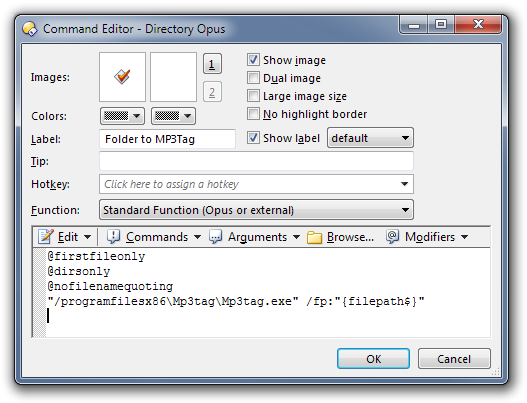
(They are different because MP3Tag.exe is a 32-bit program and thus installed under Program Files (x86) on 64-bit versions of Windows.)
If you'd rather not create the buttons manually, download the attached zip file. The zip contains button files which you can drag to your toolbar while in customize mode.
(Extract the zip, use Settings -> Customize, drag one of the .dcf files to your toolbar or menu, then click OK in the Customize window.) Folder to MP3Tag.zip (808 Bytes)
Hmm, thanks for this leo, but it doesn't work as intended for me. I have 3 folders with music files on a directory ( a dir I use to temporarily store stuff that needs to be tagged, formatted, etc, I call it Scratch), when I choose (highlight) one of the 3 folders and I click on the 64-bit button, it opens MP3Tag ands shows the files for the other 2 folders. IOW, it excludes the one highlighted and opens the other 2. Strange behaviour, isn't it?
It loads the current folder and all subfolders. Not the selected folder.
Change {sourcepath$} to {filepath$} to make it work on the selected folder (and its subfolders).
If you do that then you'll probably want to add a new line with @firstfileonly to the top of the button, too, so that it only sends the first selected item to MP3Tag. That's because MP3Tag replaces what's displayed with what you give it, instead of appending to the list.
Oh I see. One must open the folder and then hit the button, then it works great. Thanks leo. What I wanted was a bit different, but chances are this implementation is even better. Thanks again.
The line @firstfileonly should go before any other line? I just tried editing the file instead of source, and yes, I do need to add that extra line, however I am failing at the placement of said line.