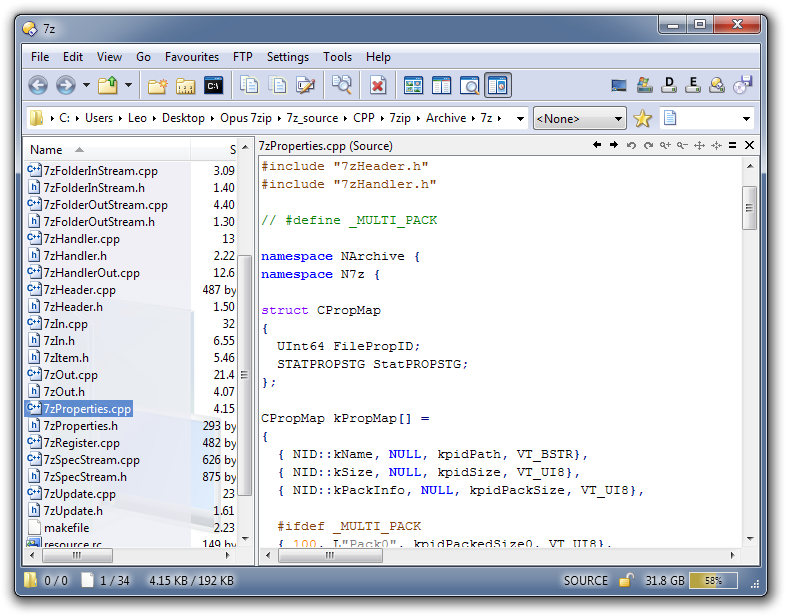
Syntax coloured source-code viewer (32 & 64 bit)

Viewer and VFS (Virtual File System) plugins.

Syntax coloured source-code viewer (32 & 64 bit)

Postby spiralx » 18 Mar 2010, 01:17

Install this, and it works straight away, nice and easy!

http://www.smartftp.com/client/addons/sourcepreview.php

Nothing else needed, going to find/write one with nicer colours though if there isn't any way to change them without hacking the DLL...

SourcePreviewHandler.png
SourcePreviewHandler.png (130.21 KB) Viewed 1746 times


Supported extensions/types:

  • ActionScript (.as, .mx)
  • ASP (.asp)
  • ASPX (.aspx)
  • AutoIt (.au3)
  • Bash (.sh, .bsh)
  • Batch (.bat, .cmd)
  • Caml (.ml, .mli, .sml, .thy)
  • C (.c)
  • C++ (.cpp, .cxx, .cc, .h, .hxx, .rgs)
  • C# (.cs)
  • CSS (.css)
  • Diff (.diff, .patch)
  • Fortran (.f, .for, .f90, .f95, .f2k)
  • Ini (.ini, .inf, .reg, .url)
  • Inno Setup (.iss)
  • Java (.java)
  • JavaScript (.js)
  • Lisp (.lsp, .lisp)
  • Makefile (.mak)
  • Matlab (.m)
  • NFO (.nfo)
  • NSIS (.nsi, .nsh)
  • Pascal (.pas, .inc)
  • Perl (.pl, .pm, .plx)
  • PHP (.php, .php3, .phtml)
  • Python (.py, .pyw)
  • Resource (.rc)
  • Smalltalk (.st)
  • TeX (.tex)
  • SQL (.sql)
  • VB (.vb)
  • VBScript (.vbs)
  • XML (.xml, .xsd, .xsml, xsl, .kml)

(Not all of the types above are assigned to it by default. To change them in Opus, use go to Settings -> Preferences / Plugins / Viewers: ActiveX + Preview + Office + Web and click Configure, then find Source in the list of preview handlers and modify the list of extensions.)
spiralx
 
Posts: 3
Joined: 15 Jan 2008, 17:41
Location: London, UK

Re: Syntax coloured source-code viewer

Postby leo » 18 Mar 2010, 01:26

Nice find!

(Added a screenshot & list of types/extensions to your post, hope you don't mind.)
User avatar
leo
Admin
 
Posts: 14654
Joined: 07 Nov 2004, 01:30
Location: London, UK
OS: Windows 7 64-bit
Opus: Illuminati

Re: Syntax coloured source-code viewer (32 & 64 bit)

Postby leo » 18 Mar 2010, 11:27

Another thank-you via the news blog comments:

http://blog.dopus.com/2010/03/syntax-co ... l#comments
User avatar
leo
Admin
 
Posts: 14654
Joined: 07 Nov 2004, 01:30
Location: London, UK
OS: Windows 7 64-bit
Opus: Illuminati

Re: Syntax coloured source-code viewer (32 & 64 bit)

Postby steje » 18 Mar 2010, 13:37

Yeah, nice find man... thanks for sharing!
The only sovereign you can allow to rule you is reason!
Settings->Backup & Restore is your best friend! | GPSoftware Support form
Opus v9.5.2.0.3659.x86 | Windows XP Pro sp3 (x86)
User avatar
steje
BBT
 
Posts: 2329
Joined: 15 Nov 2004, 20:51
Location: ...Sales?
OS: Windows XP 32-bit
Opus: Illuminati

Re: Syntax coloured source-code viewer (32 & 64 bit)

Postby Deipotent » 24 Mar 2010, 17:29

Great find

According to the SmartFTP web page this is only for Vista and above, so people on XP and 2000 may find it doesn't work (although I haven't tested it on either of these).

EDIT: Just noticed you're running XP steje, so I guess it does work on XP.
Deipotent
 
Posts: 157
Joined: 29 Nov 2004, 05:53

Re: Syntax coloured source-code viewer (32 & 64 bit)

Postby steje » 24 Mar 2010, 18:15

Yeah man... works well here, haven't noticed any problems so far.
The only sovereign you can allow to rule you is reason!
Settings->Backup & Restore is your best friend! | GPSoftware Support form
Opus v9.5.2.0.3659.x86 | Windows XP Pro sp3 (x86)
User avatar
steje
BBT
 
Posts: 2329
Joined: 15 Nov 2004, 20:51
Location: ...Sales?
OS: Windows XP 32-bit
Opus: Illuminati

Re: Syntax coloured source-code viewer (32 & 64 bit)

Postby Jamie » 02 Aug 2010, 07:05

How do I enable this for use within Directory Opus exactly? I have installed the app, but I am getting nothing within Opus. Thanks!
Jamie
 
Posts: 4
Joined: 02 Aug 2010, 07:03
OS: Windows 7 64-bit
Opus: Directory Opus 9.x

Re: Syntax coloured source-code viewer (32 & 64 bit)

Postby leo » 02 Aug 2010, 07:22

You just need to install it, unless you've disabled the Opus ActiveX plugin.

What kind of file are you trying to view with it?

When you say "nothing," what does that mean exactly? (You should still get the basic Opus text viewer if it's a text file.)
User avatar
leo
Admin
 
Posts: 14654
Joined: 07 Nov 2004, 01:30
Location: London, UK
OS: Windows 7 64-bit
Opus: Illuminati

Re: Syntax coloured source-code viewer (32 & 64 bit)

Postby Jamie » 02 Aug 2010, 07:43

Thanks for the reply leo. I get the basic text viewer plugin. Trying to just have access for quick edits to css js html txt etc. Not sure if this is helpful, but it's a win7 64 bit set-up.
Jamie
 
Posts: 4
Joined: 02 Aug 2010, 07:03
OS: Windows 7 64-bit
Opus: Directory Opus 9.x

Re: Syntax coloured source-code viewer (32 & 64 bit)

Postby leo » 02 Aug 2010, 07:53

This isn't an editor; it's just a viewer, so it probably won't do what you want anyway.
User avatar
leo
Admin
 
Posts: 14654
Joined: 07 Nov 2004, 01:30
Location: London, UK
OS: Windows 7 64-bit
Opus: Illuminati

Re: Syntax coloured source-code viewer (32 & 64 bit)

Postby Jamie » 02 Aug 2010, 08:02

So what should I be looking for in it's place leo? Just something that will allow a quick edit within the preview pane.
Jamie
 
Posts: 4
Joined: 02 Aug 2010, 07:03
OS: Windows 7 64-bit
Opus: Directory Opus 9.x

Re: Syntax coloured source-code viewer (32 & 64 bit)

Postby leo » 02 Aug 2010, 08:47

I don't know of any text-editor plugin (or preview handler etc.) which works under 64-bit at the moment.

(Maybe someone has written a preview handler that I don't know of, though. If you find one which works with Explorer it should also work with Opus.)
User avatar
leo
Admin
 
Posts: 14654
Joined: 07 Nov 2004, 01:30
Location: London, UK
OS: Windows 7 64-bit
Opus: Illuminati

Re: Syntax coloured source-code viewer (32 & 64 bit)

Postby Jamie » 02 Aug 2010, 08:52

Thanks for your help leo. Part of the 64 bit pluses and minuses. I guess for me this one is a minus. I'll keep an eye on the plugin thread. Best!
Jamie
 
Posts: 4
Joined: 02 Aug 2010, 07:03
OS: Windows 7 64-bit
Opus: Directory Opus 9.x

Re: Syntax coloured source-code viewer (32 & 64 bit)

Postby spiralx » 03 Aug 2010, 02:06

leo wrote:I don't know of any text-editor plugin (or preview handler etc.) which works under 64-bit at the moment.

(Maybe someone has written a preview handler that I don't know of, though. If you find one which works with Explorer it should also work with Opus.)

The original source code viewer plugin was basically just a thin wrapper around the Scintilla text editor component, I've not spent any time looking for a newer preview handler but it wouldn't surprise me if one was out there somewhere.

http://www.scintilla.org
spiralx
 
Posts: 3
Joined: 15 Jan 2008, 17:41
Location: London, UK

Re: Syntax coloured source-code viewer (32 & 64 bit)

Postby spiralx » 03 Aug 2010, 02:08

A quick Google search turned this up, which might be an alternative

http://previewhandlers.codeplex.com/

Adds a series of preview handlers to Windows Vista, Windows 7, Outlook 2007 and Outlook 2010 that are useful for software developers.

The pack currently supports:
ActionScript (.as)
ASPX (.aspx)
C# (.cs)
CSS (.css)
Diff (.diff, .patch)
DOS (.bat, .cmd)
JavaScript (.js)
Ruby (.rb, .rhtml, .rjs) thanks to Ivan Porto Carrero
SQL (.sql)
VB (.vb)


Probably requires being compiled before you can use it though, but if you know some C# then it's got links to articles about how to create your own ;)
spiralx
 
Posts: 3
Joined: 15 Jan 2008, 17:41
Location: London, UK


Return to Plugins