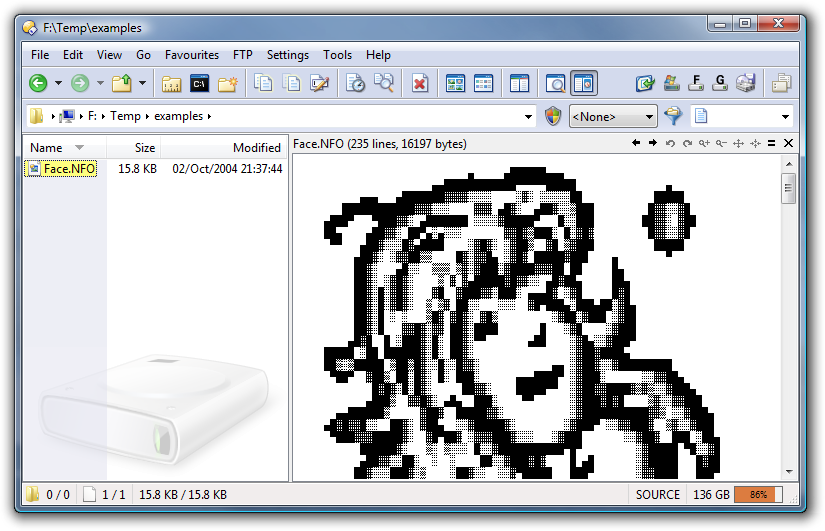
Allows you to view .nfo files using the correct line-drawing characters.
Author: Leo Davidson
Link: pretentiousname.com/nfo/
Allows you to view .nfo files using the correct line-drawing characters.
Author: Leo Davidson
Link: pretentiousname.com/nfo/
Version 1.1.0.17 (18th February 2011):
No replies? Strange...
Anyhow, I installed it (Win7 64x beta, Opus 9.1.18.3357.x64) and I can't get it to show the files with the font, even though I also tried installing it just in case. I just see it in a tiny, default (?) font... any ideas?
Btw, I just noticed your screenshot: what is the command for the drive usage percentage bar at the bottom? 
I deleted all the old replies back when I updated the plugin, since they were no longer current/useful and got in the way of finding the new info. I hate going to other forums and having to wade through pages of old, no-longer-relevant discussion to get a handle on the state of a download.
The plugin resizes the font so that every line of the file can fit in the window, on the assumption that the lines won't be long (i.e. wrapped to 80 cols). Maybe the line-drawing symbols just don't look right at such a small size.
My status bar codes can be found here.
Just tried another nfo file to check it out, here's what I get:

I also created a new nfo file with just a few chars, it gives me the same font...
Thanks for the codes, will look into them!
The font looks fine. What are you expecting to see? There are no MS-DOS line-drawing characters in that file by the look of it.
Aha! I didn't think that it would need the file to contain special characters. I made one up and it shows up fine now
Thanks for a lovely plugin! Only suggestion: maybe a dark background (black? blue) and a light font (yello/white) would make it somewhat better. Also, can the plugin be made to copy any selected text to the clipboard automatically?
Possibly... But not for a while. My eventual plan is to get rid of the NFO plugin completely and make it so you can specify codepages for different extensions with the Text plugin, which could then view NFO files. (Maybe integrate the TextThumbs plugin into the Text plugin, too, so all the text stuff is done by one plugin instead of three.)
Ah well, we'll stick with it then. Thanks, it's really handy
If you're using Opus 10 and want to export this plugin to USB, make sure you've got the latest version. This was put out in February, before Opus 10 was released, and I forgot to mention it until now.

Hi, thanks for the nice plugin. The "Configure"-button is greyed out. I would love to turn off the *.diz assignment (only) because the font is very tiny in the DO10 viewer pane... which is great for a NFO file overview but not so great for my own DIZ files. Maybe in a future revision of the plugin..
Any chance to have options for font, size, color and background color in future release?
I'm unlikely to spend any time on this viewer, but we may eventually allow for the main Text viewer to use different fonts and codepages for different file extensions. (Similar to the TextThumbs plugin, which it could be merged with.) Pretty low priority, though.
(The main Text viewer can already change font size and colors, of course. And the source code to the NFO Viewer is available if people want to extend it.)
Hi,
where i can donwload the nfo viewer?
I have nothing found.
Thanks
The link is at the top of this thread.