Admin Note: JDNet.co.uk has been down for a long time, so the links to download this plugin below may not work. --Leo
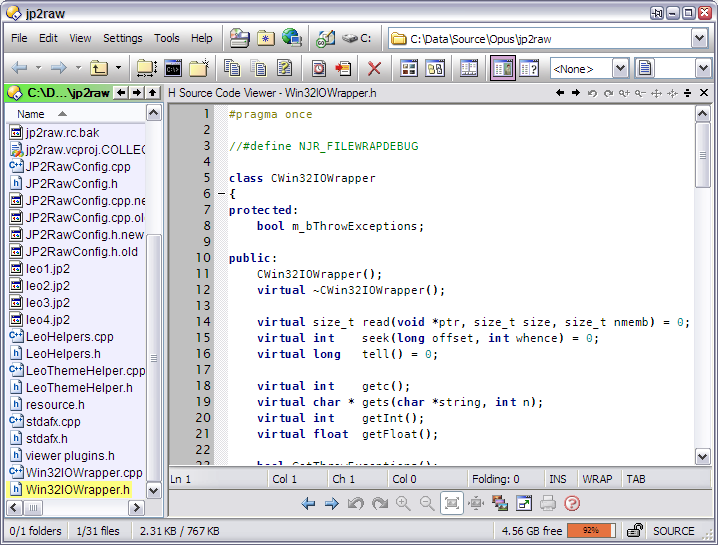
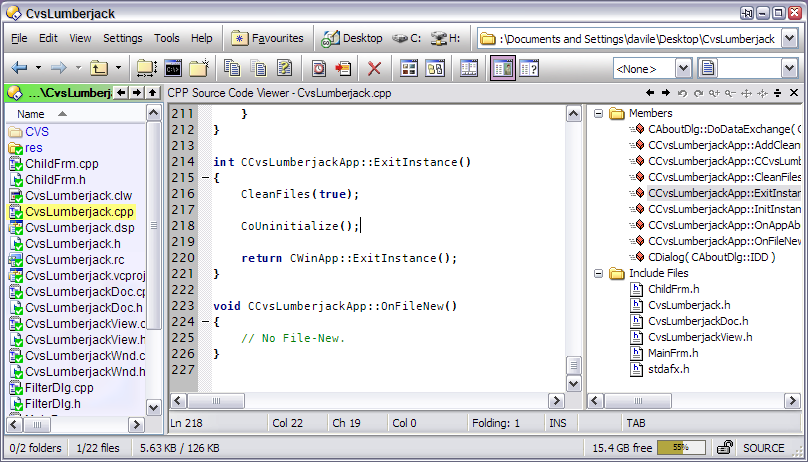
Source Code Viewer is a freeware plugin for Directory Opus (32-bit only). It provides an enhanced viewer pane for viewing your source code using the freeware Scintilla control (http://www.scintilla.org). This control provides a host of features including syntax colouring, line numbering, code block folding, word wrapping and brace matching amongst others.
The plugin also allows you to edit your code, search for text, goto lines, add your own languages, etc.
I have installed the plugin following the instructions included in the readme.txt, but the Source Code Viewer plugin is not working.
It doesn't appear in the list of installed plugins (Preferences/plugins) and, of course, it doesn't colour my files when I see them in the viewer panel.
I have found the dlls have dependencies with msjava.dll and msvcr71.dll which weren't installed in my system, but installing them hasn't solved the problem.
I don't have MSJAVA.DLL on my system either but the plugin works here, so it's not that. Hopefully James (who wrote the plugin) can help you.
BTW there's also MSVCP71.DLL in addition to MSVCR71.DLL in the plugin's dependencies. Got both?
You've got the Scintilla.dll and SciLexer.dll installed as well? I think the instructions say to copy them to system32 but I found putting them in the Directory Opus directory (i.e. alongside dopus.exe) works as well if you don't want to add things to System32.
Awsome! I have it working and I added the batch and html/xml config from the forum also. Groovin. Can anyone tell me how to go about defining my own config. I now need SQL config. Maybe a tutorial somewhere on building configurations? Much obliged.
Attached is a modified SciTEGlobal.properties for use with Source Code Viewer version 2 (beta) which makes a couple of changes to the default configuration which comes with SciTE:
All fonts changed to BitStream Vera Sans or BitStream Vera Sans Mono. (The default SciTE config uses several different fonts in various sizes which I found ugly, especially as Comic Sans was one of them.)
Display of indentation and guide whitespace turned off by default.
Colour of whitespace markers made a little lighter.
End-of-line mode set to "CRLF" and "auto", although this seems to affect SciTE only, not the plugin, for some reason.
The original config file is also in the zip so you can use a diff tool to see exactly what I've changed. These changes are not huge but, as I wasn't familiar with SciTE, it took some searching to work out what to do and I figure if may save other people some time. (Thanks also to Jamie for helping me find what needed to be edited without having to RTFM too much. )
Fonts
The BitStream Vera Sans family of fonts are not part of a standard Windows install so you'll need to grab and install them before using the config file, or edit the fonts to something else. If you don't then you'll get some default fonts used. If the main font you see is not monospaced then you haven't installed the fonts properly.
The fonts are freely available from the Gnome FTP server and I've also attached the current version to this message to make life easier.
Use an Opus button which runs Copy INSTALLFONT as a quick way to install the fonts. (Unzip and select them first.) Or you can go to your Fonts folder and select Install Fonts from the menus.
Config File
The config file itself should replace C:\Program Files\Scintilla Text Editor\SciTEGlobal.properties if you've installed SciTE to the default location.
Screenshot
Click the thumbnail below to see what the fonts look like. They work well for source code.
I installed the Source Code Viewer plugin and was able to use it to view and edit php and css files. A few days later, I tried to use it again - and it's not working for me. When I choose that plugin to view documents, they look blank. Using the text viewer on the same documents shows the contents.
Given that it was working at first, I'm baffled. I've tried reinstalling it, carefully following the instructions packaged with the plugin, but to no avail. I have the dlls mentioned earlier in this thread.
The plugin appears on the list of plugins, and is checked as active. However the "configure" option for the plugin is greyed out.
Does anyone have any ideas about what the problem might be?
-very-small-voice-on-
never mind
-very-small-voice-off-
There's a vertical divider (not sure what for, but it's there) and I somehow managed to get it dragged all the way to the left edge of the viewer pane.
I appear to have found a bug with the invaluable SCV plugin (BTW, great work RhinoBanga!)....
I was viewing the attached file (zipped up) in the SCV viewer plugin which had word wrap enabled, and then disabled word wrap. The horizontal scrollbar did not reflect the true width of the largest line. It was possible to scroll further to the right by either using the cursor keys or the right scroll arrow.
While I'm posting, I'd also like to make a feature request for "Find & Replace..." to be added to the plugin. google.zip (1.48 KB)
Another feature request - Can you make it possible to paste into the Find dialog. Currently, it is always pasted into the SCV editor, even when the Find dialog edit box has the focus.
BTW, I contacted the author of Scintilla/SciTE, Neil, regarding the horizontal scrollbar and he replied that he doesn't consider it a bug, but rather design. His argument is that he prefers to defer any processing until it's really necessary.
I have replied saying it would take minimal overhead to calculate the max line length on load and then keep this updated during editing, but it does not look like he'll implement it any time soon. If anyone else would like to see this "fixed", can you contact the Neil to voice your support.
 (I copied the Sci*.dll to the system32 folder directly).
 )
)