Note: AAC, M4A, ALAC, APE and SPX formats (as well as others) are now supported by the standalone Audio Tags plugin which comes with Opus 10 and above. You no longer need this plugin for those formats.
This plugin hooks Directory Opus into dBpoweramp Reference to enable Opus to display tags and metadata for several additional audio formats:
.AAC .M4A: iTunes AAC and ALAC (Apple Lossless Audio Codec)
.AIF .AIFF .AIFC: AIFF
.APE: Monkey's Audio
.MPC .MP+ .MPP: MusePack
.OFR .OFS: OptimFROG
.SHN: Shorten
.SND: Dalet
.SPX: Speex
.TTA: The True Audio
.W64: Wave64
.WV .WVC: WavePack
Support for some of the above formats will be has been added to the Audio Tags Pluginin the future, removing the dependency on dBpoweramp. However, it's unlikely that all of the formats above will be moved over. The dMCTags plugin will remain to handle the more esoteric audio formats.
Since Opus allows you to use music tags when renaming files the plugin can help you tidy up your music's filenames or even rearrange the files into new album folders using your chosen of naming system. See the second screenshot below for an example where the garbled filenames on an iPod are sorted into album folders.
If you only use FLAC and MP3 then it's probably not worth installing the dMC Tags plugin. The only potential advantage dMC Tags might have over the Ogg/FLAC plugin is that it supports Unicode filenames. (I plan to re-write the Ogg/FLAC plugin eventually, solving that problem in the process.) Also, dMC Tags won't handle MP3 files at all as Opus handles them internally.
On the other hand, if you do have dBpoweramp and want to use the dMC Tags plugin for other formats, then you might want to disable the Ogg/FLAC plugin to free up a bit of memory. Personally, I've left them both enabled which means the Ogg/FLAC plugin handles .OGG and .FLAC since the dMC Tags plugin keeps itself at the bottom of the list.
As mentioned on the plugin's web page, in time I (or someone else) might write standalone plugins, which don't require any additional software like dBpoweramp, which replace dMC Tags for some of the formats it handles. I doubt anyone will bother to do that for all of the formats so dMC Tags will always be potentially useful. For now it was a very quick way to add support for a lot of formats as a bonus to people who use both Opus and dBpoweramp.
dMC Tags sets a flag which keeps it near the bottom of the plugins list which means any other plugins (which don't also set that flag) that handle music tags will take priority over it.
I have both of those entries on my context menus in Opus. Have you turned off non-Opus context menu entries?
Yeah, I hate that feeling of not knowing if the rips are good until I listen to them. I might be 100 miles away from home and really want to listen to something I don't listen to often, only to find out that it's skipping all over the place. That's why I swear by EAC and dBpoweramp. I haven't used Easy CD-DA Extractor so I don't know what it is like but I've tested a lot of other rippers and EAC & dBpoweramp are the only two I've found which reliably detect all errors, try to correct them and actually report them if they fail to do so.
I have always selected the [Hide Windows items on file context menus] to clean up the menu. Of course I can always SHIFT override to see the dBa entries (the details in the Properties window is nice too) but is there any way to add those to a DO-only context menu?
Re [quote]Also, unlike my other plugins, this one is 32-bit-only unless a 64-bit version of dBpoweramp comes out[/quote]
I recently moved to 64 bit DOpus and really miss the dMC plugin. I've had a browse of the dbPoweramp forum and can't see any sign of Spoon moviong to 64 bit.
Is there any plans for a 32 bit to 64 bit shim to resurrect the dMC plugin for 64 bit users?
Which formats do you care about? I have an updated AutioTags plugin in the pipeline which will add support for M4A (AAC) files and some other things, without requiring dMC.
Which formats do you care about? I have an updated AutioTags plugin in the pipeline which will add support for M4A (AAC) files and some other things, without requiring dMC.
I use flac, m4a and mp3. The inbuilt support for flac and mp3 is great and I look forward to m4a. Thanks.
The extended meta data and album cover that pop-ups when you hover a file is still there for mp3. It isn't for m4a or flac and I can't remember if was on the 32 bit dOpus. This feature is really useful when working in folders that contain mixed filetypes.
ALAC will be included in the new plugin as well; code for that is already done.
(It's very similar to the other Apple formats, and something I use myself, or rather used before I banished/exorcised iTunes/Quicktime from every computer I own. )
Thanks for the info Leo. I have been using Itunes for some time now as a music organiser but I would certainly consider changing if there is a better way. Do you use only or do you use other applications as well?
I just stopped updating the music on my iPod. Apple seem to sabotage people's attempts to make things interop with their software/hardware so I never bothered with the alternatives (although there are some which may work great for all I know).
I don't use the iPod much these days but if I do want to update it I'll install iTunes in a virtual machine to protect my real one.
Personally, I have absolutely no need or appreciation for the whole "sync" approach. I keep music on my computer for 'archival' purposes, and am maniacal about keeping my music properly organized by filename and folder. And except for 'new' stuff I download and/or rip from original cd (I'm still only on letter "F") and keep on laptop only long enough to decide if I like it or not, I don't listen to much of it on/from the pc.
When I "do" want to listen to tunes on the pc, I just use foobar. I know what I like, know what I don't and want total control over what goes where... I've happily been using CopyTrans Manager to do so for some time now. I think they goof up their code every once in awhile, and I've had to restore/re-initialize my iPod (with - gasp - iTunes) once or twice over the past few years in order to obliterate some songs that refused to delete and got "stuck" on my ipod; but all in all - it's lightweight, works well with the latest iPod software, and it's free.
dBpoweramp has been updated to 64-bit (since Release 15). Is there a way we can get a 64-bit plugin? That would be lovely, since I archive some of my music in TTA and WV (Wavepack) formats, which are unsupported by DOpus currently.
Also, the tag renaming support sounds lovely... :3 Not to mention, FLAC tag support seems to be flaky lately. On a lot of my albums, even though other tag editors pick up the tags (including Tag&Rename, TagScanner, and dBpoweramp), DOpus doesn't. I've even tried clearing the tags out with Tag&Rename and putting them back in. No dice. Tag&Rename is slower at loading the tags of said FLAC's though, so I'm wondering if they were improperly tagged at some point.
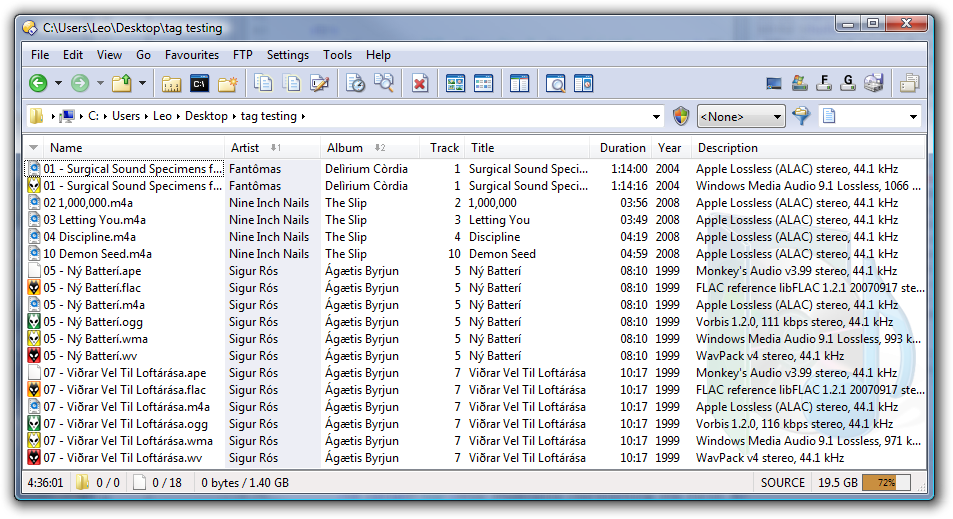
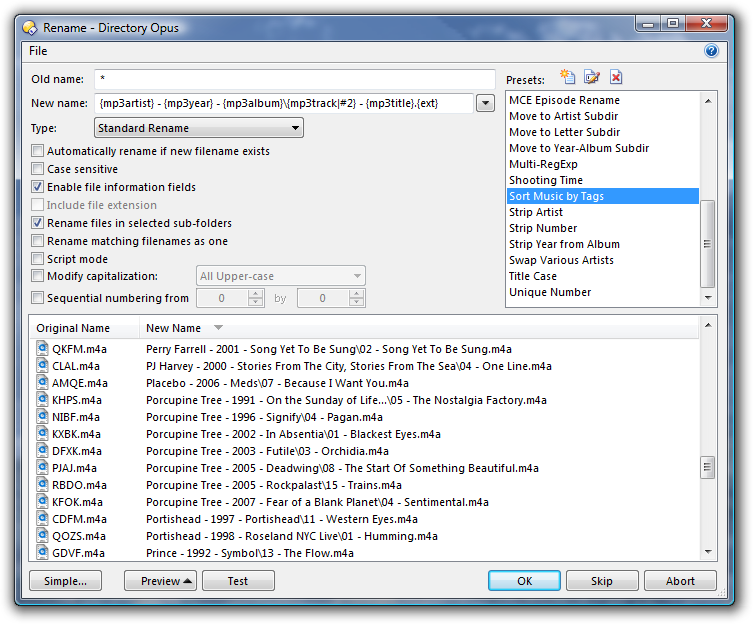

 plugin.
 )
) D-E-V-I-L