Font-Viewer (ttf, otf)

Viewer and VFS (Virtual File System) plugins.

Font-Viewer (ttf, otf)

Postby Dinkelhopper » 19 Jan 2009, 08:07

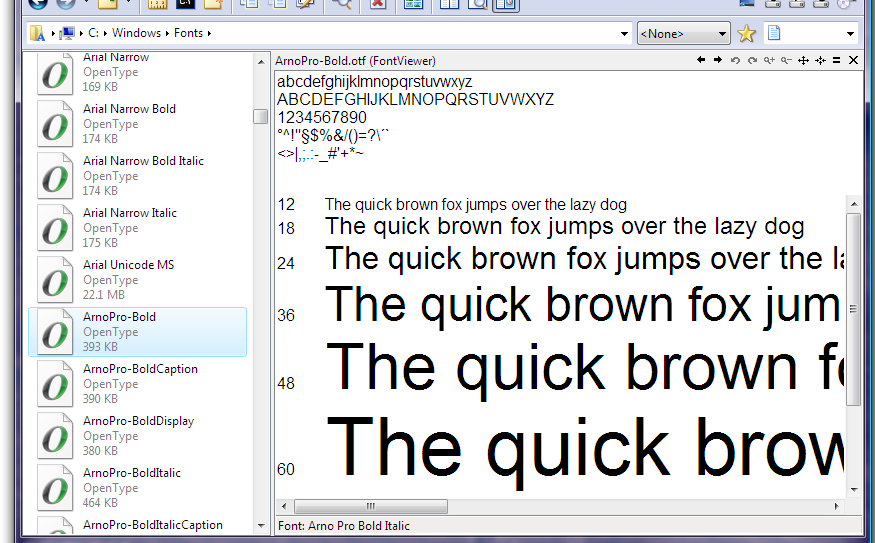
This ViewerPlugin lets you preview FontFiles (TrueType (ttf) and OpenType (otf)) within the Dopus-ViewerPane.

It works with installed and non-installed FontFiles!

Configure the included Ini-File to change the text and the fontsizes the text will be displayed.

The lower RichEdit is not read only so you are able to type your own text (temporarily)

It should work under 32bit XP and Vista.

Feedback is welcome :)

Current Version: 1.1.1 (11.02.09)

Please take a look at these files:
readme.txt => further information and usage
history.txt => changelist

ATTENTION:
Referring to this post, please use my PlugIns only with DOpus 9.1.1.8 or higher! I'll limit the usage to this version in a further release. Thanks.
Attachments
FontViewer.zip
(256.64 KB) Downloaded 2079 times
Last edited by Dinkelhopper on 16 Mar 2009, 04:54, edited 12 times in total.
Dinkelhopper
 
Posts: 134
Joined: 22 Nov 2008, 08:45
Location: Germany

Postby Ben Hill » 20 Jan 2009, 07:36

Thanks very much. It works very well for me, fast and smooth. I've been eager to have this extra capability in my file manager.

I have one question for you. Is it possible to have the viewer give the name of the font? That would be helpful to me. Often I don't recognize the *.ttf or *.otf name.
Ben Hill
 
Posts: 6
Joined: 31 Mar 2006, 09:46

Postby Dinkelhopper » 20 Jan 2009, 08:03

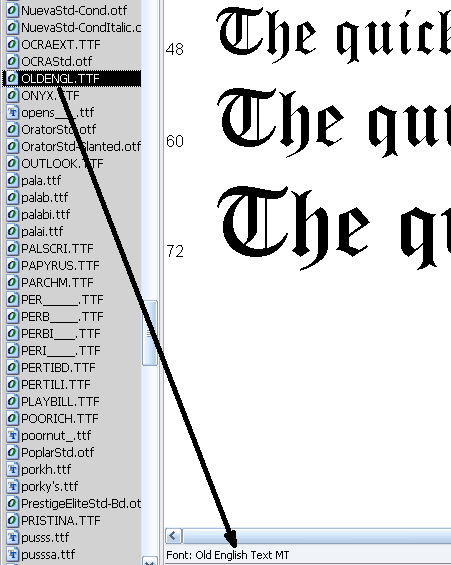
Ben Hill wrote:Is it possible to have the viewer give the name of the font?

Take a look at the StatusBar ;)
Attachments
snap01777.png
snap01777.png (17.99 KB) Viewed 6755 times
Dinkelhopper
 
Posts: 134
Joined: 22 Nov 2008, 08:45
Location: Germany

Postby AlbatorV » 20 Jan 2009, 08:29

Excellent, thanks...
User avatar
AlbatorV
BBT
 
Posts: 632
Joined: 20 Jan 2005, 08:47
Location: Paris (France)
OS: Windows XP 32-bit
Opus: Illuminati

Postby Ben Hill » 20 Jan 2009, 10:25

Thanks. I should have seen that. Looks very good.
Ben Hill
 
Posts: 6
Joined: 31 Mar 2006, 09:46

Postby Christiaan » 20 Jan 2009, 12:13

Great to have a Viewer Plugin to preview FontFiles for WinXP! :D
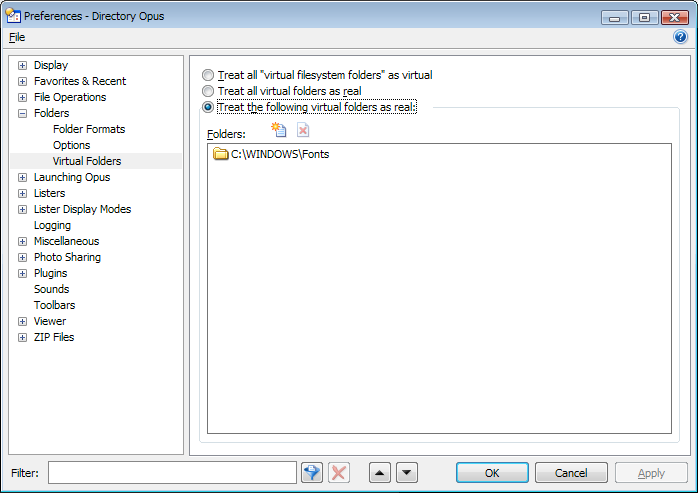
The plugin only works with the WINDOWS\Fonts directory if you choose to have DOpus display the WINDOWS\Fonts folder as a real folder: :wink:
Attachments
Untitled - 31.png
Untitled - 31.png (20.81 KB) Viewed 6700 times
User avatar
Christiaan
 
Posts: 642
Joined: 18 Oct 2006, 11:36
Location: Netherlands
OS: Windows Vista 32-bit
Opus: Directory Opus 9.x

Postby Dinkelhopper » 20 Jan 2009, 12:36

Christiaan wrote:The plugin only works with the WINDOWS\Fonts directory if you choose to have DOpus display the WINDOWS\Fonts folder as a real folder: :wink:

oops, sorry - I forget to mention this :(
I think this will be considered to every plugin.
Last edited by Dinkelhopper on 20 Jan 2009, 21:17, edited 1 time in total.
Dinkelhopper
 
Posts: 134
Joined: 22 Nov 2008, 08:45
Location: Germany

Postby fred » 20 Jan 2009, 13:31

Great work! Thank you

However, I can't get FontViewer.ini to work. I try to save the file in ANSI, UTF8 or Unicode with no sucess.

I have the last version to date: 19/01/2009 16:55:38

Config: XP SP3, DOPUS 9.1.1.6
- Win XP PRO SP3
- Directory Opus 9.5.4.0 x86
- Firefox 3.6.3 (THE browser)
User avatar
fred
 
Posts: 79
Joined: 19 Aug 2006, 08:40
Location: france
OS: Windows XP 32-bit
Opus: Directory Opus 9.x

Postby leo » 20 Jan 2009, 15:38

There is a Font Name column which you can turn on in Opus to tell you the name of each font.

Also, this plugin seems to work fine with the Fonts folder shown as virtual, although it didn't initially for some reason. (I enabled the unrelated MultiView plugin, to test if it would show something to prove to myself that plugins can see files in virtual folders and after doing that the FontViewer plugin worked fine for some reason, even if I then disabled MultiView.

Edit: Next to paragraphs crossed out. Turns out it works okay on Vista but there is indeed a problem on XP.

Dinkelhopper, it might be worth debugging the file paths you get when files in the virtual font folder are selected. Maybe they're in an unexpected format?

The Text viewer plugin has no problems showing files in virtual folders (as hex in this case) so it definitely should work for all plugins.


Good work, BTW. Nice to see some new plugins!
Attachments
Fonts.png
Fonts.png (109.25 KB) Viewed 6652 times
Last edited by leo on 29 Jan 2009, 02:52, edited 2 times in total.
User avatar
leo
Admin
 
Posts: 14449
Joined: 07 Nov 2004, 01:30
Location: London, UK
OS: Windows 7 64-bit
Opus: Illuminati

Postby trevorm » 20 Jan 2009, 15:51

Works the very best! Many thanks for this. Very useful!
trevorm
BBT
 
Posts: 257
Joined: 16 Nov 2004, 13:50

Postby Christiaan » 20 Jan 2009, 16:05

Also, this plugin seems to work fine with the Fonts folder shown as virtual (...)

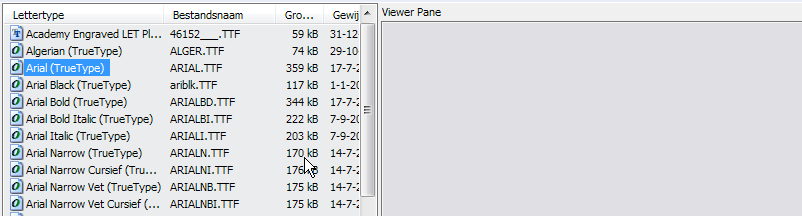
When I enable the MultiView Plugin and/or the FontViewer Plugin (in WinXP) it also doesn't show anything with the Fonts folder shown as virtual:
(but it's not a big problem for me, because it works fine with the Fonts folder shown as real)
Attachments
2009-01-21_005549.png
2009-01-21_005549.png (20.63 KB) Viewed 6625 times
User avatar
Christiaan
 
Posts: 642
Joined: 18 Oct 2006, 11:36
Location: Netherlands
OS: Windows Vista 32-bit
Opus: Directory Opus 9.x

Postby leo » 20 Jan 2009, 17:13

Just tried on XP and you're right. Must be something different with XP and Vista.

Since the text plugin also doesn't show anything Dinkelhopper is right in that it isn't the plugin's fault. I'll report that to GPSoft so they can take a look at it. For now, as Christiaan said, you can tell Opus to treat the Fonts folder as real to work around the problem on XP.

BTW, anyone using Vista should have a font viewer built in. (The Opus ActiveX plugin will use the Font preview handler which ships with Windows. That works with both 32-bit and 64-bit.) So the combination of this plugin and the ActiveX plugin means that everyone can now examine fonts in the viewer pane, one way or another, except for the small number of 64-bit users running Windows XP.
Last edited by leo on 29 Jan 2009, 04:00, edited 1 time in total.
User avatar
leo
Admin
 
Posts: 14449
Joined: 07 Nov 2004, 01:30
Location: London, UK
OS: Windows 7 64-bit
Opus: Illuminati

Postby Dinkelhopper » 20 Jan 2009, 21:05

leo wrote:I'll report that to GPSoft so they can take a look at it.

Thanks for your assistance.
Dinkelhopper
 
Posts: 134
Joined: 22 Nov 2008, 08:45
Location: Germany

Postby Dinkelhopper » 20 Jan 2009, 23:21

fred wrote:However, I can't get FontViewer.ini to work. I try to save the file in ANSI, UTF8 or Unicode with no sucess.

Could you attach your FontViewer.ini, please?
Dinkelhopper
 
Posts: 134
Joined: 22 Nov 2008, 08:45
Location: Germany

Postby Ben Hill » 21 Jan 2009, 07:21

My Fontview.ini is attached.

The Fontview.ini doesn't change text or font sizes from the default settings whether it is in the Viewers sub-folder or not.

Everything else works nicely.
Attachments
FontViewer.zip
(219 Bytes) Downloaded 248 times
Ben Hill
 
Posts: 6
Joined: 31 Mar 2006, 09:46

Next

Return to Plugins