# 12. 10 Running setup corrupted
**URL:** https://resource.dopus.com/t/12-10-running-setup-corrupted/30073
**Category:** Help & Support
**Created:** [October 6, 2018, 2:30am UTC](https://resource.dopus.com/t/12-10-running-setup-corrupted/30073 "2018-10-06T02:30:40Z")
**Posts on this page:** 5
**Page:** 1
### Author:  [@John102](https://resource.dopus.com/u/John102)
#### Post date: [October 6, 2018, 2:30am UTC](https://resource.dopus.com/t/12-10-running-setup-corrupted/30073/1 "2018-10-06T02:30:41Z")
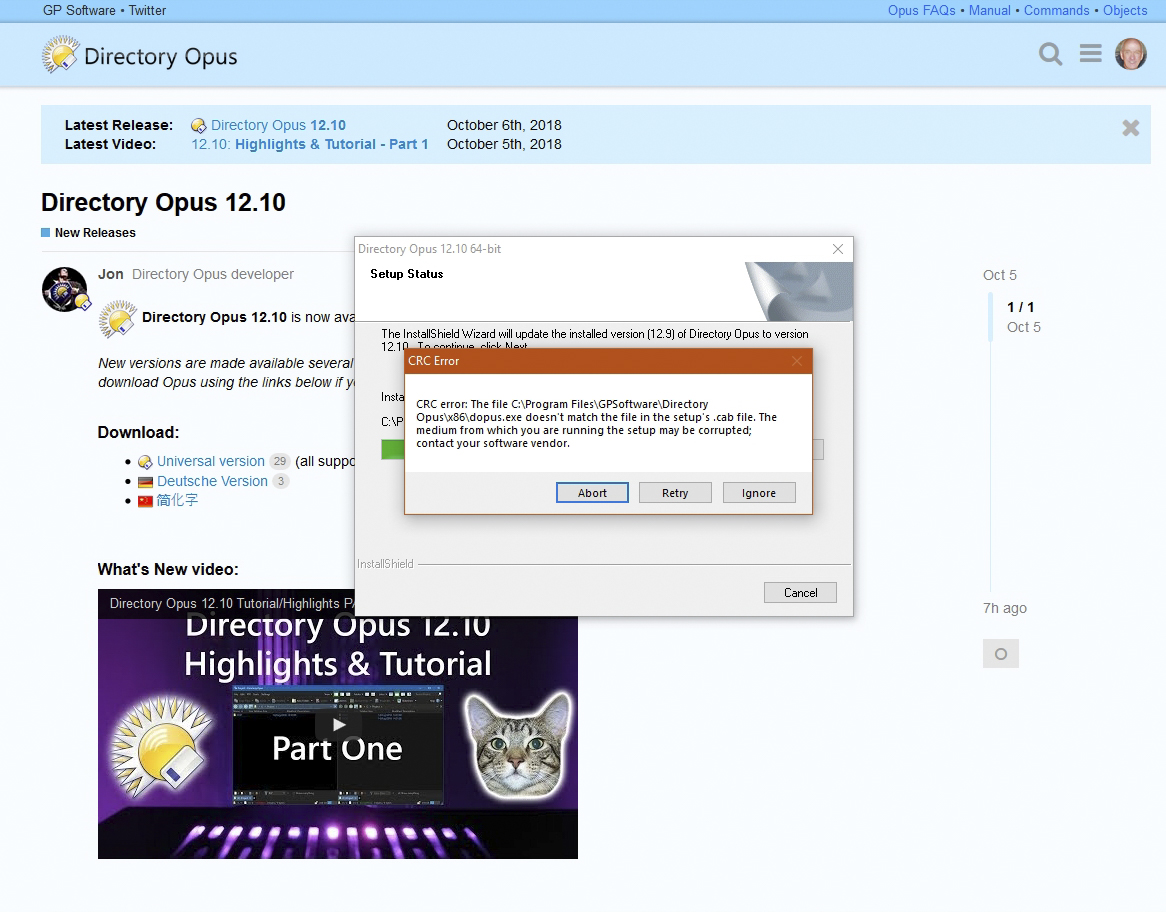
I downloaded 12.10 and installed it and here is the result.
---
### Author:  [@Leo](https://resource.dopus.com/u/Leo)
#### Post date: [October 6, 2018, 2:38am UTC](https://resource.dopus.com/t/12-10-running-setup-corrupted/30073/2 "2018-10-06T02:38:07Z")
> [@How to check for a corrupted installer or main program](https://resource.dopus.com/t/how-to-check-for-a-corrupted-installer-or-main-program/8660):
>
> Digital signatures The Directory Opus installer, as well as components of Directory Opus itself, are digitally signed by GPSoftware. Digital signatures allow you to verify that the files you have downloaded or installed are intact and unmodified. T…
---
### Author:  [@John102](https://resource.dopus.com/u/John102)
#### Post date: [October 6, 2018, 2:59am UTC](https://resource.dopus.com/t/12-10-running-setup-corrupted/30073/3 "2018-10-06T02:59:16Z")
I did find that the digital signatures were not valid. I tried downloading the installer again from the resource page and the result was the same. Next I tried downloading it from the main Directory Opus page and it was fine. Signatures were ok and the install worked great as it has in the past. If anyone else is having trouble, download it here. [https://www.gpsoft.com.au/DScripts/download.asp](https://www.gpsoft.com.au/DScripts/download.asp)
---
### Author:  [@Leo](https://resource.dopus.com/u/Leo)
#### Post date: [October 6, 2018, 3:25am UTC](https://resource.dopus.com/t/12-10-running-setup-corrupted/30073/4 "2018-10-06T03:25:44Z")
Both URLs should ultimately go to the same place. It's possible the browser cached an incomplete download for one URL. If so, clearing the browser cache should mean both URLs work again for you.
---
### Author:  [@rcoleman1943](https://resource.dopus.com/u/rcoleman1943)
#### Post date: [October 6, 2018, 3:08pm UTC](https://resource.dopus.com/t/12-10-running-setup-corrupted/30073/5 "2018-10-06T15:08:23Z")
> [@John102](#):
>
> If anyone else is having trouble, download it here. [https://www.gpsoft.com.au/DScripts/download.asp](https://www.gpsoft.com.au/DScripts/download.asp)
I notice that link seems to be to 12.9.