# Auto-select certain files when entering certain folders
**URL:** https://resource.dopus.com/t/auto-select-certain-files-when-entering-certain-folders/20413
**Category:** Buttons/Scripts
**Tags:** script, vbscript, events
**Created:** [March 31, 2015, 11:20am UTC](https://resource.dopus.com/t/auto-select-certain-files-when-entering-certain-folders/20413 "2015-03-31T11:20:07Z")
**Posts on this page:** 14
**Page:** 1
### Author:  [@Leo](https://resource.dopus.com/u/Leo)
#### Post date: [March 31, 2015, 11:20am UTC](https://resource.dopus.com/t/auto-select-certain-files-when-entering-certain-folders/20413/1 "2015-03-31T11:20:07Z")
This script add-in will make Directory Opus automatically select certain files when you go into certain folders.
You can configure the script to set the files and folders it reacts to. The folder paths can use wildcards.
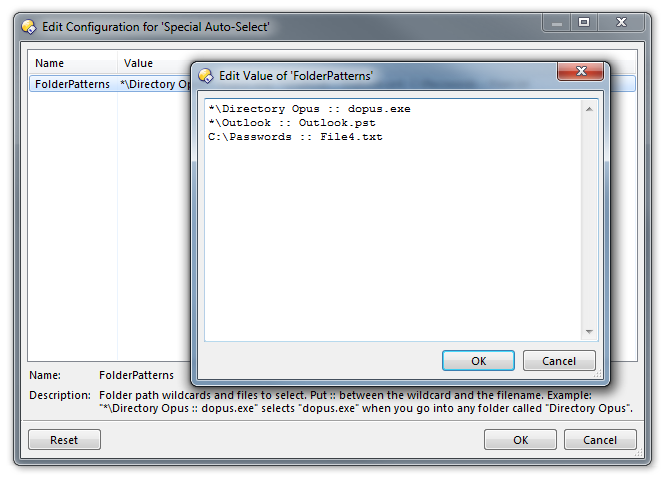
To use the script, download the .vbs.txt file below, then drag and drop it to Preferences / Toolbars / Scripts, and click Configure on the new entry to set it up.
[Special\_Auto-Select.vbs.txt](https://resource.dopus.com/uploads/default/original/3X/2/e/2e500631e6e745430fc2bef465716764dcbd1081.txt) (1.46 KB)
The script code is also reproduced here to help people looking through the forum for scripting techniques:
```vbscript
' Called by Directory Opus to initialize the script
Function OnInit(initData)
initData.name = "Special Auto-Select"
initData.desc = "Automatically select specific files when entering certain folders."
initData.copyright = ""
initData.version = "1.1"
initData.default_enable = true
Set vecDefFolders = DOpus.Create.Vector
' Default folders / example config.
vecDefFolders.push_back("*\Directory Opus :: dopus.exe")
vecDefFolders.push_back("*\Outlook :: Outlook.pst")
vecDefFolders.push_back("C:\Passwords :: File4.txt")
initData.config.FolderPatterns = vecDefFolders
Set mapDescs = DOpus.Create.Map
mapDescs("FolderPatterns") = "Folder path wildcards and files to select. Put :: between the wildcard and the filename. Example: ""*\Directory Opus :: dopus.exe"" selects ""dopus.exe"" when you go into any folder called ""Directory Opus""."
initData.config_desc = mapDescs
End Function
' Called after a new folder is read in a tab
Function OnAfterFolderChange(afterFolderChangeData)
For Each configPattern in Script.config.FolderPatterns
configSplit = Split(configPattern, "::", 2)
Set folderPattern = DOpus.FSUtil.NewWild( trim( configSplit(0) ) )
If (folderPattern.Match(afterFolderChangeData.tab.path)) Then
Set cmd = DOpus.Create.Command()
cmd.SetSourceTab afterFolderChangeData.tab
cmd.RunCommand "Select PATTERN=""" & trim( configSplit(1) ) & """ EXACT SETFOCUS DESELECTNOMATCH"
Exit Function
End If
Next
End Function
```
---
### Author:  [@SomeYoungGuy](https://resource.dopus.com/u/SomeYoungGuy)
#### Post date: [March 31, 2015, 2:28pm UTC](https://resource.dopus.com/t/auto-select-certain-files-when-entering-certain-folders/20413/2 "2015-03-31T14:28:39Z")
Thank you so much, Leo. You are amazing.
---
### Author:  [@abr](https://resource.dopus.com/u/abr)
#### Post date: [June 11, 2015, 4:29pm UTC](https://resource.dopus.com/t/auto-select-certain-files-when-entering-certain-folders/20413/3 "2015-06-11T16:29:16Z")
Neat. No more searching for the right exe in the C:\program files folder now. Maybe you could expand it to also handle subfolders?
---
### Author:  [@tbone](https://resource.dopus.com/u/tbone)
#### Post date: [June 11, 2015, 4:54pm UTC](https://resource.dopus.com/t/auto-select-certain-files-when-entering-certain-folders/20413/4 "2015-06-11T16:54:39Z")
Maybe use SelectEx: [Command: SelectEx (extended Select command)](https://resource.dopus.com/t/command-selectex-extended-select-command/20517/1)
It supports folders and files, regexes for both (path and item) and will scroll to any auto-selected item as well (if enabled). Watch the "Auto-Selection" description at the bottom and the AUTO cmdline switch.
---
### Author:  [@abr](https://resource.dopus.com/u/abr)
#### Post date: [June 11, 2015, 5:23pm UTC](https://resource.dopus.com/t/auto-select-certain-files-when-entering-certain-folders/20413/5 "2015-06-11T17:23:46Z")
Yes, that also looks very promising. However, i couldn't get it to work for some reason.
i use follwowing syntax: C:\Program Files\VideoLAN\VLC =\> vlc.exe
There's also this script error message.
SelectEx: Fehler in Zeile 671, Position 3
SelectEx: Unerwarteter Quantifizierer (0x800a139a)
By the way, i already played around with your very interesting script, and saved some selections. Is it normal, that it would remember saved selections only for one Opus session, using "save selection toundfrom" a file?
---
### Author:  [@tbone](https://resource.dopus.com/u/tbone)
#### Post date: [June 11, 2015, 5:31pm UTC](https://resource.dopus.com/t/auto-select-certain-files-when-entering-certain-folders/20413/6 "2015-06-11T17:31:48Z")
You're syntax is fine and tested to work (here at least), but let's move over to the SelectEx thread.. _beam_.. o)
---
### Author:  [@abr](https://resource.dopus.com/u/abr)
#### Post date: [June 11, 2015, 5:48pm UTC](https://resource.dopus.com/t/auto-select-certain-files-when-entering-certain-folders/20413/7 "2015-06-11T17:48:12Z")
Ok!
---
### Author:  [@Leo](https://resource.dopus.com/u/Leo)
#### Post date: [June 11, 2015, 6:04pm UTC](https://resource.dopus.com/t/auto-select-certain-files-when-entering-certain-folders/20413/8 "2015-06-11T18:04:54Z")
I can't see anything stopping the existing script from working with sub-folders already.
If you want it to auto-scroll to the selected item, I think you just need to add MAKEVISIBLE after SETFOCUS.
---
### Author:  [@abr](https://resource.dopus.com/u/abr)
#### Post date: [June 11, 2015, 6:25pm UTC](https://resource.dopus.com/t/auto-select-certain-files-when-entering-certain-folders/20413/9 "2015-06-11T18:25:09Z")
Leo, you're right. I had a typo (missing blank space after :🙂 in the old list of paths and applications, which must have caused that red error icon. So, all is fine.
---
### Author:  [@daniel123](https://resource.dopus.com/u/daniel123)
#### Post date: [June 22, 2021, 8:14pm UTC](https://resource.dopus.com/t/auto-select-certain-files-when-entering-certain-folders/20413/10 "2021-06-22T20:14:50Z")
This script is great! However when the file is auto-selected it does not preview in the viewer pane until manually selected. Is there a way to have the file both auto-selected and previewed?
---
### Author:  [@Leo](https://resource.dopus.com/u/Leo)
#### Post date: [June 22, 2021, 8:32pm UTC](https://resource.dopus.com/t/auto-select-certain-files-when-entering-certain-folders/20413/11 "2021-06-22T20:32:35Z")
Untested, but after this line:
```vbscript
cmd.RunCommand "Select PATTERN=""" & trim( configSplit(1) ) & """ EXACT SETFOCUS DESELECTNOMATCH"
```
Add this extra line:
```vbscript
cmd.RunCommand "Show FILE=""" & afterFolderChangeData.tab.path & "\" & trim( configSplit(1) ) & """ VIEWPANECMD=open"
```
(EDIT: Corrected missing `&` mentioned in the two posts below this one.)
Something like that should work. If it doesn't work, I can fix it tomorrow.
---
### Author:  [@daniel123](https://resource.dopus.com/u/daniel123)
#### Post date: [June 23, 2021, 2:14am UTC](https://resource.dopus.com/t/auto-select-certain-files-when-entering-certain-folders/20413/12 "2021-06-23T02:14:49Z")
Thanks for the quick reply! When I tried to upload it there was a parse error for some reason...
---
### Author:  [@lxp](https://resource.dopus.com/u/lxp)
#### Post date: [June 23, 2021, 3:04am UTC](https://resource.dopus.com/t/auto-select-certain-files-when-entering-certain-folders/20413/13 "2021-06-23T03:04:28Z")
Try inserting `&` before `afterFolderChange ...`.
---
### Author:  [@daniel123](https://resource.dopus.com/u/daniel123)
#### Post date: [June 23, 2021, 12:33pm UTC](https://resource.dopus.com/t/auto-select-certain-files-when-entering-certain-folders/20413/14 "2021-06-23T12:33:48Z")
Thanks that worked!