Just one question, are linked tabs and paired tabs the same? I don't find a list of my linked tabs in the preferences, only a list of their respective border colors.
Well, linked tabs and paired folders are not the same (although related, see below) 
Here's a simple setup:
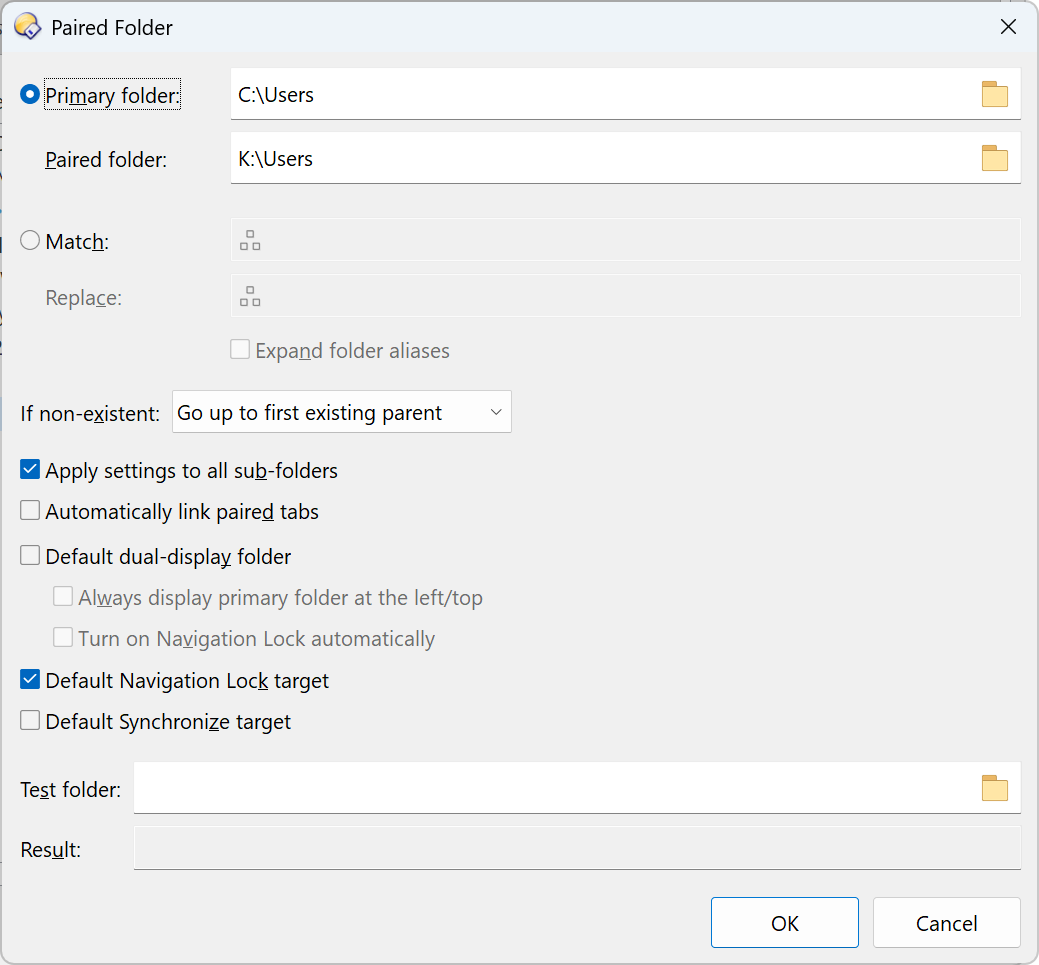
And here I navigate with the script turned off and on:
Thanks. So that's basically how i figured it should work. Only having confused linked and paired tabs/folders. I also did try to find that prefs page you have there, but to no avail. I tried "paar", then "verbunden", etc., but i still have no idea where that menu page is hidden in that deep prefs jungle.
Therefore i'd like to mention another thought here, that bothered me many times. We would need to have some sort of "tag cloud" for search items, preferably in english, because dealing with the translated stuff is quite often troublesome. Meaning, that even if i have german as the default language, it should be possible to just search for "Paired Folder" (like in your screenshot) and still be able to get that result.
Prefs PAGE="pairedfolders"
1 Like
Thanks, now i can take a deeper look into it. 
And it's also a good example of what i meant by the second part of my previous answer. It would be very useful if we sometimes could ignore the translated stuff ("gekoppelt", i'd never would have figured that out) and always be able to find the english term in that search term "cloud". Basically some "thesaurus" function.
And now i got it working. Nice! 
Is there a way to override the script, in case i don't want the effect. Something like using Shift to override?
I'd rather turn the script off and use a button to open the paired folder (see above). This could include the tab-linking and nav-locking.
You mean
Go PATH={sourcepath|pair} OPENINDUAL
?
No, that doesn't work here for some reason. Being on one of the paired folders. But don't bother, it's quite alright with the script as it is now. I only have a few folders paired, so it's not a big deal.
thank you for this. the file to download saves as .js.txt. am i correct to remove the .txt from the file name? I tried that and when I go to my primary folder it always open a new tab to C:\Program Files\GPSoftware\Directory Opus\ U:\
I saw your screenshot and have my paired folder setup correctly, am I missing something?
You may, but you don't have to. Opus will accept both extensions.
Does the paired folder open if you run this?
Go PATH={sourcepath|pair} OPENINDUAL