# Button to move files in folder named from file

**URL:** https://resource.dopus.com/t/button-to-move-files-in-folder-named-from-file/8770
**Category:** Buttons/Scripts
**Tags:** commands, button
**Created:** [November 16, 2009, 9:40am UTC](https://resource.dopus.com/t/button-to-move-files-in-folder-named-from-file/8770 "2009-11-16T09:40:41Z")
**Posts on this page:** 11
**Page:** 1

<div class="post-metadata">

### Author: ![GoinPostal](https://resource.dopus.com/user_avatar/resource.dopus.com/goinpostal/32/26083_2.png) [@GoinPostal](https://resource.dopus.com/u/GoinPostal)
#### Post date: [November 16, 2009, 9:40am UTC](https://resource.dopus.com/t/button-to-move-files-in-folder-named-from-file/8770/1 "2009-11-16T09:40:41Z")

</div>

Here is a simple button to move selected files to a new folder based on the name of the first selected file. The folder name can be changed after the move command if shift key is held down.

The second button was already posted somewhere on this forum and move all files to the parent directory and delete the folder.

```auto
<?xml version="1.0"?>
<button backcol="none" display="both" separate="yes" textcol="none" type="three_button">
	<label>Déplacement Rapide</label>
	<icon1>#opentoolbar</icon1>
	<button display="both">
		<label>Déplacer dans un dossier auto</label>
		<tip>Déplacer dans un dossier du nom du fichier</tip>
		<icon1>#makedir</icon1>
		<function type="normal">
			<instruction>@nofilenamequoting </instruction>
			<instruction>@runonce @set Folder={file|noext}</instruction>
			<instruction>@runonce CREATEFOLDER &quot;{file|noext}&quot;</instruction>
			<instruction>Copy MOVE TO &quot;.\{$Folder}&quot;</instruction>
			<instruction>@keydown:shift </instruction>
			<instruction>Rename {$Folder}</instruction>
		</function>
	</button>
	<button backcol="none" display="both" textcol="none">
		<label>Déplacer dans le dossier parent</label>
		<tip>Déplacer les fichiers dans le dossier parent et supprimer le dossier counant</tip>
		<icon1>#opentoolbar</icon1>
		<function type="batch">
			<instruction>@set ChildPath={sourcepath$|noterm}</instruction>
			<instruction>@runmode hide</instruction>
			<instruction>Copy MOVE * TO ..</instruction>
			<instruction>Go ..</instruction>
			<instruction>rmdir {$ChildPath}</instruction>
		</function>
	</button>
</button>
```

Hope this can help!  
(sorry, tips are in french 😉)

---

<div class="post-metadata">

### Author: ![GoinPostal](https://resource.dopus.com/user_avatar/resource.dopus.com/goinpostal/32/26083_2.png) [@GoinPostal](https://resource.dopus.com/u/GoinPostal)
#### Post date: [November 19, 2009, 5:13pm UTC](https://resource.dopus.com/t/button-to-move-files-in-folder-named-from-file/8770/2 "2009-11-19T17:13:27Z")

</div>

just a little change, the button couldn't work in the case folders are broswed automatically after creation.

READAUTO=no is added when creating the folder.

```xml
<?xml version="1.0"?>
<button backcol="none" display="both" separate="yes" textcol="none" type="three_button">
   <label>Déplacement Rapide</label>
   <icon1>#opentoolbar</icon1>
   <button display="both">
      <label>Déplacer dans un dossier auto</label>
      <tip>Déplacer dans un dossier du nom du fichier</tip>
      <icon1>#makedir</icon1>
      <function type="normal">
         <instruction>@nofilenamequoting </instruction>
         <instruction>@runonce @set Folder={file|noext}</instruction>
         <instruction>@runonce CREATEFOLDER READAUTO=no &quot;{file|noext}&quot;</instruction>
         <instruction>Copy MOVE TO &quot;.\{$Folder}&quot;</instruction>
         <instruction>@keydown:shift </instruction>
         <instruction>Rename {$Folder}</instruction>
      </function>
   </button>
   <button backcol="none" display="both" textcol="none">
      <label>Déplacer dans le dossier parent</label>
      <tip>Déplacer les fichiers dans le dossier parent et supprimer le dossier counant</tip>
      <icon1>#opentoolbar</icon1>
      <function type="batch">
         <instruction>@set ChildPath={sourcepath$|noterm}</instruction>
         <instruction>@runmode hide</instruction>
         <instruction>Copy MOVE * TO ..</instruction>
         <instruction>Go ..</instruction>
         <instruction>rmdir {$ChildPath}</instruction>
      </function>
   </button>
</button>

```

---

<div class="post-metadata">

### Author: ![Leo](https://resource.dopus.com/user_avatar/resource.dopus.com/leo/32/69732_2.png) [@Leo](https://resource.dopus.com/u/Leo)
#### Post date: [November 19, 2009, 6:46pm UTC](https://resource.dopus.com/t/button-to-move-files-in-folder-named-from-file/8770/3 "2009-11-19T18:46:03Z")

</div>

You can edit the original post if you want. (Editing is enabled in the download forums.)

---

<div class="post-metadata">

### Author: ![blackhalo](https://resource.dopus.com/letter_avatar_proxy/v4/letter/b/dec6dc/32.png) [@blackhalo](https://resource.dopus.com/u/blackhalo)
#### Post date: [January 4, 2014, 3:03am UTC](https://resource.dopus.com/t/button-to-move-files-in-folder-named-from-file/8770/4 "2014-01-04T03:03:32Z")

</div>

Is it possible to put this into a right-click context menu?  
I found this page, but I'm not sure how it would work with XML:

> [@How to use buttons and scripts from this forum](https://resource.dopus.com/t/how-to-add-buttons-from-this-forum-to-your-toolbars/3546/1):
>
> This post explains how to add buttons to toolbars and menus, and also applies to raw commands for things like standalone hotkeys. For how to use Script Add-Ins, please scroll down to the post below this one. See Also: The manual has more detail in…

EDIT ---- SOLUTION --- MANAGED TO FIGURE IT OUT USING THIS INFO:  
[gpsoft.com.au/help/opus10/in ... t\_Menu.htm](http://www.gpsoft.com.au/help/opus10/index.html#!Documents/Context_Menu.htm)

Pretty easy, just follow below:  
Settings \> File Type \> All Files and Folders \> Context Menu \> Run an Opus function \> Paste code below into box \> done!

```plaintext
@nofilenamequoting
@runonce @set Folder={file|noext}
@runonce CREATEFOLDER READAUTO=no "{file|noext}"
Copy MOVE TO ".\{$Folder}"
@keydown:shift
Rename {$Folder}

```

I'm super happy this mod exists...  
older apps like "Files2Folder" don't seem to work with Win8,  
there's no other options!!

Now there is!  
Thx Dopus!

---

<div class="post-metadata">

### Author: ![Leo](https://resource.dopus.com/user_avatar/resource.dopus.com/leo/32/69732_2.png) [@Leo](https://resource.dopus.com/u/Leo)
#### Post date: [January 4, 2014, 3:15am UTC](https://resource.dopus.com/t/button-to-move-files-in-folder-named-from-file/8770/5 "2014-01-04T03:15:06Z")

</div>

To put the commands on a context menu, paste the codes above on to a toolbar temporarily, then edit the buttons to get the commands out of them. You can then use the [File Type editor](http://gpsoft.com.au/help/opus10/default.htm#!Documents/Filetype_Editor.htm) and paste the same commands into new [context menu](http://gpsoft.com.au/help/opus10/default.htm#!Documents/Context_Menu.htm) items, using the Run an Opus Function type.

---

<div class="post-metadata">

### Author: ![Alderyos](https://resource.dopus.com/user_avatar/resource.dopus.com/alderyos/32/41559_2.png) [@Alderyos](https://resource.dopus.com/u/Alderyos)
#### Post date: [January 25, 2022, 7:12pm UTC](https://resource.dopus.com/t/button-to-move-files-in-folder-named-from-file/8770/6 "2022-01-25T19:12:37Z")

</div>

Hello,

I'm using this button, but I'd like to change the rename command:

```auto
@nofilenamequoting
@runonce @set Folder={file|noext}
@runonce CREATEFOLDER READAUTO=no "{file|noext}"
Copy MOVE TO ".\{$Folder}"
Rename {$Folder}

```

Unfortunately, it sometimes doesn't let me rename the folder, and I haven't been able to figure out why (I'd be curious to know):
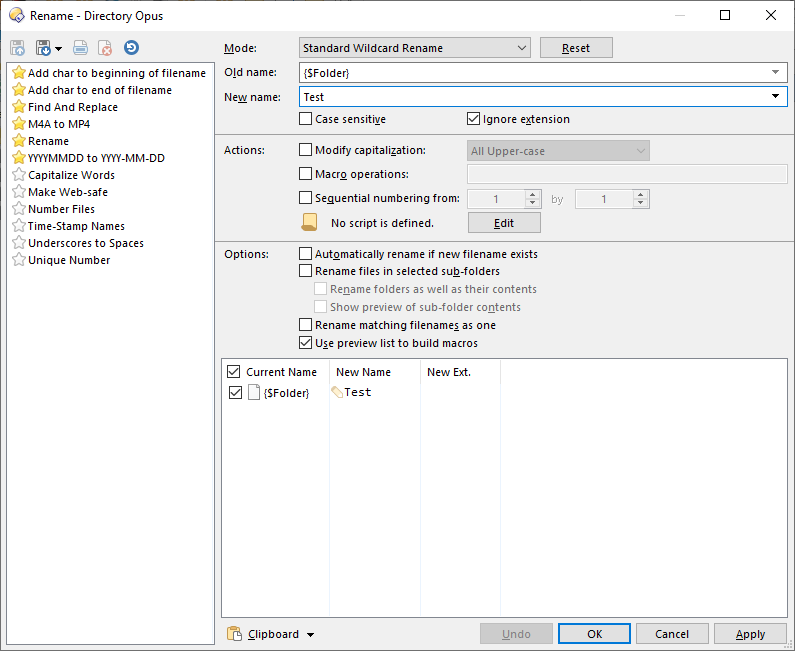
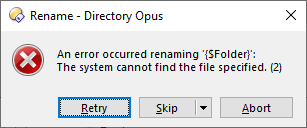
 ![Rename-01](https://resource.dopus.com/uploads/default/original/3X/1/2/123390b3c58df29142449cd9aef9d27b6fa6cf6e.png)  
 ![Rename-02](https://resource.dopus.com/uploads/default/original/3X/2/7/27a8a279a771cd444ab542954a9a07df68ff49fb.png)

But anyway, instead of using the rename operation, I'd rather prefer to be able to:

1. instantly rename inline as a last step, once all the files are moved into the new created folder (so I don't have to hit F2 each time)  
or
2. rename it once the folder is created, with the dialog below, just before the files are moved:  
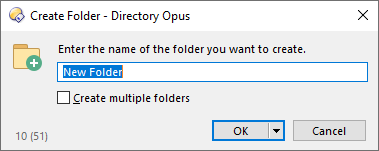
 ![New_Folder](https://resource.dopus.com/uploads/default/original/3X/5/7/579ec9774fc72e136cf8c371e74b062ce7fc1048.png)

Ideally, I'd like to test both of these options, if possible.

Also, I tried with the command " **Rename INLINE**" instead of " **Rename {$Folder}**", but no success. I also tried by adding the sync command modifier, so " **@sync:Rename INLINE**", but still no success (I believe that I still don't know how to use it properly).

Some help would be so appreciated.

Thanks!

---

<div class="post-metadata">

### Author: ![Leo](https://resource.dopus.com/user_avatar/resource.dopus.com/leo/32/69732_2.png) [@Leo](https://resource.dopus.com/u/Leo)
#### Post date: [January 25, 2022, 7:41pm UTC](https://resource.dopus.com/t/button-to-move-files-in-folder-named-from-file/8770/7 "2022-01-25T19:41:45Z")

</div>

I would do it like this:

```nohighlight
@nofilenamequoting
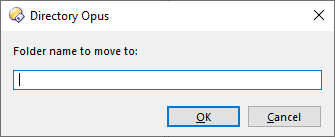
@set Folder={dlgstring|Folder name to move to:|{file|noext}}
Copy MOVE HERE CREATEFOLDER="{$Folder}"

```

That will prompt you before anything happens, then move things into the new folder.

Creating the folder and _then_ renaming it after moving is possible but a lot more complex.

---

<div class="post-metadata">

### Author: ![Alderyos](https://resource.dopus.com/user_avatar/resource.dopus.com/alderyos/32/41559_2.png) [@Alderyos](https://resource.dopus.com/u/Alderyos)
#### Post date: [January 25, 2022, 9:19pm UTC](https://resource.dopus.com/t/button-to-move-files-in-folder-named-from-file/8770/8 "2022-01-25T21:19:19Z")

</div>

Hello Leo,

Many thanks for your fast answer! It works like a charm!

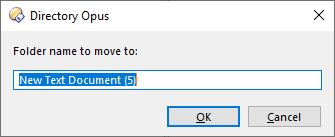
Additionally, is there any way to force the text field to already be selected or empty when the window pops up? E.g.,  
 ![Select_All](https://resource.dopus.com/uploads/default/original/3X/2/4/24ce6c2f80b0987dcaf09a719dff9249b4a73861.png)

![Empty](https://resource.dopus.com/uploads/default/original/3X/1/3/135e8a706348eb1a434c1270d66806f4281d39a7.png)

Best regards,

---

<div class="post-metadata">

### Author: ![Leo](https://resource.dopus.com/user_avatar/resource.dopus.com/leo/32/69732_2.png) [@Leo](https://resource.dopus.com/u/Leo)
#### Post date: [January 25, 2022, 9:22pm UTC](https://resource.dopus.com/t/button-to-move-files-in-folder-named-from-file/8770/9 "2022-01-25T21:22:54Z")

</div>

For _already selected_, change `dlgstring` to `dlgstringS`

For _empty_, change the whole command to this single-line command:

```nohighlight
Copy MOVE HERE CREATEFOLDER="{dlgstring|Folder name to move to:}"

```

---

<div class="post-metadata">

### Author: ![lxp](https://resource.dopus.com/user_avatar/resource.dopus.com/lxp/32/33734_2.png) [@lxp](https://resource.dopus.com/u/lxp)
#### Post date: [January 26, 2022, 6:10am UTC](https://resource.dopus.com/t/button-to-move-files-in-folder-named-from-file/8770/10 "2022-01-26T06:10:26Z")

</div>

> [@Alderyos](#):
>
> Unfortunately, it sometimes doesn't let me rename the folder, and I haven't been able to figure out why (I'd be curious to know):

Try

```
Rename FROM="{$Folder}"

```

---

<div class="post-metadata">

### Author: ![Alderyos](https://resource.dopus.com/user_avatar/resource.dopus.com/alderyos/32/41559_2.png) [@Alderyos](https://resource.dopus.com/u/Alderyos)
#### Post date: [January 27, 2022, 12:45am UTC](https://resource.dopus.com/t/button-to-move-files-in-folder-named-from-file/8770/11 "2022-01-27T00:45:19Z")

</div>

> [@lxp](#):
>
> Try
> 
> ```auto
> Rename FROM="{$Folder}"
> 
> ```

Great, I just tried and it fixes the issue.

Thank you everyone for your help!