# Can I somehow let menu bars fade or let them temporary hide?
**URL:** https://resource.dopus.com/t/can-i-somehow-let-menu-bars-fade-or-let-them-temporary-hide/41445
**Category:** Help & Support
**Created:** [June 11, 2022, 6:44am UTC](https://resource.dopus.com/t/can-i-somehow-let-menu-bars-fade-or-let-them-temporary-hide/41445 "2022-06-11T06:44:35Z")
**Posts on this page:** 15
**Page:** 1
### Author:  [@ithms](https://resource.dopus.com/u/ithms)
#### Post date: [June 11, 2022, 6:44am UTC](https://resource.dopus.com/t/can-i-somehow-let-menu-bars-fade-or-let-them-temporary-hide/41445/1 "2022-06-11T06:44:35Z")
I find it very convenient to have all these menu buttons customized and at hand, but only a few of them are used regularly. Can I somehow have a menu bar disappear after some seconds so that it fades back in after mouse over? Would greatly reduce visual distraction.
---
### Author:  [@lxp](https://resource.dopus.com/u/lxp)
#### Post date: [June 11, 2022, 7:20am UTC](https://resource.dopus.com/t/can-i-somehow-let-menu-bars-fade-or-let-them-temporary-hide/41445/2 "2022-06-11T07:20:42Z")
That's available for floating toolbars:
[https://www.gpsoft.com.au/help/opus12/index.html#!Documents/Controlling\_Floating\_Toolbars.htm](https://www.gpsoft.com.au/help/opus12/index.html#!Documents/Controlling_Floating_Toolbars.htm)
The others can be toggled with a hotkey:
[https://www.gpsoft.com.au/help/opus12/index.html#!Documents/Toolbar.htm](https://www.gpsoft.com.au/help/opus12/index.html#!Documents/Toolbar.htm)
---
### Author:  [@ithms](https://resource.dopus.com/u/ithms)
#### Post date: [June 14, 2022, 11:00am UTC](https://resource.dopus.com/t/can-i-somehow-let-menu-bars-fade-or-let-them-temporary-hide/41445/3 "2022-06-14T11:00:24Z")
Thanks a lot! I managed to create a button for each of the two toolbars in question. One toolbar works fine: I can show and hide it (toggle) with a hotkey. The other one is strange: I can press the hotkey to hide it, but I cannot unhide it again:
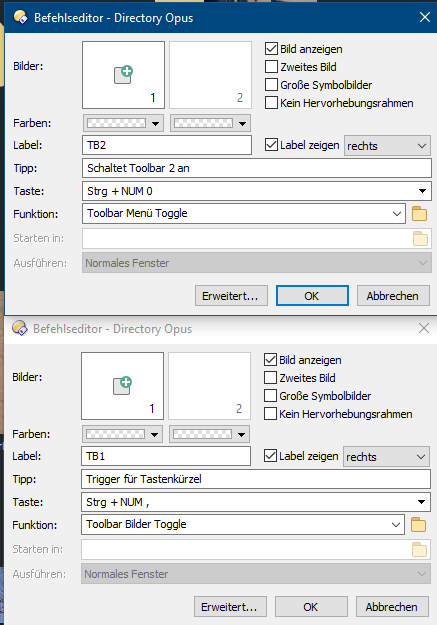
The upper one works, the lower one not. This seems to be independent from the hotkey.
---
### Author:  [@Leo](https://resource.dopus.com/u/Leo)
#### Post date: [June 14, 2022, 11:14am UTC](https://resource.dopus.com/t/can-i-somehow-let-menu-bars-fade-or-let-them-temporary-hide/41445/4 "2022-06-14T11:14:14Z")
Try adding the `LOCAL` argument.
---
### Author:  [@ithms](https://resource.dopus.com/u/ithms)
#### Post date: [June 17, 2022, 5:17am UTC](https://resource.dopus.com/t/can-i-somehow-let-menu-bars-fade-or-let-them-temporary-hide/41445/5 "2022-06-17T05:17:56Z")
How? Like this?
Toolbar Bilder Toggle LOCAL
---
### Author:  [@ithms](https://resource.dopus.com/u/ithms)
#### Post date: [June 17, 2022, 5:26am UTC](https://resource.dopus.com/t/can-i-somehow-let-menu-bars-fade-or-let-them-temporary-hide/41445/6 "2022-06-17T05:26:52Z")
Another problem: This toolbar appears after restarting DirOpus, although I have saved the lister layout including toolbar status.
And sometimes it appears when I open a folder in a tab. I cannot exactly reproduce this, will observe this behaviour.
---
### Author:  [@Leo](https://resource.dopus.com/u/Leo)
#### Post date: [June 17, 2022, 10:37am UTC](https://resource.dopus.com/t/can-i-somehow-let-menu-bars-fade-or-let-them-temporary-hide/41445/7 "2022-06-17T10:37:37Z")
> [@ithms](#):
>
> Another problem: This toolbar appears after restarting DirOpus, although I have saved the lister layout including toolbar status.
You probably need to save the default toolbar set, which is what new windows use by default. The option to do so is in the Settings \> Toolbar menu.
---
### Author:  [@Leo](https://resource.dopus.com/u/Leo)
#### Post date: [June 17, 2022, 10:38am UTC](https://resource.dopus.com/t/can-i-somehow-let-menu-bars-fade-or-let-them-temporary-hide/41445/8 "2022-06-17T10:38:33Z")
> [@ithms](#):
>
> Toolbar Bilder Toggle LOCAL
That should work, I think. Did you try it?
---
### Author:  [@ithms](https://resource.dopus.com/u/ithms)
#### Post date: [June 17, 2022, 4:16pm UTC](https://resource.dopus.com/t/can-i-somehow-let-menu-bars-fade-or-let-them-temporary-hide/41445/9 "2022-06-17T16:16:04Z")
I did save the toolbar layout as standard layout every time. Nevertheless the toolbar appears after starting DirOpus (loading the standard lister). This is quite frustrating. Command line looks like this:
Toolbar Bilder Toggle local LINE=3
Thanks for caring!
---
### Author:  [@Leo](https://resource.dopus.com/u/Leo)
#### Post date: [June 17, 2022, 4:24pm UTC](https://resource.dopus.com/t/can-i-somehow-let-menu-bars-fade-or-let-them-temporary-hide/41445/10 "2022-06-17T16:24:12Z")
> [@ithms](#):
>
> I did save the toolbar layout as standard layout every time. Nevertheless the toolbar appears after starting DirOpus (loading the standard lister). This is quite frustrating.
If **Preferences / Launching Opus / Default Lister / Ignore toolbars of Default Lister** is off, turn it back on again.
Otherwise, you may be opening something other than the Default Lister.
---
### Author:  [@ithms](https://resource.dopus.com/u/ithms)
#### Post date: [June 17, 2022, 5:47pm UTC](https://resource.dopus.com/t/can-i-somehow-let-menu-bars-fade-or-let-them-temporary-hide/41445/11 "2022-06-17T17:47:59Z")
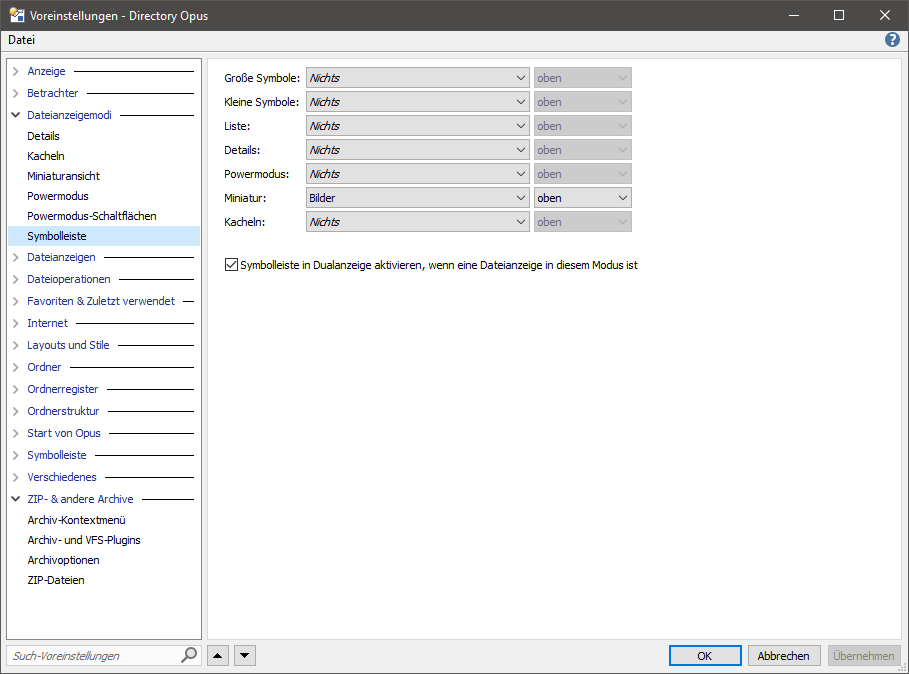
I changed the setting as suggested. Unfortunately the toolbar "Bilder" (=pictures) keeps appearing, even if I replace it on the button with for example "Drives". Even if I explicitly save it as a standard toolbar set, it shows this behaviour. I start getting mad on this. Is the toolbar "pictures" somehow set to auto-appear depending on for example the folder content or something like this?
---
### Author:  [@ithms](https://resource.dopus.com/u/ithms)
#### Post date: [June 17, 2022, 5:53pm UTC](https://resource.dopus.com/t/can-i-somehow-let-menu-bars-fade-or-let-them-temporary-hide/41445/12 "2022-06-17T17:53:25Z")
Another problem is that I realized that I loose all the toolbar hotkeys when I hide the toolbars. Can I somehow set the keyboard shortcuts to work also with the toolbar hidden?
If not: Is there a workaround? (I would suggest that you also put this onto your todo-list to have global shortcuts for the future)
---
### Author:  [@Hardkorn](https://resource.dopus.com/u/Hardkorn)
#### Post date: [June 17, 2022, 5:55pm UTC](https://resource.dopus.com/t/can-i-somehow-let-menu-bars-fade-or-let-them-temporary-hide/41445/13 "2022-06-17T17:55:01Z")
> [@ithms](#):
>
> Is the toolbar "pictures" somehow set to auto-appear depending on for example the folder content or something like this?
---
### Author:  [@Leo](https://resource.dopus.com/u/Leo)
#### Post date: [June 17, 2022, 6:42pm UTC](https://resource.dopus.com/t/can-i-somehow-let-menu-bars-fade-or-let-them-temporary-hide/41445/14 "2022-06-17T18:42:31Z")
> [@ithms](#):
>
> Another problem is that I realized that I loose all the toolbar hotkeys when I hide the toolbars. Can I somehow set the keyboard shortcuts to work also with the toolbar hidden?
There is a per-toolbar setting for that, but please [Ask one question per thread](https://resource.dopus.com/t/ask-one-question-per-thread/5444/1).
---
### Author:  [@ithms](https://resource.dopus.com/u/ithms)
#### Post date: [June 17, 2022, 7:17pm UTC](https://resource.dopus.com/t/can-i-somehow-let-menu-bars-fade-or-let-them-temporary-hide/41445/15 "2022-06-17T19:17:40Z")
@Hardkorn: That really was the problem! I set Bilder to "Nichts" and now DirOpus starts as it should. Great!