# Cannot uninstall DOPUS 9
**URL:** https://resource.dopus.com/t/cannot-uninstall-dopus-9/18529
**Category:** Help & Support
**Created:** [June 7, 2014, 3:46pm UTC](https://resource.dopus.com/t/cannot-uninstall-dopus-9/18529 "2014-06-07T15:46:36Z")
**Posts on this page:** 13
**Page:** 1
### Author:  [@MikeJackson741](https://resource.dopus.com/u/MikeJackson741)
#### Post date: [June 7, 2014, 3:46pm UTC](https://resource.dopus.com/t/cannot-uninstall-dopus-9/18529/1 "2014-06-07T15:46:36Z")
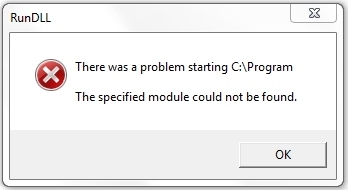
I have just bought version 11 and it says I have to uninstall the previous version first. When I try to uninstall I get this error:
"There was a problem starting C:\Program
The specified module could not be found"
---
### Author:  [@Leo](https://resource.dopus.com/u/Leo)
#### Post date: [June 7, 2014, 4:11pm UTC](https://resource.dopus.com/t/cannot-uninstall-dopus-9/18529/2 "2014-06-07T16:11:38Z")
You shouldn't need to uninstall 9 first.
Have you tried installing 11 over the top of 9? What's the exact message you're seeing, and what's displaying it, that says you need to uninstall first?
---
### Author:  [@MikeJackson741](https://resource.dopus.com/u/MikeJackson741)
#### Post date: [June 7, 2014, 4:24pm UTC](https://resource.dopus.com/t/cannot-uninstall-dopus-9/18529/3 "2014-06-07T16:24:09Z")
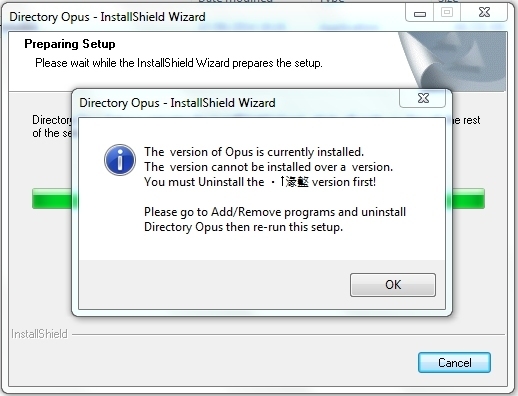
Yes, I have tried installing it over the top of 9. It tells me I have to uninstall the previous version first.
---
### Author:  [@MikeJackson741](https://resource.dopus.com/u/MikeJackson741)
#### Post date: [June 7, 2014, 4:27pm UTC](https://resource.dopus.com/t/cannot-uninstall-dopus-9/18529/4 "2014-06-07T16:27:53Z")
As per my last post, this is the error I get trying to install ver 11 over ver 9:
---
### Author:  [@Leo](https://resource.dopus.com/u/Leo)
#### Post date: [June 7, 2014, 4:53pm UTC](https://resource.dopus.com/t/cannot-uninstall-dopus-9/18529/5 "2014-06-07T16:53:13Z")
That looks like the installshield data is corrupt.
The first thing I would try is reinstalling Opus 9, in case that works and allows you to run the uninstaller normally. ([Opus 9 installer](http://www.gpsoft.com.au/DScripts/download.asp?type=old))
If that still doesn't work, please see [Problems installing Opus](https://resource.dopus.com/t/problems-installing-opus/11073/1) and try the second last section. (Note that the very last section is only one line, so is easy to miss. I mean the larger one above it which tells you to delete a folder of InstallShield data.)
(The very last part at the end is also worth a try: Verifying that the installer is digitally signed, in case the installer you're using wasn't fully downloaded correctly.)
---
### Author:  [@MikeJackson741](https://resource.dopus.com/u/MikeJackson741)
#### Post date: [June 8, 2014, 9:37am UTC](https://resource.dopus.com/t/cannot-uninstall-dopus-9/18529/6 "2014-06-08T09:37:23Z")
See my comments in bold below
On a 64-bit (x64) system,
In Explorer, double-click My Computer
Double-click Local Disk (C:)
Double-click the Windows folder
Double-click the SysWOW64 folder
Locate the InstallShield folder.
If found, right-click the folder and select Delete
OK - I am left with these which it won't let me delete even as admin
setupdir
\_isdel.exe
\_setup.dll
setup.exe
Go back to C:
Double-click the Program Files (x86) folder
Double-click the Installshield Installation Information folder
If you do not see the Installshield Installation Information folder then the folder is hidden:
From the menu bar, select Tools \> Folder Options
Click the View tab
Select Show Hidden files and folders
Click OK and then double-click the Installshield Installation Information folder.
Locate the folder ending in BF50D
This folder does not exist, however the folder suggested for 32 bit systems does - so I deleted that
Right-click the folder and select Delete
Close all Web pages and programs
From the desktop, select Start \> Run
Enter %TEMP% and click OK
Delete all the files in this temp folder.
[b]Done, rebooted, tried to uninstall ver 9.
No joy though - exactly the same as before.
The digital signature is OK
[/b]
---
### Author:  [@MikeJackson741](https://resource.dopus.com/u/MikeJackson741)
#### Post date: [June 8, 2014, 9:39am UTC](https://resource.dopus.com/t/cannot-uninstall-dopus-9/18529/7 "2014-06-08T09:39:29Z")
Sorry - I forgot to say - I tried installing ver 9 again (which it did) but it didn't help.
---
### Author:  [@Jon](https://resource.dopus.com/u/Jon)
#### Post date: [June 8, 2014, 10:15am UTC](https://resource.dopus.com/t/cannot-uninstall-dopus-9/18529/8 "2014-06-08T10:15:48Z")
Did you use some sort of migration tool to move your programs from 32 to 64 bit? That could have caused this sort of problem.
---
### Author:  [@MikeJackson741](https://resource.dopus.com/u/MikeJackson741)
#### Post date: [June 8, 2014, 11:17am UTC](https://resource.dopus.com/t/cannot-uninstall-dopus-9/18529/9 "2014-06-08T11:17:33Z")
No, I just installed it.
---
### Author:  [@MikeJackson741](https://resource.dopus.com/u/MikeJackson741)
#### Post date: [June 8, 2014, 12:00pm UTC](https://resource.dopus.com/t/cannot-uninstall-dopus-9/18529/10 "2014-06-08T12:00:50Z")
More problems I'm afraid. FTP no longer works properly now, I can copy files down from the server to my computer, but not folders. This was not the case before I tried uninstalling ver 9.
I am going to try this
[support.microsoft.com/mats/progr ... install/en](http://support.microsoft.com/mats/program_install_and_uninstall/en)
---
### Author:  [@Leo](https://resource.dopus.com/u/Leo)
#### Post date: [June 8, 2014, 12:12pm UTC](https://resource.dopus.com/t/cannot-uninstall-dopus-9/18529/11 "2014-06-08T12:12:18Z")
The 32-bit installer shouldn't have let you run it on 64-bit Windows, unless the installer exe had been manually set into Compatibility Mode (where Windows would pretend it was a different version when running the installer; that could cause problems).
(We've also seen unofficial installers made by other people who have "re-packed" our software in their own installers which also carry spyware or similar as part of the payload. Those are outside our control, of course.)
Something strange has definitely happened and messed things up. Unfortunately, it's difficult to know what. We haven't had any similar reports over the years so it may be unique to your machine.
Have any other installers/uninstallers had any strange problems?
---
### Author:  [@MikeJackson741](https://resource.dopus.com/u/MikeJackson741)
#### Post date: [June 8, 2014, 12:56pm UTC](https://resource.dopus.com/t/cannot-uninstall-dopus-9/18529/12 "2014-06-08T12:56:13Z")
OK - microsoft fixit didn't work. It just asks for a 38 character product code which I don't have.
What does work is to go here: [revouninstaller.com/download ... ersion.php](http://www.revouninstaller.com/download-freeware-version.php)
Use that to uninstall ver 9, then install ver 11.
I used the original installer I downloaded when I bought ver 9 and I didn't manually set it into Compatibility Mode. No problems with any other uninstallers.
So now I just have to fix the FTP problem, if I try to drag a folder down from an FTP site nothing happens. Files work fine. I will look through the forums and post a new thread if I can't find the answer.
---
### Author:  [@MikeJackson741](https://resource.dopus.com/u/MikeJackson741)
#### Post date: [June 8, 2014, 12:57pm UTC](https://resource.dopus.com/t/cannot-uninstall-dopus-9/18529/13 "2014-06-08T12:57:20Z")
Thanks for your help on this one BTW 🙂