# Changing Filename date format to yyyy-mm-dd Issues
**URL:** https://resource.dopus.com/t/changing-filename-date-format-to-yyyy-mm-dd-issues/29170
**Category:** Help & Support
**Created:** [June 20, 2018, 10:01am UTC](https://resource.dopus.com/t/changing-filename-date-format-to-yyyy-mm-dd-issues/29170 "2018-06-20T10:01:11Z")
**Posts on this page:** 20
**Page:** 1
### Author:  [@Simplie](https://resource.dopus.com/u/Simplie)
#### Post date: [June 20, 2018, 10:01am UTC](https://resource.dopus.com/t/changing-filename-date-format-to-yyyy-mm-dd-issues/29170/1 "2018-06-20T10:01:11Z")
Hello,
I'm in the process of modifying thousands of files, all with different date formats (some periods, some without spaces, and some with fewer digits) and I'm trying to make them all named with the following YYYY-MM-DD.
I have found the following forum below, but I'm running into issues when the original filename doesn't have 8 digits or when the dates don't have spaces, such as MMDDYY. If the digits are less than 8, for example 1 digit for the month or day, or sometimes 2 digits for the year, its extremely difficult to modify.
> [@Rename - Change Date format in File Name](https://resource.dopus.com/t/rename-change-date-format-in-file-name/11856/4):
>
> It's much easier to make a regexp if the full complexity of what you need to do is known up-front. This one should get you most of the way there: Old Name: (.\*[^0-9])([0-9]?[0-9])[-.]?([0-9][0-9])[-.]?([0-9][0-9][0-9][0-9])(\.[^.]+) New Name: \1…
---
### Author:  [@lxp](https://resource.dopus.com/u/lxp)
#### Post date: [June 21, 2018, 7:06pm UTC](https://resource.dopus.com/t/changing-filename-date-format-to-yyyy-mm-dd-issues/29170/2 "2018-06-21T19:06:19Z")
A single regex is probably next to impossible. You'll need few iterations. Start with the easy stuff like turning dots into hyphens, then YY into YYYY. Macro operations can be of great help. It's difficult to be more specific, unfortunately. Maybe post some examples.
---
### Author:  [@Leo](https://resource.dopus.com/u/Leo)
#### Post date: [June 21, 2018, 7:29pm UTC](https://resource.dopus.com/t/changing-filename-date-format-to-yyyy-mm-dd-issues/29170/3 "2018-06-21T19:29:29Z")
> [@Simplie](#):
>
> MMDDYY. If the digits are less than 8, for example 1 digit for the month or day, or sometimes 2 digits for the year, its extremely difficult to modify.
If the day or month may only be one digit then you'll have filenames with things like 12118. How would it know if that is 12-1-18 or 1-21-18?
---
### Author:  [@Simplie](https://resource.dopus.com/u/Simplie)
#### Post date: [June 25, 2018, 4:28am UTC](https://resource.dopus.com/t/changing-filename-date-format-to-yyyy-mm-dd-issues/29170/4 "2018-06-25T04:28:58Z")
I think its best for ones that are 12118 I should do manually.
Is there anyway I can make it change to 8 digits if its with periods or middle brackets if its 4, 5, 6 or 7 digits?
Such as: 9-6-18 or 2018-9-6 to YYYY-MM-DD
```auto
(.*[^0-9])([0-9]?[0-9])[-.]?([0-9][0-9])[-.]?([0-9][0-9][0-9][0-9])(.[^.]+)
\1\4.\2.\3\5
```
---
### Author:  [@wowbagger](https://resource.dopus.com/u/wowbagger)
#### Post date: [June 25, 2018, 9:04am UTC](https://resource.dopus.com/t/changing-filename-date-format-to-yyyy-mm-dd-issues/29170/5 "2018-06-25T09:04:35Z")
this should work
`([0-9]{1,2})[-.]([0-9]{1,2})[-.]([0-9]{2,4})|([0-9]{2,4})[-.]([0-9]{1,2})[-.]([0-9]{1,2})|((?:19|20)[0-9]{2})([0-9]{2})([0-9]{2})|([0-9]{2})([0-9]{2})((?:19|20)[0-9]{2})`
But I don't know how to reference more than 9 references in dopus, **\11** and **${11}** do not work.
So you will need to chose if you want YYYYMMDD or DDMMYYYY i guess.
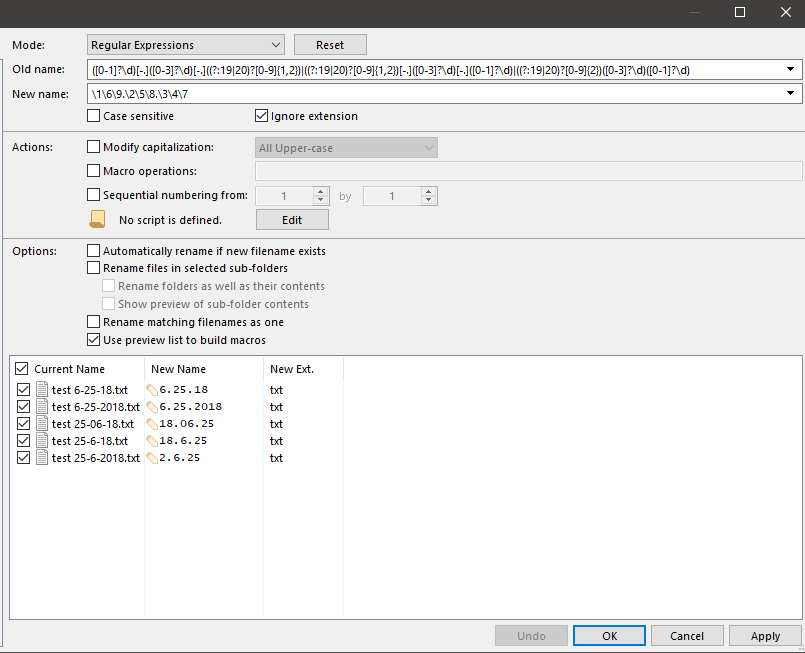
regxp: `([0-1]?\d)[-.]([0-3]?\d)[-.]((?:19|20)?[0-9]{1,2})|((?:19|20)?[0-9]{1,2})[-.]([0-3]?\d)[-.]([0-1]?\d)|((?:19|20)?[0-9]{2})([0-3]?\d)([0-1]?\d)`
replace: `\1\6\9.\2\5\8.\3\4\7`
Matches
DD-MM-YYYY
D-M-YY
YY-M-D
YYYY-M-D
YYMMDD
YYYYMMDD
What will confuse it is DD-MM-YY or YY-MM-DD or MMDDYYYY.
---
### Author:  [@Simplie](https://resource.dopus.com/u/Simplie)
#### Post date: [June 26, 2018, 4:26am UTC](https://resource.dopus.com/t/changing-filename-date-format-to-yyyy-mm-dd-issues/29170/6 "2018-06-26T04:26:08Z")
I appreciate the help, however, this isn't working for me. Its just changing the middle hyphens to a period.
Also, I typically have files with the month first, then the day, followed by the year. Instead of the day first.
Any ideas why its not working? Its not adding the missing "0" digits and its not in the YYYY-MM-DD format
---
### Author:  [@wowbagger](https://resource.dopus.com/u/wowbagger)
#### Post date: [June 26, 2018, 11:03pm UTC](https://resource.dopus.com/t/changing-filename-date-format-to-yyyy-mm-dd-issues/29170/7 "2018-06-26T23:03:07Z")
To pad the values you would need to use a rename script.
---
### Author:  [@Simplie](https://resource.dopus.com/u/Simplie)
#### Post date: [June 27, 2018, 1:00am UTC](https://resource.dopus.com/t/changing-filename-date-format-to-yyyy-mm-dd-issues/29170/8 "2018-06-27T01:00:48Z")
I would love some help if you don't mind. I honestly don't know where to begin.
---
### Author:  [@wowbagger](https://resource.dopus.com/u/wowbagger)
#### Post date: [June 27, 2018, 8:07am UTC](https://resource.dopus.com/t/changing-filename-date-format-to-yyyy-mm-dd-issues/29170/9 "2018-06-27T08:07:39Z")
This works ok. But you should set up some sample files for testing on.
There are some details here on how to use it [Rename Scripts](https://www.gpsoft.com.au/help/opus12/index.html#!Documents/Rename_Scripts.htm)
```auto
function lpad( val, pad ) {
if (!pad) pad='';
var rtn=val.toString();
return (rtn.length
### Author:  [@Simplie](https://resource.dopus.com/u/Simplie)
#### Post date: [June 27, 2018, 7:51pm UTC](https://resource.dopus.com/t/changing-filename-date-format-to-yyyy-mm-dd-issues/29170/10 "2018-06-27T19:51:38Z")
Thank you so much for all the help, wowbagger. There's no way I could have done this. I really appreciate it.
I do have a couple questions if you don't mind.
- I'm looking for it to output with the year first such as YYYY-MM-DD.
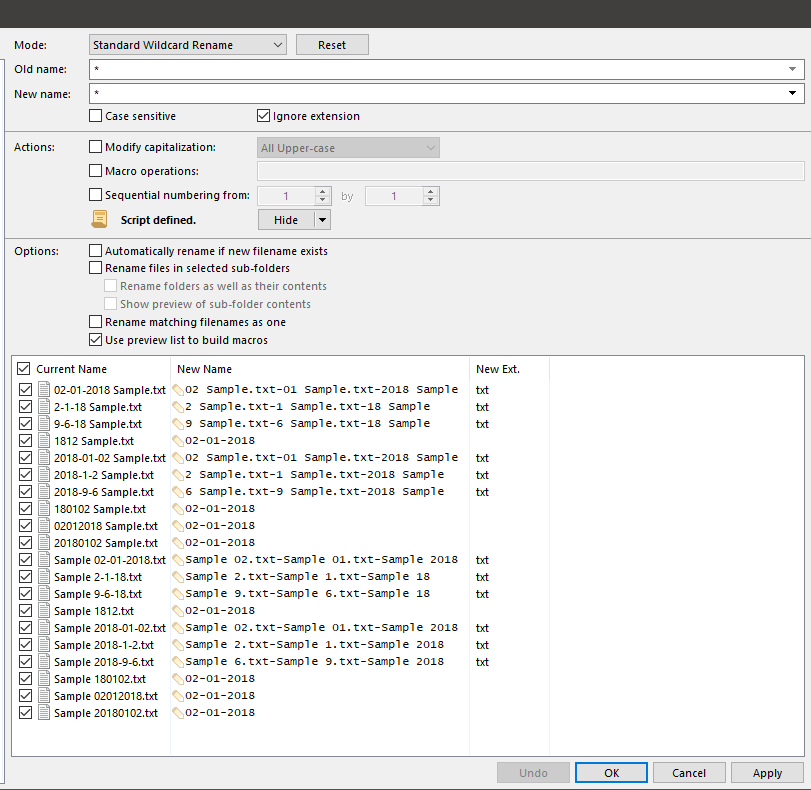
- Is there a way to make it work if there is other text within the filename? Some files output incorrectly or remove all the text from the original filename. If the file has an extension it will mess up. Your example only works on folders.
---
### Author:  [@wowbagger](https://resource.dopus.com/u/wowbagger)
#### Post date: [June 28, 2018, 12:00am UTC](https://resource.dopus.com/t/changing-filename-date-format-to-yyyy-mm-dd-issues/29170/11 "2018-06-28T00:00:40Z")
```auto
function lpad( val, pad ) {
if (!pad) pad='';
var rtn=val.toString();
return (rtn.length
### Author:  [@Simplie](https://resource.dopus.com/u/Simplie)
#### Post date: [June 28, 2018, 1:44am UTC](https://resource.dopus.com/t/changing-filename-date-format-to-yyyy-mm-dd-issues/29170/12 "2018-06-28T01:44:54Z")
You are the best!!! thank you so much
---
### Author:  [@Simplie](https://resource.dopus.com/u/Simplie)
#### Post date: [July 18, 2018, 3:31am UTC](https://resource.dopus.com/t/changing-filename-date-format-to-yyyy-mm-dd-issues/29170/13 "2018-07-18T03:31:26Z")
I found one issue and was wondering if you could help one last time.
If you have a day that is between 20-31, it changes it to 023.
Example: 2018-07-23 would change to 2018-07-023, but it should stay the same since it is already in the correct format (YYYY-MM-DD)
---
### Author:  [@wowbagger](https://resource.dopus.com/u/wowbagger)
#### Post date: [July 18, 2018, 3:51am UTC](https://resource.dopus.com/t/changing-filename-date-format-to-yyyy-mm-dd-issues/29170/14 "2018-07-18T03:51:04Z")
Had the day month match reversed in one place.
I didnt spend time to verify if this caused other issues.
```auto
function lpad( val, pad ) {
if (!pad) pad='';
var rtn=val.toString();
return (rtn.length
### Author:  [@Simplie](https://resource.dopus.com/u/Simplie)
#### Post date: [July 18, 2018, 6:53pm UTC](https://resource.dopus.com/t/changing-filename-date-format-to-yyyy-mm-dd-issues/29170/15 "2018-07-18T18:53:54Z")
Everything seems to work fine after a quick test.
The only thing that doesn't work, which I guess wasn't a feature requested, was if a filename had the month in text."jan 10, 2017.pdf" etc.
---
### Author:  [@sstepheN](https://resource.dopus.com/u/sstepheN)
#### Post date: [August 4, 2018, 4:21am UTC](https://resource.dopus.com/t/changing-filename-date-format-to-yyyy-mm-dd-issues/29170/16 "2018-08-04T04:21:59Z")
Apologies for opening an old topic.
i also having similar interest. need help to modified the script to change to month-day-year and it wont work.
---
### Author:  [@wowbagger](https://resource.dopus.com/u/wowbagger)
#### Post date: [August 4, 2018, 11:06am UTC](https://resource.dopus.com/t/changing-filename-date-format-to-yyyy-mm-dd-issues/29170/17 "2018-08-04T11:06:42Z")
> [@sstepheN](#):
>
> need help to modified the script to change to month-day-year and it wont work.
In function **ProduceNewName** change line that sets **newDate** to your desired format.
- old: `var newDate = lpad(year, "0020") + "-" + lpad(month, "00") + "-" + lpad(day, "00");`
- new: `var newDate = lpad(month, "00") + "-" + lpad(day, "00") + "-" + lpad(year, "0020");`
---
### Author:  [@sstepheN](https://resource.dopus.com/u/sstepheN)
#### Post date: [August 8, 2018, 12:31pm UTC](https://resource.dopus.com/t/changing-filename-date-format-to-yyyy-mm-dd-issues/29170/18 "2018-08-08T12:31:18Z")
Thanks, is there anyway to just output YY instead of the YYYY. So mm-dd-yy
---
### Author:  [@wowbagger](https://resource.dopus.com/u/wowbagger)
#### Post date: [August 8, 2018, 10:09pm UTC](https://resource.dopus.com/t/changing-filename-date-format-to-yyyy-mm-dd-issues/29170/19 "2018-08-08T22:09:03Z")
you can use substring to remove the first two chars from the year.
In function **ProduceNewName** change line that sets **newDate** to your desired format.
- old: `var newDate = lpad(year, "0020") + "-" + lpad(month, "00") + "-" + lpad(day, "00");`
- new: `var newDate = lpad(month, "00") + "-" + lpad(day, "00") + "-" + lpad(year, "0020").substring(2,4);`
---
### Author:  [@DavidP](https://resource.dopus.com/u/DavidP)
#### Post date: [June 29, 2022, 8:25am UTC](https://resource.dopus.com/t/changing-filename-date-format-to-yyyy-mm-dd-issues/29170/21 "2022-06-29T08:25:41Z")
Hello all,
awesome thread!
I got a file/folder structure on a network drive with half a million files and folders. A considerable part of the files and folders are (consistently) named as follows:
`YYYYMMDD[any character string].[any file extension]`
How do I best proceed to rename all (and only those) files and folders corresponding to this naming pattern, so that the result looks like this:
`YYYY-MM-DD[any character string].[any file extension]`
Probably this is fairly straightforward to do with a RegEx, except that I'm not very fluent in RegEx 🤷♂️
Also, I am of course grateful for any hints if this renaming might have any negative consequences, apart from a slight lengthening of the file/folder paths (and possibly breaking links and shortcuts).
Thanks very much!
[Next page](https://resource.dopus.com/t/changing-filename-date-format-to-yyyy-mm-dd-issues/29170.md?page=2)