# CLI QUICKGO not working with network paths
**URL:** https://resource.dopus.com/t/cli-quickgo-not-working-with-network-paths/12683
**Category:** Help & Support
**Created:** [March 16, 2012, 9:26am UTC](https://resource.dopus.com/t/cli-quickgo-not-working-with-network-paths/12683 "2012-03-16T09:26:23Z")
**Posts on this page:** 6
**Page:** 1
### Author:  [@xbprm](https://resource.dopus.com/u/xbprm)
#### Post date: [March 16, 2012, 9:26am UTC](https://resource.dopus.com/t/cli-quickgo-not-working-with-network-paths/12683/1 "2012-03-16T09:26:23Z")
Hello,
when opening a tab with Ctrl+T Dopus opens the "QuickGo" field. See below
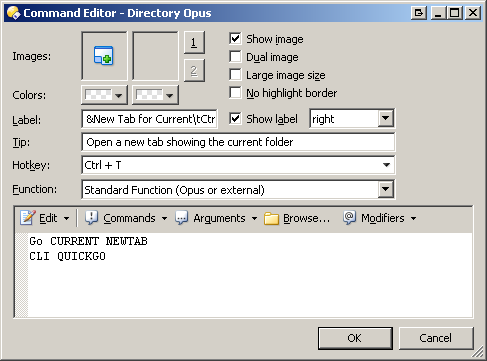
I use this to quickly go to a new path/file in a new tab. This works fine with almost all paths except network paths. Pasting a destination which is a file on a local drive Dopus opens the folder and higlights the file. Perfect.
Doing the same with a network path, i.e. \server\path\file I get the following error
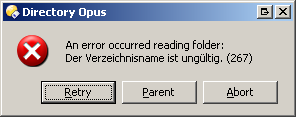
It reads: "[..] The folder name is invalid (267)[..]"
Regards
xbprm
---
### Author:  [@Leo](https://resource.dopus.com/u/Leo)
#### Post date: [March 16, 2012, 9:35am UTC](https://resource.dopus.com/t/cli-quickgo-not-working-with-network-paths/12683/2 "2012-03-16T09:35:04Z")
Do you mean when the current folder is a network path, or when you paste a network path into the Go field?
Both seem to work okay here.
Does it happen if the command just runs "CLI QUICKGO" without the newtab stuff?
---
### Author:  [@xbprm](https://resource.dopus.com/u/xbprm)
#### Post date: [March 16, 2012, 9:47am UTC](https://resource.dopus.com/t/cli-quickgo-not-working-with-network-paths/12683/3 "2012-03-16T09:47:42Z")
> [@leo](#):
>
> Do you mean when the current folder is a network path, or when you paste a network path into the Go field?
Latter one does not work
> [@leo](#):
>
> Does it happen if the command just runs "CLI QUICKGO" without the newtab stuff?
Have to check.
---
### Author:  [@Leo](https://resource.dopus.com/u/Leo)
#### Post date: [March 16, 2012, 10:13am UTC](https://resource.dopus.com/t/cli-quickgo-not-working-with-network-paths/12683/4 "2012-03-16T10:13:21Z")
Is the path actually valid? Can you paste it into the location field in Opus? What about into Windows Explorer?
---
### Author:  [@xbprm](https://resource.dopus.com/u/xbprm)
#### Post date: [March 19, 2012, 4:09pm UTC](https://resource.dopus.com/t/cli-quickgo-not-working-with-network-paths/12683/5 "2012-03-19T16:09:06Z")
> [@leo](#):
>
> Is the path actually valid?
Yes.
> [@leo](#):
>
> Can you paste it into the location field in Opus?
Same result, i.e. error.
> [@leo](#):
>
> What about into Windows Explorer?
Opens the file normally.
---
### Author:  [@Leo](https://resource.dopus.com/u/Leo)
#### Post date: [March 19, 2012, 4:27pm UTC](https://resource.dopus.com/t/cli-quickgo-not-working-with-network-paths/12683/6 "2012-03-19T16:27:42Z")
Sorry, I didn't realise that we were talking about file (not folder) paths until now when I re-read the thread.
I can reproduce the problem now.