# Color folder name text in all folders under a specific named subfolder
**URL:** https://resource.dopus.com/t/color-folder-name-text-in-all-folders-under-a-specific-named-subfolder/46953
**Category:** Help & Support
**Created:** [November 13, 2023, 9:27pm UTC](https://resource.dopus.com/t/color-folder-name-text-in-all-folders-under-a-specific-named-subfolder/46953 "2023-11-13T21:27:20Z")
**Posts on this page:** 11
**Page:** 1
### Author:  [@brucemc777](https://resource.dopus.com/u/brucemc777)
#### Post date: [November 13, 2023, 9:27pm UTC](https://resource.dopus.com/t/color-folder-name-text-in-all-folders-under-a-specific-named-subfolder/46953/1 "2023-11-13T21:27:20Z")
OK, so i am under the effects of Valium after a minor surgical procedure. I will accept any and all criticism if this is too convoluted from which to make sense.
I have perhaps 5 active sources that submit applications to me. Under the main tree heading of Work each Source has it's own folder and beneath each Source folder (each "Source folder" is named after the invidual source), three sub-folders - Active, Closed and Dead. In each of these three subfolders are folders containing files on specific projects.
If a folder for a group of files is placed under any one of the Active subfolders, i would like the name of it to be automatically colored green. I do this manually at present by selecting the folder, clicking the drop-down in Properties, selecting Set Label, and selecting an entry that i created called "Green" (real creative!).
I was just wondering if there was a way that as soon as a folder was transferred into a subfolder named "Active" something could trigger to color the project folder name text green.
Not exactly a critical function, but would save a little time!
If there is an easy script implementation to do this i would enjoy learning!
Thank you,
Bruce
---
### Author:  [@Leo](https://resource.dopus.com/u/Leo)
#### Post date: [November 13, 2023, 9:54pm UTC](https://resource.dopus.com/t/color-folder-name-text-in-all-folders-under-a-specific-named-subfolder/46953/2 "2023-11-13T21:54:27Z")
In Opus 12: It could be done using a script column which does all the heavy lifting, and a filter-label that queries the script.
In Opus 13: A filter-label using the new Folder Content clause type should let you do it without any scripting. The new clause type lets you match/exclude folders based on the things they contain.
---
### Author:  [@brucemc777](https://resource.dopus.com/u/brucemc777)
#### Post date: [November 14, 2023, 12:00am UTC](https://resource.dopus.com/t/color-folder-name-text-in-all-folders-under-a-specific-named-subfolder/46953/3 "2023-11-14T00:00:34Z")
Looking forward to 13 release!!! When do you think it will be ready as a regular (not a beta)?
---
### Author:  [@lxp](https://resource.dopus.com/u/lxp)
#### Post date: [November 14, 2023, 1:45pm UTC](https://resource.dopus.com/t/color-folder-name-text-in-all-folders-under-a-specific-named-subfolder/46953/4 "2023-11-14T13:45:17Z")
> [@brucemc777](#):
>
> clicking the drop-down in Properties, selecting Set Label, and selecting an entry that i created called "Green"
A hotkey or button would already be a bit faster:
```plaintext
@nodeselect
Properties SETLABEL=Green
```
---
### Author:  [@brucemc777](https://resource.dopus.com/u/brucemc777)
#### Post date: [November 14, 2023, 4:27pm UTC](https://resource.dopus.com/t/color-folder-name-text-in-all-folders-under-a-specific-named-subfolder/46953/5 "2023-11-14T16:27:03Z")
Thank you! Took me a bit to figure out once again just how to make the button, but it works fine with the code you provided for me - i never would have figured that out.
Looking forward to V13 and then learning just how to proceed as Leo advised - i can read many of the words in that which he wrote, but a number of them appear to be in a language i don't yet understand 😉
How do i mark two solutions?
---
### Author:  [@lxp](https://resource.dopus.com/u/lxp)
#### Post date: [November 14, 2023, 5:30pm UTC](https://resource.dopus.com/t/color-folder-name-text-in-all-folders-under-a-specific-named-subfolder/46953/6 "2023-11-14T17:30:13Z")
Reading your initial post again... I think this should already be doable with v12, unless I missed something.
Here are the settings for the demo:
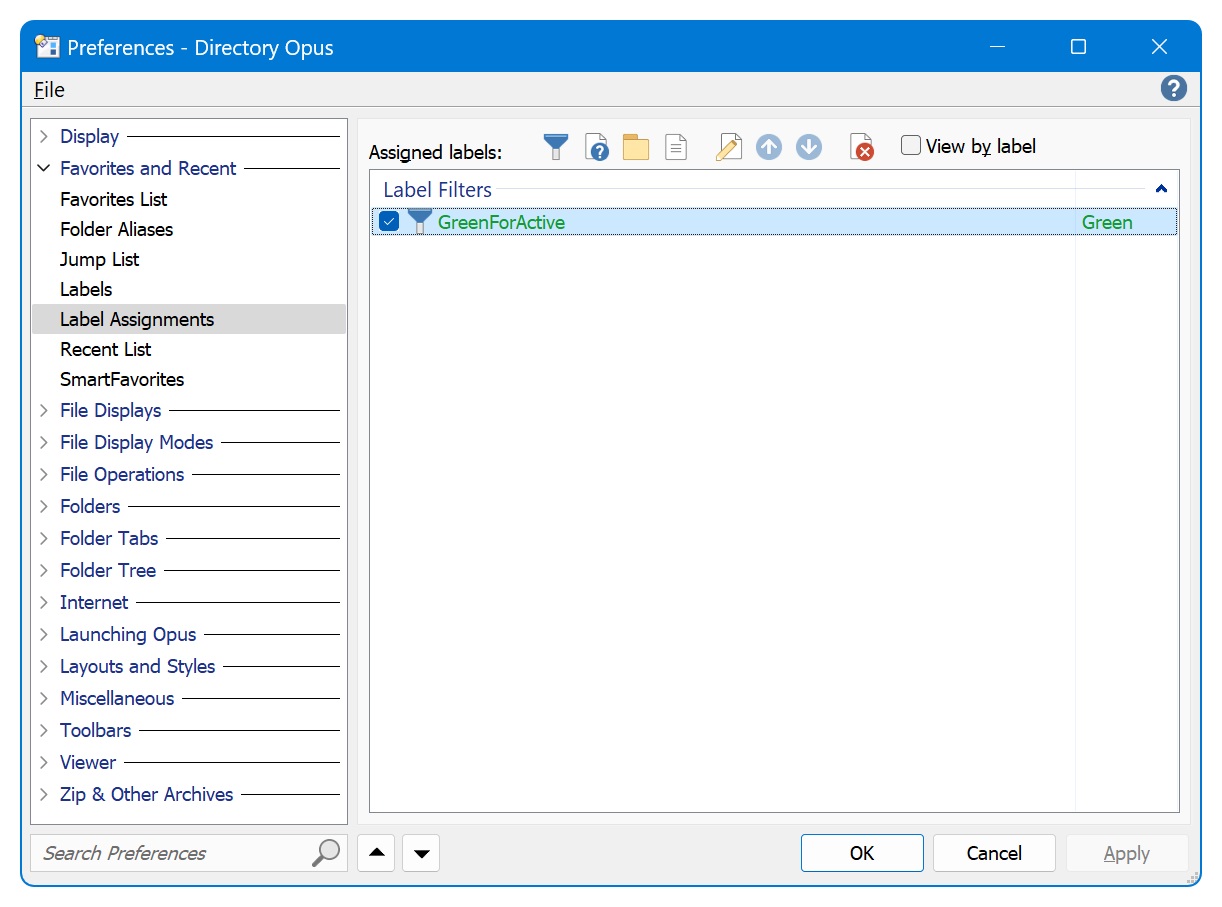
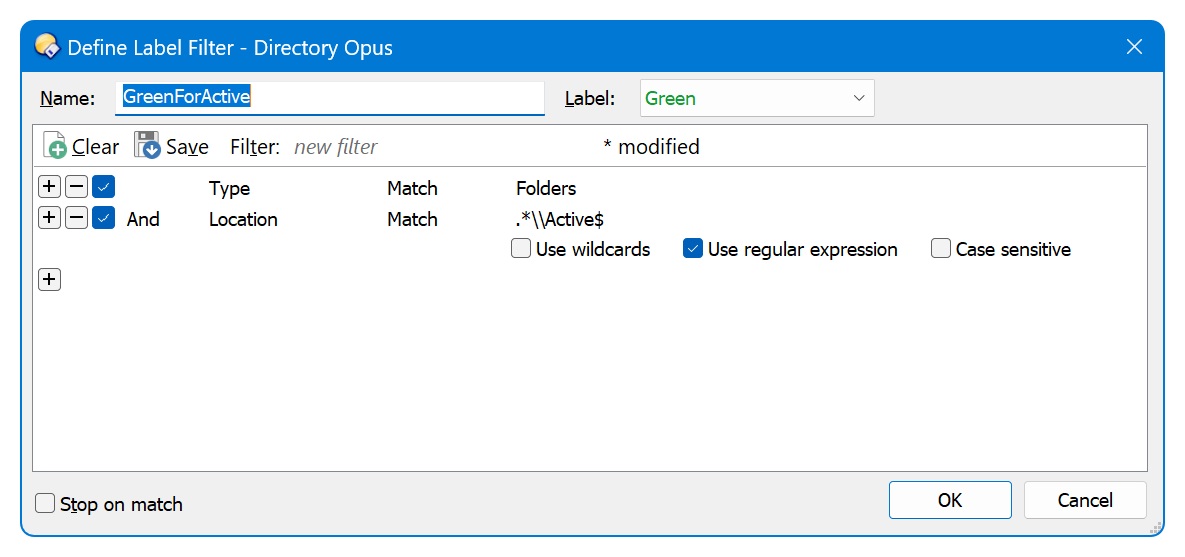
This is the regex for the filter:
```plaintext
.*\\Active$
```
---
### Author:  [@brucemc777](https://resource.dopus.com/u/brucemc777)
#### Post date: [November 14, 2023, 6:07pm UTC](https://resource.dopus.com/t/color-folder-name-text-in-all-folders-under-a-specific-named-subfolder/46953/7 "2023-11-14T18:07:03Z")
OK, so i am amazed - Thank You very much!
---
### Author:  [@xavierarmand](https://resource.dopus.com/u/xavierarmand)
#### Post date: [March 19, 2024, 5:41pm UTC](https://resource.dopus.com/t/color-folder-name-text-in-all-folders-under-a-specific-named-subfolder/46953/8 "2024-03-19T17:41:20Z")
hmmm, how can can i apply similar filter to folders containing "\*.flac" files? im shuffingling thru 100s-gigs of music.
i've trying to figure this out on my own for a few days. i finial got a folder label reading correctly from one of your posts by moving the \* around. this great if the the word flac is in the folder name.

now, cause why stop here? haha
im trying to apply this label to if there is .flac in side of it. i think it can be dont on dopus 13?

---
### Author:  [@xavierarmand](https://resource.dopus.com/u/xavierarmand)
#### Post date: [March 19, 2024, 5:54pm UTC](https://resource.dopus.com/t/color-folder-name-text-in-all-folders-under-a-specific-named-subfolder/46953/9 "2024-03-19T17:54:18Z")
i think i may have just figured it out....
almost... this is working but its also labeling folders that do have any .flac in them. it must be searching fuzzy?

---
### Author:  [@lxp](https://resource.dopus.com/u/lxp)
#### Post date: [March 19, 2024, 7:43pm UTC](https://resource.dopus.com/t/color-folder-name-text-in-all-folders-under-a-specific-named-subfolder/46953/10 "2024-03-19T19:43:14Z")
[Contains](https://docs.dopus.com/doku.php?id=file_operations:filtered_operations:filter_clause_types) doesn't mean what you think it does 😉
Try
```plaintext
foldercontent match (
name match flac nowild partial
)
```
(Check _Edit as text_)
---
### Author:  [@xavierarmand](https://resource.dopus.com/u/xavierarmand)
#### Post date: [March 19, 2024, 7:54pm UTC](https://resource.dopus.com/t/color-folder-name-text-in-all-folders-under-a-specific-named-subfolder/46953/11 "2024-03-19T19:54:42Z")
ahhh! this is great!
alas running such filters on a dense media drive is certainly giving it a spin-for-its-$!
dopus is lagging but hang on ... it crashed the Resource Moniter however. LOL