# Column: CreationMonth (sort and group by month)
**URL:** https://resource.dopus.com/t/column-creationmonth-sort-and-group-by-month/19738
**Category:** Buttons/Scripts
**Tags:** script, column, jscript
**Created:** [December 16, 2014, 11:48pm UTC](https://resource.dopus.com/t/column-creationmonth-sort-and-group-by-month/19738 "2014-12-16T23:48:06Z")
**Posts on this page:** 11
**Page:** 1
### Author:  [@tbone](https://resource.dopus.com/u/tbone)
#### Post date: [December 16, 2014, 11:48pm UTC](https://resource.dopus.com/t/column-creationmonth-sort-and-group-by-month/19738/1 "2014-12-16T23:48:06Z")
CreationMonth - A script column to sort and group items by their month of creation. ("month of creation" - is that correct english?)
This column is the first to come in two languages. English is the default, german kicks in automatically if you use the german language in DO. This script shall be a test as well, if multilanguage-addins are a good thing to have or will lead to yet unforeseen issues.
Description:
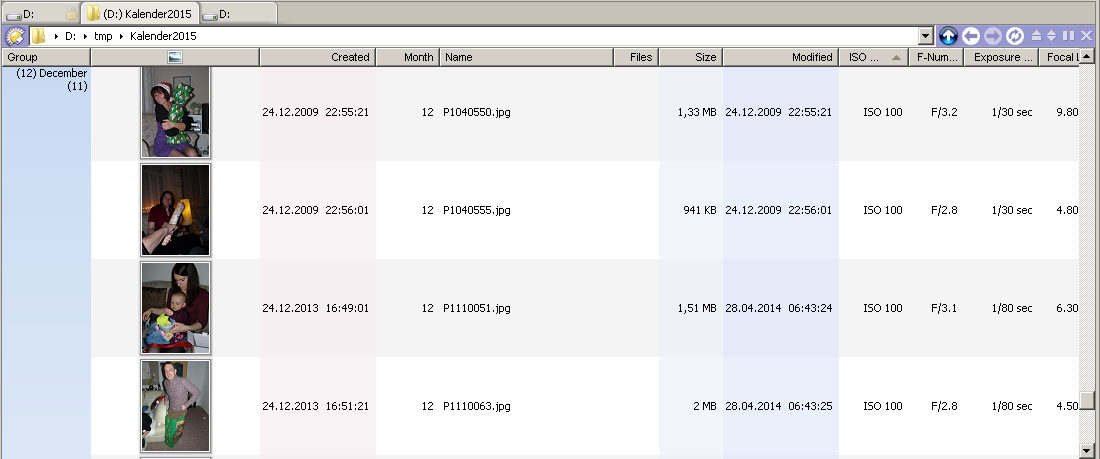
This column is useful, if you're browsing a larger photo collection (flatview maybe), which covers several years and the only pictures you're interested in shall have been taken in any december e.g. If you sort/group on images, the exif-datetaken or exif-shootingtime always takes precedence over the file-creation date.
You can find images related to christmas/winter/summer/automn/spring more easily with this. I'm currently preparing a calendar to print, so finding images fitting a specific season is the task! o)
Demo:
The images below were taken in different years, but they come together in a group "December", because all of them were taken in december.
Installation:
To install the column, download the \*.js.txt file below and drag it to Preferences / Toolbars / Scripts.
After that, right click any listers column header and add the column from the "script" submenu.
Notes:
Sooner or later this column will/should move into the CustomGrouping-Addin:
> [@Columns: CustomGrouping (group by SizeRange/FileTypeGroup..)](https://resource.dopus.com/t/columns-customgrouping-group-by-sizerange-filetypegroup/19009/1):
>
> Introduction "CustomGrouping" - Some columns which DO does not support natively. These (may) provide adjustable group names, number of groups or sorting items by DO internal settings. Columns: Notice: Names and size ranges of groups can be custom…
Make sure to add your rare image file extension to the script configuration "Extensions" item.
Download:
Download the latest file below, then drag it to the list under **Preferences / Toolbars / Scripts**.
- Latest: v0.2.1 / 2015.05.31 - merged with non-released v0.1.1:
[Column.Generic\_CreationMonth.js.txt](https://resource.dopus.com/uploads/default/original/3X/3/7/3767865a6543c83f262e7d7904ed7cefbbe4b20c.txt) (10.9 KB)
- v0.2 / 2015.04.02 - speed improvement:
[Column.Generic\_CreationMonth.js.txt](https://resource.dopus.com/uploads/default/original/3X/8/1/81a95a82f399870442044c1bd4cccbcfd1be335f.txt) (10.6 KB)
- v0.1 - initial version:
[Column.Generic\_CreationMonth.js.txt](https://resource.dopus.com/uploads/default/original/3X/0/e/0eac5e3a76a8841d36240e91a17caf26d637718a.txt) (10.4 KB)
---
### Author:  [@Leo](https://resource.dopus.com/u/Leo)
#### Post date: [December 16, 2014, 11:53pm UTC](https://resource.dopus.com/t/column-creationmonth-sort-and-group-by-month/19738/2 "2014-12-16T23:53:01Z")
Nice idea.
---
### Author:  [@tbone](https://resource.dopus.com/u/tbone)
#### Post date: [December 17, 2014, 1:03am UTC](https://resource.dopus.com/t/column-creationmonth-sort-and-group-by-month/19738/3 "2014-12-17T01:03:34Z")
Thanks! o) So you do picture-calendars as well from time to time? o)
Maybe DO could have builtin support for finding specific days/weeks/months regardless of the year. Because the windows search also did not help while trying to find photos taken in a specific month. At least I managed to get something out of it with the following query, but that's not really handy to use, this also needs translation to the german query keyword syntax if your windows is a german edition, how insane is that? Wonder when spanish SQL sees the light. o)
Example-query to find all images taken in december from 2009 to 2012:
```nohighlight
date:December2009 OR date:December2010 OR date:December2011 OR date:December2012 OR date:December2012
```
---
### Author:  [@Dinkelhopper](https://resource.dopus.com/u/Dinkelhopper)
#### Post date: [April 2, 2015, 9:31am UTC](https://resource.dopus.com/t/column-creationmonth-sort-and-group-by-month/19738/4 "2015-04-02T09:31:00Z")
Hey tbone,
I find this very interesting 👍
But unfortunately I have a performance-issue with evaluating the month-value.
For a folder with ~2000 files it takes about 12 secs for DOpus to add all month-column-values.
=\> very sluggish ☹
The reason is the access of item-metadata.
Imho, for filetypes \<\> image this would not be necessary.
Maybe there are other ways to identify a file as an image? E.g. by extension?
---
### Author:  [@tbone](https://resource.dopus.com/u/tbone)
#### Post date: [April 2, 2015, 11:23am UTC](https://resource.dopus.com/t/column-creationmonth-sort-and-group-by-month/19738/5 "2015-04-02T11:23:03Z")
Well, yes identifying by extension would be possible, but then you also need to avoid to look at the exif-dates within the pictures to speed things up. Maybe I add another column to this script, that does not try to detect images at all and just goes for the regular filesystem creation timestamp, then it's as fast as can be.
---
### Author:  [@Dinkelhopper](https://resource.dopus.com/u/Dinkelhopper)
#### Post date: [April 2, 2015, 1:21pm UTC](https://resource.dopus.com/t/column-creationmonth-sort-and-group-by-month/19738/6 "2015-04-02T13:21:04Z")
You have misunderstood me.
For images it would not be possible to speed it up because you need those date-information.
But for non-images you do not need any of those metadata-information.
Sth. like this (would not work in DO, because vector != array....)
```javascript
var imageExt = ['.jpg', '.jpeg', '.tiff', '.tif', '.png', '.gif', '.bmp'];
if (imageExt.indexOf(data.item.ext) > -1) {
if (data.item.metadata.image_text.datetaken != undefined){
creationDate = new Date(data.item.metadata.image.datetaken);
}
if (data.item.metadata.image_text.shootingtime != undefined){
creationDate = new Date(data.item.metadata.image.shootingtime);
}
}
if (creationDate === null){
creationDate = new Date(data.item.create);
}
var month = creationDate.getMonth();
data.value = month+1;
}
```
---
### Author:  [@Leo](https://resource.dopus.com/u/Leo)
#### Post date: [April 2, 2015, 1:36pm UTC](https://resource.dopus.com/t/column-creationmonth-sort-and-group-by-month/19738/7 "2015-04-02T13:36:09Z")
> [@Dinkelhopper](#):
>
> You have misunderstood me.
> For images it would not be possible to speed it up because you need those date-information.
That should work (if it works outside of Opus), if you mean the first two lines. You can use JScript vectors arrays in JScript code, Opus just doesn't use them for its own APIs as they behave inconsistently between languages.
---
### Author:  [@Dinkelhopper](https://resource.dopus.com/u/Dinkelhopper)
#### Post date: [April 2, 2015, 2:35pm UTC](https://resource.dopus.com/t/column-creationmonth-sort-and-group-by-month/19738/8 "2015-04-02T14:35:12Z")
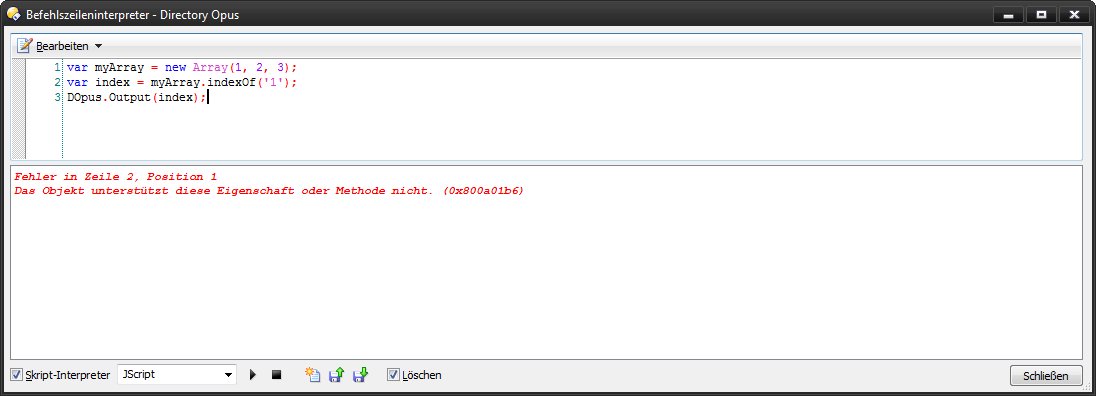
Isn't this JScript-Code? 😮
---
### Author:  [@tbone](https://resource.dopus.com/u/tbone)
#### Post date: [April 2, 2015, 2:49pm UTC](https://resource.dopus.com/t/column-creationmonth-sort-and-group-by-month/19738/9 "2015-04-02T14:49:05Z")
Updated to v0.2
- speed improvement (when there are alot of non-image files)
@dinkel
An array does not have a .indexOf() method. In recent javascript, there is contains(), but that's also not part of JScript. If you like to stick with an array for these kind of checks, use something like myArr.join("").indexOf(".xyz"). I'd use a string right from the start though.
---
### Author:  [@Dinkelhopper](https://resource.dopus.com/u/Dinkelhopper)
#### Post date: [April 2, 2015, 7:15pm UTC](https://resource.dopus.com/t/column-creationmonth-sort-and-group-by-month/19738/10 "2015-04-02T19:15:27Z")
Thanks for that lesson, tbone 🙂
Is it right, that the part after the && will be considered only if the first part is true?
```javascript
if ((Script.Config.Extensions.indexOf(String(data.item.ext).toLowerCase())>-1) && data.item.metadata=="image"){
```
---
### Author:  [@tbone](https://resource.dopus.com/u/tbone)
#### Post date: [April 2, 2015, 10:46pm UTC](https://resource.dopus.com/t/column-creationmonth-sort-and-group-by-month/19738/11 "2015-04-02T22:46:10Z")
Yes, that's right, but wouldn't work in vbscript btw..
VBscript brainlessly always evaluates all of the condiditions and would not prevent to "touch" data.item.metadata in this case.