# Column with alternative text
**URL:** https://resource.dopus.com/t/column-with-alternative-text/22956
**Category:** Help & Support
**Created:** [July 12, 2016, 11:43am UTC](https://resource.dopus.com/t/column-with-alternative-text/22956 "2016-07-12T11:43:13Z")
**Posts on this page:** 9
**Page:** 1
### Author:  [@blueroly](https://resource.dopus.com/u/blueroly)
#### Post date: [July 12, 2016, 11:43am UTC](https://resource.dopus.com/t/column-with-alternative-text/22956/1 "2016-07-12T11:43:13Z")
Hi guys,
I would like to create a column based on part of the text in a filename, but then replacing it with alternative text (see attached image).
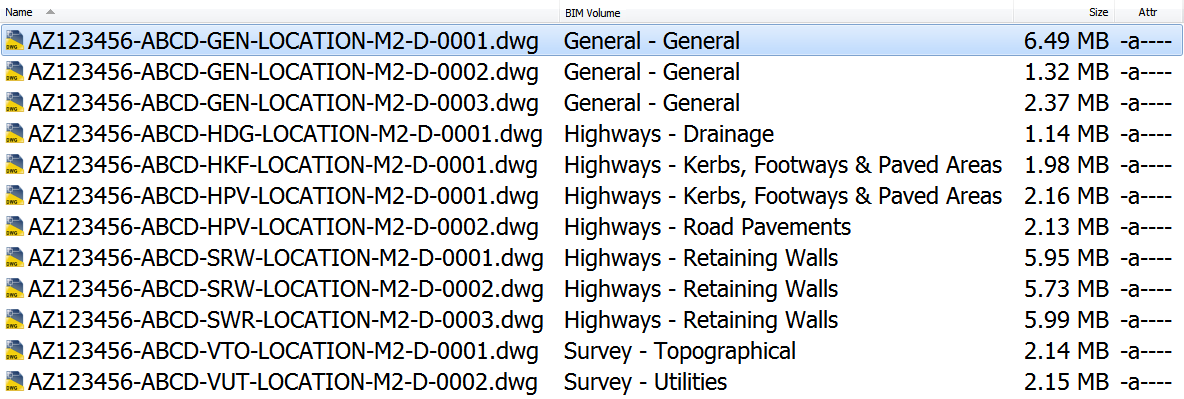
For example, I have a bunch of files named as follows:
AZ123456-ABCD-GEN-LOCATION-M2-D-0001.dwg
AZ123456-ABCD-GEN-LOCATION-M2-D-0002.dwg
AZ123456-ABCD-GEN-LOCATION-M2-D-0003.dwg
AZ123456-ABCD-HDG-LOCATION-M2-D-0001.dwg
AZ123456-ABCD-HKF-LOCATION-M2-D-0001.dwg
AZ123456-ABCD-HPV-LOCATION-M2-D-0001.dwg
AZ123456-ABCD-HPV-LOCATION-M2-D-0002.dwg
AZ123456-ABCD-SRW-LOCATION-M2-D-0001.dwg
AZ123456-ABCD-SRW-LOCATION-M2-D-0002.dwg
AZ123456-ABCD-SWR-LOCATION-M2-D-0003.dwg
AZ123456-ABCD-VTO-LOCATION-M2-D-0001.dwg
AZ123456-ABCD-VUT-LOCATION-M2-D-0002.dwg
The GEN, HDG, HKF, HPV, SRW, VTO & VUT parts of the filename are abbreviations but I want to display the full text. i.e. "General" instead of GEN" etc.
Looking at a few sample scripts I reckon I can create the column and populate it but I don't know if the alternative text is possible. Does anyone else know any better?
Regards
Blueroly
---
### Author:  [@Leo](https://resource.dopus.com/u/Leo)
#### Post date: [July 12, 2016, 12:31pm UTC](https://resource.dopus.com/t/column-with-alternative-text/22956/2 "2016-07-12T12:31:31Z")
Script columns can do anything you want them to based on the filename and other details of each file, so this is all possible.
[RegexColumnsReloaded](https://resource.dopus.com/t/regexcolumnsreloaded-easily-add-regex-columns-or-any-kind-of-column/20799/1) does something similar.
---
### Author:  [@blueroly](https://resource.dopus.com/u/blueroly)
#### Post date: [July 12, 2016, 1:50pm UTC](https://resource.dopus.com/t/column-with-alternative-text/22956/3 "2016-07-12T13:50:03Z")
Brilliant, thanks Leo. I'll take a look later.
---
### Author:  [@blueroly](https://resource.dopus.com/u/blueroly)
#### Post date: [July 12, 2016, 8:48pm UTC](https://resource.dopus.com/t/column-with-alternative-text/22956/4 "2016-07-12T20:48:38Z")
I've had a look at the link above and all the links to Andy's site but I can't find anything on alternative text. Renaming the files using Andy's "[year=2004\_dir=Martin Scorcese]" convention is not permitted in this case.
Any thoughts anyone?
---
### Author:  [@Leo](https://resource.dopus.com/u/Leo)
#### Post date: [July 12, 2016, 9:00pm UTC](https://resource.dopus.com/t/column-with-alternative-text/22956/5 "2016-07-12T21:00:58Z")
[Custom Column - Custom Text V1.2](https://resource.dopus.com/t/custom-column-custom-text-v1-2/18727/1) is another example that might be closer to what you want.
It pulls parts of the filename out into columns using regular expressions. Aside from defining the regexes to match the bits of the filename you're looking for, you'd need to add a bit of logic that takes what was found and expands GEN to General and whatever your other rules/expansions need to be.
---
### Author:  [@blueroly](https://resource.dopus.com/u/blueroly)
#### Post date: [July 19, 2016, 12:20pm UTC](https://resource.dopus.com/t/column-with-alternative-text/22956/6 "2016-07-19T12:20:36Z")
Hi Leo,
I've read through all the links but still not much wiser. I have almost managed to put together the code the create and populate the columns (not with alternative text for now...but it's a start) but I am struggling with the RegExp. The expressions below works fine in the Opus rename panel but not within a script.
Sample File: AZ123456-ABCD-GEN-LOCATION-M2-D-0001.dwg
(\w{2}\d{7})-(\w{2,6})-(\w{3})-(\w{1,10})-(\w{1}\d{1})-(\w{1})-(\d{4,6}).(.\*)
(I appreciate I don't need all of the capture groups for now but I will refine them once the basics are done.)
When I parse the script, Opus tells me this...
```auto
MovieFilenameDBTEST.js: Error at line 123, position 26
MovieFilenameDBTEST.js: pattern: (/\w{2}\d{7})\-(\w{2,6}).(\w{3}).(\w{1,10}).(\w{1}\...
MovieFilenameDBTEST.js: ^
MovieFilenameDBTEST.js: Expected '/' (0x800a03f4)
MovieFilenameDBTEST.js: Parse error - script aborted
```
It seems like the problem is with the hyphen (-) but no matter what I've used to escape it, I can't get it to work.
Why does it work in the rename panel but not in the script?
Also, when I get round to adding the conditions to switch GEN to General etc. I assume I need to use the IF, THEN, ELSE function?
Any further help would be appreciated.
Regards
Blueroly
---
### Author:  [@Leo](https://resource.dopus.com/u/Leo)
#### Post date: [July 19, 2016, 12:46pm UTC](https://resource.dopus.com/t/column-with-alternative-text/22956/7 "2016-07-19T12:46:33Z")
Debugging the code would be easier if we could see the code. 🙂
---
### Author:  [@blueroly](https://resource.dopus.com/u/blueroly)
#### Post date: [July 19, 2016, 2:31pm UTC](https://resource.dopus.com/t/column-with-alternative-text/22956/8 "2016-07-19T14:31:03Z")
Oops! Didn't realise that was so important 😃
[code]// Opus calls OnInit to initialize the script add-in function OnInit(initData) {
//uid added via script wizard (do not change after publishing this script)
var uid = "98D528BF-0B42-4F51-85E0-6770DABF47BE";
//resource center url added via script wizard (required for updating)
var url = "[Column with alternative text](https://resource.dopus.com/t/column-with-alternative-text/22956/1)
// basic information about the script
initData.name = "BIM Columns";
initData.desc = "Adds columns defined by regex search against filenames.";
initData.copyright = "Blueroly 2016";
initData.min\_version = "11.5.1"
initData.version = "0.9.2";
initData.default\_enable = true;
// The following prefix is added to the column names when looking at columns in
// the Folder Format panel, in order to distinguish the column from
// similar columns from other scripts.
// The prefix will not show in the actual column header
var ColumnPrefix = "BIM.";
// Add all columns (create ScriptColumn objects via AddColumn()
// See [http://www.gpsoft.com.au/help/opus11/index.html#!Documents/Scripting/ScriptColumn.htm](http://www.gpsoft.com.au/help/opus11/index.html#!Documents/Scripting/ScriptColumn.htm)
for(var key in columns) {
if (columns.hasOwnProperty(key)) {
var column = columns[key];
var cmd = initData.AddColumn();
cmd.autorefresh = true;
cmd.defsort = (typeof column.sort === 'undefined') || (column.sort != "DESC") ? 1 : -1;
cmd.defwidth = (typeof column.width === 'undefined') ? 5 : column.width;
cmd.header = key;
cmd.infotiponly = (typeof column.infotiponly === 'undefined') ? false : column.infotiponly;
cmd.justify = (typeof column.justify === 'undefined') ? "left" : column.justify;
cmd.label = ColumnPrefix + key;
cmd.method = "OnRegexColumn";
cmd.name = key;
cmd.namerefresh = true;
cmd.type = (typeof column.type === 'undefined') ? null : column.type;
}
} // End OnInit
var columns = {
'Project' : {
Pattern: (/\w{2}\d{7})-(/\w{2,6}).(/\w{3}).(/\w{1,10}).(/\w{1}\d{1}).(/\w{1}).(/\d{4,6}).(.\*)
group: 1
},
'Originator' : {
Pattern: (\w{2}\d{7})-(\w{2,6})-(\w{3})-(\w{1,10})-(\w{1}\d{1})-(\w{1})-(\d{4,6}).(.\*)
group: 2
},
'Volume' : {
Pattern: (\w{2}\d{7})-(\w{2,6})-(\w{3})-(\w{1,10})-(\w{1}\d{1})-(\w{1})-(\d{4,6}).(.\*)
group: 3
justify: "center",
},
[/code]
---
### Author:  [@Leo](https://resource.dopus.com/u/Leo)
#### Post date: [July 19, 2016, 4:13pm UTC](https://resource.dopus.com/t/column-with-alternative-text/22956/9 "2016-07-19T16:13:56Z")
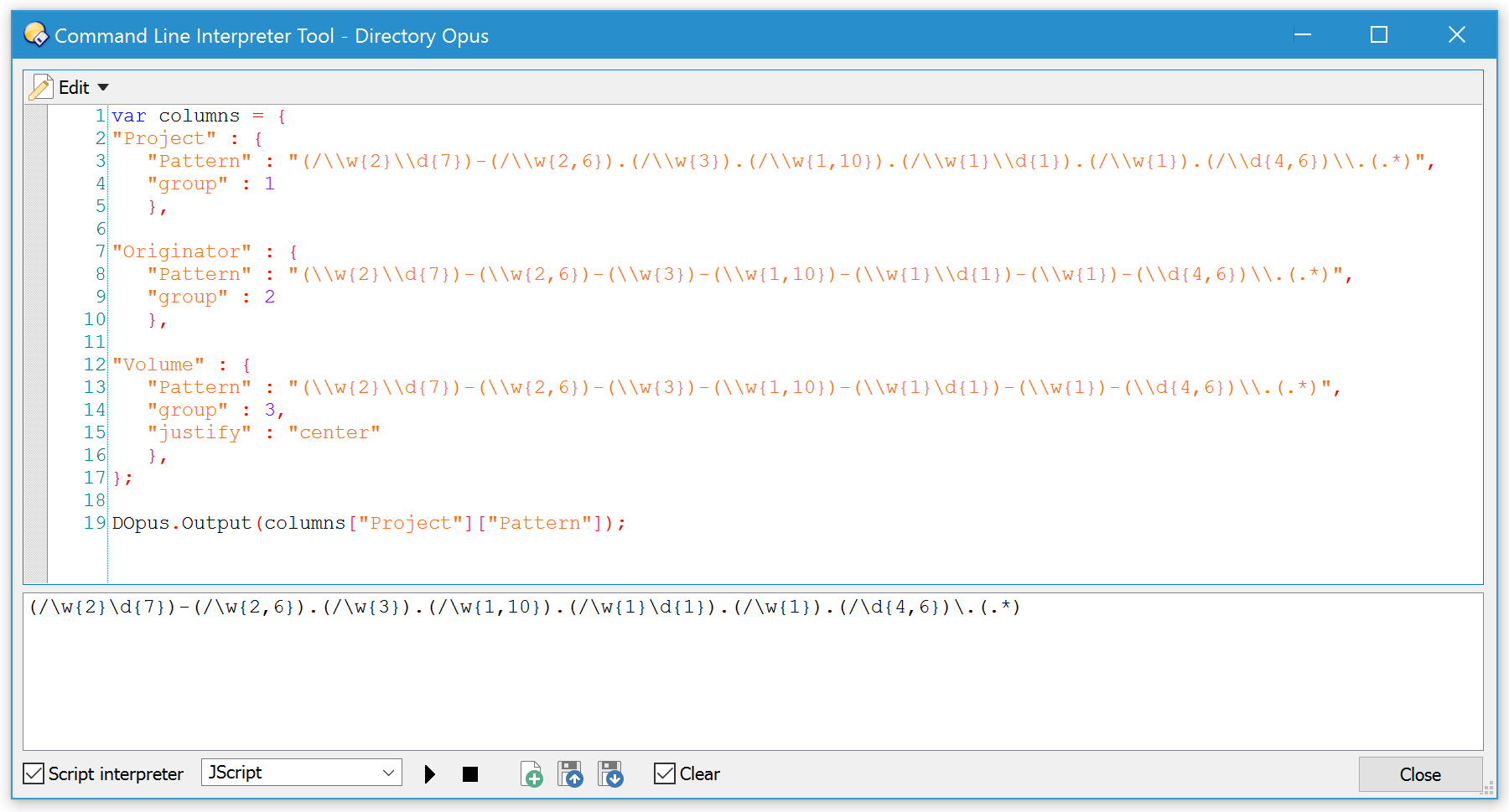
Your JSON at the bottom is not syntactically correct.
JSON strings should be quoted (especially if they contain { and }) and JScript strings should have \ turned into \ since the \ on its own is an escape character. You also need a comma after each JSON name/value pair, I think. (I am not sure as this is the first time I've ever used JSON and I'm just copying what I see from some examples myself.)
This seems to work:
[code]var columns = {
"Project" : {
"Pattern" : "(/\w{2}\d{7})-(/\w{2,6}).(/\w{3}).(/\w{1,10}).(/\w{1}\d{1}).(/\w{1}).(/\d{4,6})\.(.\*)",
"group" : 1
},
"Originator" : {
"Pattern" : "(\w{2}\d{7})-(\w{2,6})-(\w{3})-(\w{1,10})-(\w{1}\d{1})-(\w{1})-(\d{4,6})\.(.\*)",
"group" : 2
},
"Volume" : {
"Pattern" : "(\w{2}\d{7})-(\w{2,6})-(\w{3})-(\w{1,10})-(\w{1}\d{1})-(\w{1})-(\d{4,6})\.(.\*)",
"group" : 3,
"justify" : "center"
},
};[/code]