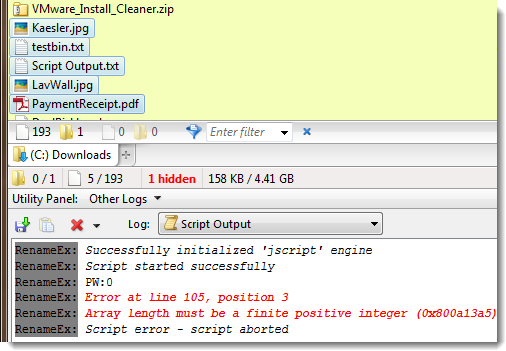
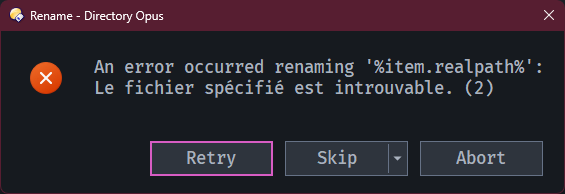
RenameEx - a script-addin for extended "Rename" functionality.
Features summary:
- Rename selected items by fetching new item-names from the clipboard (derived from: Command: RenameFromClipboard)
- Automatic numbering of items with support for adding the number of affected/selected items and other counters (derived from Rename to 'file' of 'total files')
Main command line switches:
-
FROMCLIP Rename items with the help of text or files in the clipboard
- detects multiline clipboard content and line endings (CR vs. CR+LF etc.)
- validates and shapes clipboard content before renaming items (not 100% idiot-proof yet)
- warns if number of selected items does not match the number of items in the clipboard
- supports following placeholders to increase flexibility (moving of files is a usecase e.g.)
- Old-Name: {item.realpath}, {item.name}, {item.name_stem}, {item.path}, {item.ext}
- New-Name: {item.new_realpath}, {item.new_name}, {item.new_name_stem}, {item.new_path}, {item.new_ext}
- The default operation is
Rename FROM="{item.realpath}" TO="{item.new_name}" - You can run your custom rename operation like so..
(this one will move files and do other silly things):
RenameEx FROMCLIP COMMANDS=Rename FROM="C:\foo\{item.name}" TO="C:\bar\{item.new_name}.{item.new_ext}.bak"
- can run multiple commands (default is "Rename" only, edit script config or use COMMANDS param to set additional params and add commands)
- you can use plain-text directly or files and folders currently in the clipboard
- SAFEMODE switch for testing and watching results on the console
- Parameters:
- QUIET (avoid confirmation if number of selected items does not match number of items in clipboard)
- SAFEMODE (do not run any operation, for testing and previewing actions on the console)
- COMMANDS (any dopus commands to replace/change the default rename operation, use "\n" to separate them here, param must be last)
Demo:
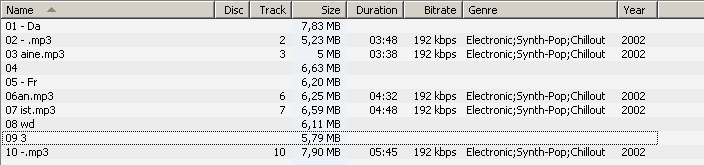
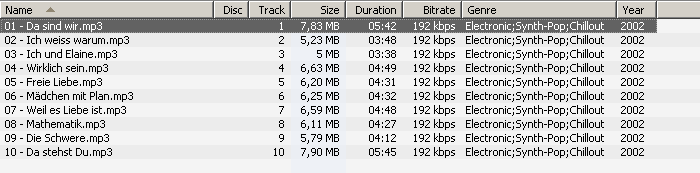
Crappy filenames in dopus:
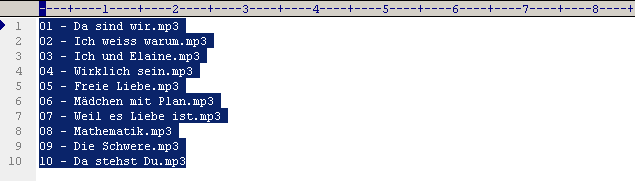
Nice file names in editor (copied to clipboard):
Nice file names in DOpus after selecting the crappy mess and running "RenameEx FROMCLIP":
- NUMBER Add numbering to items (this wraps the native Rename NUMBER command)
-
Options: = <startindex> Default is 1
-
Switches:
- REMOVENUM Try to remove existing numbering from affected items
- PAD The number of digits in padding, default is "auto"
- PADWITH The characters used for padding, default is "0" (only applies to totals)
- BY Increment when renaming items, default is 1
- PATTERN Defaults to
(.*?)((?:[^A-z0-9]*|\\s*)?\\D?\\d+.*?)?($|\\..*) - TO Defaults to
{stem} {num}{ext}
Following additional vars are available (also the native ones with FILEINFO):
- {num} The ongoing number
- {stem} Item stem or basename (without extension)
- {ext} The items extension (including .)
- {total} Total item count
- {totalfiles} Total file count
- {totaldirs} Total dir count
- {totalsel} Selected item count
- {totalselfiles} Selected file count
- {totalseldirs} Selected dir count
-
Examples:
-
Add basic numbering in front of extension, remove existing numbering at first
RenameEx NUMBER REMOVENUM -
Add numbering and ".. of x" in front of extension, pad numbers to 3-digits
RenameEx NUMBER PAD=3 TO="{stem}-{num} of {totalsel}{ext}" -
Do not add numbering, just add "of x" in front of extension, padding as required
RenameEx NUMBER PAD TO="{stem} of {totalsel}{ext}" -
Enter a new name for all selected items and append numbering and ".. of x"
RenameEx NUMBER PAD TO="{dlgstring|New filename:|{file|noext}} - {num} of {totalsel}{ext}"
-
-
Global switches/options:
- PATTERN Works like the regular PATTERN of the rename command
- FROM Works like the regular FROM of the rename command
- TO Works like the regular TO of the rename command
- FILEINFO Works like the regular FILEINFO of the rename command
- NODESELECT Do not deselect selected items
- PT Switches and options to PassThrough to the native Rename command
- XLOG Level of output, defaults to normal, which means important information only
- Options: = off,xit,err,inf,warn,,trace,dump
Installation:
Download the *.js.txt file below and drag it to Preferences / Toolbars / Scripts.
Trouble-Shooting:
Add XLOG=dump to your command line or raise the global log level in the script config.
Then re-do what failed and post the result (output) right here! o)
cya,
tb
Download:
-
v0.3.3 - 2025-12-26
Command.Generic_RenameEx.js.txt (58.7 KB)
// - set default log level to normal, fix SAFEMODE log output -
v0.3.2 - 2025-12-25
Command.Generic_RenameEx.js.txt (57.9 KB)
// - fix script error, because "COMMANDS" option was missing after merging
// - turns out, even more merging errors were present, sorry for that -
v0.3.1 - 2025-09-09
Command.Generic_RenameEx.js.txt (54.4 KB)
// - use FSMagic v0.61
// - reorder change log
// - import fix from RenameFromClipboard v0.3.1: fix FSMagic.getBasename() returning "" for files without extension
// - import fix from RenameFromClipboard v0.3.1: add placeholder {item.new_name_stem} -
v0.3 / 2015-10
Command.Generic_RenameEx.js.txt (51.8 KB)
//- new option "RECURSE", recursive rename for all items (native rename does not support this for folders) -
v0.2 - 2015-10
//- new option "FROMCLIP", renders RenameFromClipboard command obsolete
//- passing of pad-with changed to PAD="width=0"
//- passing of pad-size changed to PAD="size=2"