It is because the parameters passed to SelectEx do not end up in the correct variables, you can see that in my screenshot above. I'm not sure if there is an error in the parameter template or something, this needs some tinkering to figure out where the problem is exactly. Until fixed, what you tried won't work.
Hello, I add a feature.
"var template = "
I add a template arg "NTHSTART/O", for SelectEx_NTH from the range index of the first selected item.
function SelectEx_NTH(cmd, sourcetab, args){
	...
	...
	var i = 1;
	if(args["NTHSTART"].exists) {
		if(args["NTHSTART"].value)
			i = parseInt(args["NTHSTART"].value,10) //Starting index number
		else {
			if(sourcetab.selected.count > 0){ //If no index number is specified, start at the first selected file.
				for (var eSel = new Enumerator(sourcetab.all); !eSel.atEnd(); eSel.moveNext()){
					if(eSel.item().selected)
						break;
					i++;
				}
			}
		}
	}
	cmd.ClearFiles();
	for(;i<=sourcetab.all.count;i=i+nth)
		range += i+",";
1 Like
Aha, I see! Thank you, I added the NTHSTART option, makes sense! o)
I struggle with your logic about the already selected items though. What's the idea or use case behind? If the NTHSTART option is present (even if it has no value), why take selected items into account? You also seem to use the "sum" of selected items as start number, which makes no sense to me either. Please explain or I have to omit this part. o)
Some improvements..
	var nth = parseInt(args["NTH"].value,10), range = "";
	Log("NTH    : " + nth,"D");
	if (!nth){
		Log("No 'nth' given.","X");
		Log("-","T",-1);
		return COMMAND_FAILURE;
	}
	var i = 1, nthStart = "";
	if(args["NTHSTART"].exists) {
		if(args["NTHSTART"].value)
			nthStart = parseInt(args["NTHSTART"].value,10); // Starting index number
		else nthStart = 0;
	}
	cmd.ClearFiles();
	if(nthStart === ""){ //  not exist NTHSTART, start from 1
		i = 1;
	} else if(nthStart>0)
		i = nthStart;
	else if(nthStart==0) {
		if(sourcetab.selected.count > 0){ //If no index number is specified, start at the first selected file.
			for (var eSel = new Enumerator(sourcetab.all); !eSel.atEnd(); eSel.moveNext()){
				if(eSel.item().selected)
					break;
				i++;
			}
		} else i = 1;
	} else { // If negative, count backwards from the last, -1 is the last file, and so on
		i = sourcetab.all.count + 1 + nthStart;
	}
	//DOpus.Output("Start at: " + (nthStart==0?nthStart+"-Current selected":nthStart) + "     Nth=" + nth + "    i=" + i);

	if(nth>0){ // Forward increasing sequence
		for( ; i<=sourcetab.all.count; i=i+nth)
		range += i+",";
	} else if(nth<0){ // Reverse decreasing sequence
		for( ; i>0; i=i+nth)
		range += i+",";
	}
for test :
SelectEx EXACT MAKEVISIBLE NTH=3 // start from 1
SelectEx EXACT MAKEVISIBLE NTHSTART NTH=2  //go down from the first selected file
SelectEx EXACT MAKEVISIBLE NTHSTART NTH=-4  //go up from the first selected file
SelectEx EXACT MAKEVISIBLE NTHSTART=2 NTH=2
SelectEx EXACT MAKEVISIBLE NTHSTART=-3 NTH=-3
SelectEx EXACT MAKEVISIBLE NTHSTART=22 NTH=-2
1 Like
Could I use this to force a selection that is within the same numbered sequence as my currently selected item?
As in, if I have one of these files selected I could make it select the rest of them, deselecting everything else:
This Is File 1
This Is File 2
This is File 3
What is "this"?..
I think the regular select command can do this no problem, lookup the PATTERN and DESELECTNOMATCH options or simply deselect in a two step process before selecting by pattern.
1 Like
I asked elsewhere and it has been dealt with already, thanks though.
Hello. I have a basic button created using SelectEx to open a random file in the current folder:
SelectEx RANDOM FILES ACTION=open MAKEVISIBLE
I was wondering if someone could help me make this better, by only selecting items that have never been opened before.
What I have set up is a custom label/status in Dir Opus called "Old". I would like to modify the button's command to only select files which do not have this Old status label. If possible, I would also like the button to set this Old label on the file after it's opened. As of now I can set this manually via the Properties menu, or via a File Type > Double Click Event, but opening via the Random button doesn't do it.
Thanks!
1 Like
The evaluator can handle most of your needs:
Select RANGE={=Floor(totalfiles*Rnd())+1=} DESELECTNOMATCH
Select DESELECT FILTERDEF label match Old nowild
Properties SETLABEL=Old
FileType ACTION=open
However, the evaluator does not support loops, so you may need to press the button multiple times to launch a random, non-"Old" file.
This seems to have worked. Thank you!
i'm finding that the larger a directory, the longer selectex takes to make a selection. it takes around 25 seconds to make a random selection in a folder with over 600k files. is there a way to speed things up a bit?
Use the evaluator, if you can.
This ran about eight times faster than the JScript equivalent in a folder with 600k files:
Select FILTERDEF =Rnd()<.5
i will TRY. i don't script or code. i don't even know what the evaluator is. i CAN figure some things out, so i will TRY. if i have difficulty i'll come back. thanks for your help.
If you are doing a random selection multiple times, then you can first hide all non new files. Then you have a shorter list to work with. Not sure if what you're using will still process the hidden files though.
can i turn this into a button?
Yes.
i know how to make a button. i tried it and it didn't work. i tried evaluator and it created a column that didn't do what i want. what i want is a button to select a random file and open it with an external app. i figured out how to do it with selectex, but it takes too long to make the selection.
=Rnd()<.5
I don't understand this usage...
I didn't find an example in the manual help

This will open one random file with its default app:
Select RANGE={=Floor(totalfiles*Rnd())+1=} DESELECTNOMATCH
Select NOPATTERN DESELECT
FileType ACTION=open
2 Likes
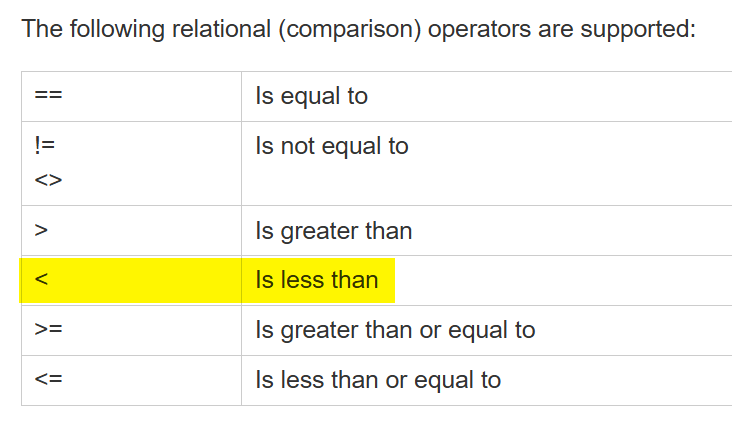
Explanation here:
2 Likes