# Copying Quick launch Icons
**URL:** https://resource.dopus.com/t/copying-quick-launch-icons/9722
**Category:** Help & Support
**Created:** [July 14, 2010, 3:40am UTC](https://resource.dopus.com/t/copying-quick-launch-icons/9722 "2010-07-14T03:40:32Z")
**Posts on this page:** 20
**Page:** 1
### Author:  [@CWBillow](https://resource.dopus.com/u/CWBillow)
#### Post date: [July 14, 2010, 3:40am UTC](https://resource.dopus.com/t/copying-quick-launch-icons/9722/1 "2010-07-14T03:40:32Z")
I don' understand something: I use a program called True launch Bar ( [truelaunchbar.com/](http://www.truelaunchbar.com/) ) and it stores icons in " C:\Users%User%\AppData\Roaming\Microsoft\Internet Explorer\Quick Launch ~~images~~ \Icons ".
I keep a copy of drive "C" on Drive "I". When I try to go to " I:\Users%User%\AppData\Roaming\Microsoft\Internet Explorer\Quick Launch ~~images~~ \Icons " to copy icons from Drive "I" to the same folder on "Drive C", I can't.
Or rather, in DirOpus I can't. If I go in another file manger all is well, but if I try to get there in DO, I can only get as far as " C:\Users%User%\AppData\Roaming\Microsoft\Internet Explorer\Quick Launch\ " -- when I try to go into the images folder, I end up in the folder -- on the "C" drive!
Yet, if I try to do that very thing using Explorer or Total Commander, it works fine.
How come this is?
Chuck Billow
---
### Author:  [@Leo](https://resource.dopus.com/u/Leo)
#### Post date: [July 14, 2010, 8:20am UTC](https://resource.dopus.com/t/copying-quick-launch-icons/9722/2 "2010-07-14T08:20:00Z")
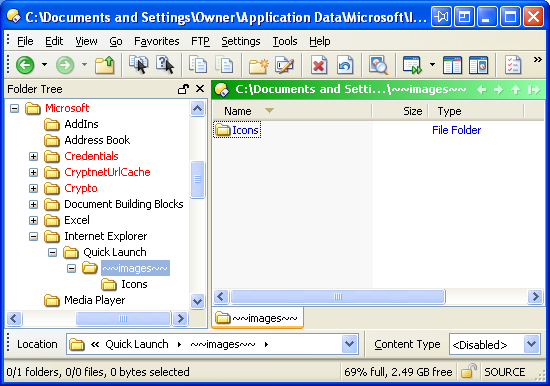
Please post a screenshot showing your lister just before you enter the ~~images~~ folder and indicate how your are entering it (e.g. double-clicking in the file display, selecting in the tree, etc.).
I checked and had no problem entering a folder with that name:
---
### Author:  [@CWBillow](https://resource.dopus.com/u/CWBillow)
#### Post date: [July 14, 2010, 7:37pm UTC](https://resource.dopus.com/t/copying-quick-launch-icons/9722/3 "2010-07-14T19:37:32Z")
Leo,
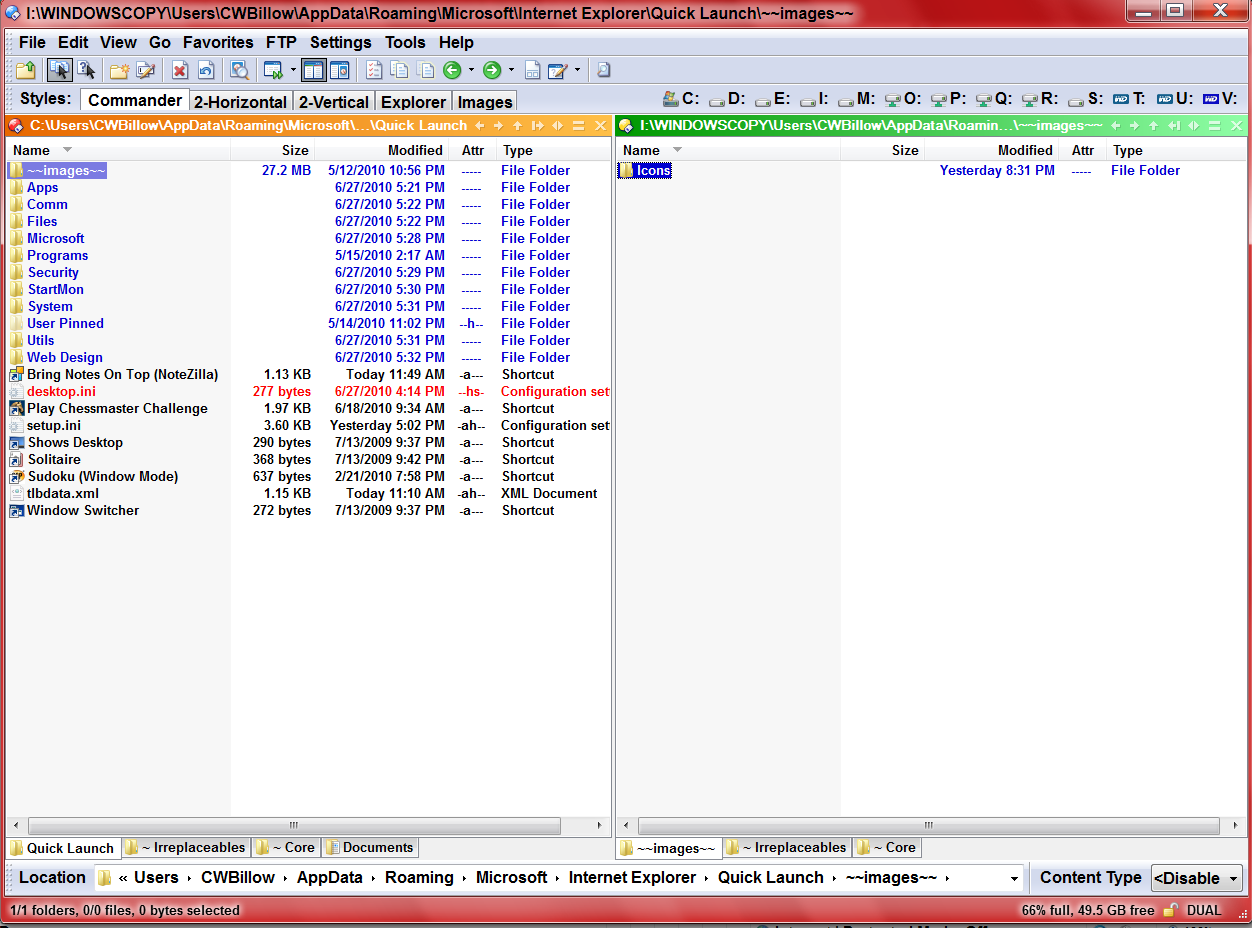
The right pane (Icons), is within a folder named " ~~images~~" (sans quotes). If I then elect the "Icons" folder (double-clicking on the right pane icon) I end up at " C:\Users\CWBillow\AppData\Roaming\Microsoft\Internet Explorer\Quick Launch ~~images~~ \Icons " -- every time.
The " I " version is created by copying the "C" drive to " I:\WINDOWSCOPY".
---
### Author:  [@Leo](https://resource.dopus.com/u/Leo)
#### Post date: [July 15, 2010, 6:49am UTC](https://resource.dopus.com/t/copying-quick-launch-icons/9722/4 "2010-07-15T06:49:39Z")
That seems impossible, unless the Icons folder on the right is a shortcut/hardlink/softlink pointing to the area on the C:\ drive (which it doesn't look like from the Type column) or you have modified what happens when you double-click folders (have you?).
Are there any hidden files/folders inside the Icons directory? e.g. a Desktop.ini or something named with a long number in { } ? (Check with another tool and make sure it is set to show you hidden files. If you can see the desktop.ini on the left of your screenshot in the other tool then it's showing hidden files.)
BTW, your first and second posts disagree on which drives and folders are involved at each stage which is confusing and makes me wonder if there is a missing step or something here that we don't know about yet.
---
### Author:  [@CWBillow](https://resource.dopus.com/u/CWBillow)
#### Post date: [July 15, 2010, 10:50pm UTC](https://resource.dopus.com/t/copying-quick-launch-icons/9722/5 "2010-07-15T22:50:33Z")
Leo;
I checked the folder and found nothing out of the ordinary. THEN, I set up a new folder (Icons 2) at the same level but copied nothing into it.
The same thing happened.
When I got to one level above "Icons 2" I was on my "I" drive, but the minute I entered the "Icons 2" folder, I was on my "C" drive"
This didn't and doesn't happen with either Explorer, working down from "My Computer", or using "Total Commander."
Very, very strange...
Regards,
Chuck
---
### Author:  [@Jon](https://resource.dopus.com/u/Jon)
#### Post date: [July 15, 2010, 11:07pm UTC](https://resource.dopus.com/t/copying-quick-launch-icons/9722/6 "2010-07-15T23:07:15Z")
What actually makes you think you are on your C drive? Can you post a screenshot showing before / after ?
---
### Author:  [@CWBillow](https://resource.dopus.com/u/CWBillow)
#### Post date: [July 16, 2010, 8:44am UTC](https://resource.dopus.com/t/copying-quick-launch-icons/9722/7 "2010-07-16T08:44:31Z")
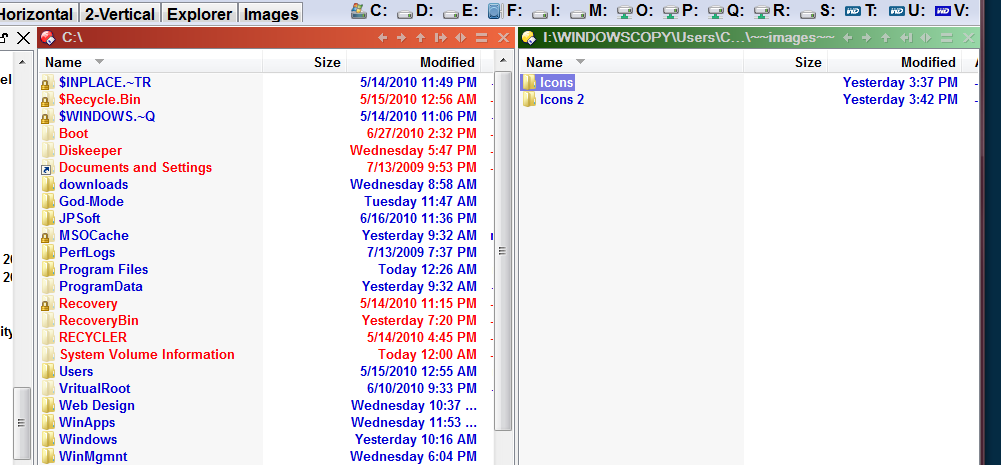
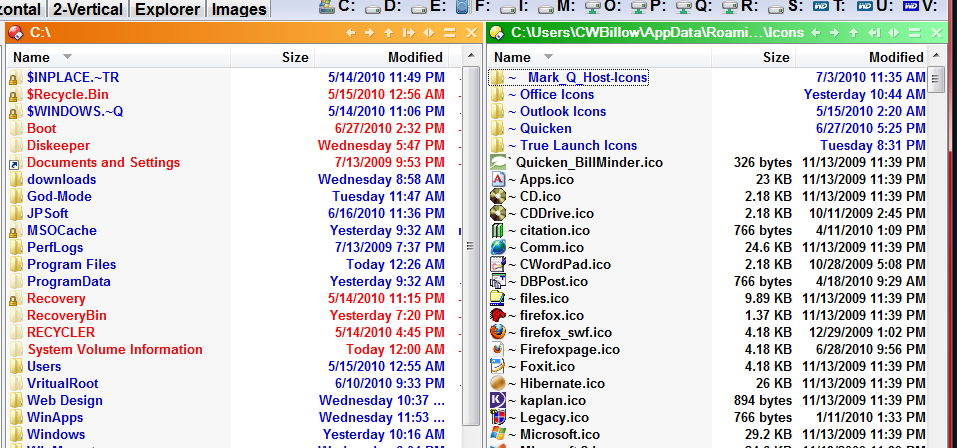
Leo, The one labeled "Before" shows the right pane with the Icons folder one level down -- on drive "I". Double-clicking "Icons" give me the after shot -- note the drive in the right panel.
Regards,
---
### Author:  [@Leo](https://resource.dopus.com/u/Leo)
#### Post date: [July 16, 2010, 9:37am UTC](https://resource.dopus.com/t/copying-quick-launch-icons/9722/8 "2010-07-16T09:37:18Z")
Really strange. 😮
When you're in the I-drive ~~~images~~~ folder, what happens if you manually type \Icons on to the end of the path field and hit return? Do you end up in the right place then?
---
### Author:  [@Jon](https://resource.dopus.com/u/Jon)
#### Post date: [July 16, 2010, 9:45am UTC](https://resource.dopus.com/t/copying-quick-launch-icons/9722/9 "2010-07-16T09:45:25Z")
Check if the Icons folder on I: has a target.lnk file in it:
- Go to the parent ~~images~~ folder
- Right click on the background, choose Command Prompt Here
- in the command prompt, type cd icons and press return
- type dir /ah
See if there's a target.lnk file listed - if so, deleting this file should fix the problem.
---
### Author:  [@CWBillow](https://resource.dopus.com/u/CWBillow)
#### Post date: [July 16, 2010, 5:59pm UTC](https://resource.dopus.com/t/copying-quick-launch-icons/9722/10 "2010-07-16T17:59:03Z")
[quote="leo"]Really strange. 😮
When you're in the I-drive ~~~images~~~ folder, what happens if you manually type \Icons on to the end of the path field and hit return? Do you end up in the right place then?[/quote]
Leo, it switches over to "C".
Chuck
---
### Author:  [@CWBillow](https://resource.dopus.com/u/CWBillow)
#### Post date: [July 16, 2010, 6:04pm UTC](https://resource.dopus.com/t/copying-quick-launch-icons/9722/11 "2010-07-16T18:04:05Z")
[quote="jon"]Check if the Icons folder on I: has a target.lnk file in it:
- Go to the parent ~~images~~ folder
- Right click on the background, choose Command Prompt Here
- in the command prompt, type cd icons and press return
- type dir /ah
See if there's a target.lnk file listed - if so, deleting this file should fix the problem.[/quote]
Leo, no target.lnk file.
---
### Author:  [@Jon](https://resource.dopus.com/u/Jon)
#### Post date: [July 17, 2010, 12:36am UTC](https://resource.dopus.com/t/copying-quick-launch-icons/9722/12 "2010-07-17T00:36:48Z")
If you rename the ~~images~~ folder on I: to something else, and then double-click it, what happens?
---
### Author:  [@CWBillow](https://resource.dopus.com/u/CWBillow)
#### Post date: [July 17, 2010, 2:52am UTC](https://resource.dopus.com/t/copying-quick-launch-icons/9722/13 "2010-07-17T02:52:08Z")
It still ends up on "C"
---
### Author:  [@Jon](https://resource.dopus.com/u/Jon)
#### Post date: [July 17, 2010, 4:08am UTC](https://resource.dopus.com/t/copying-quick-launch-icons/9722/14 "2010-07-17T04:08:22Z")
Rename the ~~images~~ folder on I: to something else, and then create a new folder called ~~images~~ and double-click it - what happens?
Also, what happens if you select it in the tree rather than double-clicking in the file display?
---
### Author:  [@CWBillow](https://resource.dopus.com/u/CWBillow)
#### Post date: [July 17, 2010, 4:28am UTC](https://resource.dopus.com/t/copying-quick-launch-icons/9722/15 "2010-07-17T04:28:55Z")
Jon, both renaming and/or accessing from the folder tree put me back on drive "C" the minute I entered the Ions folder. I get to ~~Images~~ without incident, but when entering Icons, it switches.
The interesting thing is that if I do it in explorer, or via My COmputer, it works fine.
Regards,
Chuck Billow
---
### Author:  [@Jon](https://resource.dopus.com/u/Jon)
#### Post date: [July 17, 2010, 5:51am UTC](https://resource.dopus.com/t/copying-quick-launch-icons/9722/16 "2010-07-17T05:51:10Z")
Sorry, I forgot it was the Icons folder that has the issue, not ~~images~~. Going back a couple of steps, what happens if you rename the Icons folder on I: and then double-click it?
---
### Author:  [@CWBillow](https://resource.dopus.com/u/CWBillow)
#### Post date: [July 17, 2010, 9:53am UTC](https://resource.dopus.com/t/copying-quick-launch-icons/9722/17 "2010-07-17T09:53:08Z")
Tried that too...still get the same thing.
Chuck
---
### Author:  [@Xyzzy](https://resource.dopus.com/u/Xyzzy)
#### Post date: [July 17, 2010, 11:42am UTC](https://resource.dopus.com/t/copying-quick-launch-icons/9722/18 "2010-07-17T11:42:50Z")
I am not following this exactly, but could you temporarily rename the TARGET folder (the one DO goes to after clicking) and see what happens?
---
### Author:  [@CWBillow](https://resource.dopus.com/u/CWBillow)
#### Post date: [July 17, 2010, 9:24pm UTC](https://resource.dopus.com/t/copying-quick-launch-icons/9722/19 "2010-07-17T21:24:49Z")
Tried that.
---
### Author:  [@CWBillow](https://resource.dopus.com/u/CWBillow)
#### Post date: [July 18, 2010, 12:35am UTC](https://resource.dopus.com/t/copying-quick-launch-icons/9722/20 "2010-07-18T00:35:18Z")
An update for any and all watching:
I turned off ALL startup programs via MSConfig. Then I rebooted.
Then, I just totally uninstalled DO (including registry entries). Then I double-checked, using Total COmmander and My Computer (Explorer), and drilling down past ~~images~~ into Icons had no problem, remaining on Drive "I" -- which is a hard partition, not a mapped drive.
ThenI re-installed DO, and, before making ANY changes at all, I tried to repeat the process of getting into the Icons folder on drive "I" at the parent level to "Icons" all is fine. But the minute I entered the Icons folder, I was on Drive "C", not Drive "I".
So I dunno what else to try...
Regards,
Chuck Billow
[Next page](https://resource.dopus.com/t/copying-quick-launch-icons/9722.md?page=2)