# Default atributes for a Folder and alphabetical order?
**URL:** https://resource.dopus.com/t/default-atributes-for-a-folder-and-alphabetical-order/47387
**Category:** Help & Support
**Created:** [December 9, 2023, 9:15pm UTC](https://resource.dopus.com/t/default-atributes-for-a-folder-and-alphabetical-order/47387 "2023-12-09T21:15:20Z")
**Posts on this page:** 3
**Page:** 1
### Author:  [@Mavoz777](https://resource.dopus.com/u/Mavoz777)
#### Post date: [December 9, 2023, 9:15pm UTC](https://resource.dopus.com/t/default-atributes-for-a-folder-and-alphabetical-order/47387/1 "2023-12-09T21:15:20Z")
Hi there, I'm trying to figure out how to do the following..and there are so many amazing options..I don't quite know exactly what I should do...
How do I?
Set a standard default view of attibutres for a folder. Eg. Name, Size, Date Modified, Free space?
Set the order of alphabetical order...so that I don't have to manually change this every time?
For the last 6 months or so I have to go every time and right click choose "Modified"..to have that show...I then also have to click on the "Name" header to make the files show in alphabetical order.
Thank you for your patience...I know this is documented out there somewhere....I just didn't know what to search for. Thanks.
---
### Author:  [@Leo](https://resource.dopus.com/u/Leo)
#### Post date: [December 9, 2023, 9:19pm UTC](https://resource.dopus.com/t/default-atributes-for-a-folder-and-alphabetical-order/47387/2 "2023-12-09T21:19:57Z")
If you're using Opus 13, you use Settings \> Set Lister Defaults and select "save the default folder format":
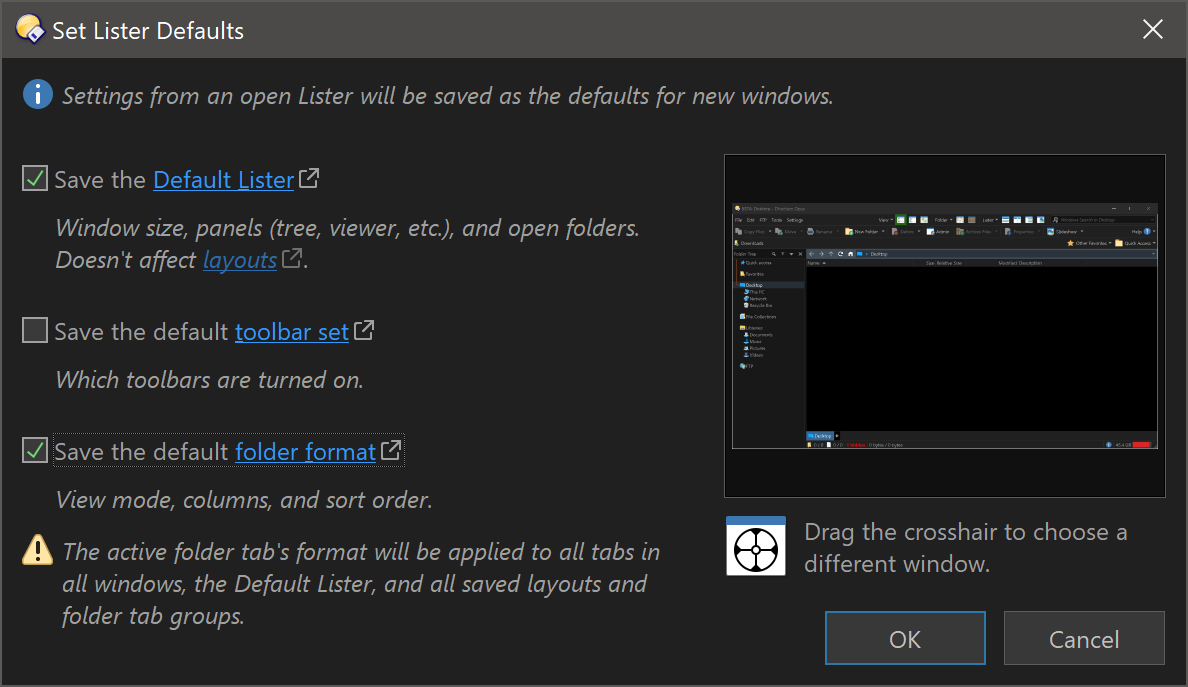
In both 12 & 13 you can also do it via the Folder \> Folder Format (aka Folder Options), which gives access to some additional settings. That's described here:
> [@Folder Formats: Quick Guide](https://resource.dopus.com/t/folder-formats-quick-guide/1313/1):
>
> This FAQ explains how to make Opus use the same format in all normal directories. There are two closely related FAQs which you may wish to read afterwards: [Folder Formats: Special Folders (Computer, Network, etc.)](https://resource.dopus.com/t/folder-formats-special-folders-computer-network-etc/1311/1)[Folder Formats: Detailed Guide](https://resource.dopus.com/t/folder-formats-detailed-guide/11718) T…
---
### Author:  [@Mavoz777](https://resource.dopus.com/u/Mavoz777)
#### Post date: [December 9, 2023, 9:26pm UTC](https://resource.dopus.com/t/default-atributes-for-a-folder-and-alphabetical-order/47387/3 "2023-12-09T21:26:16Z")
Thanks so much for that....it's been bugging me for months..and thought I better just go and try and figure this out. Thank you!! Can see how those options work...so much to learn about this great software...need to watch a few more tutorial videos. Thank you!