# Directory Opus Vista Icons v2.0
**URL:** https://resource.dopus.com/t/directory-opus-vista-icons-v2-0/3986
**Category:** Icons
**Created:** [June 6, 2007, 5:41pm UTC](https://resource.dopus.com/t/directory-opus-vista-icons-v2-0/3986 "2007-06-06T17:41:34Z")
**Posts on this page:** 14
**Page:** 2
### Author:  [@Cris](https://resource.dopus.com/u/Cris)
#### Post date: [March 11, 2009, 11:21pm UTC](https://resource.dopus.com/t/directory-opus-vista-icons-v2-0/3986/21 "2009-03-11T23:21:49Z")
Thanks for all the kind words!
> [@steje](#):
>
> (...) Any chance you might consider adding in a (...)
The DOpus Vista Icon Set v3 is a complete replacement set for the Default Icons.
When I have time, I will probably add some extra icons to a new Vista Add On Set ... 😉
---
### Author:  [@mackley](https://resource.dopus.com/u/mackley)
#### Post date: [March 24, 2009, 7:26am UTC](https://resource.dopus.com/t/directory-opus-vista-icons-v2-0/3986/22 "2009-03-24T07:26:45Z")
Good work !
I'm waiting the 3.0 version 😉
---
### Author:  [@Lars](https://resource.dopus.com/u/Lars)
#### Post date: [May 22, 2009, 2:51pm UTC](https://resource.dopus.com/t/directory-opus-vista-icons-v2-0/3986/23 "2009-05-22T14:51:10Z")
I was redoing my DOpus layout lately and stumbled over you Icon Set. Really nice work!
I just want to point out a small inconsistency. The icons that represent lists (like 'Layoutlist', 'Favotite-Liste', 'FTP-Adressmenu' and so on) are crafted in two different ways. One has list symbol as the filling element in the back and the defining symbon in the lower right corner up to the front. The other has the defining element in the back and the list symbol in the lower right corner.
I'm not ultimativly prefering one or an other, but would it be not nicer if the placement would be systematic?
As I read above you might work on some addon icon set. If you still collecting ideas, I would love to see icons for a 'Displaymode-List', a Flatview-List' a 'Sorty-by-List' and a 'Lister-Dialog-Panes-List.
With best regards, Lars
---
### Author:  [@Cris](https://resource.dopus.com/u/Cris)
#### Post date: [May 22, 2009, 4:36pm UTC](https://resource.dopus.com/t/directory-opus-vista-icons-v2-0/3986/24 "2009-05-22T16:36:52Z")
Lars, thank you for your reply. It's always good to get some critical feedback. You are right, the icons representing a list are inconsistent.
The next version will certainly be more consistent! BTW: I will start with the add-on set when the next version of the vista icons is ready.
---
### Author:  [@mattgorner](https://resource.dopus.com/u/mattgorner)
#### Post date: [June 25, 2009, 2:33pm UTC](https://resource.dopus.com/t/directory-opus-vista-icons-v2-0/3986/25 "2009-06-25T14:33:10Z")
I'm a bit late grabbing this one, lovely icon set, thanks Christiaan.
---
### Author:  [@Blade007](https://resource.dopus.com/u/Blade007)
#### Post date: [December 9, 2009, 5:32am UTC](https://resource.dopus.com/t/directory-opus-vista-icons-v2-0/3986/26 "2009-12-09T05:32:34Z")
Hey Christiaan,
Hows Ver 3 coming along played with v2 which are great but cant wait till v3 is out.
Cheers,
---
### Author:  [@Pirx](https://resource.dopus.com/u/Pirx)
#### Post date: [February 1, 2010, 2:12pm UTC](https://resource.dopus.com/t/directory-opus-vista-icons-v2-0/3986/27 "2010-02-01T14:12:05Z")
[quote="Blade007"]Hey Christiaan,
Hows Ver 3 coming along played with v2 which are great but cant wait till v3 is out.
Cheers,[/quote]
Here's a request for Version 3: The Recycle Bin image on the icon that is placed on the shift-delete dialog absolutely must go! Shift-delete causes a file to be deleted irretrievably, and not to go to the recycle bin. The corresponding icon must indicate that clearly (see the icons that are used for Delete versus Shift-Delete, respectively both in Windows Explorer and the default Opus icon set).
Otherwise, love your iconset, and look forward to version 3!
---
### Author:  [@Cris](https://resource.dopus.com/u/Cris)
#### Post date: [February 1, 2010, 8:56pm UTC](https://resource.dopus.com/t/directory-opus-vista-icons-v2-0/3986/28 "2010-02-01T20:56:59Z")
> [@](#):
>
> (...) Shift-delete causes a file to be deleted irretrievably (...) The corresponding icon must indicate that clearly.
Delete icon fixed ... Just download the file again. 😉
---
### Author:  [@Pirx](https://resource.dopus.com/u/Pirx)
#### Post date: [February 1, 2010, 10:15pm UTC](https://resource.dopus.com/t/directory-opus-vista-icons-v2-0/3986/29 "2010-02-01T22:15:41Z")
> [@Christiaan](#):
>
> quote Shift-delete causes a file to be deleted irretrievably (...) The corresponding icon must indicate that clearly.
Delete icon fixed ... Just download the file again. 😉[/quote]
Wow, that was fast! Thanks!
P.S.: While you're at it, why not simply copy the icon that Vista uses, like so: 😉

---
### Author:  [@Cris](https://resource.dopus.com/u/Cris)
#### Post date: [February 7, 2010, 3:21pm UTC](https://resource.dopus.com/t/directory-opus-vista-icons-v2-0/3986/30 "2010-02-07T15:21:07Z")
> [@Pirx](#):
>
> (...) While you're at it, why not simply copy the icon that Vista uses (...)
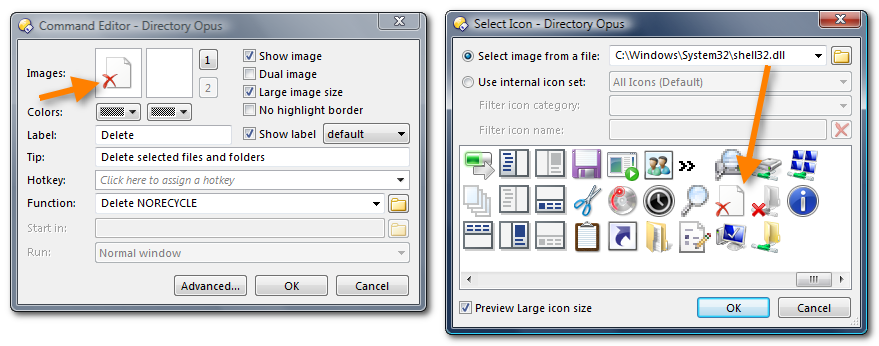
If you don't like a particular icon in the Set, you could use another icon/image for the button using the command editor:
---
### Author:  [@Pirx](https://resource.dopus.com/u/Pirx)
#### Post date: [February 27, 2010, 10:45pm UTC](https://resource.dopus.com/t/directory-opus-vista-icons-v2-0/3986/31 "2010-02-27T22:45:59Z")
[quote="Christiaan"]
If you don't like a particular icon in the Set, you could use another icon/image for the button using the command editor:[/quote]
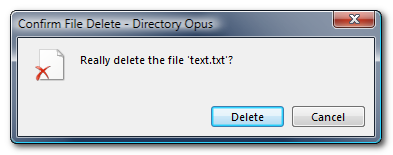
Awesome! Now, can I also change the icon that appears in the Delete dialog this way?
---
### Author:  [@Cris](https://resource.dopus.com/u/Cris)
#### Post date: [February 27, 2010, 11:47pm UTC](https://resource.dopus.com/t/directory-opus-vista-icons-v2-0/3986/32 "2010-02-27T23:47:15Z")
No, but did you know .dis files are just .zip files (just change the extension)? You could replace the delete.ico file (32x32 .ico file) inside the DopusVista.dis file.
If you don't want to replace files inside the original DopusVista.dis file, just download the .dis file below to only replace the delete icon. 😉
---
### Author:  [@Leo](https://resource.dopus.com/u/Leo)
#### Post date: [February 28, 2010, 1:01am UTC](https://resource.dopus.com/t/directory-opus-vista-icons-v2-0/3986/33 "2010-02-28T01:01:04Z")
You could also make your own icon set which contains/overrides just that one icon. Opus looks at the sets in the order you put them in Preferences.
---
### Author:  [@Cris](https://resource.dopus.com/u/Cris)
#### Post date: [February 28, 2010, 11:24am UTC](https://resource.dopus.com/t/directory-opus-vista-icons-v2-0/3986/34 "2010-02-28T11:24:21Z")
> [@Pirx](#):
>
> (...) Now, can I also change the icon that appears in the Delete dialog this way? (...)
Ok, here is your 'special icon-set'. It only contains a delete icon. Just download the .dis file and put it on top of the list (move to top - button) as Leo suggests above.
[DOpusVistaDelete.zip](https://resource.dopus.com/uploads/default/original/3X/0/e/0ee27bea0e049216ad04db9e555e4f9588a479a9.zip) (1.59 KB)
[Previous page](https://resource.dopus.com/t/directory-opus-vista-icons-v2-0/3986.md?page=1)