# Display Year from Filename in Column
**URL:** https://resource.dopus.com/t/display-year-from-filename-in-column/35635
**Category:** Help & Support
**Created:** [May 24, 2020, 12:37am UTC](https://resource.dopus.com/t/display-year-from-filename-in-column/35635 "2020-05-24T00:37:43Z")
**Posts on this page:** 10
**Page:** 1
### Author:  [@DMRoss](https://resource.dopus.com/u/DMRoss)
#### Post date: [May 24, 2020, 12:37am UTC](https://resource.dopus.com/t/display-year-from-filename-in-column/35635/1 "2020-05-24T00:37:43Z")
How can I display the year in a column taken from a filename?
---
### Author:  [@Leo](https://resource.dopus.com/u/Leo)
#### Post date: [May 24, 2020, 12:42am UTC](https://resource.dopus.com/t/display-year-from-filename-in-column/35635/2 "2020-05-24T00:42:31Z")
One of the Regular Expressions column scripts will let you do that.
e.g. This one has a nice UI for setting up the columns:
> [@Column - Custom Text and Regexp](https://resource.dopus.com/t/column-custom-text-and-regexp/18727/1):
>
> This script adds support for creating custom columns using regexp against the file name and path. The columns are configured using a dialog, with all Dopus column types and custom column settings being supported. Example output The first column are …
This one has a long tutorial written about it:
> [@RegexColumnsReloaded (easily add regex columns or any kind of column)](https://resource.dopus.com/t/regexcolumnsreloaded-easily-add-regex-columns-or-any-kind-of-column/20799/1):
>
> There have been several regex column scripts in the past year. I was first wow'ed by this feature when I came across wowbagger's script. Since then, I have been experimenting with columns and writing several scripts to suit my needs. At the risk of …
A third option (may also have a config UI; I'm not sure):
> [@RegExColumns V2](https://resource.dopus.com/t/regexcolumns-v2/19530/1):
>
> Overview This is a new Version of my [RegExColumns Script](https://resource.dopus.com/t/custom-column-custom-text-v1-2/18727/1) using the multi line script config for the RegExColumns Definition. There is no need to edit the actual script anymore. Installation Open Preferences / Toolbars / Scripts, then download Reg…
---
### Author:  [@DMRoss](https://resource.dopus.com/u/DMRoss)
#### Post date: [May 24, 2020, 11:23pm UTC](https://resource.dopus.com/t/display-year-from-filename-in-column/35635/3 "2020-05-24T23:23:15Z")
Thanks, Leo. I tried all three options, but can't get what appears to be something simple working. I have the scripts loaded, see the menu options, but can't see how to then display the year column with the years displayed from file names.
---
### Author:  [@Leo](https://resource.dopus.com/u/Leo)
#### Post date: [May 24, 2020, 11:28pm UTC](https://resource.dopus.com/t/display-year-from-filename-in-column/35635/4 "2020-05-24T23:28:27Z")
You'll need to configure the scripts to add columns that extract the dates based on the format of your filenames and dates.
If you give us some examples of what the filenames look like, and what you want the column to show for each example, we might be able to give more detail.
---
### Author:  [@DMRoss](https://resource.dopus.com/u/DMRoss)
#### Post date: [May 25, 2020, 12:19am UTC](https://resource.dopus.com/t/display-year-from-filename-in-column/35635/5 "2020-05-25T00:19:33Z")
It's quite simple, really: my files are titled using the format Example (2020). I would just like to be able to display each of the years of these shown in a separate Year column. Thanks.
---
### Author:  [@lxp](https://resource.dopus.com/u/lxp)
#### Post date: [May 25, 2020, 5:38am UTC](https://resource.dopus.com/t/display-year-from-filename-in-column/35635/6 "2020-05-25T05:38:26Z")
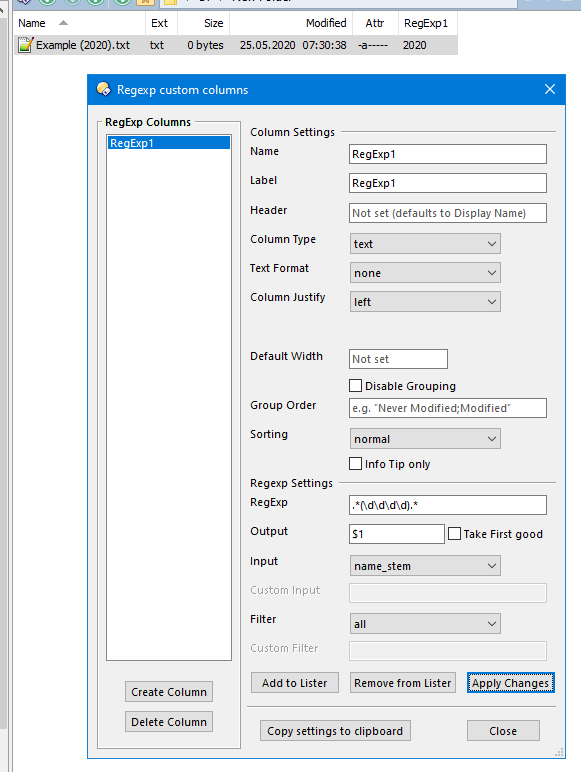
Quick tip:
---
### Author:  [@DMRoss](https://resource.dopus.com/u/DMRoss)
#### Post date: [May 25, 2020, 2:29pm UTC](https://resource.dopus.com/t/display-year-from-filename-in-column/35635/7 "2020-05-25T14:29:42Z")
I can't get that screenshot window to load. What am I missing?
---
### Author:  [@lxp](https://resource.dopus.com/u/lxp)
#### Post date: [May 25, 2020, 2:36pm UTC](https://resource.dopus.com/t/display-year-from-filename-in-column/35635/8 "2020-05-25T14:36:35Z")
That's from the first link Leo posted. Just install the script and the button and you'll get the configuration dialog.
---
### Author:  [@Leo](https://resource.dopus.com/u/Leo)
#### Post date: [May 25, 2020, 2:45pm UTC](https://resource.dopus.com/t/display-year-from-filename-in-column/35635/9 "2020-05-25T14:45:18Z")
I've added some details to the root post in that thread to make it a bit easier.
---
### Author:  [@DMRoss](https://resource.dopus.com/u/DMRoss)
#### Post date: [May 25, 2020, 3:05pm UTC](https://resource.dopus.com/t/display-year-from-filename-in-column/35635/10 "2020-05-25T15:05:14Z")
Thanks. I got there in the end!