# DO11 slim style
**URL:** https://resource.dopus.com/t/do11-slim-style/16980
**Category:** Screenshots
**Created:** [January 8, 2014, 1:24am UTC](https://resource.dopus.com/t/do11-slim-style/16980 "2014-01-08T01:24:50Z")
**Posts on this page:** 14
**Page:** 1
### Author:  [@newguy](https://resource.dopus.com/u/newguy)
#### Post date: [January 8, 2014, 1:24am UTC](https://resource.dopus.com/t/do11-slim-style/16980/1 "2014-01-08T01:24:50Z")
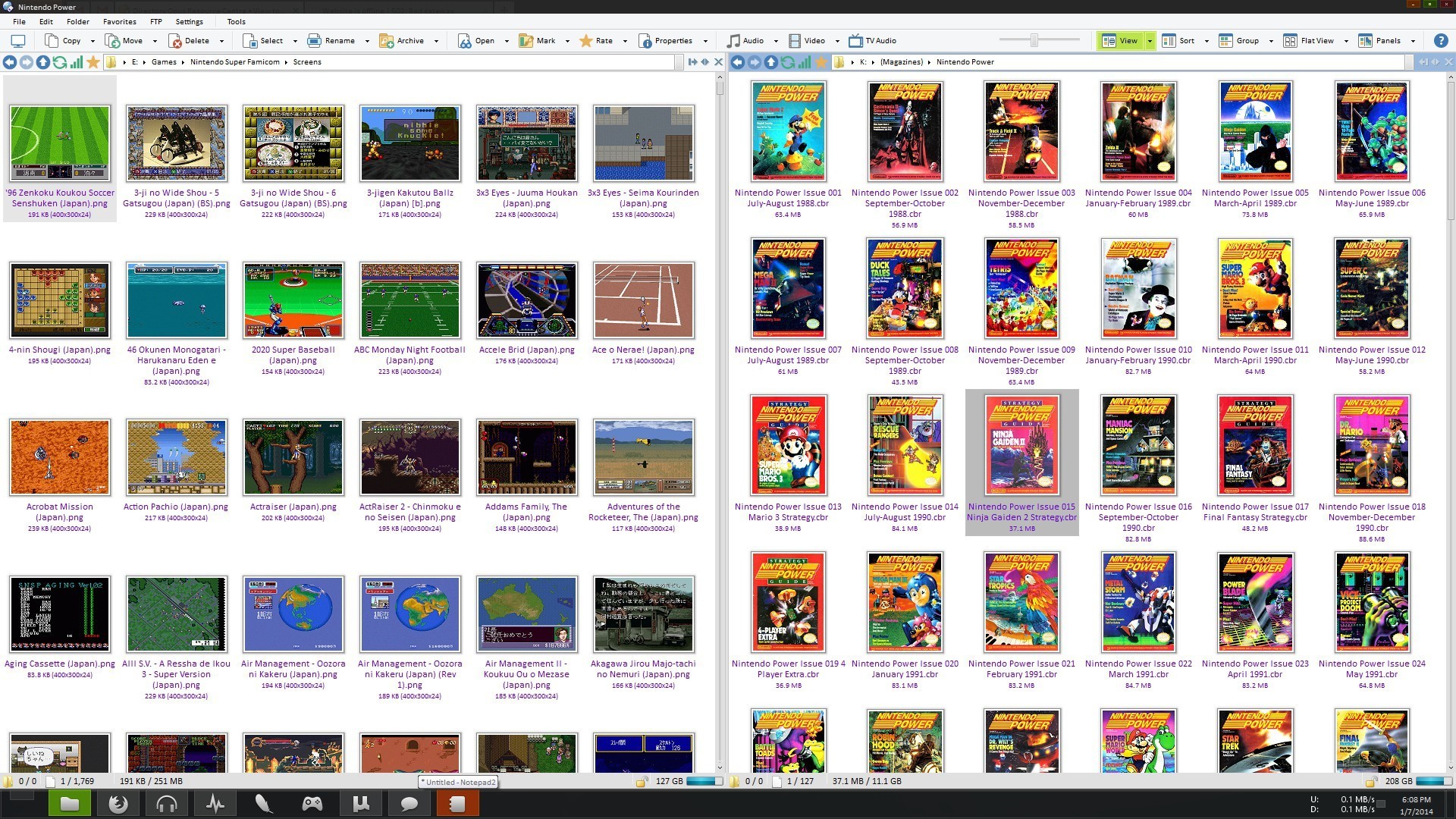
Trying to slim down my toolbars and maximize the size of my file displays. The new file display border toolbars in DO11 certainly helps!
---
### Author:  [@nate\_dawg](https://resource.dopus.com/u/nate_dawg)
#### Post date: [January 8, 2014, 3:21am UTC](https://resource.dopus.com/t/do11-slim-style/16980/2 "2014-01-08T03:21:37Z")
What is the wifi icon next to the refresh and favorites icons?
---
### Author:  [@anon94230625](https://resource.dopus.com/u/anon94230625)
#### Post date: [January 8, 2014, 12:13pm UTC](https://resource.dopus.com/t/do11-slim-style/16980/3 "2014-01-08T12:13:33Z")
To place the refresh icon into lister-toolbar is a good idea. Will include one that fits to the arrows in my new iconset 🙂.
---
### Author:  [@newguy](https://resource.dopus.com/u/newguy)
#### Post date: [January 8, 2014, 1:01pm UTC](https://resource.dopus.com/t/do11-slim-style/16980/4 "2014-01-08T13:01:22Z")
> [@nate\_dawg](#):
>
> What is the wifi icon next to the refresh and favorites icons?
It's actually a button to calculate folder sizes and to toggle the "relative size" column on and off.
I need to edit the icon to mix the bars up a little so it doesn't look like a phone signal meter 🙂
---
### Author:  [@anon94230625](https://resource.dopus.com/u/anon94230625)
#### Post date: [January 8, 2014, 1:19pm UTC](https://resource.dopus.com/t/do11-slim-style/16980/5 "2014-01-08T13:19:09Z")
Just draw a ruler 🙂.
---
### Author:  [@nate\_dawg](https://resource.dopus.com/u/nate_dawg)
#### Post date: [January 8, 2014, 3:45pm UTC](https://resource.dopus.com/t/do11-slim-style/16980/6 "2014-01-08T15:45:42Z")
> [@newguy](#):
>
> It's actually a button to calculate folder sizes and to toggle the "relative size" column on and off.
Can you paste the button code because that's an interesting idea.
I also like the refresh button being there... the only problem is that the pathbar is getting shorter and shorter for me on my 15" laptop. I'm trying to change my habits with this release as well by using the dual path bars rather than a single one in the toolbar above, but I'm not sure this will work out.
---
### Author:  [@newguy](https://resource.dopus.com/u/newguy)
#### Post date: [January 8, 2014, 4:33pm UTC](https://resource.dopus.com/t/do11-slim-style/16980/7 "2014-01-08T16:33:12Z")
Yeah I would like to put more buttons, a couple menus, and a search bar in there, but then the path bar wouldn't fit. I am almost tempted to just fill the toolbar with other useful bits and go back to having the path field in my menu toolbar!
The button is very simple. Left-click is set to GetSizes {file$}, right-click is set to Set COLUMNSTOGGLE=disksizerel(2).
I use it quite often for finding and purging large files I don't need anymore. I have almost 10TB of drive space, but somehow I keep running out of room!
---
### Author:  [@Leo](https://resource.dopus.com/u/Leo)
#### Post date: [January 8, 2014, 6:36pm UTC](https://resource.dopus.com/t/do11-slim-style/16980/8 "2014-01-08T18:36:16Z")
GetSizes on its own should be all you need, without the {file$} arg (the command doesn't take a filename).
---
### Author:  [@newguy](https://resource.dopus.com/u/newguy)
#### Post date: [January 8, 2014, 6:44pm UTC](https://resource.dopus.com/t/do11-slim-style/16980/9 "2014-01-08T18:44:38Z")
Haha thanks Leo. When I saw that you posted in this thread, I thought to myself: "he's probably correcting the code I pasted." 😃
---
### Author:  [@anon94230625](https://resource.dopus.com/u/anon94230625)
#### Post date: [January 8, 2014, 6:51pm UTC](https://resource.dopus.com/t/do11-slim-style/16980/10 "2014-01-08T18:51:06Z")
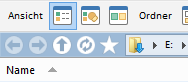
Done! 😃 Thanks for the idea.
---
### Author:  [@newguy](https://resource.dopus.com/u/newguy)
#### Post date: [January 8, 2014, 7:20pm UTC](https://resource.dopus.com/t/do11-slim-style/16980/11 "2014-01-08T19:20:18Z")
Nice buttons! White is a good idea, it will go with any color. Will you be sharing them?
---
### Author:  [@anon94230625](https://resource.dopus.com/u/anon94230625)
#### Post date: [January 8, 2014, 10:18pm UTC](https://resource.dopus.com/t/do11-slim-style/16980/12 "2014-01-08T22:18:58Z")
Go here: [url][S-DOX II Icon Set (2 x 208 icons)](https://resource.dopus.com/t/s-dox-ii-icon-set-2-x-208-icons/16879/1)]
---
### Author:  [@newguy](https://resource.dopus.com/u/newguy)
#### Post date: [August 26, 2017, 8:58pm UTC](https://resource.dopus.com/t/do11-slim-style/16980/13 "2017-08-26T20:58:05Z")
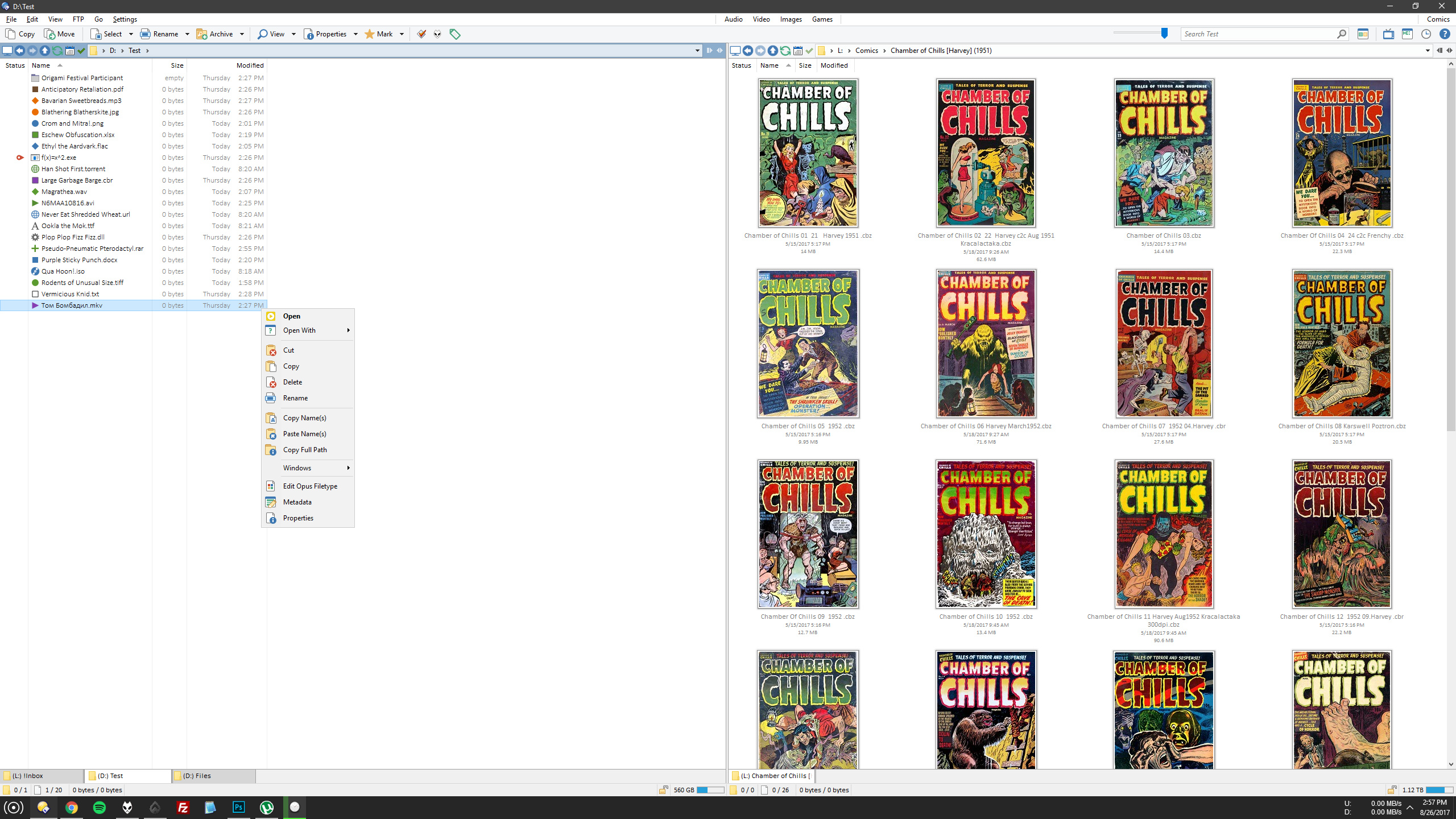
Updated screenshot. Not much has changed in terms of the layout.
The left pane shows a file labeling system I've been working on. I used to color-code filenames based on file type or file type category. Now I'm using icons instead, which is a much cleaner look.
For .exe files, I am using a status icon to help me quickly locate the executable when I enter a program's folder.
It's a good system since it's all part of my config file, so when I re-install Windows, it's easy to load up again. No messing with the registry or using third party apps to change icons...
---
### Author:  [@Enternal](https://resource.dopus.com/u/Enternal)
#### Post date: [August 27, 2017, 8:58pm UTC](https://resource.dopus.com/t/do11-slim-style/16980/14 "2017-08-27T20:58:27Z")
Very nice and simple! I like it!
Unrelated but I took a look at your old screenshot. Is that... Saizan Eyes (3x3) in the left pane? Wow... so much memories. I should re-read that.