# DOpus 10 & Everything
**URL:** https://resource.dopus.com/t/dopus-10-everything/10943
**Category:** Help & Support
**Created:** [May 17, 2011, 6:08pm UTC](https://resource.dopus.com/t/dopus-10-everything/10943 "2011-05-17T18:08:52Z")
**Posts on this page:** 15
**Page:** 1
### Author:  [@Subway](https://resource.dopus.com/u/Subway)
#### Post date: [May 17, 2011, 6:08pm UTC](https://resource.dopus.com/t/dopus-10-everything/10943/1 "2011-05-17T18:08:52Z")
Hi,
in my DOpus 9 Enviroment i have used DOpus & Everything (as explained here):
[url][SearchEverything: Getting Opus to work with Everything v4.0](https://resource.dopus.com/t/searcheverything-getting-opus-to-work-with-everything-v4-0/8894/1)]
for quick searches accross all my files.
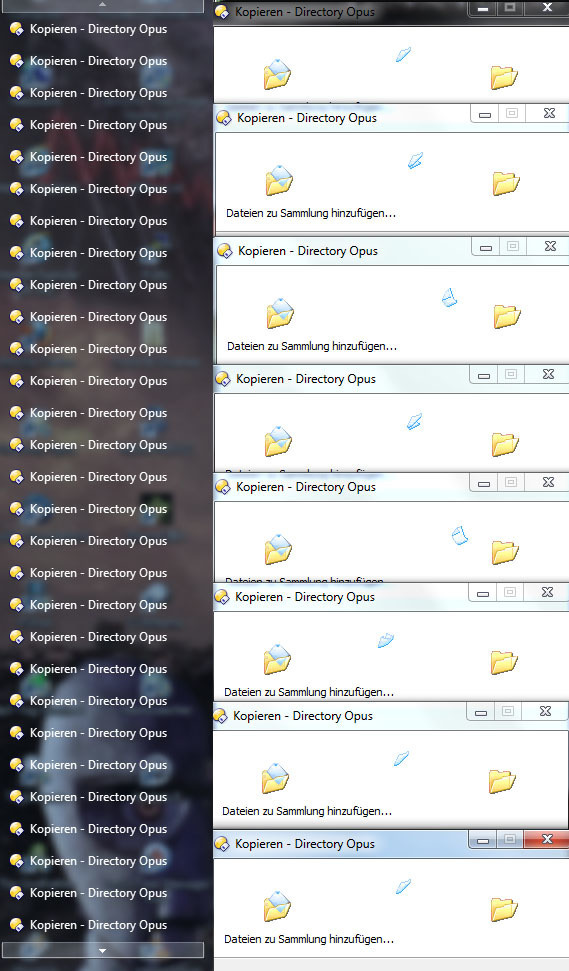
But since i've installed DOpus 10 it will generate a lot of small copy windows (most of the time, but not allways) that will not go away and i have to kill Dopus.
Can someone test this & help me to get it working again.
tnx
---
### Author:  [@Dick\_Pape](https://resource.dopus.com/u/Dick_Pape)
#### Post date: [May 17, 2011, 6:20pm UTC](https://resource.dopus.com/t/dopus-10-everything/10943/2 "2011-05-17T18:20:56Z")
I also use Everything and Dopus (not integrated) and have not encountered a "small copy window" issue. I have had problems with Everything and Irfanview not playing well together but this has been going on forever.
---
### Author:  [@Leo](https://resource.dopus.com/u/Leo)
#### Post date: [May 17, 2011, 6:23pm UTC](https://resource.dopus.com/t/dopus-10-everything/10943/3 "2011-05-17T18:23:21Z")
Could you post a screenshot of one of the windows you see?
Not sure if you mean copy progress windows or some other kind of progress window.
---
### Author:  [@Subway](https://resource.dopus.com/u/Subway)
#### Post date: [May 17, 2011, 6:34pm UTC](https://resource.dopus.com/t/dopus-10-everything/10943/4 "2011-05-17T18:34:03Z")
Here we go:
MaybeI it has something to do with the used command in the compiled Hotkeys.exe ??
RunWait,"%dopusRT%" /cmd Copy TO="coll://Everything" COPYTOCOLL=member FILE="%A\_LoopField%",,Hide
---
### Author:  [@abr](https://resource.dopus.com/u/abr)
#### Post date: [May 18, 2011, 12:24pm UTC](https://resource.dopus.com/t/dopus-10-everything/10943/5 "2011-05-18T12:24:22Z")
Following could help: in -\> settings -\> preferences -\> Opus start -\> explorer replacement there is an option
"open external folders in new tab". Check this option, if it´s unchecked, to see if it solves the problem.
---
### Author:  [@abr](https://resource.dopus.com/u/abr)
#### Post date: [May 18, 2011, 12:25pm UTC](https://resource.dopus.com/t/dopus-10-everything/10943/6 "2011-05-18T12:25:22Z")
Wrong click, sorry.
---
### Author:  [@Subway](https://resource.dopus.com/u/Subway)
#### Post date: [May 18, 2011, 6:38pm UTC](https://resource.dopus.com/t/dopus-10-everything/10943/7 "2011-05-18T18:38:02Z")
Nope, Sorry, that didn't do the trick.
i didn't change anything on my system (btw. Win7 Pro X64 SP1), except that i move from DOpus 9 to DOpus 10 (And maybe changed some settings in DO).
So i guess that something in the dopusrt copy command has changed??
---
### Author:  [@Leo](https://resource.dopus.com/u/Leo)
#### Post date: [May 18, 2011, 7:05pm UTC](https://resource.dopus.com/t/dopus-10-everything/10943/8 "2011-05-18T19:05:44Z")
What does %A\_LoopField% turn into?
---
### Author:  [@Subway](https://resource.dopus.com/u/Subway)
#### Post date: [May 19, 2011, 3:17am UTC](https://resource.dopus.com/t/dopus-10-everything/10943/9 "2011-05-19T03:17:29Z")
How can i determine that?
Is there a way to trace?
I only have the compiled Autohotkey exe from that Thread: [url][SearchEverything: Getting Opus to work with Everything v4.0](https://resource.dopus.com/t/searcheverything-getting-opus-to-work-with-everything-v4-0/8894/1)]
---
### Author:  [@Leo](https://resource.dopus.com/u/Leo)
#### Post date: [May 19, 2011, 5:59am UTC](https://resource.dopus.com/t/dopus-10-everything/10943/10 "2011-05-19T05:59:47Z")
I would edit the script so that it display a message box with the command-line it is running. That way we can see what it's actually doing and try to reproduce it by itself, without Autohotkey & Everything being involved.
I don't know enough about Autohtokey to say how to do that, though.
---
### Author:  [@Subway](https://resource.dopus.com/u/Subway)
#### Post date: [May 19, 2011, 5:41pm UTC](https://resource.dopus.com/t/dopus-10-everything/10943/11 "2011-05-19T17:41:03Z")
After installing AutoHotKey i can answer your question (before, i had only the executable on my computer).
The %A\_LoopField% Variable holds the found Path or Filename.
After tracing a whole search process with \> 100 found items (was a lot MsgBox to click away 😁 ), i couln't see any inconsistence in the passed variables.
There all looking good for me.
But one thing i've noticed is that i didn't get any copy window from dopus if i display a MsgBox after each found item.
Without the MsgBox the same behaviour as described occur.
So it maybe has something to do with the timing?
---
### Author:  [@Subway](https://resource.dopus.com/u/Subway)
#### Post date: [May 20, 2011, 9:36am UTC](https://resource.dopus.com/t/dopus-10-everything/10943/12 "2011-05-20T09:36:16Z")
After some further testing i've found out that when i insert a "Loop 25" (Waits 25 Milliseconds, it's the shortest time that will work allways) after each call to dopusrt.exe everything works as in DOpus 9 and expected.
Maybe the call to dopusrt.exe should be done in another way than in DOpus 9??
I've found this sentence on the "What's New" Section for DOpus 10:
"There is a new interface to manipulate the Opus File Collections system from outside the program, using dopusrt.exe with the /col option"
Does anyone have further information of this "new interface" ?
tnx
---
### Author:  [@Leo](https://resource.dopus.com/u/Leo)
#### Post date: [May 20, 2011, 10:07am UTC](https://resource.dopus.com/t/dopus-10-everything/10943/13 "2011-05-20T10:07:19Z")
Using the /col stuff would make sense, even without this issue.
It's described in detail in the last section of the What's New file.
---
### Author:  [@Subway](https://resource.dopus.com/u/Subway)
#### Post date: [May 20, 2011, 10:30am UTC](https://resource.dopus.com/t/dopus-10-everything/10943/14 "2011-05-20T10:30:48Z")
Thanks Leo.
Will do some testing in the evening.
Now i has something to do "in real life" 🕶
---
### Author:  [@Subway](https://resource.dopus.com/u/Subway)
#### Post date: [May 20, 2011, 9:16pm UTC](https://resource.dopus.com/t/dopus-10-everything/10943/15 "2011-05-20T21:16:50Z")
Hi,
some good news (for me) 😉
After adapting the AutoHotKey Script to the new /col stuff that DOpus 10 introduce it will work again the way it does in DOpus 9.
I would thnaks all the people who have looked at my problem and pointing me in the right direction. 👍