I have released a new version:
- Added ExifTool class to get EXIF information using ExifTool
I have released a new version:
Hello, thank you for your excellent work!
I think of a function : determine the encoding of text.
This is an open-source tool which can detect the encoding (for example, non-UTF8 without BOM).
I really need such a com object:
var uchardet = new ActiveXObject('DOpusScriptingExtensions.Uchardet');
var file = 'c:\\test.txt';
var encoding = uchardet.detect(file);
DOpus.Output(encoding);

//then we can decode the content in the txt file.
var st = DOpus.Create.StringTools;
var file = DOpus.FSUtil.OpenFile(file)
var Blob = file.read()
var content = st.Decode(Blob, encoding ); //so we get the right text.
Great idea. It can be done.
Do you know if the names that uchardet returns are accepted by the StringTools.Decode method as is?
Although the return value are not exactly equal to StringTools.Decode, we can do a mapping. 
It seems that Windows uses the same names (~95% matching) as returned from uchardet:
Code Page Identifiers - Win32 apps
Agreed. I will implement it soon.
I have released a new version:
Thank you! very cool!
In DOpus jscript, use "new ActiveXObject()" instead of "createComObject()".
Indeed, thank you. I have fixed the Readme file.
@PolarGoose
This is probably the right place to mention an issue I had during install (my first install of this tool, due to a script by @errante that required using your extension).
FYI I'm running a still fully updated Windows 10 and always using the latest built of DO 13 (Beta).
The install itself was peanuts, but it shuts down DO during the process. When I restarted DO, my tabs + tab history were gone (not too bad) but also all my toolbars were gone, that is, disabled. I could quickly restore them - it just required some manipulation because I use 3 vertical toolbars and DO cannot restore them in the right place automatically. But discovering that my toolbars have gone was somewhat scary - not good for trust (I'm thinking of non-IT aware users, unlike me).
Would this be an issue with your extension or rather a problem in DO? (I could ask this to @Leo too of course).
Another little thing: I like transparency. But I could not find your extension under "Miscellaneous > Shell Extensions" in DO's Preferences. Or am I looking in the wrong place?
In addition: when using your extension in a script, only for certain functionalities, is it possible to test if it has been installed? So we can disable or hide one or more buttons in a dialog based on the outcome of this test.
The install itself was peanuts, but it shuts down DO during the process.
The installer shuts down the DOpus during installation.
Now I realise that it is not needed and seems to cause problems like you described.
I have fixed the installer. Now it doesn't shut down the Directory Opus.
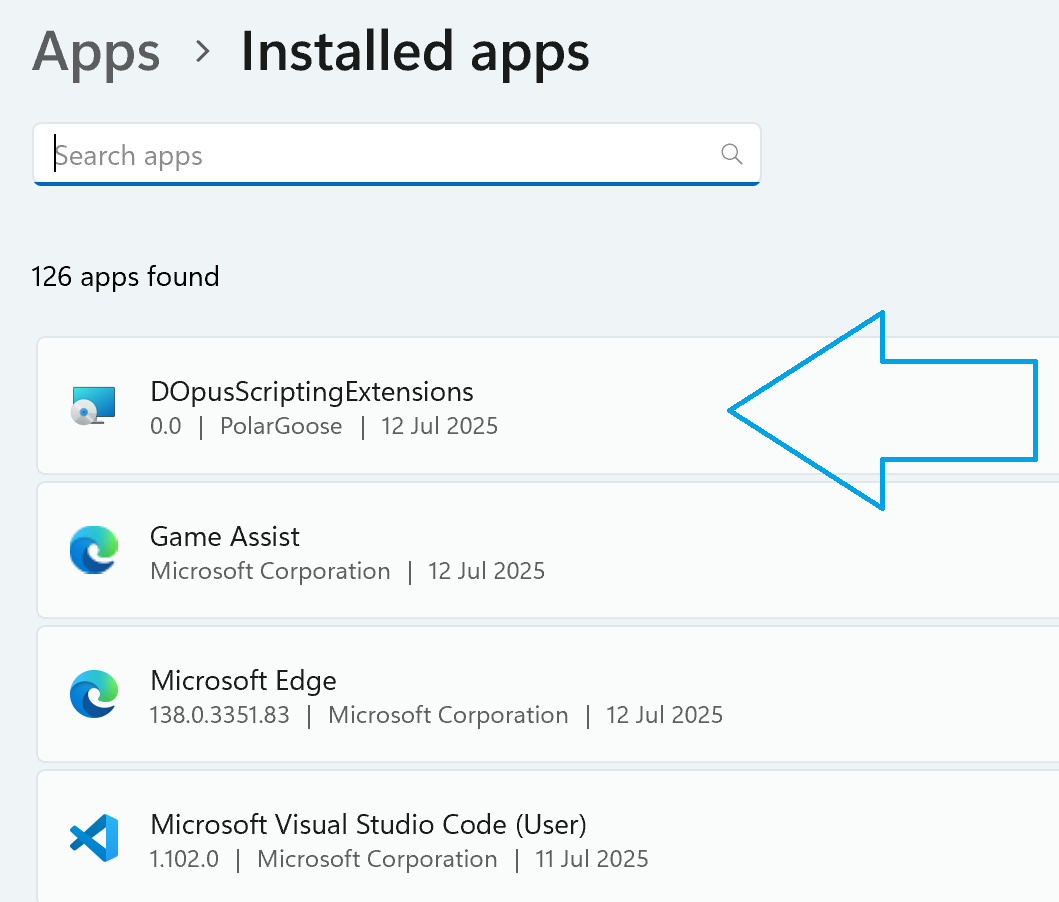
I like transparency. But I could not find your extension under "Miscellaneous > Shell Extensions" in DO's Preferences. Or am I looking in the wrong place?
You can see it in the Apps & Features Windows menu, and you can uninstall it from there:
In addition: when using your extension in a script, only for certain functionalities, is it possible to test if it has been installed?
Yes, there are many ways you can do it. I think the simplest is:
// returns a COM object if available, otherwise returns null
function tryCreateComObject(comClassName) {
  try {
    return new ActiveXObject(comClassName) // throws if the COM object is not available
  } catch (e) {
    return null // COM object is not available
  }
}
Indeed, the test works fine. Thx for the quick answers.
As another simple way, we can use .bat to add COM class to registry.
(bat code is implemented by zyRen)
This is a "portable" bat package.
DOpusScriptingExtensions18-bat-portable.zip (5.2 KB)
Interesting idea. I didn't know that there is UPX packaging 
Thank you for the hint.
However, I'm not sure packaging is worth it to be honest.
About the bat script:
You can do it by calling regsvr32 comDll.dll and unregister it by regsvr32 /u comDll.dll
Another concern is that it is not so portable because you have to remember to unregister the dll before you remove it. Also it is better to unregister previous version before you register new one. It is all handled by the MSI installer out of the box. That is why I had to create an msi installer, this is the only reliable way to ensure that nothing gets screwed up.
Right.
Run the bat to install, and run it again to uninstall.
The advantage is:no files left on the C drive.
The advantage is:no files left on the C drive.
When you uninstall the MSI installer, it also should remove everything, or do you mean something else?
just I personally prefer portable software.
I have collected a lot of portable softwares and put them in a folder ( such as D: \ Tools),
then use a bat to perform multiple softwares installation at once,
in order to quickly configure these softwares after reinstalling system.
there is this line in .bat
if exist "%WinDir%\System32\regsvr32.exe" regsvr32 /s "%~dp0DOpusScriptingExtensions.dll" 1>nul 2>nul&Goto End
Only if not existing "regsvr32.exe", the following "reg add" lines will be executed.
Sorry, didn't notice. To be honest, I couldn't read part of the bat script because it uses an unusual encoding
Is it possible to not have regsvr32.exe on the system?
Also, please take into account that for MediaInfo and ExifTool functionality, you need extra files next to the DLL. Just the DLL is not enough.
Is there a reason to use UPX on modern hardware?
We generally don’t allow it on the forum as it causes problems and has no advantages that we know of.