# Double-clicked images not opening in DO Image Viewer
**URL:** https://resource.dopus.com/t/double-clicked-images-not-opening-in-do-image-viewer/23456
**Category:** Help & Support
**Created:** [September 13, 2016, 8:35pm UTC](https://resource.dopus.com/t/double-clicked-images-not-opening-in-do-image-viewer/23456 "2016-09-13T20:35:32Z")
**Posts on this page:** 9
**Page:** 1
### Author:  [@Unregistered\_User](https://resource.dopus.com/u/Unregistered_User)
#### Post date: [September 13, 2016, 8:35pm UTC](https://resource.dopus.com/t/double-clicked-images-not-opening-in-do-image-viewer/23456/1 "2016-09-13T20:35:32Z")
I found "[HOW TO: Use the Opus image viewer inside or outside of Opus](https://resource.dopus.com/t/how-to-use-the-opus-image-viewer-inside-or-outside-of-opus/1326/1)", and I have the "Use internal picture viewer for:" setting on "all recognized pictures", but images double clicked in DO still open in an external viewer. Tested with .GIF, .JPG, and .PNG. Please advise.
---
### Author:  [@Jon](https://resource.dopus.com/u/Jon)
#### Post date: [September 13, 2016, 8:50pm UTC](https://resource.dopus.com/t/double-clicked-images-not-opening-in-do-image-viewer/23456/2 "2016-09-13T20:50:03Z")
See what you have set for the double-click event in Filetypes for the individual filetypes and also the Images group.
(To get there, go to Settings -\> Filetypes, locate the filetype or group in question, click Edit, then look on the Events tab).
---
### Author:  [@Unregistered\_User](https://resource.dopus.com/u/Unregistered_User)
#### Post date: [September 13, 2016, 10:34pm UTC](https://resource.dopus.com/t/double-clicked-images-not-opening-in-do-image-viewer/23456/3 "2016-09-13T22:34:31Z")
Sticking with PNG to keep it simple... For PNG, left double click events are "". Same for the Images file type group.
---
### Author:  [@Unregistered\_User](https://resource.dopus.com/u/Unregistered_User)
#### Post date: [September 13, 2016, 10:38pm UTC](https://resource.dopus.com/t/double-clicked-images-not-opening-in-do-image-viewer/23456/4 "2016-09-13T22:38:32Z")
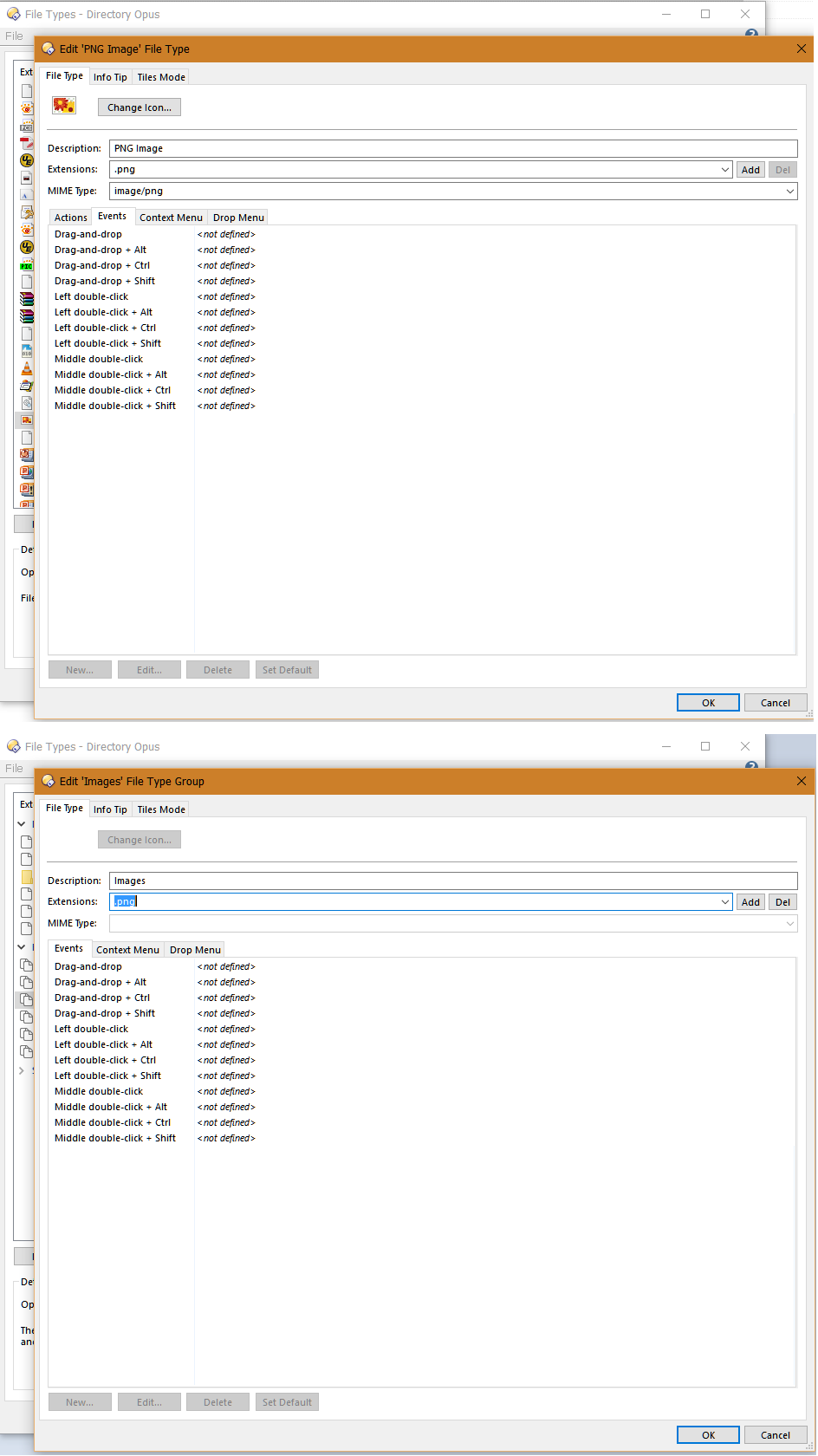
---
### Author:  [@Jon](https://resource.dopus.com/u/Jon)
#### Post date: [September 13, 2016, 10:42pm UTC](https://resource.dopus.com/t/double-clicked-images-not-opening-in-do-image-viewer/23456/5 "2016-09-13T22:42:39Z")
Something else to check, also in file types - make sure the double-click event for the Recognized Images entry (in the "Directory Opus File Types" section) is set to Show.
---
### Author:  [@Unregistered\_User](https://resource.dopus.com/u/Unregistered_User)
#### Post date: [September 13, 2016, 10:45pm UTC](https://resource.dopus.com/t/double-clicked-images-not-opening-in-do-image-viewer/23456/6 "2016-09-13T22:45:23Z")
Yep, it's set to "show". I hope you believe me without a screenshot. 🙂
---
### Author:  [@Unregistered\_User](https://resource.dopus.com/u/Unregistered_User)
#### Post date: [September 13, 2016, 10:47pm UTC](https://resource.dopus.com/t/double-clicked-images-not-opening-in-do-image-viewer/23456/7 "2016-09-13T22:47:20Z")
Oops! I accidentally looked at "Left double-click + Ctrl". The "Left double-click" entry was "". Changed it to "show" and I think I'm good now. Thanks! Love not being able to edit posts!
---
### Author:  [@Jon](https://resource.dopus.com/u/Jon)
#### Post date: [September 13, 2016, 11:00pm UTC](https://resource.dopus.com/t/double-clicked-images-not-opening-in-do-image-viewer/23456/8 "2016-09-13T23:00:21Z")
I believed you even before the screenshots 🙂
I actually think this is classed as a bug; if the Preferences option is on and left double-click isn't defined on the Recognized Images filetype it probably should default to "Show", otherwise as you discovered it appears like the option does nothing.
---
### Author:  [@BeeVee](https://resource.dopus.com/u/BeeVee)
#### Post date: [February 3, 2026, 1:24pm UTC](https://resource.dopus.com/t/double-clicked-images-not-opening-in-do-image-viewer/23456/9 "2026-02-03T13:24:05Z")
Even when I set the PNG entry to show, it still didn't. I'm glad it isn't me going mad\*
B
\*I might still be going mad, but this isn't the proximate cause.