# Dual Lister Layout With Toolbar Between
**URL:** https://resource.dopus.com/t/dual-lister-layout-with-toolbar-between/54423
**Category:** Help & Support
**Created:** [February 4, 2025, 9:47am UTC](https://resource.dopus.com/t/dual-lister-layout-with-toolbar-between/54423 "2025-02-04T09:47:41Z")
**Posts on this page:** 4
**Page:** 1
### Author:  [@Micky](https://resource.dopus.com/u/Micky)
#### Post date: [February 4, 2025, 9:47am UTC](https://resource.dopus.com/t/dual-lister-layout-with-toolbar-between/54423/1 "2025-02-04T09:47:41Z")
Continuing the discussion from [Directory Opus 13.13.1 (Beta)](https://resource.dopus.com/t/directory-opus-13-13-1-beta/54418):
> [@Directory Opus 13.13.1 (Beta)](https://resource.dopus.com/t/directory-opus-13-13-1-beta/54418/1):
>
> The `Set DUAL=Toggle,Remember` command now remembers which side (left/right) was previously closed, and reopens the closed tabs on the same side of the Lister.
This works perfectly well, thanks for this feature!
My qeustion is not fully related to the new feature above.
I've got this layout here, a toolbar _between_ left and right lister as shown below.
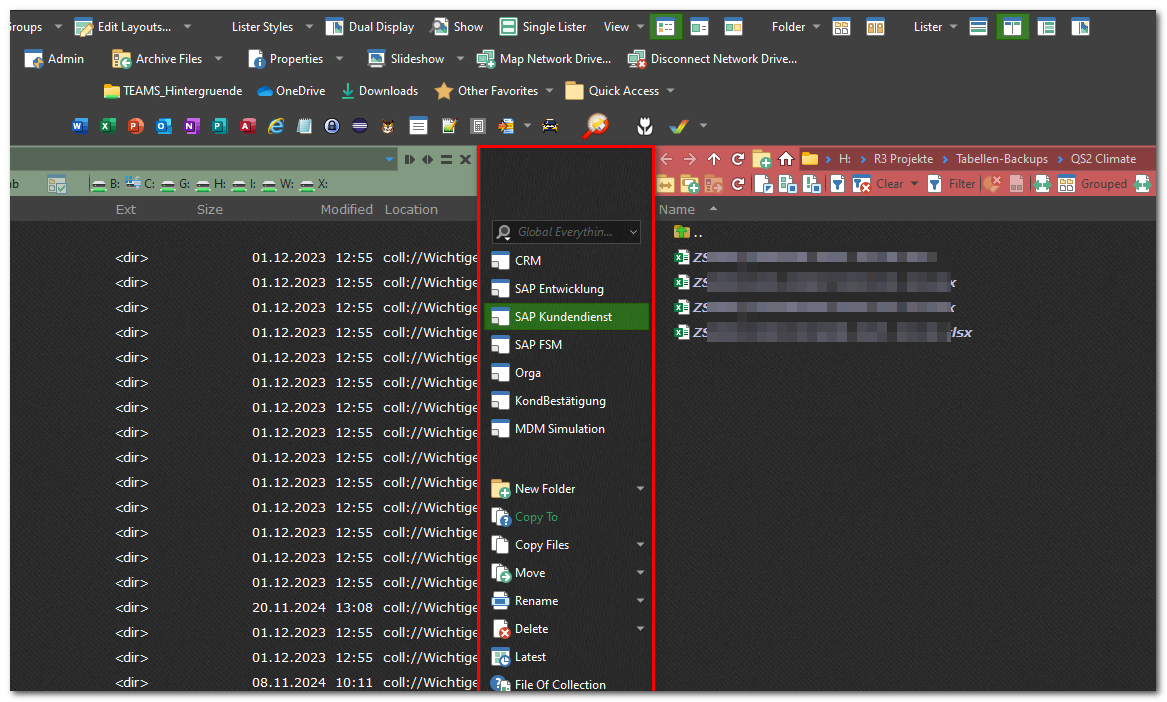
When pressing the button "Dual Display" with command
```auto
Set DUAL=Toggle,Remember
@toggle:invert
@if:Set DUAL=on
Set VIEWPANE=on
@icon:dualdisplay, Set DUAL=off
@if:else
Set VIEWPANE=off
@icon:viewerpane, Set DUAL=on
```
I get the following layout: the toolbar, which previously was located between the listers has now moved to the right side.
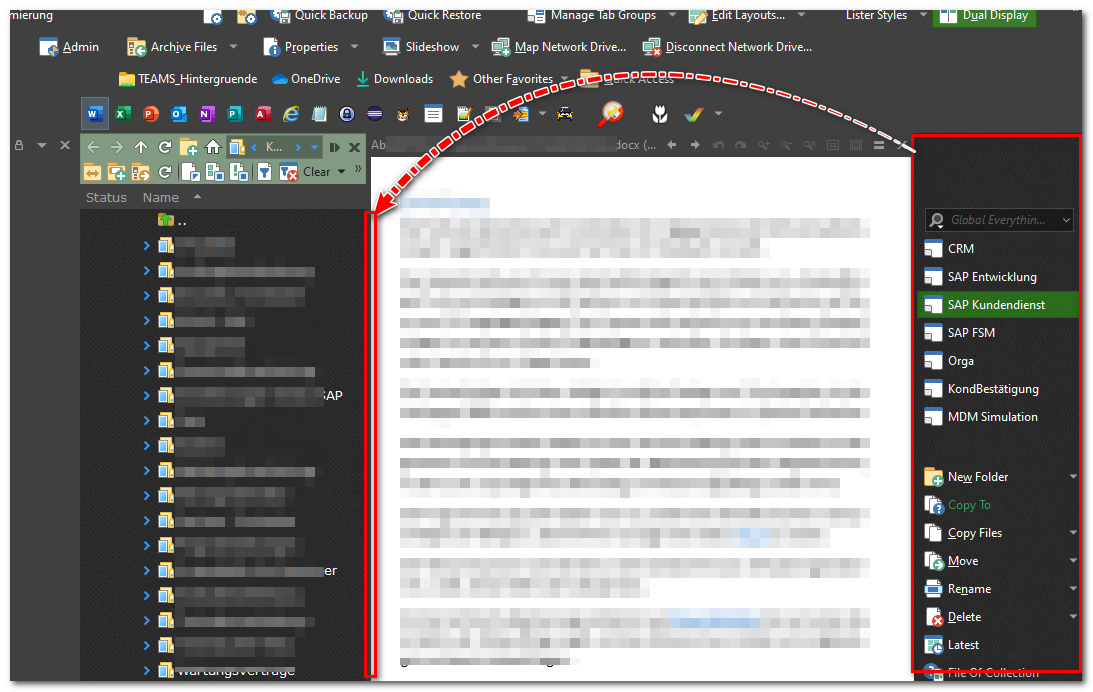
Is there a chance to stick this TB to the left lister at its right border as it was before?
Don't get me wrong, when pressing the "Dual Display" button once again, the layout is reverted back to as it was before!
Michael
---
### Author:  [@Leo](https://resource.dopus.com/u/Leo)
#### Post date: [February 4, 2025, 10:11am UTC](https://resource.dopus.com/t/dual-lister-layout-with-toolbar-between/54423/2 "2025-02-04T10:11:25Z")
You should be able to make your button move the toolbar as well as toggling the viewer pane, I think.
---
### Author:  [@jinsight](https://resource.dopus.com/u/jinsight)
#### Post date: [February 4, 2025, 1:37pm UTC](https://resource.dopus.com/t/dual-lister-layout-with-toolbar-between/54423/3 "2025-02-04T13:37:18Z")
You need to create two toolbar sets, one with the vertical toolbar in the center and another with that toolbar on the left edge, as shown in this code with the lines beginning with Toolbar:
```auto
//Preferences-File Displays-Options-Dual display must unselect "Set new panel to when switching to dual file display"
@toggle:if Set Dual=off
Set PAIREDFOLDERS=off
@if:Set DUAL=on
@set lst:sourceWasRight={=IsChecked("Set SOURCE=right")=}
Set DUAL=toggle,remember
Toolbar "Operations Left" LOADSET=replace
@if:else
Set DUAL=toggle,remember
Toolbar "Default" LOADSET=replace
=return Val("$lst:sourceWasRight") ? "Go SWAP" : ""
=return Val("$lst:sourceWasRight") ? "Set SOURCE=right" : ""
```
---
### Author:  [@Leo](https://resource.dopus.com/u/Leo)
#### Post date: [February 4, 2025, 2:39pm UTC](https://resource.dopus.com/t/dual-lister-layout-with-toolbar-between/54423/4 "2025-02-04T14:39:13Z")
You should be able to do it without a toolbar set, although using one lets you move multiple toolbars at once.