# Error message
**URL:** https://resource.dopus.com/t/error-message/53446
**Category:** Help & Support
**Created:** [November 13, 2024, 4:31am UTC](https://resource.dopus.com/t/error-message/53446 "2024-11-13T04:31:39Z")
**Posts on this page:** 11
**Page:** 1
### Author:  [@eurosoba](https://resource.dopus.com/u/eurosoba)
#### Post date: [November 13, 2024, 4:31am UTC](https://resource.dopus.com/t/error-message/53446/1 "2024-11-13T04:31:40Z")
Since the latest Windows update I am getting an Unhandled Exception error when I try to start DO. I have uninstalled, reinstalled, rebooted etc but still get it. Any ideas please?
---
### Author:  [@Jon](https://resource.dopus.com/u/Jon)
#### Post date: [November 13, 2024, 5:16am UTC](https://resource.dopus.com/t/error-message/53446/2 "2024-11-13T05:16:53Z")
Could you post a screenshot of the error?
---
### Author:  [@eurosoba](https://resource.dopus.com/u/eurosoba)
#### Post date: [November 29, 2024, 9:25am UTC](https://resource.dopus.com/t/error-message/53446/3 "2024-11-29T09:25:03Z")
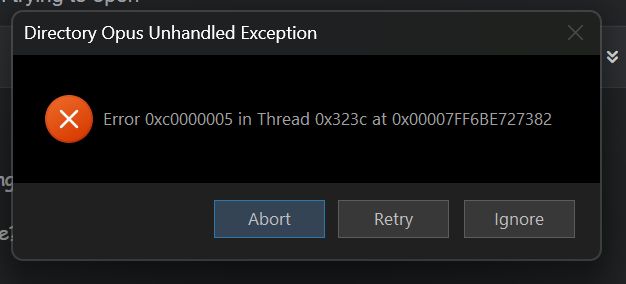
---
### Author:  [@Splash3313](https://resource.dopus.com/u/Splash3313)
#### Post date: [November 29, 2024, 10:35am UTC](https://resource.dopus.com/t/error-message/53446/4 "2024-11-29T10:35:48Z")
Application Error 0xc0000005 (Access Violation) is caused by the computer not being able to correctly process the files and settings required to run a particular program or installation.
It has many different causes including faulty RAM problems, errors with the files of the PC and issues with the settings of the PC.
---
### Author:  [@Leo](https://resource.dopus.com/u/Leo)
#### Post date: [November 29, 2024, 10:45am UTC](https://resource.dopus.com/t/error-message/53446/5 "2024-11-29T10:45:19Z")
If you haven't already, please try using the latest beta ( [Directory Opus 13.11.4 (Beta)](https://resource.dopus.com/t/directory-opus-13-11-4-beta/53646) ) in case it's something that was fixed recently.
If that still has the problem, we might be able to work out the cause from some [process snapshots](https://resource.dopus.com/t/manually-generating-process-snapshots/34071), made while the error message is still on-screen.
(I would not worry about hardware errors, unless you're seeing random issues with other software as well. This is more likely to be a bug in either Opus or a DLL something has installed on the system which gets loaded during startup.)
---
### Author:  [@eurosoba](https://resource.dopus.com/u/eurosoba)
#### Post date: [November 29, 2024, 12:13pm UTC](https://resource.dopus.com/t/error-message/53446/6 "2024-11-29T12:13:07Z")
Thanks for your help. Dump files as requested
---
### Author:  [@eurosoba](https://resource.dopus.com/u/eurosoba)
#### Post date: [December 5, 2024, 6:38am UTC](https://resource.dopus.com/t/error-message/53446/8 "2024-12-05T06:38:38Z")
Hi Leo
Any progress with the dump files?
Regards
---
### Author:  [@Jon](https://resource.dopus.com/u/Jon)
#### Post date: [December 5, 2024, 6:53am UTC](https://resource.dopus.com/t/error-message/53446/9 "2024-12-05T06:53:33Z")
Could you have a look and see if you have "NOKL" installed, as this was the cause of a very similar error in this thread here:
> [@Crash / Unhandled Exception 0x00000005 on Opening Dopus Version 13.11 / 13.11.4](https://resource.dopus.com/t/crash-unhandled-exception-0x00000005-on-opening-dopus-version-13-11-13-11-4/53692):
>
> Today, every time that I try to open Directory Opus, it crashes with Unhandled Exception 0xc00000005. See the screenshot. The thread and address referenced in the error message vary. I am unable to find a log file to check for more information. I be…
---
### Author:  [@eurosoba](https://resource.dopus.com/u/eurosoba)
#### Post date: [December 5, 2024, 9:57am UTC](https://resource.dopus.com/t/error-message/53446/10 "2024-12-05T09:57:05Z")
Hi Jon
Oh yes, I use it quite a bit!
Apart from choosing between NOKL or DO, was there a solution?
Regards
---
### Author:  [@Jon](https://resource.dopus.com/u/Jon)
#### Post date: [December 5, 2024, 10:32am UTC](https://resource.dopus.com/t/error-message/53446/11 "2024-12-05T10:32:44Z")
We should have a fix for it in the next update; in the meantime you could rename the shell extension DLL (or just not use Opus!).
---
### Author:  [@Jon](https://resource.dopus.com/u/Jon)
#### Post date: [December 5, 2024, 11:43pm UTC](https://resource.dopus.com/t/error-message/53446/12 "2024-12-05T23:43:17Z")
We've put the fix into the [latest beta](https://resource.dopus.com/t/directory-opus-13-11-5-beta/53716) if you want to give it a try. Please let us know if it fails to resolve the problem.