# Evaluator Column - Precise Ages
**URL:** https://resource.dopus.com/t/evaluator-column-precise-ages/57788
**Category:** Buttons/Scripts
**Tags:** column, evaluator
**Created:** [November 16, 2025, 4:19pm UTC](https://resource.dopus.com/t/evaluator-column-precise-ages/57788 "2025-11-16T16:19:15Z")
**Posts on this page:** 20
**Page:** 1
### Author:  [@Chuck](https://resource.dopus.com/u/Chuck)
#### Post date: [November 16, 2025, 4:19pm UTC](https://resource.dopus.com/t/evaluator-column-precise-ages/57788/1 "2025-11-16T16:19:16Z")
Converting the [Column - Age](https://resource.dopus.com/t/column-age/24364) script to evaluator columns as they are much quicker.
These three columns provide Age Modified, Age Created, and Age Accessed in YY:DDD:HH:MM:SS format, respectively.
EDIT: updated based on @lxp's excellent - and brief - code down thread.
AGE MODIFIED:
```auto
secs = Age(modifieddate, "s");
ss = secs Mod 60 As "#2";
mm = secs / 60 Mod 60 As "#2";
hh = secs / 60 / 60 Mod 24 As "#2";
dd = secs / 60 / 60 / 24 Mod 365 As "#3";
yy = secs / 60 / 60 / 24 / 365 As "#2";
return yy + ":" + dd + ":" + hh + ":" + mm + ":" + ss;
```
> **Longer version for educational purposes**
>
> ```auto
>
> if (operation == "sort")
> return modifieddate; // Enable sorting by generic modifieddate
>
> secs = Abs(DateDiff("s", Now(), modifieddate)); // Get difference in seconds between current second and second folder/file was last modified
>
> s = secs Mod 60;
> m = secs / 60 Mod 60;
> h = secs / 60 / 60 Mod 24;
> d = secs / 60 / 60 / 24 Mod 365;
> y = secs / 60 / 60 / 24 / 365;
>
> // SECONDS
> if (s == 0) ss = "00";
> elseif (s < 10) ss = "0" + s; // 0 < s < 10
> else ss = s; // s > 9
>
> // MINUTES
> if (m == 0) mm = "00";
> elseif (m < 10) mm = "0" + m; // 0 < m < 10
> else mm = m; //m > 9
>
> // HOURS
> if (h == 0) hh = "00";
> elseif (h < 10) hh = "0" + h; // 0 < h < 10
> else hh = h; // h > 9
>
> // DAYS
> if (d == 0) dd = "000";
> elseif (d < 10) dd = "00" + d; // 0 < d < 10
> elseif (d < 100) dd = "0" + d; // 9 < d < 100
> else dd = d; // h > 99
>
> // YEARS
> if (y == 0) yy = "00";
> elseif (y < 10) yy = "0" + y; // 0 < y < 10
> else yy = y; // y > 9
>
> return Trim(yy + ":" + dd + ":" + hh + ":" + mm + ":" + ss); // yy:ddd:hh:mm:ss
> ```
AGE CREATED:
```auto
secs = Age(createddate, "s");
ss = secs Mod 60 As "#2";
mm = secs / 60 Mod 60 As "#2";
hh = secs / 60 / 60 Mod 24 As "#2";
dd = secs / 60 / 60 / 24 Mod 365 As "#3";
yy = secs / 60 / 60 / 24 / 365 As "#2";
return yy + ":" + dd + ":" + hh + ":" + mm + ":" + ss;
```
> **Longer version for educational purposes**
>
> ```auto
>
> if (operation == "sort")
> return createddate; // Enable sorting by generic modifieddate
>
> secs = Abs(DateDiff("s", Now(), createddate)); // Get difference in seconds between current second and second folder/file was last created
>
> s = secs Mod 60;
> m = secs / 60 Mod 60;
> h = secs / 60 / 60 Mod 24;
> d = secs / 60 / 60 / 24 Mod 365;
> y = secs / 60 / 60 / 24 / 365;
>
> // SECONDS
> if (s == 0) ss = "00";
> elseif (s < 10) ss = "0" + s; // 0 < s < 10
> else ss = s; // s > 9
>
> // MINUTES
> if (m == 0) mm = "00";
> elseif (m < 10) mm = "0" + m; // 0 < m < 10
> else mm = m; //m > 9
>
> // HOURS
> if (h == 0) hh = "00";
> elseif (h < 10) hh = "0" + h; // 0 < h < 10
> else hh = h; // h > 9
>
> // DAYS
> if (d == 0) dd = "000";
> elseif (d < 10) dd = "00" + d; // 0 < d < 10
> elseif (d < 100) dd = "0" + d; // 9 < d < 100
> else dd = d; // h > 99
>
> // YEARS
> if (y == 0) yy = "00";
> elseif (y < 10) yy = "0" + y; // 0 < y < 10
> else yy = y; // y > 9
>
> return Trim(yy + ":" + dd + ":" + hh + ":" + mm + ":" + ss); // yy:ddd:hh:mm:ss
> ```
AGE ACCESSED:
```auto
secs = Age(accesseddate, "s");
ss = secs Mod 60 As "#2";
mm = secs / 60 Mod 60 As "#2";
hh = secs / 60 / 60 Mod 24 As "#2";
dd = secs / 60 / 60 / 24 Mod 365 As "#3";
yy = secs / 60 / 60 / 24 / 365 As "#2";
return yy + ":" + dd + ":" + hh + ":" + mm + ":" + ss;
```
> **Longer version for educational purposes**
>
> ```auto
>
> if (operation == "sort")
> return accesseddate;
>
> date_now = Now();
> when_accessed = accesseddate;
>
> secs = Abs(DateDiff("s", date_now, when_accessed));
>
> s = secs Mod 60;
> m = secs / 60 Mod 60;
> h = secs / 60 / 60 Mod 24;
> d = secs / 60 / 60 / 24 Mod 365;
> y = secs / 60 / 60 / 24 / 365;
>
> //SECONDS
> if (s == 0) ss = "00";
> elseif (s < 10) ss = "0" + s;
> else ss = s; // s > 9
>
> //MINUTES
> if (m == 0) mm = "00";
> elseif (m < 10) mm = "0" + m;
> else mm = m; //m > 9
>
> //HOURS
> if (h == 0) hh = "00";
> elseif (h < 10) hh = "0" + h;
> else hh = h; // h > 9
>
> //DAYS
> if (d == 0) dd = "000";
> elseif (d < 10) dd = "00" + d;
> elseif (d < 100) dd = "0" + d;
> else dd = d; //h > 99
>
> //YEARS
> if (y == 0) yy = "00";
> elseif (y < 10) yy = "0" + y;
> else yy = y; // y > 9
>
> return Trim(yy + ":" + dd + ":" + hh + ":" + mm + ":" + ss);
> ```
To use any of these columns, open Preferences \> Evaluator Columns \> Add.
---
### Author:  [@lxp](https://resource.dopus.com/u/lxp)
#### Post date: [November 16, 2025, 5:27pm UTC](https://resource.dopus.com/t/evaluator-column-precise-ages/57788/2 "2025-11-16T17:27:55Z")
You could save a few lines by calculating the age with `Age()`, and zero-padding the results with `As`, e.g. `dd = d As "#3";`.
---
### Author:  [@Chuck](https://resource.dopus.com/u/Chuck)
#### Post date: [November 16, 2025, 5:45pm UTC](https://resource.dopus.com/t/evaluator-column-precise-ages/57788/3 "2025-11-16T17:45:19Z")
This is as slim as I can get it, but it is not as precise. Days, hours, minutes, and seconds are slightly off. What might I be missing?
```auto
yy = Age(modifieddate, "yyyy") As "#2";
dd = (Age(modifieddate) Mod 365) As "#3";
hh = (Age(modifieddate, "h") Mod 24) As "#2";
mm = (Age(modifieddate, "n") Mod 60) As "#2";
ss = (Age(modifieddate, "s") Mod 60) As "#2";
return yy + ":" + dd + ":" + hh + ":" + mm + ":" + ss;
```
---
### Author:  [@lxp](https://resource.dopus.com/u/lxp)
#### Post date: [November 18, 2025, 6:29am UTC](https://resource.dopus.com/t/evaluator-column-precise-ages/57788/4 "2025-11-18T06:29:51Z")
`Age()` will return rounded values, so only seconds will always be correct for the intended purpose. Let's stay with your original formula and just apply the formatting:
```javascript
secs = Age(modifieddate, "s");
ss = secs Mod 60 As "#2";
mm = secs / 60 Mod 60 As "#2";
hh = secs / 60 / 60 Mod 24 As "#2";
dd = secs / 60 / 60 / 24 Mod 365 As "#3";
yy = secs / 60 / 60 / 24 / 365 As "#2";
return yy + ":" + dd + ":" + hh + ":" + mm + ":" + ss;
```
---
### Author:  [@Chuck](https://resource.dopus.com/u/Chuck)
#### Post date: [November 18, 2025, 11:48am UTC](https://resource.dopus.com/t/evaluator-column-precise-ages/57788/5 "2025-11-18T11:48:25Z")
I believe this is two beverages of choice I owe you...
Thanks @lxp!
---
### Author:  [@jinsight](https://resource.dopus.com/u/jinsight)
#### Post date: [November 18, 2025, 2:26pm UTC](https://resource.dopus.com/t/evaluator-column-precise-ages/57788/6 "2025-11-18T14:26:52Z")
@Chuck
Do you have an updated version of [Column - Age](https://resource.dopus.com/t/column-age/24364)?
---
### Author:  [@Bennjamin](https://resource.dopus.com/u/Bennjamin)
#### Post date: [November 18, 2025, 2:41pm UTC](https://resource.dopus.com/t/evaluator-column-precise-ages/57788/7 "2025-11-18T14:41:56Z")
The short piece of code posted by @lxp (2 posts upwards) works perfect - just paste it in the evaluator code field (Settings \> File Display Columns \> Evaluator columns), give it the name “Age”, choose the category Date and Time.
---
### Author:  [@Chuck](https://resource.dopus.com/u/Chuck)
#### Post date: [November 19, 2025, 12:13am UTC](https://resource.dopus.com/t/evaluator-column-precise-ages/57788/8 "2025-11-19T00:13:18Z")
I posted an update to the original script in that thread. Will be moving forward with this one.
I also updated the original post to reflect @lxp's wisdom.
---
### Author:  [@Bennjamin](https://resource.dopus.com/u/Bennjamin)
#### Post date: [February 25, 2026, 5:24pm UTC](https://resource.dopus.com/t/evaluator-column-precise-ages/57788/9 "2026-02-25T17:24:35Z")
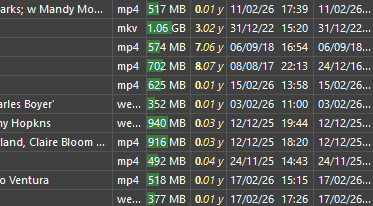
I liked this Age column idea, but my own preferred version aims at “quick impression” of age rather than precision. I also use createddate instead of modifieddate, because I’m not so much interested when I made the last change, I want a quick impression how long files have been on my system. I also use the “Support markup” option in the evaluator column setup to make the year stand out.
So this is my version:
```auto
days = Age(createddate, "d");
mm = Ceil((days Mod 365) / 30.4) As "#2";
yy = days / 365;
return ""+yy+"."+mm+" y";
```
This is what it looks like, year plus number of months:
---
### Author:  [@Chuck](https://resource.dopus.com/u/Chuck)
#### Post date: [February 25, 2026, 9:50pm UTC](https://resource.dopus.com/t/evaluator-column-precise-ages/57788/10 "2026-02-25T21:50:18Z")
Nice addition with the bold. Need to look more at that...
---
### Author:  [@ASUNDER](https://resource.dopus.com/u/ASUNDER)
#### Post date: [March 8, 2026, 6:40am UTC](https://resource.dopus.com/t/evaluator-column-precise-ages/57788/11 "2026-03-08T06:40:39Z")
In your updated code blocks I think you missed the first line in each; the definition.
Created:
secs = Age(createddate, "s");
Modified:
secs = Age(modifieddate, "s");
Accessed:
secs = Age(accesseddate, "s");
---
### Author:  [@ASUNDER](https://resource.dopus.com/u/ASUNDER)
#### Post date: [March 8, 2026, 6:42am UTC](https://resource.dopus.com/t/evaluator-column-precise-ages/57788/12 "2026-03-08T06:42:24Z")
Ok it is in there, at the far right, but my script log threw a syntax error.
So this version works fine:
secs = Age(modifieddate, "s");
ss = secs Mod 60 As "#2";
mm = secs / 60 Mod 60 As "#2";
hh = secs / 60 / 60 Mod 24 As "#2";
dd = secs / 60 / 60 / 24 Mod 365 As "#3";
yy = secs / 60 / 60 / 24 / 365 As "#2";
return yy + ":" + dd + ":" + hh + ":" + mm + ":" + ss;
---
### Author:  [@Chuck](https://resource.dopus.com/u/Chuck)
#### Post date: [March 8, 2026, 1:16pm UTC](https://resource.dopus.com/t/evaluator-column-precise-ages/57788/13 "2026-03-08T13:16:17Z")
I receive no syntax errors when running any combination of the precise age columns here.
Comparing the code I have with your revised code, it's literally the same with the exception of the variable spaces before 'As "#"'
```auto
secs = Age(modifieddate, "s");
ss = secs Mod 60 As "#2";
mm = secs / 60 Mod 60 As "#2";
hh = secs / 60 / 60 Mod 24 As "#2";
dd = secs / 60 / 60 / 24 Mod 365 As "#3";
yy = secs / 60 / 60 / 24 / 365 As "#2";
return yy + ":" + dd + ":" + hh + ":" + mm + ":" + ss;
```
Do you recall the syntax error? Maybe it's involving another evaluator column or script?
---
### Author:  [@Bennjamin](https://resource.dopus.com/u/Bennjamin)
#### Post date: [March 8, 2026, 6:22pm UTC](https://resource.dopus.com/t/evaluator-column-precise-ages/57788/14 "2026-03-08T18:22:29Z")
> [@ASUNDER](#):
>
> accesseddate
I don’t think you can change accesseddate.
---
### Author:  [@ASUNDER](https://resource.dopus.com/u/ASUNDER)
#### Post date: [March 8, 2026, 11:09pm UTC](https://resource.dopus.com/t/evaluator-column-precise-ages/57788/15 "2026-03-08T23:09:26Z")
> [@Chuck](#):
>
> Do you recall the syntax error? Maybe it's involving another evaluator column or script?
On my first try I used the copy button from your first post, so the syntax error is line 1 position 1, the xml header.
Getting rid of that xml text, it works. And then I had another error, a “bad acting” error. I thought it’s because you missed the first line in the eval, but you didn’t, my fault.
---
### Author:  [@ASUNDER](https://resource.dopus.com/u/ASUNDER)
#### Post date: [March 8, 2026, 11:10pm UTC](https://resource.dopus.com/t/evaluator-column-precise-ages/57788/16 "2026-03-08T23:10:44Z")
Oh? Well date accessed is basically a paperweight anyway, because the system can touch the date, and consider that “accessed”. I had a huge rant about this a while back. I’m not sure how many people actually find date accessed useful. The reason it’s not popular is probably because it’s logically nonsense.
---
### Author:  [@Bennjamin](https://resource.dopus.com/u/Bennjamin)
#### Post date: [March 9, 2026, 1:12pm UTC](https://resource.dopus.com/t/evaluator-column-precise-ages/57788/17 "2026-03-09T13:12:48Z")
> [@ASUNDER](#):
>
> I’m not sure how many people actually find date accessed useful. The reason it’s not popular is probably because it’s logically nonsense.
Maybe it is “logically” nonsense, but for sensitive data I guess logging last accessed date would make sense. By contrast, being able to alter it (falsify it) would not make any “logical sense”. In a way, being able to change any of these dates via editing does not make any “logical” sense whatsoever.
---
### Author:  [@ASUNDER](https://resource.dopus.com/u/ASUNDER)
#### Post date: [March 9, 2026, 2:16pm UTC](https://resource.dopus.com/t/evaluator-column-precise-ages/57788/18 "2026-03-09T14:16:00Z")
Ya. Accessed by whom is my issue.
Did the system access the file or the user? And what is meant by system? And how was it accessed? If I open a document program that on its welcome dashboard is a list of recent files, are those files considered accessed because the system had to read them to display them in the list? Or is only opening the file in the interactive gui considered accessed? And if it’s a program (not the OS) that executes a read function, is that still system or is it user? If a program is set up to do something automatically but the user set that up, is that still system or is it now user?
Is an antivirus scanning things considered accessed? What about an onboard cloud service updating files? I have to “save” a file, overwriting it to be “modified” but what about even programs like Dopus displaying metadata in its columns? It has to read the files to display it. Does that touch the accessed date? And if those kinds of things do, then accessed is entirely useless, since that data is whitewashed every time you open a folder and look at the contents.
Wouldn’t it be nice to see exactly what is reading files and when, and how often? And if and when files are copied/exfiltrated from their place. Just like the “what is locking this program” tools, where are the Windows functions for ‘accessed’ metadata info? If we take an interest in keeping an eye on programs that have access to our sensitive property (and by that, what would we even call “sensitive”, when talking about things that belong to us? Do we let strangers sit in our living room?), we can see if programs are taking liberties on our computer and take it up with the company. And of course warn the world of what we find.
Wouldn’t it be nice to quickly see all the things you did recently? Text like notes and books, when did I last read that? A game, when did I last play that? A video, when did I last watch that? This info isn’t worth manually tracking but for it to be automatic would be helpful. But we can’t know any of this because we don’t know accessed by whom and how. The last time I read a particular book could have been last week but since the system read the file yesterday, the “date accessed” says yesterday? Get out of here with that.
Proper accessed info not being standard practice on Windows is actually pretty gross.
---
### Author:  [@Bennjamin](https://resource.dopus.com/u/Bennjamin)
#### Post date: [March 9, 2026, 2:26pm UTC](https://resource.dopus.com/t/evaluator-column-precise-ages/57788/19 "2026-03-09T14:26:59Z")
Such deep monitoring actually sounds a bit scary. There’s no doubt the CCP can do exactly that, but whether my OS needs to be equipped for that I have my doubts. Although I would like it if some app could tell me how much I have understood of the books I’ve read. Or maybe not… The risk of depression makes me hesitating a bit here.
---
### Author:  [@ASUNDER](https://resource.dopus.com/u/ASUNDER)
#### Post date: [March 10, 2026, 12:40am UTC](https://resource.dopus.com/t/evaluator-column-precise-ages/57788/20 "2026-03-10T00:40:55Z")
Why does date accessed exist if we can’t use it?
I would like to hear even one testimony of someone who finds it useful, uses it on a regular basis, and how they use it. And how they know for sure the date they are looking at is what they think it is.
Date Modified too. We know what the term “modified” means, but a simple an an optional expanded info block about this would make it more useful. What is the modification? Click to expand the date to the expanded version, to see what modified it. Some ideas:
Modified on (date + time) - user \> file saved (overwritten) in program
Modified on (date + time) - user \> metadata changed \> Directory Opus 13
Modified on (date + time) - user \> file copied
Modified on (date + time) - program \> filed copied \> (backup software name)
[Next page](https://resource.dopus.com/t/evaluator-column-precise-ages/57788.md?page=2)