# EXIF Data Columns Not Displaying for All Files
**URL:** https://resource.dopus.com/t/exif-data-columns-not-displaying-for-all-files/51275
**Category:** Help & Support
**Tags:** bug-report
**Created:** [June 14, 2024, 12:00pm UTC](https://resource.dopus.com/t/exif-data-columns-not-displaying-for-all-files/51275 "2024-06-14T12:00:58Z")
**Posts on this page:** 19
**Page:** 1
### Author:  [@albedo74](https://resource.dopus.com/u/albedo74)
#### Post date: [June 14, 2024, 12:00pm UTC](https://resource.dopus.com/t/exif-data-columns-not-displaying-for-all-files/51275/1 "2024-06-14T12:00:58Z")
**Description:** I am experiencing an issue with Directory Opus where the columns that should display EXIF data are not showing the information for all files in a folder. This problem occurs even though the EXIF data is available for all the pictures in the folder.
**Steps to Reproduce:**
1. Open a folder containing multiple image files with EXIF data.
2. Add columns to display EXIF data (e.g., Date Taken, Camera Model).
3. Observe that EXIF data is only displayed for a few files, while the majority show blank columns.
**Expected Behavior:** EXIF data should be displayed for all image files that contain this information.
**Actual Behavior:** EXIF data columns are only populated for a few image files, despite all images having available EXIF data.
**Screenshot:**
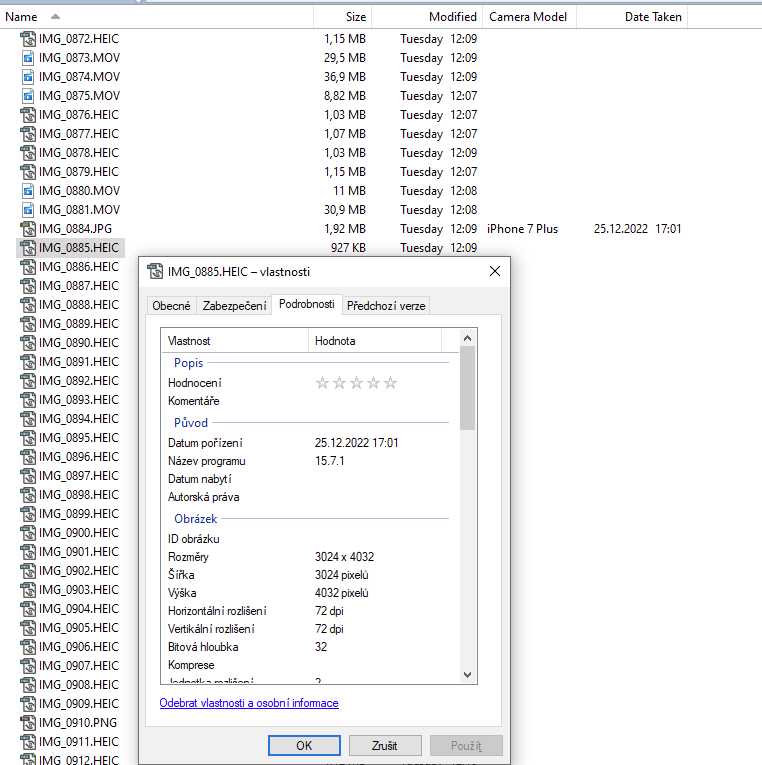
**Additional Information:**
- Directory Opus version: Directory Opus 13.6 x64
- OS version: Windows 10 Pro 22H2
- File types affected: JPEG, HEIC, PNG, etc.
- I have verified that the EXIF data is present in the files using another application.
Please let me know if any further information is needed to resolve this issue. Thank you for your assistance.
---
### Author:  [@Leo](https://resource.dopus.com/u/Leo)
#### Post date: [June 14, 2024, 12:41pm UTC](https://resource.dopus.com/t/exif-data-columns-not-displaying-for-all-files/51275/2 "2024-06-14T12:41:07Z")
(Please [link your account](https://resource.dopus.com/my/link-opus).)
The metadata threads are probably getting stuck on some of the other files in the folder, which usually happens due to bugs in video splitters/demuxers and metadata extractors. Likely connected to the MOV files in the folder.
Those splitters/demuxers are not part of Opus. Updating or replacing them with newer/better versions will often fix things, but requires working out what you currently have (or installing over it with something like LAVFilters).
---
### Author:  [@lxp](https://resource.dopus.com/u/lxp)
#### Post date: [June 14, 2024, 1:47pm UTC](https://resource.dopus.com/t/exif-data-columns-not-displaying-for-all-files/51275/3 "2024-06-14T13:47:29Z")
`.heic` and these hybrid `.mov` files are still a bit tricky. [ExifTool Custom Columns](https://resource.dopus.com/t/exiftool-custom-columns/38975) can help.
---
### Author:  [@MegMac](https://resource.dopus.com/u/MegMac)
#### Post date: [June 14, 2024, 2:29pm UTC](https://resource.dopus.com/t/exif-data-columns-not-displaying-for-all-files/51275/4 "2024-06-14T14:29:48Z")
**HEIC:**
Date Taken is not a metadata field, it is a windows property that looks a several different metadata fields.
Directory Opus does not display a Date Taken for HEIC files. I usually convert them to JPEG, but I've never understood why Directory Opus does not display a Date Taken for HEIC when File Explorer does! **Why not, Leo?**
**PNG:**
PNG never display a Date Taken.
**MOV:**
I'm not sure why LXP referred to your MOV files as 'hybrid'. They are normal MOV files and will never display a Date Taken.
MOV files will display a date in the Media Created column that File Explorer has. Leo helped me add the media Created column to Directory Opus, but that was a long time ago, and I don't remember how I added that column.
**Leo, I think Directory Opus should include the Media Created field** because MOV are such a common file type.
---
### Author:  [@Leo](https://resource.dopus.com/u/Leo)
#### Post date: [June 14, 2024, 2:43pm UTC](https://resource.dopus.com/t/exif-data-columns-not-displaying-for-all-files/51275/5 "2024-06-14T14:43:13Z")
> [@MegMac](#):
>
> I've never understood why Directory Opus does not display a Date Taken for HEIC when File Explorer does! **Why not, Leo?**
Because every new image format requires custom coding to support its metadata, and there are so many, none of which have really taken off for general use, making it remain at quite a low priority.
There is a plugin API, and example AudioTags plugin / source code, for people who want to extend metadata support.
You can also import columns from File Explorer into Opus if Explorer shows the information you want already.
---
### Author:  [@MegMac](https://resource.dopus.com/u/MegMac)
#### Post date: [June 14, 2024, 2:50pm UTC](https://resource.dopus.com/t/exif-data-columns-not-displaying-for-all-files/51275/6 "2024-06-14T14:50:56Z")
Leo,
Thank you for the explanation. I understand about file types that have never taken off, but HEIC is the default for iPhones, and is in no danger of going away. It's definitely here to stay.
Can you please provide a link or instructions for importing File Explorer columns?
---
### Author:  [@Leo](https://resource.dopus.com/u/Leo)
#### Post date: [June 14, 2024, 2:59pm UTC](https://resource.dopus.com/t/exif-data-columns-not-displaying-for-all-files/51275/7 "2024-06-14T14:59:17Z")
Even iPhone tends to convert things to JPEG before they go to another system (although you can turn that off and work around it, it's clear that even Apple still consider JPEG the format for general interchange).
> [@MegMac](#):
>
> Can you please provide a link or instructions for importing File Explorer columns?
Preferences / File Display Columns / Shell Properties
---
### Author:  [@MegMac](https://resource.dopus.com/u/MegMac)
#### Post date: [June 14, 2024, 3:07pm UTC](https://resource.dopus.com/t/exif-data-columns-not-displaying-for-all-files/51275/8 "2024-06-14T15:07:41Z")
Leo,
Respectfully, I organize millions of photos every year for clients who use iPhone and Apple Photos and I export or download or transfer their photos and videos using 3rd party solutions. I get HEIC files more than half the time. I hope you will reconsider this. I am working on a Directory Opus course for professional photo organizers, and they will want this!
Kind regards,
---
### Author:  [@albedo74](https://resource.dopus.com/u/albedo74)
#### Post date: [June 14, 2024, 4:11pm UTC](https://resource.dopus.com/t/exif-data-columns-not-displaying-for-all-files/51275/9 "2024-06-14T16:11:54Z")
> [@Leo](#):
>
> Preferences / File Display Columns / Shell Properties
That's a good workaround.
---
### Author:  [@MegMac](https://resource.dopus.com/u/MegMac)
#### Post date: [June 14, 2024, 4:29pm UTC](https://resource.dopus.com/t/exif-data-columns-not-displaying-for-all-files/51275/10 "2024-06-14T16:29:26Z")
albedo74,
Add the Media Created column from Shell Properties and that will let you see MOV dates.
But it won't change the HEIC issue.
No, I'm wrong! With the Shell Properties 'Date Take' column, HEIC do display a Date Taken!!!!
Now I will need to test that to see if that might cause any problems /conflicts!
---
### Author:  [@MegMac](https://resource.dopus.com/u/MegMac)
#### Post date: [June 15, 2024, 4:14pm UTC](https://resource.dopus.com/t/exif-data-columns-not-displaying-for-all-files/51275/11 "2024-06-15T16:14:16Z")
Leo,
I export, download, copy, or move millions of photos every year. Depending on the method used to get photos from Apple devices and/or iCloud, one might get JPEG or one might get HEIF/HEIC. One does not always have a choice to get JPEG.
I have a mentorship program for teaching photo organizing, and by coincidence, I got an email with screenshots of HEIC photos (from a new student showing HEIC photos without a Date Taken:

There are 11,000 HEIC in the photo collection she is just starting to work with.
HEIC is supported by applications _including_:
- File Explorer
- Finder (Mac)
- PhotoSweeper (Mac only)
- Photo Mechanic
- Adobe Bridge
- Adobe Lightroom Classic
- On1
- ACDSee
- Mylio
- Duplicate Cleaner pro (PC only)
- Excire Foto
I can understand not supporting JPEG2000, but I just don't understand the choice to not support HEIF/HEIC.
Please add support for HEIC.
---
### Author:  [@Agnieszka](https://resource.dopus.com/u/Agnieszka)
#### Post date: [June 15, 2024, 4:36pm UTC](https://resource.dopus.com/t/exif-data-columns-not-displaying-for-all-files/51275/12 "2024-06-15T16:36:08Z")
Hi,
I'm working with HEIC files for my clients and it really is problematic that HEIC is not supported by Directory Opus. I cannot see all the metadata as it is for JPEG. Please consider it. Thanks
---
### Author:  [@Leo](https://resource.dopus.com/u/Leo)
#### Post date: [June 15, 2024, 4:58pm UTC](https://resource.dopus.com/t/exif-data-columns-not-displaying-for-all-files/51275/13 "2024-06-15T16:58:19Z")
> [@Agnieszka](#):
>
> HEIC is not supported by Directory Opus
HEIC is supported, in terms of displaying them and thumbnails. Just not (yet) in terms of EXIF metadata.
---
### Author:  [@MegMac](https://resource.dopus.com/u/MegMac)
#### Post date: [June 15, 2024, 6:58pm UTC](https://resource.dopus.com/t/exif-data-columns-not-displaying-for-all-files/51275/14 "2024-06-15T18:58:46Z")
Leo,
it's more than just an EXIF issue. Opus does not display most IPTC and XMP metadata added to HEIC files with other applications.
---
### Author:  [@Leo](https://resource.dopus.com/u/Leo)
#### Post date: [June 15, 2024, 9:28pm UTC](https://resource.dopus.com/t/exif-data-columns-not-displaying-for-all-files/51275/15 "2024-06-15T21:28:35Z")
Yes, OK. I mean "photo metadata" in general.
---
### Author:  [@MegMac](https://resource.dopus.com/u/MegMac)
#### Post date: [June 16, 2024, 3:45pm UTC](https://resource.dopus.com/t/exif-data-columns-not-displaying-for-all-files/51275/16 "2024-06-16T15:45:31Z")
Leo, I am please that you suggested that HEIC files will be _more_ supported in the future. I just hope its not too far into the future!
---
### Author:  [@SilvMoon](https://resource.dopus.com/u/SilvMoon)
#### Post date: [June 16, 2024, 10:12pm UTC](https://resource.dopus.com/t/exif-data-columns-not-displaying-for-all-files/51275/17 "2024-06-16T22:12:24Z")
As an avid user of Directory Opus and also an organizer working with millions of photos a year, I would love love LOVE to have the ability to view metadata associated with HEIC files within DOpus. And some of my Apple-only clients don't necessarily want their images converted. Please consider adding this capability within DOpus...I'm another vote for it! Thank you!
---
### Author:  [@weronikagasperczyk](https://resource.dopus.com/u/weronikagasperczyk)
#### Post date: [June 27, 2024, 9:40am UTC](https://resource.dopus.com/t/exif-data-columns-not-displaying-for-all-files/51275/18 "2024-06-27T09:40:20Z")
Even though Apple does Apple (like creating HEIC and then not actually caring about it as much), there are so many clients who use iPhones and want to continue using them. It is always an option to convert HEICs to JPGs to work with them in DOpus, but it does not make sense if people want to keep their HEICs. I agree with SilvMoon that adding the capability to view metadata within DOpus for HEICs would be another brick to efficiency for our profession.
---
### Author:  [@tan](https://resource.dopus.com/u/tan)
#### Post date: [December 19, 2024, 5:28pm UTC](https://resource.dopus.com/t/exif-data-columns-not-displaying-for-all-files/51275/19 "2024-12-19T17:28:40Z")
I recently downloaded the Directory Opus trial. It seemed like the perfect solution for my application until the "Camera Model" and "Date Taken" columns came back empty for HEIC files. Any updates on when HEIC camera EXIF data will be supported? I'd purchase a license immediately if that capability were added. Otherwise it's just another partial solution. Thanks!