# File display columns not right in search mode
**URL:** https://resource.dopus.com/t/file-display-columns-not-right-in-search-mode/24905
**Category:** Help & Support
**Created:** [February 12, 2017, 3:44pm UTC](https://resource.dopus.com/t/file-display-columns-not-right-in-search-mode/24905 "2017-02-12T15:44:48Z")
**Posts on this page:** 6
**Page:** 1
### Author:  [@Hydrops](https://resource.dopus.com/u/Hydrops)
#### Post date: [February 12, 2017, 3:44pm UTC](https://resource.dopus.com/t/file-display-columns-not-right-in-search-mode/24905/1 "2017-02-12T15:44:49Z")
Hi I'm trying to configure file display columns
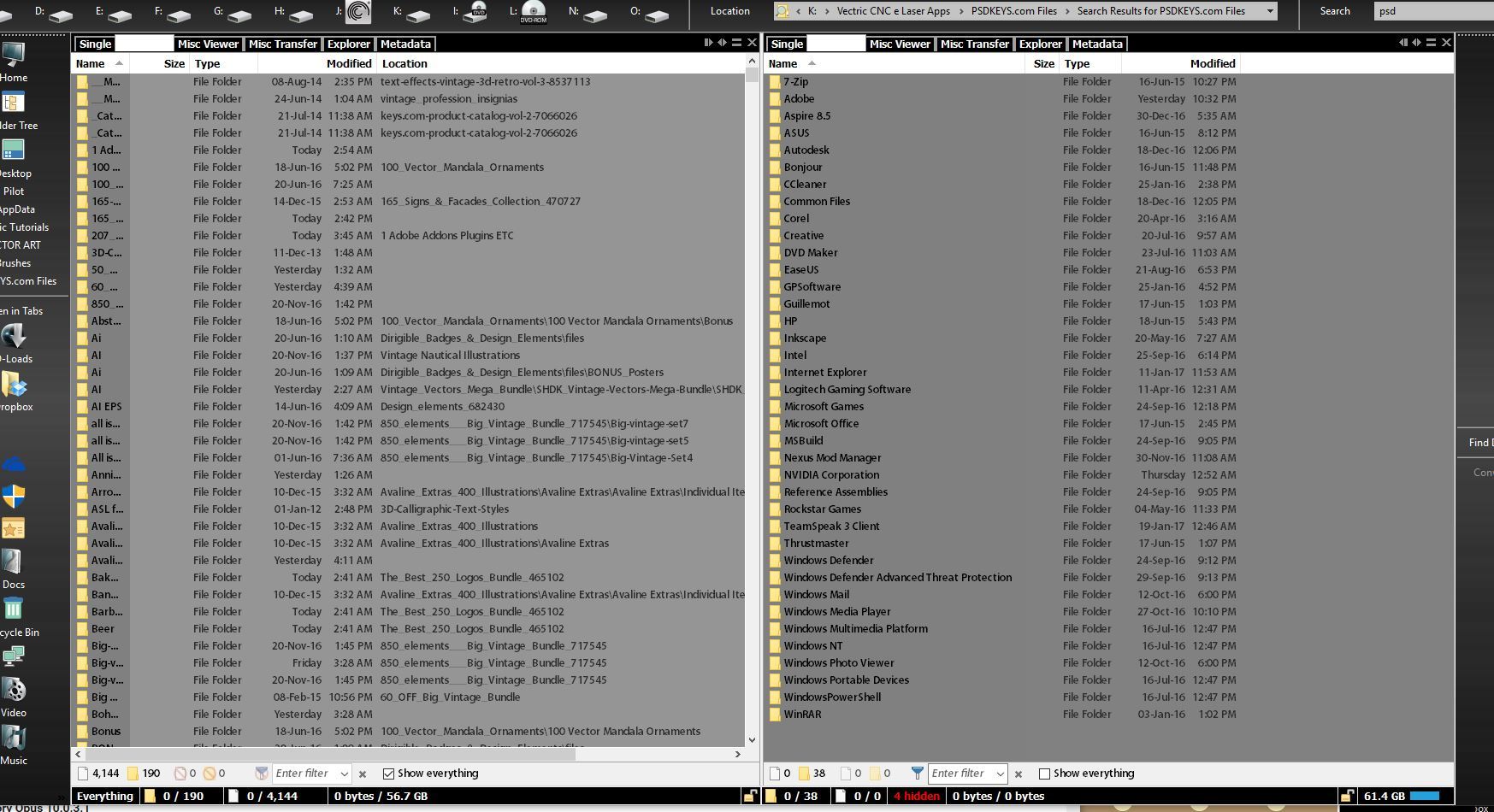
Everything seems ok but for the columns in search mode, check screen
When I do a search filename column is shortened to 3 or 4 letters, settings in folder options are the same as for all the other options can please you tell me what I'm missing here ?
Thank you, Dopus 12 is awesome 😄
---
### Author:  [@Leo](https://resource.dopus.com/u/Leo)
#### Post date: [February 12, 2017, 3:53pm UTC](https://resource.dopus.com/t/file-display-columns-not-right-in-search-mode/24905/2 "2017-02-12T15:53:54Z")
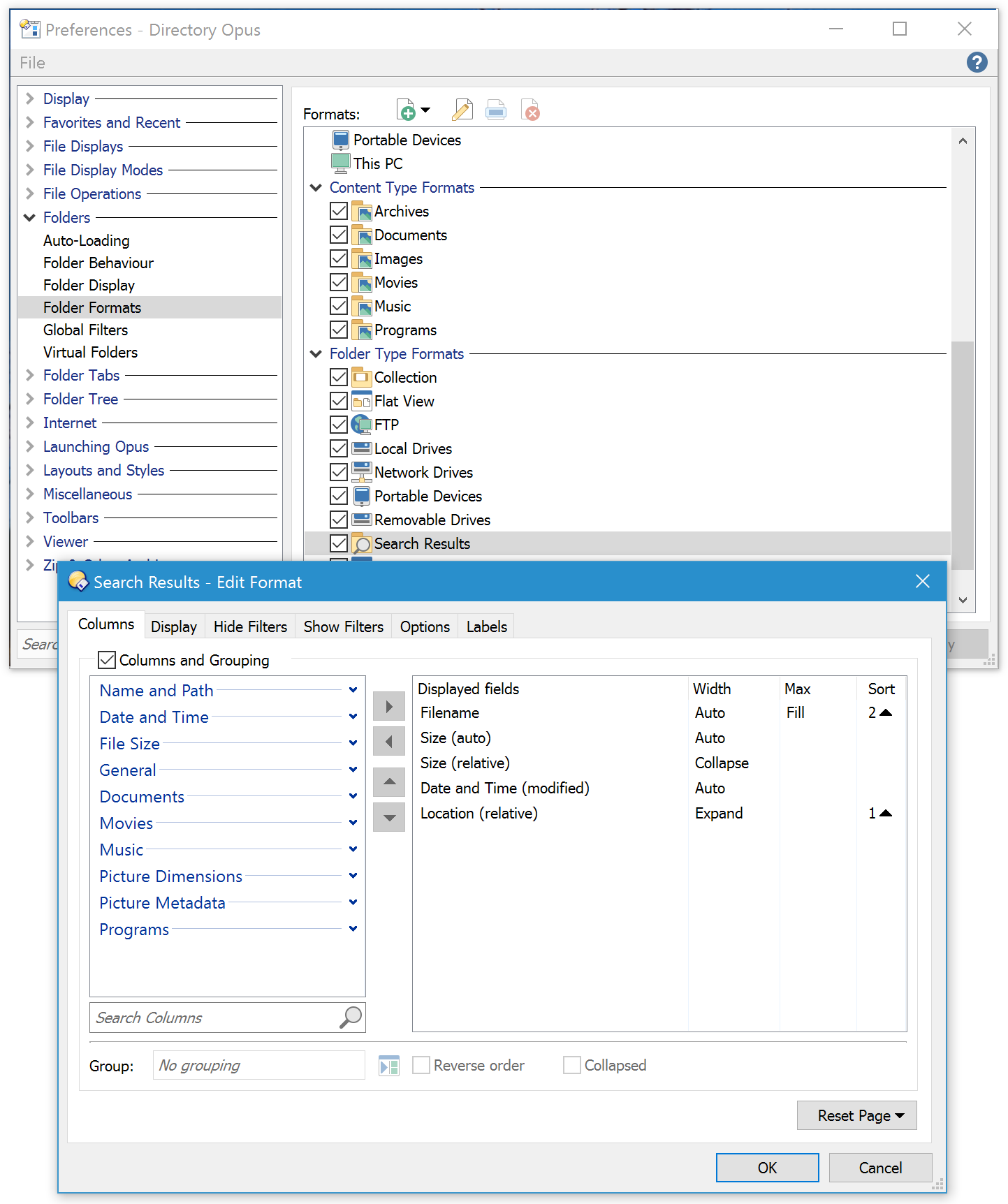
Looks like the filename column is set to only use/fill the remaining space, and the location column is set to auto-size and eating all the space.
Changing either column can fix things, depending on exactly what you want. I personally have location set to expand, so it goes off the side if the filename column needs more space.
Here is where to check the settings for the Search Results folders, and where to make the changes:
To learn about the column modes in depth, here's a video tutorial about them:
n.b. For _Find Results_ (from the internal Find Files tool) as opposed to _Search Results_ (from Windows Search), you'd normally need to edit the **Collection** format instead of the **Search Results** one.
Also check in the top of the list of formats, Path Formats section, for anything saved for a specific set of results, e.g. "col://Find Results" would override the Collection format if the results go to a collection called "Find Results". That would only be there if explicitly saved, however.
---
### Author:  [@Hydrops](https://resource.dopus.com/u/Hydrops)
#### Post date: [February 12, 2017, 6:54pm UTC](https://resource.dopus.com/t/file-display-columns-not-right-in-search-mode/24905/3 "2017-02-12T18:54:37Z")
Thank you,
will check it later to see if I can get it right.
---
### Author:  [@Hydrops](https://resource.dopus.com/u/Hydrops)
#### Post date: [February 13, 2017, 1:42am UTC](https://resource.dopus.com/t/file-display-columns-not-right-in-search-mode/24905/4 "2017-02-13T01:42:08Z")
Thank you
It worked but I had an issue here where if I opened search results format window through preferences\ folder formats\ search results any changes I made had no visible result but when I opened it by right clicking tab on search result window and selecting more after changing settings and clicking apply every thing changed accordingly.
Just letting know in case it happens to anyone else
---
### Author:  [@Leo](https://resource.dopus.com/u/Leo)
#### Post date: [February 13, 2017, 1:43am UTC](https://resource.dopus.com/t/file-display-columns-not-right-in-search-mode/24905/5 "2017-02-13T01:43:54Z")
Changes made in the Preferences list will only affect what happens when a new folder is opened, in general.
It's best to test them by closing any open folders and then opening new ones, to ensure no old or cached information is still being used.
The [Folder Formats: Quick Guide](https://resource.dopus.com/t/folder-formats-quick-guide/1313) and the more advanced guide that follows on from it go into things in more detail if you're interested.
---
### Author:  [@Hydrops](https://resource.dopus.com/u/Hydrops)
#### Post date: [February 13, 2017, 1:47am UTC](https://resource.dopus.com/t/file-display-columns-not-right-in-search-mode/24905/6 "2017-02-13T01:47:31Z")
Got it,
Thank you.