# Files to favorites via commands
**URL:** https://resource.dopus.com/t/files-to-favorites-via-commands/56850
**Category:** Help & Support
**Tags:** feature-request
**Created:** [August 13, 2025, 5:59pm UTC](https://resource.dopus.com/t/files-to-favorites-via-commands/56850 "2025-08-13T17:59:51Z")
**Posts on this page:** 11
**Page:** 1
### Author:  [@joer](https://resource.dopus.com/u/joer)
#### Post date: [August 13, 2025, 5:59pm UTC](https://resource.dopus.com/t/files-to-favorites-via-commands/56850/1 "2025-08-13T17:59:51Z")
> [@Directory Opus 13.17](https://resource.dopus.com/t/directory-opus-13-17/56574/1):
>
> ### Favorites
>
> - The Favorites system now allows files to be added to the list as well as folders.
> - Clicking a favorite file opens the file (except if displayed in the tree, where clicking it will read its parent folder and select the file).
I’d like to request an enhancement to the `Favorites ADD` command. In the latest update, adding files via drag-and-drop in Preferences or the Favorites menu opens them immediately. However, using `Favorites ADD PATH={filepath}` on a selected file still navigates to its folder and selects it. Could you add an optional argument i.e. `type` to Favorites ADD so files added via command open directly? Thanks for considering!
---
### Author:  [@Jon](https://resource.dopus.com/u/Jon)
#### Post date: [August 14, 2025, 1:10am UTC](https://resource.dopus.com/t/files-to-favorites-via-commands/56850/2 "2025-08-14T01:10:08Z")
Thanks for the report, this has been done for the next beta. (No need to specify the type manually, it'll detect it automatically).
---
### Author:  [@joer](https://resource.dopus.com/u/joer)
#### Post date: [September 1, 2025, 5:25am UTC](https://resource.dopus.com/t/files-to-favorites-via-commands/56850/3 "2025-09-01T05:25:48Z")
Greetings, i'm bringing this to your attention again because I found that when you type a command with the specific path of a file using a folder alias, it treats the favorite like a folder.
When you add the favorite via drag and drop and then you replace the path with the one using the alias, this doesn't happen, as you can see in the video.
Thanks in advance again.
---
### Author:  [@Leo](https://resource.dopus.com/u/Leo)
#### Post date: [September 1, 2025, 5:59am UTC](https://resource.dopus.com/t/files-to-favorites-via-commands/56850/4 "2025-09-01T05:59:37Z")
Which version are you running?
---
### Author:  [@joer](https://resource.dopus.com/u/joer)
#### Post date: [September 1, 2025, 6:00am UTC](https://resource.dopus.com/t/files-to-favorites-via-commands/56850/5 "2025-09-01T06:00:49Z")
13.18 stable
---
### Author:  [@Leo](https://resource.dopus.com/u/Leo)
#### Post date: [September 1, 2025, 9:49am UTC](https://resource.dopus.com/t/files-to-favorites-via-commands/56850/6 "2025-09-01T09:49:16Z")
Thanks.
The alias in the PATH argument is what's causing the problem. We'll get that fixed, but for now you can make things work by specifying the full path without using the /desktop alias.
---
### Author:  [@joer](https://resource.dopus.com/u/joer)
#### Post date: [October 31, 2025, 7:49pm UTC](https://resource.dopus.com/t/files-to-favorites-via-commands/56850/7 "2025-10-31T19:49:23Z")
Hi, following up on this: The "Find As You Type" field, in folders mode with favorites displayed still seems to treat file favorites like folders, pointing to the file directory instead of opening the file itself. It’s irrelevant if an alias is used or not, but with an alias path the icon of the program is not displayed in the fayt field (uses a folder icon instead). Could you have a look at this?
Thanks again. 🙂
(This demo was recorded in beta 13.19.2)
---
### Author:  [@Leo](https://resource.dopus.com/u/Leo)
#### Post date: [October 31, 2025, 9:08pm UTC](https://resource.dopus.com/t/files-to-favorites-via-commands/56850/8 "2025-10-31T21:08:07Z")
FAYT's Folders mode is for navigating to folders, so what it's doing seems correct to me.
If you want a way to open a specific file by typing something short into FAYT, a User Command is probably the way to do. Then you can type `>cmd` into FAYT, where `cmd` is the name you chose for the command. User Commands can be created via Settings \> Customize \> User Commands.
---
### Author:  [@joer](https://resource.dopus.com/u/joer)
#### Post date: [October 31, 2025, 11:36pm UTC](https://resource.dopus.com/t/files-to-favorites-via-commands/56850/9 "2025-10-31T23:36:48Z")
I would have agreed with that perspective before the ability to open files from the favorites list was added. In fact, the same thing could have been said about the favorites themselves, as is noted in the manual reference, the main focus for favorites is folders:
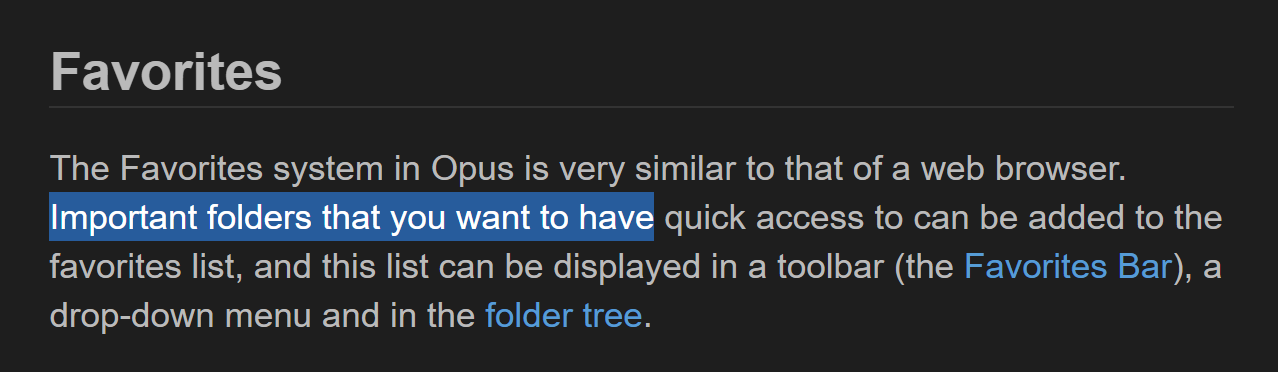
Back then, the favorites section within the FAYT 'folders mode' made sense, it only contained folders and acted as a mirror of the main favorites list.
However, now that the main favorites list can be used to open files directly, I believe the concept has changed. It now seems inconsistent (at least to me) that I can click to open a file from the main list, but am unable to do the same when accessing favorites through the FAYT mode.
Perhaps you could consider adding a checkbox to the 'folders mode' that treats any favorite pointing to a file as a file itself.
---
### Author:  [@Jon](https://resource.dopus.com/u/Jon)
#### Post date: [November 1, 2025, 5:39am UTC](https://resource.dopus.com/t/files-to-favorites-via-commands/56850/10 "2025-11-01T05:39:05Z")
Makes sense, we'll change that for the next update.
---
### Author:  [@joer](https://resource.dopus.com/u/joer)
#### Post date: [November 6, 2025, 4:37pm UTC](https://resource.dopus.com/t/files-to-favorites-via-commands/56850/11 "2025-11-06T16:37:10Z")
> [@joer](#):
>
> but with an alias path the icon of the program is not displayed in the fayt field (uses a folder icon instead).
Hi!, first of all, thank you for your quick responses and compromise, it's very very appreciated. I tried the beta and regarding the last topic, works great, could you have a look at this thing with aliases? It now shows a generic file icon in the fayt when used, but with absolute paths shows the file icon properly.