# Find a Tag via a Button
**URL:** https://resource.dopus.com/t/find-a-tag-via-a-button/20393
**Category:** Help & Support
**Tags:** script
**Created:** [March 28, 2015, 3:01pm UTC](https://resource.dopus.com/t/find-a-tag-via-a-button/20393 "2015-03-28T15:01:05Z")
**Posts on this page:** 20
**Page:** 1
### Author:  [@Chuck](https://resource.dopus.com/u/Chuck)
#### Post date: [March 28, 2015, 3:01pm UTC](https://resource.dopus.com/t/find-a-tag-via-a-button/20393/1 "2015-03-28T15:01:05Z")
I tag files that Windows Search can't track via tags (ie PDF files). I want to be able to find tag files using a button to enter a string. Something like this:
```auto
Find IN {sourcepath$} TAGS:"{dlgstring|Enter Tag}"
```
Unfortunately, this doesn't work. I know query won't work because it depends on Windows Search, so need to go the find route, but don't want to open the find panel.
Any ideas would be appreciated.
---
### Author:  [@Chuck](https://resource.dopus.com/u/Chuck)
#### Post date: [March 29, 2015, 4:46am UTC](https://resource.dopus.com/t/find-a-tag-via-a-button/20393/2 "2015-03-29T04:46:30Z")
I haven't cracked this at all.
Let's try a different approach:
There has to be a way to do the following via a button or script:
1. Open the find panel for the current source path
2. Enter advanced criteria as Tags Match
3. Open dialog for user input to enter matching text
4. Initiate search and close find panel
5. Display results in a collection
Any ideas along these lines?
---
### Author:  [@steje](https://resource.dopus.com/u/steje)
#### Post date: [March 29, 2015, 2:26pm UTC](https://resource.dopus.com/t/find-a-tag-via-a-button/20393/3 "2015-03-29T14:26:36Z")
How exactly are you setting the tags in the first place? Whats the command you used to do it?
---
### Author:  [@Leo](https://resource.dopus.com/u/Leo)
#### Post date: [March 30, 2015, 8:34am UTC](https://resource.dopus.com/t/find-a-tag-via-a-button/20393/4 "2015-03-30T08:34:51Z")
I think the only good way to do this at the moment would be a script which does the search itself.
That isn't as hard as it might sound, since Opus provides objects for recursively looping through everything below a folder & its subfolders, and the Metadata object lets you get back the list of tags for a file.
[Scripts (JS & VBS) Snippet: Enumerating files and metadata tags](https://resource.dopus.com/t/scripts-js-vbs-snippet-enumerating-files-and-metadata-tags/18439/1) is a good starting point.
---
### Author:  [@Chuck](https://resource.dopus.com/u/Chuck)
#### Post date: [March 30, 2015, 10:21am UTC](https://resource.dopus.com/t/find-a-tag-via-a-button/20393/5 "2015-03-30T10:21:33Z")
> [@steje](#):
>
> How exactly are you setting the tags in the first place? Whats the command you used to do it?
`@nodeselect
SetAttr META "tags:{dlgstring|Enter New Tag}"`
---
### Author:  [@Chuck](https://resource.dopus.com/u/Chuck)
#### Post date: [March 30, 2015, 10:29am UTC](https://resource.dopus.com/t/find-a-tag-via-a-button/20393/6 "2015-03-30T10:29:39Z")
[quote="leo"]I think the only good way to do this at the moment would be a script which does the search itself.
That isn't as hard as it might sound, since Opus provides objects for recursively looping through everything below a folder & its subfolders, and the Metadata object lets you get back the list of tags for a file.
[Scripts (JS & VBS) Snippet: Enumerating files and metadata tags](https://resource.dopus.com/t/scripts-js-vbs-snippet-enumerating-files-and-metadata-tags/18439/1) is a good starting point.[/quote]
Thanks for the pointer, Leo, although I think you overestimate my skill set!
I'll give it a go.
---
### Author:  [@Chuck](https://resource.dopus.com/u/Chuck)
#### Post date: [March 30, 2015, 10:35am UTC](https://resource.dopus.com/t/find-a-tag-via-a-button/20393/7 "2015-03-30T10:35:43Z")
> [@steje](#):
>
> How exactly are you setting the tags in the first place? Whats the command you used to do it?
Another follow-up to this: In addition to the code previously mentioned, I also use Kundal's [Tagger script](https://resource.dopus.com/t/tagger/18010/1) and, on occasion, do it manually through the Edit Metadata dialog.
---
### Author:  [@Chuck](https://resource.dopus.com/u/Chuck)
#### Post date: [March 30, 2015, 11:20am UTC](https://resource.dopus.com/t/find-a-tag-via-a-button/20393/8 "2015-03-30T11:20:55Z")
[quote="leo"]I think the only good way to do this at the moment would be a script which does the search itself.
That isn't as hard as it might sound, since Opus provides objects for recursively looping through everything below a folder & its subfolders, and the Metadata object lets you get back the list of tags for a file.
[Scripts (JS & VBS) Snippet: Enumerating files and metadata tags](https://resource.dopus.com/t/scripts-js-vbs-snippet-enumerating-files-and-metadata-tags/18439/1) is a good starting point.[/quote]
I think I'm tracking with this. ANy pointers on how to output to a DOpus collection, rather than the utility panel?
---
### Author:  [@Leo](https://resource.dopus.com/u/Leo)
#### Post date: [March 30, 2015, 11:31am UTC](https://resource.dopus.com/t/find-a-tag-via-a-button/20393/9 "2015-03-30T11:31:37Z")
For individual items, you can run the normal copy command to add things to collections.
For adding to or replacing collections in bulk: [External Manipulation of File Collections](http://www.gpsoft.com.au/help/opus11/index.html#!Documents/External_Manipulation_of_File_Collections.htm).
---
### Author:  [@Chuck](https://resource.dopus.com/u/Chuck)
#### Post date: [March 30, 2015, 12:02pm UTC](https://resource.dopus.com/t/find-a-tag-via-a-button/20393/10 "2015-03-30T12:02:14Z")
[quote="leo"]For individual items, you can run the normal copy command to add things to collections.
For adding to or replacing collections in bulk: [External Manipulation of File Collections](http://www.gpsoft.com.au/help/opus11/index.html#!Documents/External_Manipulation_of_File_Collections.htm).[/quote]
So something like this:
`Dim oShell
Set oShell = WScript.CreateObject ("WScript.Shell")
oShell.run "C:\Program Files\GPSoftware\dopusrt.exe /col create Tags"
Set oShell = Nothing`
Am I on the right track?
---
### Author:  [@Leo](https://resource.dopus.com/u/Leo)
#### Post date: [March 30, 2015, 12:10pm UTC](https://resource.dopus.com/t/find-a-tag-via-a-button/20393/11 "2015-03-30T12:10:58Z")
Yes, right track!
---
### Author:  [@Chuck](https://resource.dopus.com/u/Chuck)
#### Post date: [March 31, 2015, 11:18am UTC](https://resource.dopus.com/t/find-a-tag-via-a-button/20393/12 "2015-03-31T11:18:26Z")
OK, clearly I am taking baby steps, so bear with me. I'm stuck referencing the active tab. How do I do it?
Here's the code I have cobbled together so far:
[code]Option Explicit
Function PadSpaceRight(str, slen)
str = CStr(Str) ' Force To String.
If (Len(str) \< slen) Then
str = str & Space(slen - Len(str))
End If
PadSpaceRight = str
End Function
Function onClick(clickData)
PadSpaceRight()
```
Dim folderItem
Dim folderEnum
Dim activeTab
Dim tag
Dim tagString
Dim oShell
Set oShell = WScript.CreateObject ("WScript.Shell")
oShell.run "C:\Program Files\GPSoftware\dopusrt.exe /col create Tags"
'Identify active tab (source tab)
Set activeTab = DOpus.
'Run through active source tab
Set folderEnum = DOpus.FSUtil.ReadDir(activeTab, False)
'Add dialog here to ask for tag(s) to look for
Do While (Not folderEnum.complete)
Set folderItem = folderEnum.Next
If (Not folderItem.is_dir) Then
If (folderItem.metadata = "none") Then
tagString = ""
Else
tagString = ""
For Each tag In folderItem.metadata.tags
If (tagString <> "") Then
tagString = tagString & ", "
tagString = tagString & tag
Else
tagString = tag
End If
Next
If (tagString = "") Then
tagString = ""
End If
End If
'Send output to utility panel
DOpus.Output(PadSpaceRight(folderItem + ": ",25) & tagString)
'Add item (only identified tags that meet user dialog input.
'I know I didn't identify this properly. Do I need a variable?
oShell.run "C:\Program Files\GPSoftware\dopusrt.exe /col add Tags"
End If
Loop
Set oShell = Nothing
```
End Function[/code]
I also need to do the following:
1. add a dialog to ask for the tab(s) of concern
2. limit output to only those tags identified
3. make the Tags collection appear and have focus
I'll take all the help I can get! 👍
---
### Author:  [@Leo](https://resource.dopus.com/u/Leo)
#### Post date: [March 31, 2015, 2:34pm UTC](https://resource.dopus.com/t/find-a-tag-via-a-button/20393/13 "2015-03-31T14:34:33Z")
1. clickData.func.sourcetab gets you the active tab from an [OnClick](http://www.gpsoft.com.au/help/opus11/index.html#!Documents/Scripting/OnClick.htm) handler like you're using.
2. [Dialogs and Popup Menus](http://www.gpsoft.com.au/help/opus11/index.html#!Documents/Scripting/Dialogs_and_Popup_Menus.htm) example.
3. I'm not sure what you mean there. How would you know which tags you will find until you've found them all? You could make the script store all the results until the end, then ask the user, and then send the wanted items to a collection. But the code isn't doing that at the moment so I'm not sure if I have understood.
4. Run the Go command from the script to go to a folder or open a new tab.
---
### Author:  [@Chuck](https://resource.dopus.com/u/Chuck)
#### Post date: [April 1, 2015, 10:01am UTC](https://resource.dopus.com/t/find-a-tag-via-a-button/20393/14 "2015-04-01T10:01:33Z")
[quote="leo"]0. clickData.func.sourcetab gets you the active tab from an [OnClick](http://www.gpsoft.com.au/help/opus11/index.html#!Documents/Scripting/OnClick.htm) handler like you're using.[/quote]Leo, thanks for your assistance and patience. I do not write code for a living and have not done anything even remotely meaningful from a coding standpoint in over a decade. What little skill I had is long since lost. That said, I'm still here! So...
So my code would be:`Set activeTab = clickData.func.sourcetab`
[quote]1. [Dialogs and Popup Menus](http://www.gpsoft.com.au/help/opus11/index.html#!Documents/Scripting/Dialogs_and_Popup_Menus.htm) example.
1. I'm not sure what you mean there. How would you know which tags you will find until you've found them all? You could make the script store all the results until the end, then ask the user, and then send the wanted items to a collection. But the code isn't doing that at the moment so I'm not sure if I have understood.[/quote]
I was tracking with the dialog box itself, just hadn't got there yet. Clearly the code I posted is not going to do what I want and I need to do something else. What I want to do is call a dialog to input tag(s) for which to search, then compare those with any tagged files. I will assign a variable to dlg.input
[code]Set dlg = DOpus.Dlg
```
dlg.window = DOpus.Listers(0)
dlg.message = "Enter tag(s) you are searching for." & vbCrLf & "If searching for more than one, separate each with a comma." & vbCrLf & "(for example: photos, money, travel)"
dlg.title = Tag Search
dlg.buttons = "OK|Cancel"
dlg.icon = "question"
dlg.max = 128
ret = dlg.Show
tagSearch = dlg.input[/code]
```
How do I parse tagSearch for each tag and store the values for comparison?
How do I construct the `Do While (Not folderEnum.complete)` sequence to loop through the active tab and compare any found tags with those supplied by dlg.input?
How do I store those that actually match in the collection?
Is this all making sense?
> [@](#):
>
> 3. Run the Go command from the script to go to a folder or open a new tab.
Like this?
```auto
oShell.run "C:\Program Files\GPSoftware\dopusrt.exe /col Go Tags"
```
Thanks again for your assistance and patience!
---
### Author:  [@Chuck](https://resource.dopus.com/u/Chuck)
#### Post date: [September 28, 2017, 5:32am UTC](https://resource.dopus.com/t/find-a-tag-via-a-button/20393/15 "2017-09-28T05:32:37Z")
**BRING OUT YOUR DEAD!!!**
Reviving an old topic upon which my EXTREMELY LIMITED scripting skills ran aground, I still for the life of me can't figure out how to search/filter tagged files via a button, especially those tagged specifically within DOpus (ie using the Tagger script).
If we could get something like this to work for all tags:
```nohighlight
Find QUERY tags:{dlgstring|Enter tag to search for}
```
Otherwise, if someone has a comparable script or further advice, either would be welcomed!
---
### Author:  [@auden](https://resource.dopus.com/u/auden)
#### Post date: [September 28, 2017, 6:09am UTC](https://resource.dopus.com/t/find-a-tag-via-a-button/20393/16 "2017-09-28T06:09:06Z")
I do not know whether the way I do this helps. I have thousands of images which I have tagged through Opus (caption, keywords copyright etc). I use the Microsoft indexer to index the folders where I keep the images. I then use a pretty simple script to make SQL searches of the Microsoft indexed files in Opus.
The system is unbelievably fast. I can, for instance, search for pictures taken in Spain of a beach with parasols and have the result back in under a second - and that search will include thousands of images. The Microsoft indexer is much maligned, but if you have a powerful enough machine, it works an absolute treat.
I will be happy to share the script if it is of any use. You can then amend it to your needs. I run it from a button BTW.
---
### Author:  [@Chuck](https://resource.dopus.com/u/Chuck)
#### Post date: [September 28, 2017, 6:23am UTC](https://resource.dopus.com/t/find-a-tag-via-a-button/20393/17 "2017-09-28T06:23:15Z")
@auden - Thanks! I will take any help I can get.
Do you happen to tag other files/folders as well? Are you able to search for those with your script?
---
### Author:  [@auden](https://resource.dopus.com/u/auden)
#### Post date: [September 28, 2017, 8:08am UTC](https://resource.dopus.com/t/find-a-tag-via-a-button/20393/18 "2017-09-28T08:08:36Z")
First of all here is the button with the VBA script on it.
[Index search.dcf](https://resource.dopus.com/uploads/default/original/3X/8/6/86f6efd6cc2624a411c5b3a31d1e56e1c38fd5de.dcf) (7.8 KB)
This what the script interface looks like:
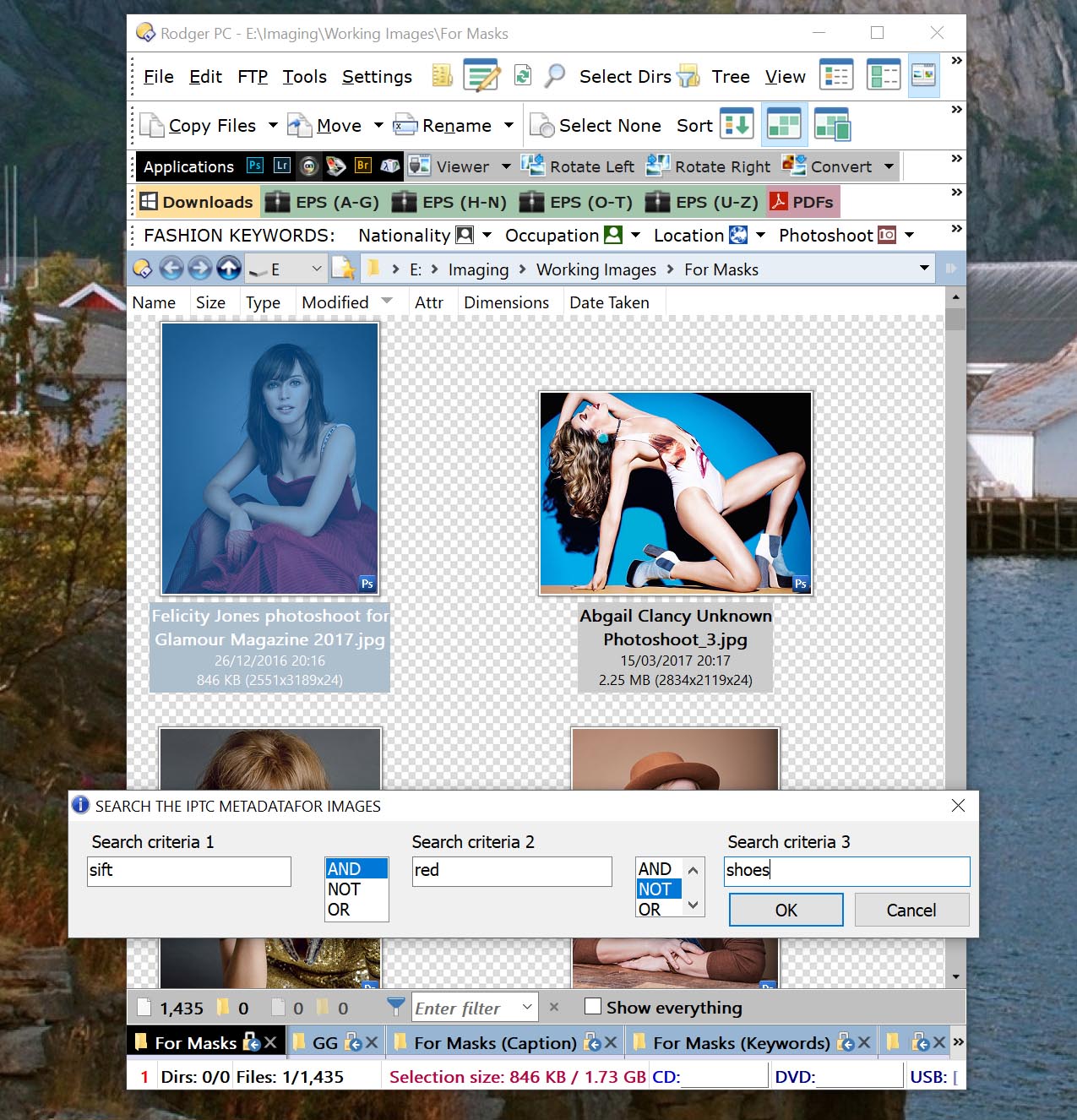
(sorry about the typo in Search Criteria 1 it should read Swift)
Basically the script takes what you enter as search criteria and your choices (AND NOT OR) and executes an Opus search command on those choices. (You will see the search you construct in the search box) It also tries to stop you from making the kind of AND NOT OR choices that are not valid under the SQL Microsoft search seems to use..
That means it does work with all tagged material - or as far as I have been able to try it - music tracks, mainly. It is just that the indexed material is super-fast.
This is the result of the search (when you correct the typo)
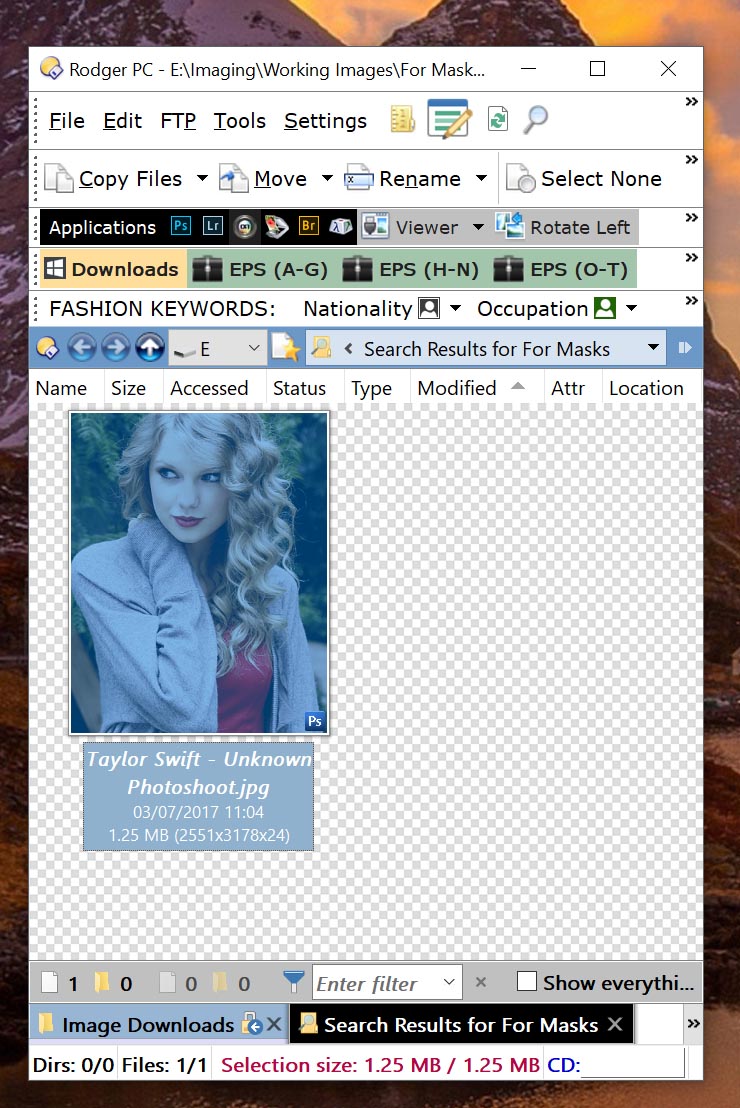
There are around 1500 images in the directory I am searching here and the one picture of Taylor Swift that matches the search criteria is returned in the blink of an eye.
Please feel free to amend the script as you wish. BTW I am no programmer so the code is probably pretty awful, but it does work - and fast.
---
### Author:  [@Chuck](https://resource.dopus.com/u/Chuck)
#### Post date: [September 28, 2017, 10:01am UTC](https://resource.dopus.com/t/find-a-tag-via-a-button/20393/19 "2017-09-28T10:01:37Z")
@auden - thanks for this. Unfortunately, I can't make any sense of it or get it to work.
---
### Author:  [@auden](https://resource.dopus.com/u/auden)
#### Post date: [September 28, 2017, 10:28am UTC](https://resource.dopus.com/t/find-a-tag-via-a-button/20393/20 "2017-09-28T10:28:34Z")
Do you have a lister that contains images with tags (metadata)? Is the lister active i.e. you have clicked inside the lister? If it is the the form should just load. For obvious reasons it searches only the lister you have active.
Can you see the output from the form in the search field in Opus? Can you see the metadata in your files in the Opus metadata app?
I suspect that you may not be able to see the form on your screen. Here is a version that will get around that problem. I use a high resolution screen and the display co-ordinates may be out of range on a smaller monitor.
[Index search.dcf](https://resource.dopus.com/uploads/default/original/3X/4/a/4aadb4d924aba032ba48ed74de343603854845bf.dcf) (7.8 KB)
Rest assured I have been using this script for months.
[Next page](https://resource.dopus.com/t/find-a-tag-via-a-button/20393.md?page=2)