Thank you both for your help.
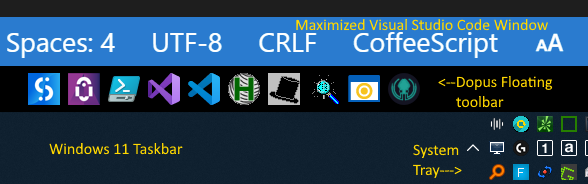
By following Leo & Jon's guidance I essentially restored the Windows Quick Launch Toolbar omitted from the current Insider's release of Windows 11.
- I now have a working toolbar that is docked to the top of the Windows taskbar.
- A maximized window DOES NOT cover the Dopus toolbar!
- The Dopus Toolbar automatically opens when I restart my computer
This result is better than trying to dock the Dopus toolbar on top of the Windows Taskbar because the Windows Taskbar is now available, as intended, to show pinned and running applications.
I did this configuration work in Windows 11, which to my own surprise, is working very well with all of my legacy applications and with Directory Opus!
One tiny caveat: If task manager is used to terminate Explorer.exe (or Windows does this for some random reason), then the floating Dopus toolbar will vanish. Getting the floating toolbar(s) back requires exiting and restarting Dopus or alternatively restarting the computer.
If Microsoft does not restore Toolbars on the Taskbar, then I am guessing that this Dopus feature will convince many Windows 10 users to purchase Directory Opus for Windows 11. Directory Opus is and continues to be a useful and valuable tool that I enjoy using every day!
Thank you,
Gary