# Folders not autorefreshing after 12.22 update
**URL:** https://resource.dopus.com/t/folders-not-autorefreshing-after-12-22-update/36937
**Category:** Help & Support
**Tags:** bug-report
**Created:** [October 16, 2020, 11:46am UTC](https://resource.dopus.com/t/folders-not-autorefreshing-after-12-22-update/36937 "2020-10-16T11:46:31Z")
**Posts on this page:** 20
**Page:** 1
### Author:  [@rddavistoronto2](https://resource.dopus.com/u/rddavistoronto2)
#### Post date: [October 16, 2020, 11:46am UTC](https://resource.dopus.com/t/folders-not-autorefreshing-after-12-22-update/36937/1 "2020-10-16T11:46:31Z")
I updated yesterday to 12.22, and suddenly the folders will only update manually. If I add a file to a folder it will not show up in DO until I hit F5. This is new behaviour that I have never seen before, and can't find the parameter to change to fix this.
---
### Author:  [@Leo](https://resource.dopus.com/u/Leo)
#### Post date: [October 16, 2020, 11:48am UTC](https://resource.dopus.com/t/folders-not-autorefreshing-after-12-22-update/36937/2 "2020-10-16T11:48:51Z")
Please try rebooting in case it's a temporary issue or due to files that couldn't be replaced during the installation.
Which type(s) of folders is it happening in?
[Changes to folders are not being detected](https://resource.dopus.com/t/changes-to-folders-are-not-being-detected/1786) has other things to check/try.
---
### Author:  [@rddavistoronto2](https://resource.dopus.com/u/rddavistoronto2)
#### Post date: [October 16, 2020, 1:03pm UTC](https://resource.dopus.com/t/folders-not-autorefreshing-after-12-22-update/36937/3 "2020-10-16T13:03:17Z")
Thanks very much Leo. It's happening in local drive folders. I'll try your fixes. Hopefully one of them will work.
---
### Author:  [@rddavistoronto2](https://resource.dopus.com/u/rddavistoronto2)
#### Post date: [October 16, 2020, 2:04pm UTC](https://resource.dopus.com/t/folders-not-autorefreshing-after-12-22-update/36937/4 "2020-10-16T14:04:47Z")
OK - I tried everything, including rebooting and re-installing 12.22 (except the Process Monitor and Change Test methods). No change. The problem is persisting. The problem is not happening in File Explorer, which is refreshing automatically.
---
### Author:  [@Leo](https://resource.dopus.com/u/Leo)
#### Post date: [October 16, 2020, 2:07pm UTC](https://resource.dopus.com/t/folders-not-autorefreshing-after-12-22-update/36937/5 "2020-10-16T14:07:17Z")
What are the results of the **Debugging** section of the guide I linked (near the middle)?
Did you try the **Change Test** tool as well (at the end)?
---
### Author:  [@rddavistoronto2](https://resource.dopus.com/u/rddavistoronto2)
#### Post date: [October 16, 2020, 2:51pm UTC](https://resource.dopus.com/t/folders-not-autorefreshing-after-12-22-update/36937/6 "2020-10-16T14:51:57Z")
I did try the CHANGE and debug steps. I'm attaching the debug log and the readout from the CHANGE utility. Unfortunately, the problem is persisitng.
[CHANGE.txt](https://resource.dopus.com/uploads/short-url/pLnIAuIlXw3BPqBKk9o5peGi8zU.txt) (144.4 KB) [DB201016.txt](https://resource.dopus.com/uploads/short-url/nbHOCrfOdL3agSVJEKMeTozWDxV.txt) (345 Bytes)
---
### Author:  [@Leo](https://resource.dopus.com/u/Leo)
#### Post date: [October 16, 2020, 2:53pm UTC](https://resource.dopus.com/t/folders-not-autorefreshing-after-12-22-update/36937/7 "2020-10-16T14:53:44Z")
Thanks.
Which files/folders did you modify as a test while making the logs?
---
### Author:  [@rddavistoronto2](https://resource.dopus.com/u/rddavistoronto2)
#### Post date: [October 16, 2020, 2:58pm UTC](https://resource.dopus.com/t/folders-not-autorefreshing-after-12-22-update/36937/8 "2020-10-16T14:58:20Z")
Drive: D:\One Drive RDD\OneDrive\Desktop
the files I modified were a doc file and some zip archives
---
### Author:  [@Leo](https://resource.dopus.com/u/Leo)
#### Post date: [October 16, 2020, 3:08pm UTC](https://resource.dopus.com/t/folders-not-autorefreshing-after-12-22-update/36937/9 "2020-10-16T15:08:17Z")
There aren't any references to `D:\`, `OneDrive`, `doc` or `zip` in either of the log files. If the logs were being collected while the files were being changed, that points to a general issue with the system or drive. (Or the logging wasn't on while the change happened.)
---
### Author:  [@rddavistoronto2](https://resource.dopus.com/u/rddavistoronto2)
#### Post date: [October 16, 2020, 3:13pm UTC](https://resource.dopus.com/t/folders-not-autorefreshing-after-12-22-update/36937/10 "2020-10-16T15:13:43Z")
Debug kept crashing, so I may have screwed up the process and sent you the subsequent log. Sorry. I'll try again.
---
### Author:  [@Leo](https://resource.dopus.com/u/Leo)
#### Post date: [October 16, 2020, 3:24pm UTC](https://resource.dopus.com/t/folders-not-autorefreshing-after-12-22-update/36937/11 "2020-10-16T15:24:56Z")
DebugView? Or do you mean something else?
DebugView++ is an alternative to Microsoft's DebugView, if you're having problems with it:
> **[Releases · CobaltFusion/DebugViewPP](https://github.com/CobaltFusion/DebugViewPP/releases)**
>
> DebugView++, collects, views, filters your application logs, and highlights information that is important to you! - CobaltFusion/DebugViewPP
(That's what I actually use. It's a better program, but not from Microsoft.)
---
### Author:  [@rddavistoronto2](https://resource.dopus.com/u/rddavistoronto2)
#### Post date: [October 16, 2020, 3:26pm UTC](https://resource.dopus.com/t/folders-not-autorefreshing-after-12-22-update/36937/12 "2020-10-16T15:26:28Z")
Ok - ran DebugView again. It didn't crash this time. Thanks for the tip about DebugView++
All the activity I logged consisted of my deleting and repasting CHANGE.txt in D:\One Drive RDD\OneDrive\Desktop to see if DB would refresh automatically. It didn't. DebugView log below.
```nohighlight
[\\RDD2019PHANTEKS]
00000035 28.41062355 [12628] Razer Synapse Service Process.exe Information: 0 :
00000036 28.41065025 [12628] ResetForegroundTimer: Check again after 2000 ms.
00000037 31.44848061 [2160] [15240] dopus: ShellChange: 00000200020B2D40, 3
00000038 31.44859886 [2160] [15240] dopus: ShellChange: dwEvent = 2000
00000039 31.44871330 [2160] [15240] dopus: ShellChange: update item = D:\One Drive RDD\OneDrive
00000040 31.44903946 [2160] [15240] dopus: ShellChange: 00000200020B3040, 3
00000041 31.44905853 [2160] [15240] dopus: ShellChange: dwEvent = 2000
00000042 31.44927406 [2160] [15240] dopus: ShellChange: update item = D:\One Drive RDD\OneDrive\Desktop
00000043 31.45709419 [2160] [15240] dopus: ShellChange: 00000200020B2FB0, 3
00000044 31.46067238 [2160] [15240] dopus: ShellChange: dwEvent = 2000
00000045 31.46449280 [2160] [15240] dopus: ShellChange: update item = D:\One Drive RDD\OneDrive\Desktop\db
00000046 31.46759415 [2160] [15240] dopus: ShellChange: 00000200020B2CE0, 3
00000047 31.46953964 [2160] [15240] dopus: ShellChange: dwEvent = 2000
00000048 31.47151947 [2160] [15240] dopus: ShellChange: update item = D:\One Drive RDD\OneDrive
00000049 31.47651291 [2160] [15240] dopus: ShellChange: 00000200020B2950, 3
00000050 31.48363113 [2160] [15240] dopus: ShellChange: dwEvent = 2000
00000051 31.48647308 [2160] [15240] dopus: ShellChange: update item = D:\One Drive RDD\OneDrive\Desktop
00000052 31.49534798 [2160] [15240] dopus: ShellChange: 00000200020B29B0, 3
00000053 31.50140190 [2160] [15240] dopus: ShellChange: dwEvent = 2000
00000054 31.50640297 [2160] [15240] dopus: ShellChange: update item = D:\One Drive RDD\OneDrive\Desktop\db
00000055 31.51006126 [2160] [15240] dopus: ShellChange: 00000200020B30D0, 3
00000056 31.51385880 [2160] [15240] dopus: ShellChange: dwEvent = 2000
00000057 31.52004814 [2160] [15240] dopus: ShellChange: update item = D:\One Drive RDD\OneDrive\Desktop
00000058 31.53960228 [2160] [15240] dopus: ShellChange: 00000200020B28F0, 3
00000059 31.54320717 [2160] [15240] dopus: ShellChange: dwEvent = 2000
00000060 31.54995537 [2160] [15240] dopus: ShellChange: update item = D:\One Drive RDD\OneDrive\Desktop\db
00000061 31.55291557 [2160] [15240] dopus: ShellChange: 00000200020B2AA0, 3
00000062 31.55606651 [2160] [15240] dopus: ShellChange: dwEvent = 2000
00000063 31.55889320 [2160] [15240] dopus: ShellChange: update item = D:\One Drive RDD\OneDrive\Desktop
00000064 31.56239128 [2160] [15240] dopus: ShellChange: 00000200020B2E60, 3
00000065 31.57081223 [2160] [15240] dopus: ShellChange: dwEvent = 2000
00000066 31.57489967 [2160] [15240] dopus: ShellChange: update item = D:\One Drive RDD\OneDrive\Desktop\db
00000067 31.68029213 [12628] Razer Synapse Service Process.exe Information: 0 :
00000068 31.68033600 [12628] ResetForegroundTimer: Check again after 2000 ms.
00000069 33.81301117 [12628] Razer Synapse Service Process.exe Information: 0 :
00000070 33.81304169 [12628] SetForegroundWindow: explorer.exe.
00000071 33.81410599 [12628] Razer Synapse Service Process.exe Information: 0 :
00000072 33.81414413 [12628] ResetForegroundTimer: Check again after 3000 ms.
00000073 35.11896133 [12628] Razer Synapse Service Process.exe Information: 0 :
00000074 35.11901474 [12628] ResetForegroundTimer: Check again after 2000 ms.
00000075 35.12106705 [12628] Razer Synapse Service Process.exe Information: 0 :
00000076 35.12150955 [12628] ResetForegroundTimer: Check again after 2000 ms.
00000077 35.19480133 [2160] [15240] dopus: ShellChange: 0000020002422E20, 3
00000078 35.19486237 [2160] [15240] dopus: ShellChange: dwEvent = 40000
00000079 35.20092773 [12628] Razer Synapse Service Process.exe Information: 0 :
00000080 35.20101166 [12628] ResetForegroundTimer: Check again after 2000 ms.
00000081 35.20404434 [12628] Razer Synapse Service Process.exe Information: 0 :
00000082 35.20441818 [12628] ResetForegroundTimer: Check again after 2000 ms.
00000083 36.98618698 [12628] Razer Synapse Service Process.exe Information: 0 :
00000084 36.98631287 [12628] ResetForegroundTimer: Check again after 2000 ms.
00000085 38.19210052 [2160] [15240] dopus: ShellChange: 00000200020B2860, 3
00000086 38.19216156 [2160] [15240] dopus: ShellChange: dwEvent = 2000
00000087 38.19218445 [2160] [15240] dopus: ShellChange: update item = D:\One Drive RDD\OneDrive\Desktop
00000088 38.19242477 [2160] [15240] dopus: ShellChange: 00000200020B28C0, 3
00000089 38.19244385 [2160] [15240] dopus: ShellChange: dwEvent = 2000
00000090 38.19247818 [2160] [15240] dopus: ShellChange: update item = D:\One Drive RDD\OneDrive\Desktop
00000091 38.19265366 [2160] [15240] dopus: ShellChange: 00000200020B27A0, 3
00000092 38.19267273 [2160] [15240] dopus: ShellChange: dwEvent = 2000
00000093 38.19270325 [2160] [15240] dopus: ShellChange: update item = D:\One Drive RDD\OneDrive\Desktop
00000094 38.19285583 [2160] [15240] dopus: ShellChange: 00000200020B26B0, 3
00000095 38.19287491 [2160] [15240] dopus: ShellChange: dwEvent = 2000
00000096 38.19289780 [2160] [15240] dopus: ShellChange: update item = D:\One Drive RDD\OneDrive\Desktop
00000097 39.18297958 [12628] Razer Synapse Service Process.exe Information: 0 :
00000098 39.18302536 [12628] SetForegroundWindow: dopus.exe.
00000099 39.18402100 [12628] Razer Synapse Service Process.exe Information: 0 :
00000100 39.18408585 [12628] ResetForegroundTimer: Check again after 3000 ms.
00000101 46.93264771 [12628] Razer Synapse Service Process.exe Information: 0 :
00000102 46.93267441 [12628] ResetForegroundTimer: Check again after 2000 ms.
00000103 49.07364273 [12628] Razer Synapse Service Process.exe Information: 0 :
00000104 49.07369232 [12628] SetForegroundWindow: dbgview64.exe.
00000105 49.07477570 [12628] Razer Synapse Service Process.exe Information: 0 :
00000106 49.07486343 [12628] ResetForegroundTimer: Check again after 3000 ms.
00000107 52.08932495 [12628] Razer Synapse Service Process.exe Information: 0 :
00000108 52.08938980 [12628] ResetForegroundTimer: Check again after 2000 ms.
00000109 54.22313690 [12628] Razer Synapse Service Process.exe Information: 0 :
00000110 54.22315598 [12628] SetForegroundWindow: dopus.exe.
00000111 54.22425079 [12628] Razer Synapse Service Process.exe Information: 0 :
00000112 54.22433853 [12628] ResetForegroundTimer: Check again after 3000 ms.
00000113 56.07250595 [12628] Razer Synapse Service Process.exe Information: 0 :
00000114 56.07265091 [12628] ResetForegroundTimer: Check again after 2000 ms.
00000115 65.91176605 [12628] Razer Synapse Service Process.exe Information: 0 :
00000116 65.91200256 [12628] ResetForegroundTimer: Check again after 2000 ms.
00000117 66.95729828 [12628] Razer Synapse Service Process.exe Information: 0 :
00000118 66.97462463 [12628] ResetForegroundTimer: Check again after 2000 ms.
00000119 69.10865021 [12628] Razer Synapse Service Process.exe Information: 0 :
00000120 69.10868835 [12628] SetForegroundWindow: dbgview64.exe.
00000121 69.10965729 [12628] Razer Synapse Service Process.exe Information: 0 :
00000122 69.10969543 [12628] ResetForegroundTimer: Check again after 3000 ms.
```
---
### Author:  [@Leo](https://resource.dopus.com/u/Leo)
#### Post date: [October 16, 2020, 3:30pm UTC](https://resource.dopus.com/t/folders-not-autorefreshing-after-12-22-update/36937/13 "2020-10-16T15:30:36Z")
Are both **notify\_debug** and **shellchange\_debug** set to True there?
It looks like only **shellchange\_debug** is on, unless something is blocking the other type of notifications entirely. (Antivirus / "privacy" tools would be my best bet, if that's the case.)
---
### Author:  [@rddavistoronto2](https://resource.dopus.com/u/rddavistoronto2)
#### Post date: [October 16, 2020, 3:52pm UTC](https://resource.dopus.com/t/folders-not-autorefreshing-after-12-22-update/36937/14 "2020-10-16T15:52:40Z")
I did have both **notify\_debug** and **shellchange\_debug** set to True.
I'm only running Windows Defender, but no other antivirus and (I believe) no privacy tools.
---
### Author:  [@Leo](https://resource.dopus.com/u/Leo)
#### Post date: [October 16, 2020, 3:56pm UTC](https://resource.dopus.com/t/folders-not-autorefreshing-after-12-22-update/36937/15 "2020-10-16T15:56:20Z")
Could you try the ChangeTest.exe tool on your D:\ drive to see if it sees the change?
> Note that Change Test only monitors C:\ by default, when run without any other arguments. You can specify a drive or folder path on the command line if you want it to monitor a different place.
i.e. Run it as `ChangeTest.exe D:\`
Try renaming it to `dopus.exe` as well, in case something is keying off the exe name. (So rename ChangeTest.exe and then run it as `dopus.exe D:\` to test if it can see changes made to the D drive.)
---
### Author:  [@rddavistoronto2](https://resource.dopus.com/u/rddavistoronto2)
#### Post date: [October 16, 2020, 4:03pm UTC](https://resource.dopus.com/t/folders-not-autorefreshing-after-12-22-update/36937/16 "2020-10-16T16:03:55Z")
Done. See below. Same directory are before. I pasted then deleted "Beniuk v Leamington 2020onca238 LIMITATIONS.pdf". In neither case did the change show up in OD.
Watching "D:" (recursive)
Push any key to exit.
Notified with 168 bytes.
FILE\_ACTION\_ADDED "D:\One Drive RDD\OneDrive\Desktop\Beniuk v Leamington 2020onca238 LIMITATIONS.pdf"
Notified with 240 bytes.
FILE\_ACTION\_MODIFIED "D:\One Drive RDD\OneDrive\Desktop"
FILE\_ACTION\_MODIFIED "D:\One Drive RDD\OneDrive\Desktop\Beniuk v Leamington 2020onca238 LIMITATIONS.pdf"
Notified with 168 bytes.
FILE\_ACTION\_MODIFIED "D:\One Drive RDD\OneDrive\Desktop\Beniuk v Leamington 2020onca238 LIMITATIONS.pdf"
Notified with 168 bytes.
FILE\_ACTION\_MODIFIED "D:\One Drive RDD\OneDrive\Desktop\Beniuk v Leamington 2020onca238 LIMITATIONS.pdf"
Notified with 152 bytes.
FILE\_ACTION\_ADDED "D:$RECYCLE.BIN\S-1-5-21-1642791172-59815949-4117489744-1001$I5A3YEJ.pdf"
Notified with 952 bytes.
FILE\_ACTION\_MODIFIED "D:$RECYCLE.BIN\S-1-5-21-1642791172-59815949-4117489744-1001$I5A3YEJ.pdf"
FILE\_ACTION\_MODIFIED "D:$RECYCLE.BIN\S-1-5-21-1642791172-59815949-4117489744-1001"
FILE\_ACTION\_REMOVED "D:\One Drive RDD\OneDrive\Desktop\Beniuk v Leamington 2020onca238 LIMITATIONS.pdf"
FILE\_ACTION\_ADDED "D:$RECYCLE.BIN\S-1-5-21-1642791172-59815949-4117489744-1001$R5A3YEJ.pdf"
FILE\_ACTION\_MODIFIED "D:$RECYCLE.BIN\S-1-5-21-1642791172-59815949-4117489744-1001"
FILE\_ACTION\_MODIFIED "D:$RECYCLE.BIN\S-1-5-21-1642791172-59815949-4117489744-1001$R5A3YEJ.pdf"
FILE\_ACTION\_MODIFIED "D:\One Drive RDD\OneDrive\Desktop"
---
### Author:  [@Leo](https://resource.dopus.com/u/Leo)
#### Post date: [October 16, 2020, 4:09pm UTC](https://resource.dopus.com/t/folders-not-autorefreshing-after-12-22-update/36937/17 "2020-10-16T16:09:31Z")
Thanks.
I'm not sure what is going in in this case. If you definitely had **notify\_debug** (not just shellchange\_debug) on in the previous log, there was no output from it. (None at all, even for the changes to the Chrome temp folder in C:\ which the change.txt log made by the test tool was showing.) That indicates something is preventing Opus from receiving change notifications on your system, but I couldn't tell you what.
---
### Author:  [@rddavistoronto2](https://resource.dopus.com/u/rddavistoronto2)
#### Post date: [October 16, 2020, 4:15pm UTC](https://resource.dopus.com/t/folders-not-autorefreshing-after-12-22-update/36937/18 "2020-10-16T16:15:09Z")
I'll try again with DebugVew++ making sure that notify\_debug and shellchange\_debug are true.
---
### Author:  [@rddavistoronto2](https://resource.dopus.com/u/rddavistoronto2)
#### Post date: [October 16, 2020, 4:26pm UTC](https://resource.dopus.com/t/folders-not-autorefreshing-after-12-22-update/36937/19 "2020-10-16T16:26:44Z")
You're right about DebugVew++.
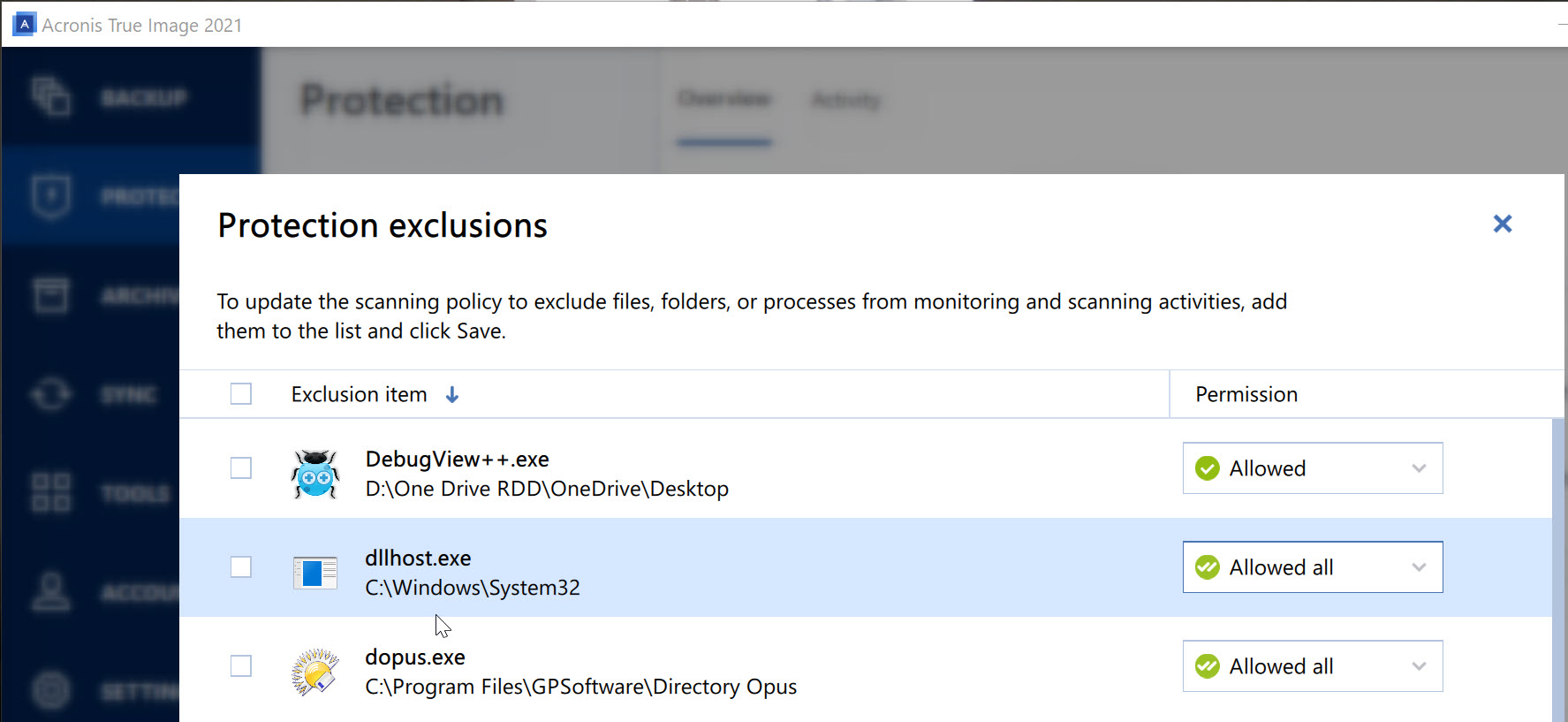
Ran it. Same results. Log attached. Same directory as before. File was "2020-10-16\_12-16-05". Screen grab of DO settings showing notify\_debug and shellchange\_debug as true. I also realized that Acronis Protection is running - but DO is excluded (see screen grab). Should I be excluding any other files?
    [DebugView++.txt](https://resource.dopus.com/uploads/short-url/oh6J7TUGB7dBxYUeW0Zx3CJ74Lj.txt) (14.9 KB)
---
### Author:  [@Leo](https://resource.dopus.com/u/Leo)
#### Post date: [October 16, 2020, 4:29pm UTC](https://resource.dopus.com/t/folders-not-autorefreshing-after-12-22-update/36937/20 "2020-10-16T16:29:59Z")
Temporarily uninstalling it might be worth a try, since that kind of "privacy" tool has been known to cause strange problems (even when disabled or configured to exclude the process), but I couldn't say if it's involved for sure, and I'm not familiar with that particular tool.
[Next page](https://resource.dopus.com/t/folders-not-autorefreshing-after-12-22-update/36937.md?page=2)