# From Clipboard or File v4.0
**URL:** https://resource.dopus.com/t/from-clipboard-or-file-v4-0/23433
**Category:** Rename Presets
**Tags:** script, vbscript
**Created:** [September 12, 2016, 10:44am UTC](https://resource.dopus.com/t/from-clipboard-or-file-v4-0/23433 "2016-09-12T10:44:13Z")
**Posts on this page:** 16
**Page:** 1
### Author:  [@gieron](https://resource.dopus.com/u/gieron)
#### Post date: [September 12, 2016, 10:44am UTC](https://resource.dopus.com/t/from-clipboard-or-file-v4-0/23433/1 "2016-09-12T10:44:13Z")
Replaced by [From Clipboard or File v4.1](https://resource.dopus.com/t/from-clipboard-or-file-v4-1/48713)
* * *
This version works only in Directory Opus 12 and above.
If you have Directory Opus 11 or below use [From file rename script 3.1](https://resource.dopus.com/t/from-file-rename-script-3-1/10224/1) instead.
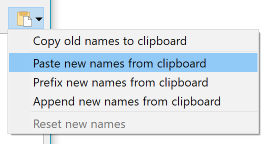
Also note that Opus 12's Rename dialog has built-in support for renaming files from the clipboard:
* * *
These rename presets take lines from clipboard or a text file and use them as new filenames or as part of new filenames.
Script information
From clipboard or file rename script version 4.0 (tested with Directory Opus 12.1 x64)
by Henrik Ripa ([henrik@gieron.info](mailto:henrik@gieron.info)) 2016-09-11
Changelog for version 4.0
- The settings are now accessible from the rename dialog
- Whether to use the clipboard or a file is now a setting instead of the old way of falling back to file if there was nothing in the clipboard
- There are now two rename presets, one for clipboard and one for file
Installation
Download and unzip the .orp files.
Open the Directory Opus rename dialog. Select Import Preset File from the Preset Management menu and open 'From Clipboard.orp'. Close the Directory Opus rename dialog.
Open the Directory Opus rename dialog. Select Import Preset File from the Preset Management menu and open 'From File.orp'. Close the Directory Opus rename dialog.
Instructions
This script replaces the string 'MARKER' in new file names with lines taken from the clipboard or from a text file. If the lines include any characters that are illegal in filenames they will be removed.
If a text file is used it must be located in the same directory as the files that you want to rename.
When the text file is in place, or you have copied some text to the clipboard, select the files you want to rename. The order of the selected files in the lister must be the same as the order in the text file. Then click the rename button and select this script under presets.
Set up the old name and new name fields so that the the string 'MARKER' is present in the new file names. You can use standard rename, regular expressions or find and replace. Inspect the results in the preview pane and click OK.
If you have problems you can start by examining the script output below the editor. If you find a bug or have a feature request you can either go to the Dopus Resource Centre forum thread where you got this script from or send me an email.
[From Clipboard or File 4.0.zip](https://resource.dopus.com/uploads/default/original/3X/2/2/225da462c9e571ad198a4b95333190d316258d0b.zip) (8.99 KB)
---
### Author:  [@opw62](https://resource.dopus.com/u/opw62)
#### Post date: [January 21, 2017, 9:09am UTC](https://resource.dopus.com/t/from-clipboard-or-file-v4-0/23433/2 "2017-01-21T09:09:43Z")
Fantastic!
Have to confess, with Opus v12.3.3 I was still using the 'From file rename script 3.1'.
That one worked fine... Wasn't aware of a newer version until I needed to rename files whilst using existing names combined with clipboard.
Wasn't sure how to do that with v3.1 (if at all possible) and noticed a newer version was out.
Many thanks indeed, it works perfectly.
=
p.s. what is the difference between the From Clipboard.orp and From File.orp
when selecting 'Get filenames from"' pulldown and select 'Clipboard' they look the same.
---
### Author:  [@Amorax](https://resource.dopus.com/u/Amorax)
#### Post date: [January 22, 2017, 12:29pm UTC](https://resource.dopus.com/t/from-clipboard-or-file-v4-0/23433/3 "2017-01-22T12:29:37Z")
Thanks for version 4.0.
@opw62: From clipboard uses the clipboard contents. So you can copy the filenames from some place and use them directly without pasting them first in a file.
---
### Author:  [@opw62](https://resource.dopus.com/u/opw62)
#### Post date: [January 23, 2017, 7:32am UTC](https://resource.dopus.com/t/from-clipboard-or-file-v4-0/23433/4 "2017-01-23T07:32:28Z")
Probably I am overlooking something.
For me they look very much the same and when selecting 'Clipboard' in the drop down menu (at: Get filenames from) they act the same.
BUT.. that is a minor thing.
It is a great tool, that's for sure!
=
# [](http://imgur.com/ydGhsui)
---
### Author:  [@Amorax](https://resource.dopus.com/u/Amorax)
#### Post date: [January 23, 2017, 8:18am UTC](https://resource.dopus.com/t/from-clipboard-or-file-v4-0/23433/5 "2017-01-23T08:18:05Z")
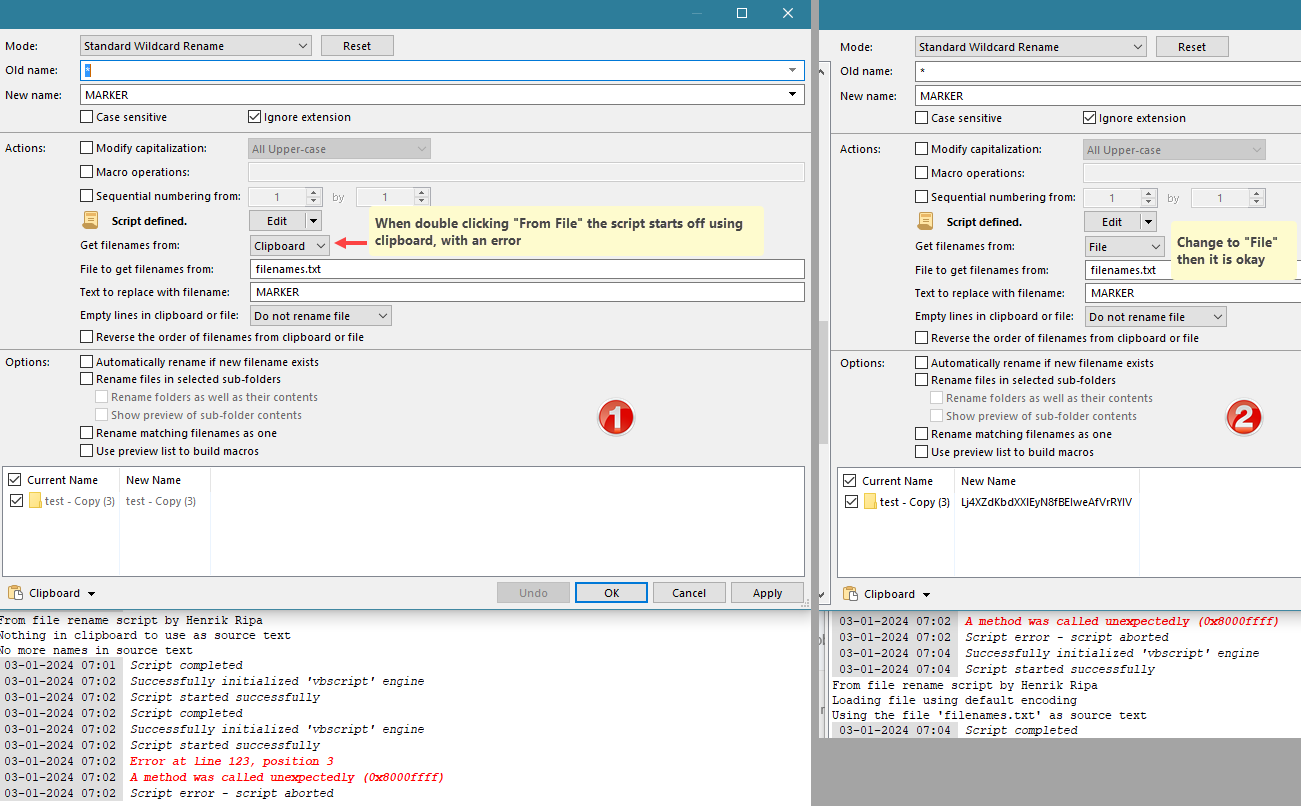
Ah, I see what you mean. I thought the difference was the default option for the dropdown 'Get filenames from'. So when you double click the 'From file' preset |File is selected in the dropdown and for 'From Clipboard' the option |Clipboard. But that's not the case; both times it's Clipboard.
BTW. Looking at the scripts I see that lines 2, 413 and 415 are different.
@Giero:
1. Can you make the dropdown chooses File when I double click the 'From File' preset?
2. Can you fill in the field 'File to get filenames from' with a default value 'filenames.txt.
It saves mouse clicks and typing when using the 'From file' preset.
---
### Author:  [@gieron](https://resource.dopus.com/u/gieron)
#### Post date: [April 4, 2017, 5:55pm UTC](https://resource.dopus.com/t/from-clipboard-or-file-v4-0/23433/6 "2017-04-04T17:55:35Z")
Sorry for not answering this sooner.
The two presets are definitely intended to work in the way Amorax describes. The default values for the dropdown and 'File' field is also the only difference between them. The script is exactly the same for both.
There was a bug in earlier Opus versions where it didn't update the custom fields when switching between presets. But that should be fixed now. Let me know if there is still an issue with this.
---
### Author:  [@3dlabor](https://resource.dopus.com/u/3dlabor)
#### Post date: [November 15, 2023, 8:47am UTC](https://resource.dopus.com/t/from-clipboard-or-file-v4-0/23433/7 "2023-11-15T08:47:07Z")
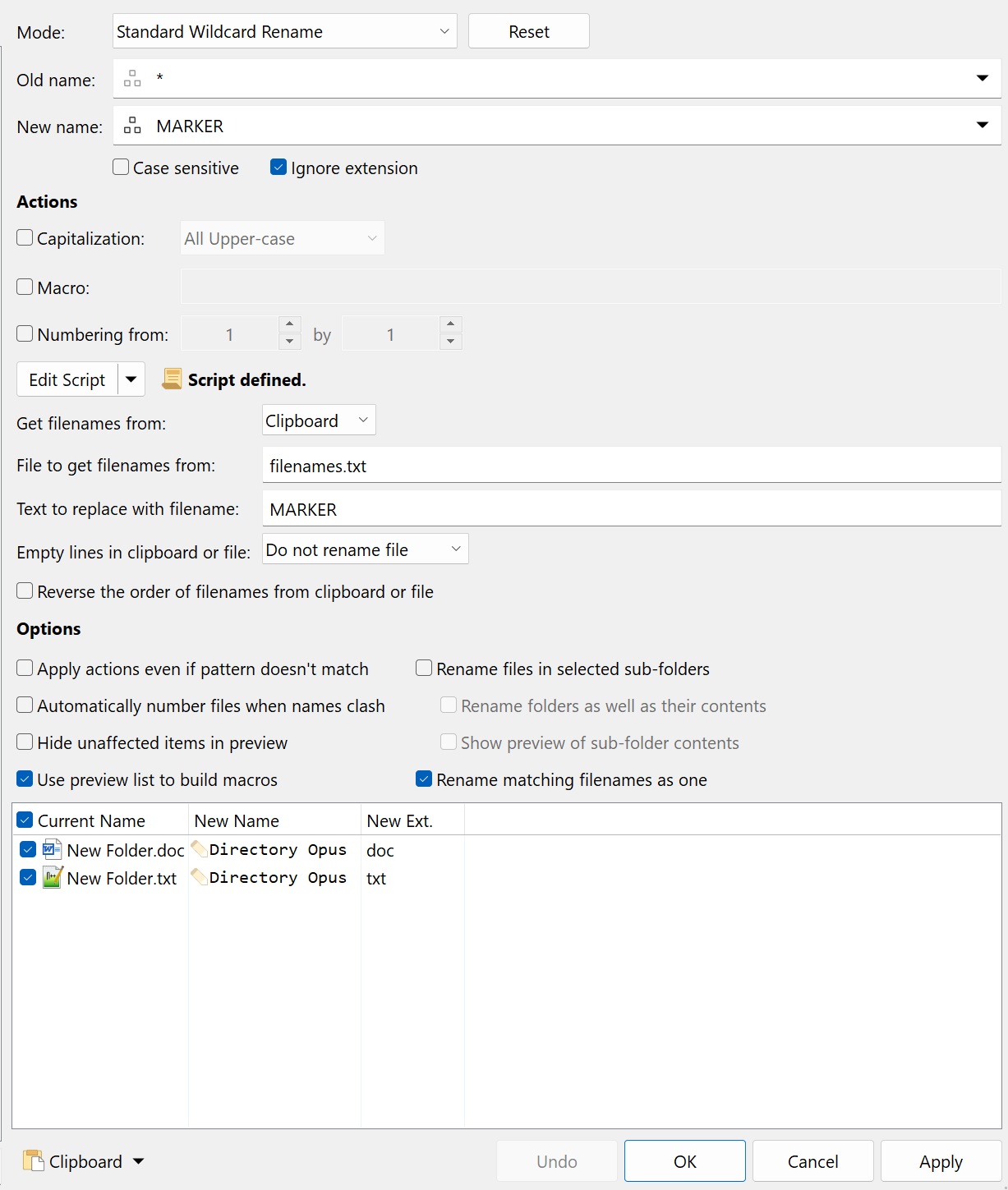
A little question, hope sombody read this after 6 years. I have to replace the names of 2 ore more filenames from clipboard with different extensions at once. I made a button with the "From clipboard" preset. When I mark two files in the lister and hit that button only the first name is changed. How to do it for all files at once (they have different extensions). Thanks in advance.
---
### Author:  [@lxp](https://resource.dopus.com/u/lxp)
#### Post date: [November 15, 2023, 9:06am UTC](https://resource.dopus.com/t/from-clipboard-or-file-v4-0/23433/8 "2023-11-15T09:06:22Z")
Try checking `Rename matching filenames as one`.
---
### Author:  [@3dlabor](https://resource.dopus.com/u/3dlabor)
#### Post date: [November 15, 2023, 9:38am UTC](https://resource.dopus.com/t/from-clipboard-or-file-v4-0/23433/9 "2023-11-15T09:38:17Z")
Sadly this doesnt work here. With " Rename matching filenames as one" checked only the first file is renamed, also when I use the built in "From clipboard" command in the rename window.
---
### Author:  [@lxp](https://resource.dopus.com/u/lxp)
#### Post date: [November 15, 2023, 9:44am UTC](https://resource.dopus.com/t/from-clipboard-or-file-v4-0/23433/10 "2023-11-15T09:44:38Z")
Odd. Seems to work here.
---
### Author:  [@3dlabor](https://resource.dopus.com/u/3dlabor)
#### Post date: [November 18, 2023, 8:47pm UTC](https://resource.dopus.com/t/from-clipboard-or-file-v4-0/23433/11 "2023-11-18T20:47:46Z")
Ha, today I tried it once more in a lister without changing anything before, but now it works! Thank you for your hints!
---
### Author:  [@opw62](https://resource.dopus.com/u/opw62)
#### Post date: [January 3, 2024, 7:34am UTC](https://resource.dopus.com/t/from-clipboard-or-file-v4-0/23433/12 "2024-01-03T07:34:36Z")
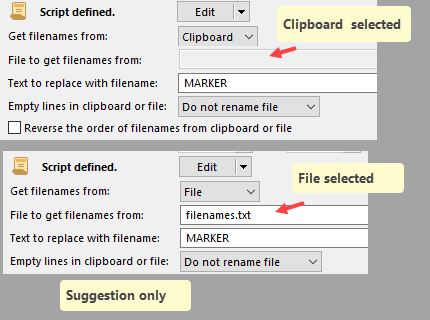
@gieron I would like to make 2 suggestions:
1. Using v4.0 with Opus 12.33 x64: when double clicking the "From File" preset, it opens using Clipboard by default. Could that be changed to using "File" ?
2. The "filenames.txt" should be copied over to the folder that should be renamed.It would be nice to allow the filenames.txt alongside the .orp files (usually in Opus folder)/
If, for example, you wish to rename various folders and files on different partitions using random file names, you would need to copy filenames.txt folder each time.
Or folders and sub folders and files on drive 1 but just the files on on drive 2, you have to copy the file each time.
So, 1 central place would be nice.
---
### Author:  [@gieron](https://resource.dopus.com/u/gieron)
#### Post date: [February 6, 2024, 7:03pm UTC](https://resource.dopus.com/t/from-clipboard-or-file-v4-0/23433/13 "2024-02-06T19:03:15Z")
It was the intention that the dropdown should be set to File if the "From File" preset was used, but it seems it never worked properly. I have updated the script to 4.1 where I removed the dropdown altogether so the presets work like intended.
> [@From Clipboard or File v4.1](https://resource.dopus.com/t/from-clipboard-or-file-v4-1/48713):
>
> These rename presets take lines from clipboard or a text file and use them as new filenames or as part of new filenames. Script information From clipboard or file rename script version 4.1 (tested with Directory Opus 13.1 x64) by Henrik Ripa ([henr…](mailto:henrik@gieron.info)
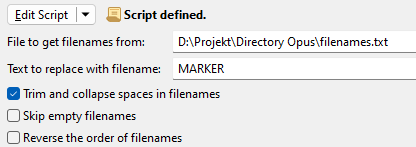
For your second suggestion I made an update to the 4.1 version so that the filename can now take an absolute path. So in your case, put the file wherever you want then put in the full pathname of the file as shown below. If you save this as a preset it will always use that file.
---
### Author:  [@opw62](https://resource.dopus.com/u/opw62)
#### Post date: [February 8, 2024, 6:13am UTC](https://resource.dopus.com/t/from-clipboard-or-file-v4-0/23433/14 "2024-02-08T06:13:26Z")
Super!
**Thank** you very much indeed.
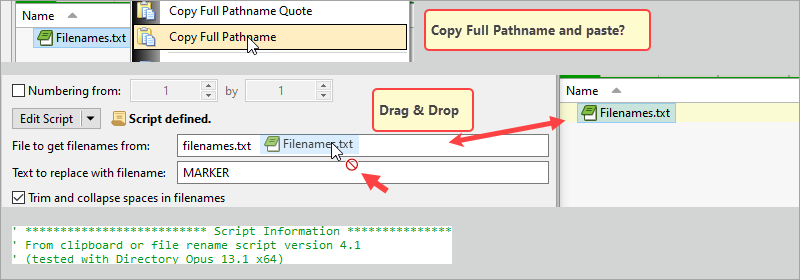
As for the 2nd thing matter (filenames.txt), just for good order's sake: is it correct that one has to select and copy/paste the full path name?
Drag & Drop filesnames.txt located in some other folder - not sure it works as intended. Or maybe I am doing something wrong. Could very well be ... 🙂
(Using v13.1 x64)
---
### Author:  [@gieron](https://resource.dopus.com/u/gieron)
#### Post date: [February 8, 2024, 7:48am UTC](https://resource.dopus.com/t/from-clipboard-or-file-v4-0/23433/15 "2024-02-08T07:48:29Z")
It's just a simple text box, so it won't have fancy features like drag & drop of filenames. Copy/paste the full path name is the way to go.
---
### Author:  [@opw62](https://resource.dopus.com/u/opw62)
#### Post date: [February 8, 2024, 9:21am UTC](https://resource.dopus.com/t/from-clipboard-or-file-v4-0/23433/16 "2024-02-08T09:21:22Z")
Okay, clear. No problem, of course.
Thanks again.