# General usage problems after upgrade to 12.7
**URL:** https://resource.dopus.com/t/general-usage-problems-after-upgrade-to-12-7/28563
**Category:** Help & Support
**Created:** [April 14, 2018, 9:35pm UTC](https://resource.dopus.com/t/general-usage-problems-after-upgrade-to-12-7/28563 "2018-04-14T21:35:24Z")
**Posts on this page:** 8
**Page:** 1
### Author:  [@PeterPanino](https://resource.dopus.com/u/PeterPanino)
#### Post date: [April 14, 2018, 9:35pm UTC](https://resource.dopus.com/t/general-usage-problems-after-upgrade-to-12-7/28563/1 "2018-04-14T21:35:25Z")
I have just upgraded to 12.7 from 11.x. I am rather **frustrated** because most simple things from old version do not work anymore!
• Hide folders command (previously F7) does not work anymore. Did not find "Hide folders" command in Customize dialog
• Toolbars are not clearly marked as from previous version or from new 12 version
• When I enter \*.pdf in the Filter field many other file types are displayed. In the previous version 11 only PDf files were displayed
---
### Author:  [@Leo](https://resource.dopus.com/u/Leo)
#### Post date: [April 14, 2018, 10:02pm UTC](https://resource.dopus.com/t/general-usage-problems-after-upgrade-to-12-7/28563/2 "2018-04-14T22:02:09Z")
> [@PeterPanino](#):
>
> Hide folders command (previously F7) does not work anymore. Did not find “Hide folders” command in Customize dialog
That isn't one of the default/standard commands (unless you mean toggling the Folder Tree, which is in the Lister menu with F8 hotkey by default).
If you were using a customized toolbar/menu setup before, it's still there and you can switch back to it or temporarily turn it on to copy custom buttons out of it as needed: [Your toolbars are still there after you upgrade](https://resource.dopus.com/t/your-old-toolbars-are-still-there-after-you-upgrade/10812).
> [@PeterPanino](#):
>
> Toolbars are not clearly marked as from previous version or from new 12 version
in what sense? Could you give an example? The default toolbars between Opus 11 and 12 did not change fundamentally; we just added some new commands to them. If the Opus 12 toolbars seem unfamiliar to you, maybe you were not using the Opus 11 toolbars either but have a setup dating back to a much older version? You can always go back to your old toolbars if you wish.
> [@PeterPanino](#):
>
> When I enter \*.pdf in the Filter field many other file types are displayed. In the previous version 11 only PDf files were displayed
Please post a screenshot so we can see how the filter is set up and some examples of files shown that shouldn't be.
PS/Reminder: [please ask one question per thread](https://resource.dopus.com/t/ask-one-question-per-thread/5444).
---
### Author:  [@PeterPanino](https://resource.dopus.com/u/PeterPanino)
#### Post date: [April 14, 2018, 10:14pm UTC](https://resource.dopus.com/t/general-usage-problems-after-upgrade-to-12-7/28563/3 "2018-04-14T22:14:30Z")
Your link "Your toolbars are still there after you upgrade" does not work. How can I temporarily switch back to my previous configuration?
---
### Author:  [@Leo](https://resource.dopus.com/u/Leo)
#### Post date: [April 14, 2018, 10:22pm UTC](https://resource.dopus.com/t/general-usage-problems-after-upgrade-to-12-7/28563/4 "2018-04-14T22:22:55Z")
> [@PeterPanino](#):
>
> Your link “Your toolbars are still there after you upgrade” does not work.
Fixed link: [Your old toolbars are still there after you upgrade](https://resource.dopus.com/t/your-old-toolbars-are-still-there-after-you-upgrade/10812).
---
### Author:  [@PeterPanino](https://resource.dopus.com/u/PeterPanino)
#### Post date: [April 14, 2018, 11:05pm UTC](https://resource.dopus.com/t/general-usage-problems-after-upgrade-to-12-7/28563/5 "2018-04-14T23:05:08Z")
Thanks. There was a small bar on the bottom of the left lister which contained a filter field which seems to be better, so I deleted the old filter field from the old toolbar. But now the small bar is gone and I don't know how to make it reappear.
---
### Author:  [@PeterPanino](https://resource.dopus.com/u/PeterPanino)
#### Post date: [April 15, 2018, 12:06am UTC](https://resource.dopus.com/t/general-usage-problems-after-upgrade-to-12-7/28563/6 "2018-04-15T00:06:24Z")
OK, I have discovered the Filter Bar which seems to be very powerful. No more questions.
Ah, one more: It would be helpful to get the toolbar name when clicking on a toolbar. Is this possible?
---
### Author:  [@wowbagger](https://resource.dopus.com/u/wowbagger)
#### Post date: [April 16, 2018, 12:13pm UTC](https://resource.dopus.com/t/general-usage-problems-after-upgrade-to-12-7/28563/7 "2018-04-16T12:13:48Z")
> [@PeterPanino](#):
>
> Ah, one more: It would be helpful to get the toolbar name when clicking on a toolbar. Is this possible?
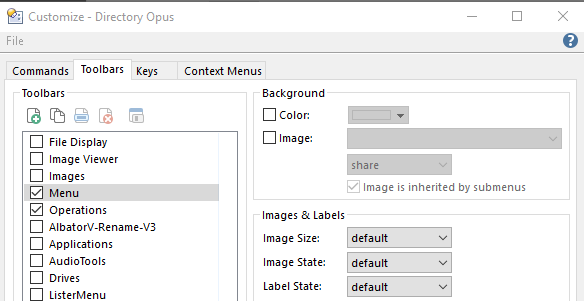
When you enter [customise mode](https://www.gpsoft.com.au/help/opus12/index.html#!Documents/Editing_the_Toolbar.htm), If your right click on a toolbar (avoiding a button) and select Customize from the menu the selected toolbar will be highlighted in the Customize window.
---
### Author:  [@Leo](https://resource.dopus.com/u/Leo)
#### Post date: [April 16, 2018, 12:16pm UTC](https://resource.dopus.com/t/general-usage-problems-after-upgrade-to-12-7/28563/8 "2018-04-16T12:16:02Z")
And you can also double-click toolbars in the Customize list (the one in wowbagger's screenshot, above) to make the toolbar flash in the lister.