# HDD Name Display Font Color
**URL:** https://resource.dopus.com/t/hdd-name-display-font-color/21103
**Category:** Help & Support
**Created:** [August 27, 2015, 9:52am UTC](https://resource.dopus.com/t/hdd-name-display-font-color/21103 "2015-08-27T09:52:48Z")
**Posts on this page:** 5
**Page:** 1
### Author:  [@davecampbell](https://resource.dopus.com/u/davecampbell)
#### Post date: [August 27, 2015, 9:52am UTC](https://resource.dopus.com/t/hdd-name-display-font-color/21103/1 "2015-08-27T09:52:48Z")
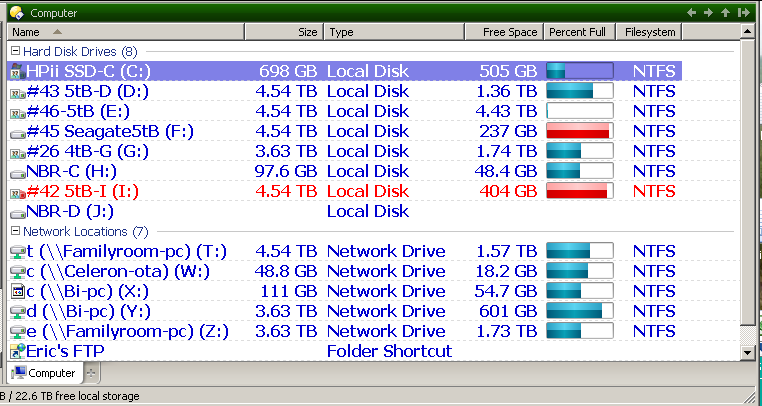
In DOpus v10 my HDD name display font color is red on one drive, but in WE it shows black like all the other drives. I've forgotten what the significance of the color red is, but would like to change it back to black like the others. How?
---
### Author:  [@Leo](https://resource.dopus.com/u/Leo)
#### Post date: [August 27, 2015, 10:16am UTC](https://resource.dopus.com/t/hdd-name-display-font-color/21103/2 "2015-08-27T10:16:10Z")
You've assigned the Red label to that drive.
You can reset it using this menu, assuming you're using the default Opus 10 toolbars:
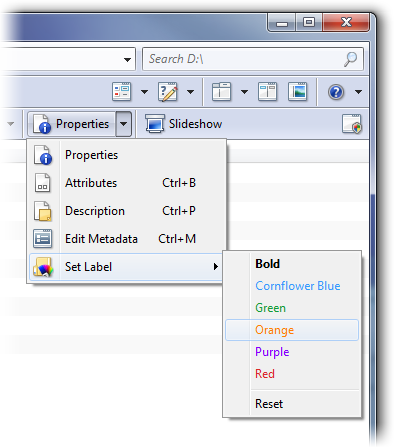
See [Set File & Folder Colors/Labels via Context Menu](https://resource.dopus.com/t/set-file-folder-colors-labels-via-context-menu/6333/1) if you don't have the menu and need an alternative.
---
### Author:  [@davecampbell](https://resource.dopus.com/u/davecampbell)
#### Post date: [August 27, 2015, 12:27pm UTC](https://resource.dopus.com/t/hdd-name-display-font-color/21103/3 "2015-08-27T12:27:01Z")
Thanks Leo! I would never have found that. Apparently it got set some time ago with an accidental click sometime in the past.
Also, when I attached that screen shot, it showed up as an attachment but there was no way for me to actually view what I attached. Is that by design? I don't know if you actually got it or could see it either.
---
### Author:  [@Leo](https://resource.dopus.com/u/Leo)
#### Post date: [August 27, 2015, 12:40pm UTC](https://resource.dopus.com/t/hdd-name-display-font-color/21103/4 "2015-08-27T12:40:57Z")
> [@davecampbell](#):
>
> Also, when I attached that screen shot, it showed up as an attachment but there was no way for me to actually view what I attached. Is that by design? I don't know if you actually got it or could see it either.
It's because the screenshot was in TIF format, which few web browsers support. I converted it to PNG format and changed the forum so it blocks TIF uploads to avoid the same confusion in the future.
---
### Author:  [@davecampbell](https://resource.dopus.com/u/davecampbell)
#### Post date: [August 27, 2015, 12:43pm UTC](https://resource.dopus.com/t/hdd-name-display-font-color/21103/5 "2015-08-27T12:43:28Z")
Beautiful! You're a champ. Thanks for all the great help.
That reminds me, I have another unrelated issue which I'll submit as a separate subject.