# Help needed to configure Movie viewer plugin to play videos
**URL:** https://resource.dopus.com/t/help-needed-to-configure-movie-viewer-plugin-to-play-videos/37668
**Category:** Help & Support
**Created:** [January 23, 2021, 7:13am UTC](https://resource.dopus.com/t/help-needed-to-configure-movie-viewer-plugin-to-play-videos/37668 "2021-01-23T07:13:11Z")
**Posts on this page:** 11
**Page:** 1
### Author:  [@iam1simpleguy](https://resource.dopus.com/u/iam1simpleguy)
#### Post date: [January 23, 2021, 7:13am UTC](https://resource.dopus.com/t/help-needed-to-configure-movie-viewer-plugin-to-play-videos/37668/1 "2021-01-23T07:13:12Z")
Right now if i use Movie viewer plugin i get black screen in viewer pane although video is plugin.If i disabled this plugin then ActiveX+Preview+Office+Web comes into play but i don't want to use that as it don't have autoplay.
According to this it should work out of box MP4 and MKV but none of my vidoe files are working.
I have done this step
Windows 10: Go to Control Panel -\> System -\> Default Apps and click the Video Player option, then assign it to Windows Media Player.
> [@HOW TO: Enable/fix playback of various media formats in Opus](https://resource.dopus.com/t/how-to-enable-fix-playback-of-various-media-formats-in-opus/1974):
>
> Plugin Config Go to Settings / Preferences / Viewer / Plugins and configure the Video & Audio (Opus 13) or Movie (Opus 12) plugin. Make sure it includes the extension you are trying to play in its list. Codecs If videos aren't playing, a codec is p…
also i have Lav filters installed.
So plz guide me how can i make this Movie viewer plugin work or any other video plugin that just autoplay videos.
---
### Author:  [@Leo](https://resource.dopus.com/u/Leo)
#### Post date: [January 23, 2021, 9:42am UTC](https://resource.dopus.com/t/help-needed-to-configure-movie-viewer-plugin-to-play-videos/37668/2 "2021-01-23T09:42:18Z")
Have you tried using the WMP ActiveX viewer (not the WMP preview handler) yet?
(I've suggested this three times now, in your various threads.)
---
### Author:  [@iam1simpleguy](https://resource.dopus.com/u/iam1simpleguy)
#### Post date: [January 23, 2021, 11:14am UTC](https://resource.dopus.com/t/help-needed-to-configure-movie-viewer-plugin-to-play-videos/37668/3 "2021-01-23T11:14:21Z")
is this the one u talking about?
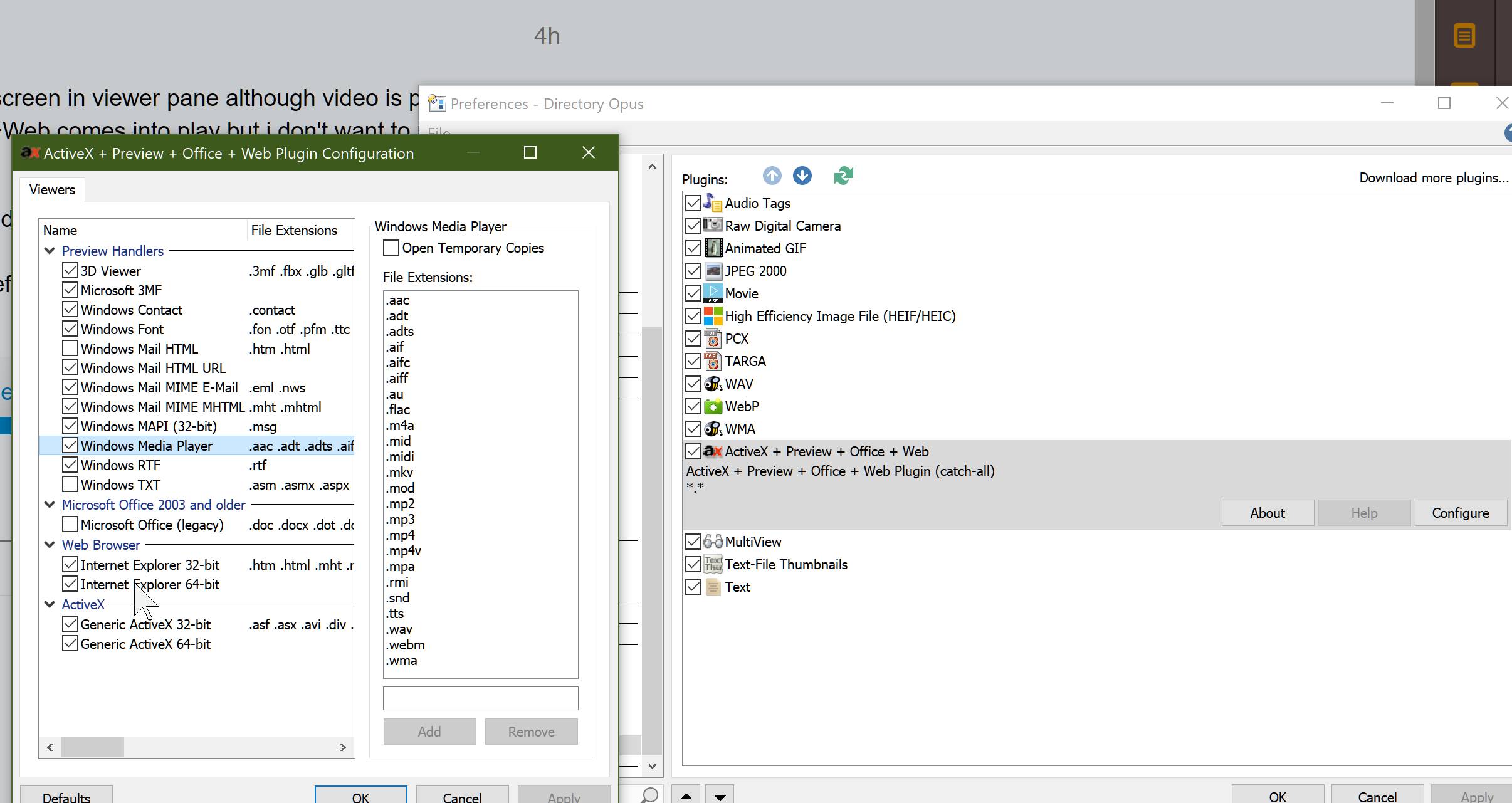
If yes then i already replied above and in other thread too that it don't have autoplay.
---
### Author:  [@Leo](https://resource.dopus.com/u/Leo)
#### Post date: [January 23, 2021, 11:15am UTC](https://resource.dopus.com/t/help-needed-to-configure-movie-viewer-plugin-to-play-videos/37668/4 "2021-01-23T11:15:50Z")
No, that is the WMP preview handler. WMP also has an ActiveX control which does auto-play. I explained how to use it in one of the other threads.
---
### Author:  [@iam1simpleguy](https://resource.dopus.com/u/iam1simpleguy)
#### Post date: [January 23, 2021, 4:13pm UTC](https://resource.dopus.com/t/help-needed-to-configure-movie-viewer-plugin-to-play-videos/37668/5 "2021-01-23T16:13:29Z")
I been searching this forum and im not sure how to use WMP ActiveX viewer. Maybe u mean disable movie plugin and inside ActiveX+Preview+Office+Web disable Windows media player?and after that it will use Generic Activex 32bit 64bit?
is that so?
well i did tried that too after looking at this thread.
> [@No volume slider in Viewer Pane](https://resource.dopus.com/t/no-volume-slider-in-viewer-pane/31673):
>
> Hello, Please accept my apologies in advance, English is not my first language. I'm currently having issues with the Viewer Pane and how it handles videos autoplay and volume. Settings \> Preferences... \> Viewer \> Plugins \> ActiveX + Preview + Offi…
But i don't know what changed...It was good when i was using Opus 10. and autoplay was like that pic shared by this user,its from the same thread mentioned above.

---
### Author:  [@Leo](https://resource.dopus.com/u/Leo)
#### Post date: [January 23, 2021, 6:46pm UTC](https://resource.dopus.com/t/help-needed-to-configure-movie-viewer-plugin-to-play-videos/37668/6 "2021-01-23T18:46:03Z")
> [@iam1simpleguy](#):
>
> I been searching this forum and im not sure how to use WMP ActiveX viewer. Maybe u mean disable movie plugin and inside ActiveX+Preview+Office+Web disable Windows media player?and after that it will use Generic Activex 32bit 64bit?
That's right. Essentially what I suggested in [Is there WebM support? - #5 by Leo](https://resource.dopus.com/t/is-there-webm-support/33740/5) :
> [@Is there WebM support?](https://resource.dopus.com/t/is-there-webm-support/33740/5):
>
> But Windows Media Player (WMP) also has an ActiveX control which does autoplay. You can use that instead by turning off the WMP Preview Handler, and making sure the extensions you're interested in are included in the _Generic ActiveX (32-bit)_ line near the bottom of the dialog (the same one where you enable/disable the WMP Preview Handler).
>
> You may also need to fix registry settings for that to work, if WMP isn't assigned as the ActiveX handler for those file types. That can usually be done by (temporarily) setting Windows Media Player as the default player for the types involved (see [HOW TO: Enable/fix playback of various media formats in Opus](https://resource.dopus.com/t/how-to-enable-fix-playback-of-various-media-formats-in-opus/1974)).
That's the method I use and it works. But it also depends on the file types you're trying to play being correct in the registry.
(FWIW, we will be making a new Movie plugin that should make things easier in the future, although the old one can still be made to work with the right 64-bit codecs and splitters.)
---
### Author:  [@iam1simpleguy](https://resource.dopus.com/u/iam1simpleguy)
#### Post date: [January 24, 2021, 7:19am UTC](https://resource.dopus.com/t/help-needed-to-configure-movie-viewer-plugin-to-play-videos/37668/7 "2021-01-24T07:19:15Z")
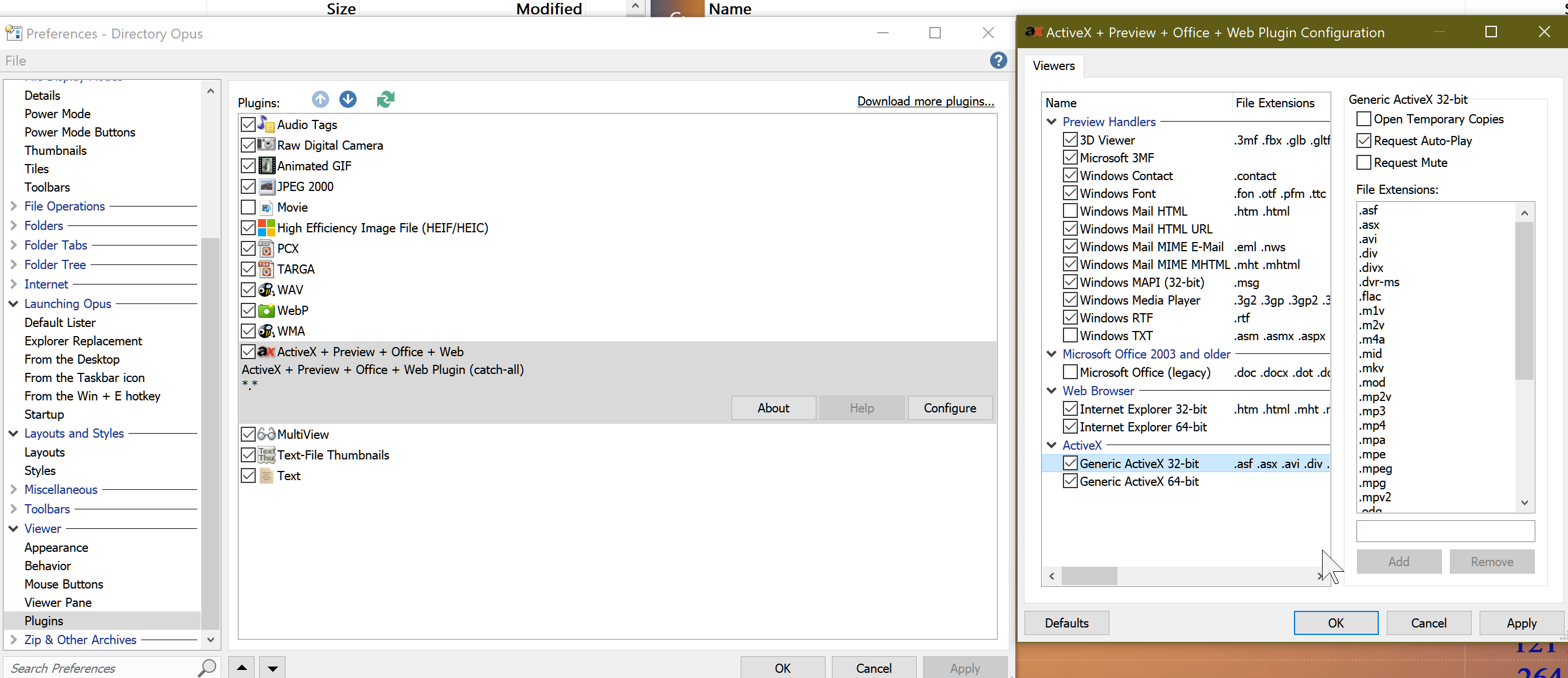
Right now most of files are working.After doing lot of tries not sure what actually works and how suddenly autoplay start showing like the pic shown above.
1.Changed default apps to WP
2 Used this button created by Leo [Register or Unregister DLL or OCX](https://resource.dopus.com/t/register-or-unregister-dll-or-ocx/6440)
3.I have disabled movie plugin but since WMP preview handler is not what i want to use so i just removed few extensions from it so that ActiveX takes control.As ActiveX still not able to play webm files.WMP preview handler just plays files but i have to click twice to play the video and it has white background too.ActiveX is able to play even 15gb mkv files which i didn't expect at all.
Here's setting i am using.
---
### Author:  [@iam1simpleguy](https://resource.dopus.com/u/iam1simpleguy)
#### Post date: [January 24, 2021, 7:26am UTC](https://resource.dopus.com/t/help-needed-to-configure-movie-viewer-plugin-to-play-videos/37668/8 "2021-01-24T07:26:07Z")
Yeah that would be so cool whenever u guys managed to make a new Movie plugin as there are lot of post regarding this movie plugin.If only one could do that then it would be awesome.Right now for me old one is completely useless though i like to use it if possible.U said with right 64bit codecs and splitters but I do have Lav filters installed but not sure why it is not working with them.
---
### Author:  [@iam1simpleguy](https://resource.dopus.com/u/iam1simpleguy)
#### Post date: [February 12, 2021, 2:00am UTC](https://resource.dopus.com/t/help-needed-to-configure-movie-viewer-plugin-to-play-videos/37668/9 "2021-02-12T02:00:19Z")
I have disabled movie plugin and using setting mentioned above ,but now i am not able to get duration of video files in duration column .So how to get durations with WMP ActiveX viewer.
As a workaround i thought I try to do this and movie plugin will get durations and rest of videos will be handled with Active X but it didn't work that way.
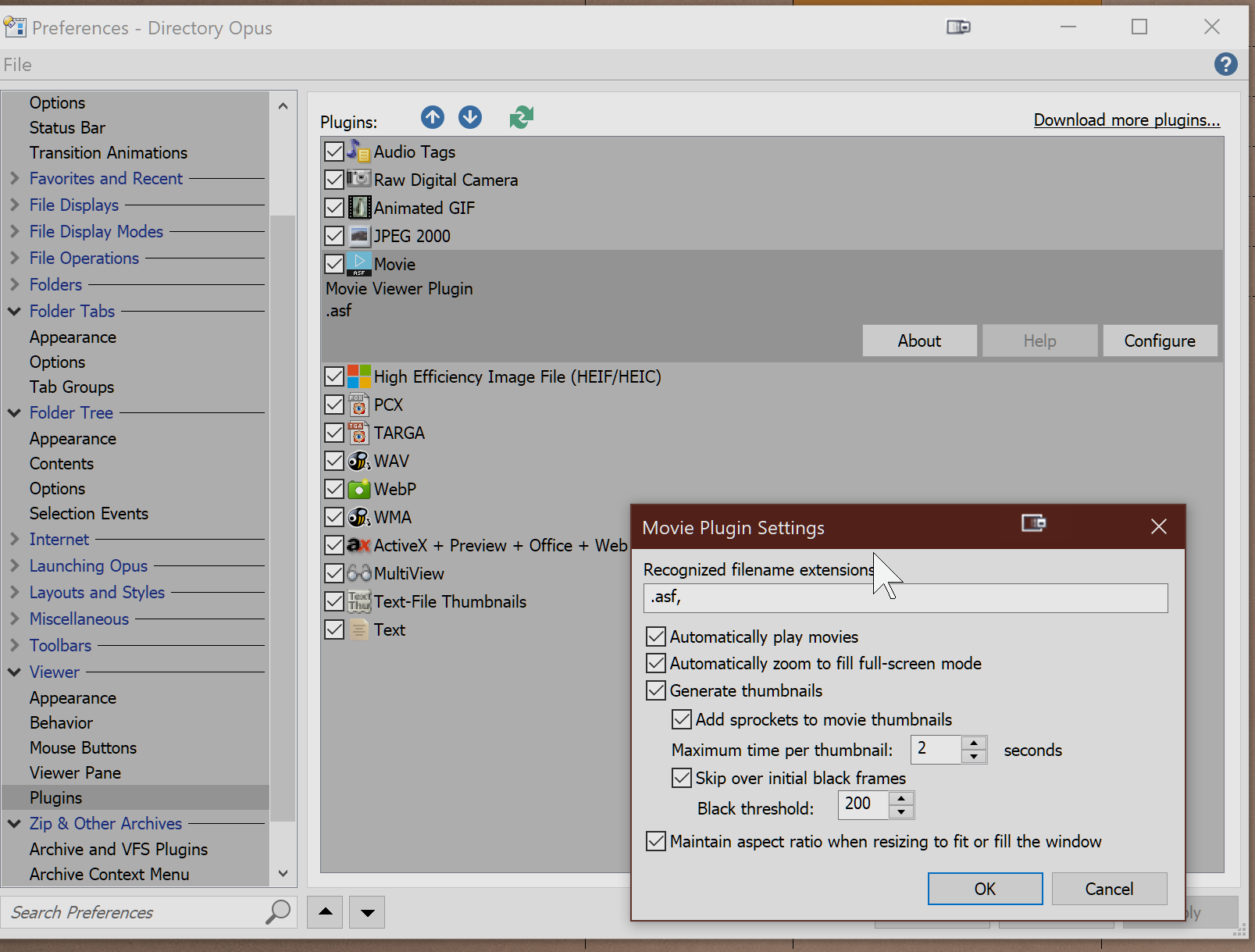
As i don't want to use movie plugin which causes black videos so i try to disable most of extensions like screenshot but movie plugin still try to play video files not in above list and display black videos.
Uff 🤔
---
### Author:  [@Leo](https://resource.dopus.com/u/Leo)
#### Post date: [February 12, 2021, 9:24am UTC](https://resource.dopus.com/t/help-needed-to-configure-movie-viewer-plugin-to-play-videos/37668/10 "2021-02-12T09:24:52Z")
These alternative columns will work even if the Movie plugin is disabled:
> [@Video length, dimensions, framerate, definition columns](https://resource.dopus.com/t/video-length-dimensions-framerate-definition-columns/28147/1):
>
> Overview: This script imports several columns, showing details about video/movie files, from File Explorer into Directory Opus, and generates some others based on them: Length (Duration) Relative Length (Duration as a bar graph) Dimensions (Width x…
---
### Author:  [@iam1simpleguy](https://resource.dopus.com/u/iam1simpleguy)
#### Post date: [February 14, 2021, 6:41am UTC](https://resource.dopus.com/t/help-needed-to-configure-movie-viewer-plugin-to-play-videos/37668/11 "2021-02-14T06:41:19Z")
Yes thx..
This script is very helpful.But i would like to inform that movie plugin is very faster compared to this script .
Here's a small gif recording .
As you already know Duration column is movie plugin's and Length column is script's.
[https://mega.nz/file/8VtkBRKQ#nr7oXNXzZjL\_2A2S7L3K47q0l7vwsgJkY00E6ZsTOhc](https://mega.nz/file/8VtkBRKQ#nr7oXNXzZjL_2A2S7L3K47q0l7vwsgJkY00E6ZsTOhc)