# Homework Submission Tracker for Teachers
**URL:** https://resource.dopus.com/t/homework-submission-tracker-for-teachers/60483
**Category:** Buttons/Scripts
**Tags:** button, jscript
**Created:** [September 8, 2026, 1:55am UTC](https://resource.dopus.com/t/homework-submission-tracker-for-teachers/60483 "2026-09-08T01:55:58Z")
**Posts on this page:** 3
**Page:** 1
### Author:  [@xoxo](https://resource.dopus.com/u/xoxo)
#### Post date: [September 8, 2026, 1:55am UTC](https://resource.dopus.com/t/homework-submission-tracker-for-teachers/60483/1 "2026-09-08T01:55:58Z")
## Homework Submission Tracker for Lazy Teachers
Toolbar button script for teachers using DOpus + OneDrive to receive student homework.
**Folder structure:**
```auto
Class\
Student\
Week 1\
Week 2\
...
```
**What it does** (one click while inside a class folder):
- Scans every week folder for every student.
- Week is empty → tags `Not Submitted`
- Week has file(s), no manual label → tags `Submitted`
- Week already labeled `Graded` (or anything you set manually) → left alone
- Student folder gets aggregate label with priority: `Submitted` \> `Graded` \> `Not Submitted`
So at a glance you see who has outstanding work (yellow), who's fully done (green), and who has submitted nothing (grey).
**Setup:**
1. Create three labels in Preferences → Favorites and Recent → Labels: `Submitted`, `Not Submitted`, `Graded` (edit constants at top of script if you use different names).
2. Paste script into a new toolbar button (script function, JScript).
3. Click while browsing a class folder.
**Features:**
- Live progress.
- Non-destructive — only touches its own managed labels. `Graded` and any custom labels you apply are preserved across scans.
- Toggles via `Properties SETLABEL ADDLABEL SETLABELTOGGLE` so no label wipes.
- Full decision trace in Tools → Script Log for debugging.
Script attached. Feedback welcome — especially on the label-read behavior when items come from `FSUtil.ReadDir` vs `FSUtil.GetItem`.
* * *
```auto
// Toolbar Button Script — Homework Submission Scan
// three-state labeling
//
// WEEK folders (script manages Submitted / Not Submitted only):
// - empty -> Not Submitted
// - has file(s), no label -> Submitted
// - Graded (manual) -> left alone
// - any other user label -> left alone
//
// STUDENT folders (script manages all three labels):
// - any week Submitted -> Submitted
// - else any week Graded -> Graded
// - else -> Not Submitted
//
// EDIT THESE IF YOUR LABEL NAMES DIFFER:
var LABEL_SUBMITTED = "Submitted";
var LABEL_NOT_SUBMITTED = "Not Submitted";
var LABEL_GRADED = "Graded";
// Labels the script controls on WEEK folders (all others = user territory)
var WEEK_MANAGED = [LABEL_SUBMITTED, LABEL_NOT_SUBMITTED];
// Labels the script controls on STUDENT folders
var STUDENT_MANAGED = [LABEL_SUBMITTED, LABEL_NOT_SUBMITTED, LABEL_GRADED];
function OnClick(clickData) {
DOpus.ClearOutput();
var tab = clickData.func.sourcetab;
var classPath = String(tab.path);
var fsu = DOpus.FSUtil();
DOpus.Output("=== HW Scan starting in: " + classPath + " ===");
// Pre-count students for progress bar
var total = 0;
var pre = fsu.ReadDir(classPath);
while (!pre.complete) {
var p = pre.Next();
if (p && p.is_dir) total++;
}
if (total === 0) { DOpus.Output("No student folders found."); return; }
var progCmd = DOpus.Create().Command();
var progress = progCmd.progress;
progress.abort = true;
progress.Init(tab.lister, "Homework Submission Scan");
progress.SetFiles(total);
progress.Show();
var cmd = clickData.func.command;
cmd.Clear();
var idx = 0;
var students = fsu.ReadDir(classPath);
while (!students.complete) {
var s = students.Next();
if (!s || !s.is_dir) continue;
idx++;
progress.SetName("Student (" + idx + "/" + total + "): " + s.name);
progress.SetStatus("");
progress.StepFiles(1);
if (progress.GetAbortState() === "a") {
DOpus.Output("Cancelled.");
progress.Hide();
return;
}
DOpus.Output("[STUDENT] " + s.name);
var studentHasSubmitted = false;
var studentHasGraded = false;
var weeks = fsu.ReadDir(String(s.realpath));
while (!weeks.complete) {
var w = weeks.Next();
if (!w || !w.is_dir) continue;
progress.SetStatus("Checking: " + w.name);
var wPath = String(w.realpath);
var wLabels = getExplicitLabels(wPath);
var hasFiles = folderHasFiles(fsu, wPath);
// What state is this week in?
var weekState = classifyWeek(wLabels, hasFiles);
DOpus.Output(" [WEEK] " + w.name +
" | files=" + hasFiles +
" | labels=[" + wLabels.join(",") + "]" +
" | state=" + weekState);
// Feed student aggregate
if (weekState === "submitted") studentHasSubmitted = true;
else if (weekState === "graded") studentHasGraded = true;
// Reconcile WEEK label
var desiredWeekLabel = null;
if (weekState === "submitted") desiredWeekLabel = LABEL_SUBMITTED;
else if (weekState === "empty") desiredWeekLabel = LABEL_NOT_SUBMITTED;
// graded / other_user_label -> leave managed labels alone (no auto touch)
if (weekState === "submitted" || weekState === "empty") {
reconcileLabels(cmd, wPath, wLabels, desiredWeekLabel, WEEK_MANAGED);
} else {
// Leave Graded / user-labeled weeks alone
// But if week has stale Submitted/Not Submitted AND a user label, remove the auto label
for (var mi = 0; mi < WEEK_MANAGED.length; mi++) {
if (arrayHas(wLabels, WEEK_MANAGED[mi])) {
cmd.AddLine('Properties SETLABEL="' + WEEK_MANAGED[mi] +
'" ADDLABEL SETLABELTOGGLE FILE="' + wPath + '"');
DOpus.Output(" (removing stale auto-label: " + WEEK_MANAGED[mi] + ")");
}
}
}
}
// Determine student desired label
var desiredStudentLabel;
if (studentHasSubmitted) desiredStudentLabel = LABEL_SUBMITTED;
else if (studentHasGraded) desiredStudentLabel = LABEL_GRADED;
else desiredStudentLabel = LABEL_NOT_SUBMITTED;
var sPath = String(s.realpath);
var sLabels = getExplicitLabels(sPath);
DOpus.Output(" -> student desired=" + desiredStudentLabel +
" | current labels=[" + sLabels.join(",") + "]");
reconcileLabels(cmd, sPath, sLabels, desiredStudentLabel, STUDENT_MANAGED);
}
progress.SetName("Applying label changes...");
progress.SetStatus("");
DOpus.Output("=== Queued " + cmd.count + " command(s) ===");
if (cmd.count > 0) {
cmd.Run();
DOpus.Output("Commands ran.");
} else {
DOpus.Output("Nothing to change.");
}
cmd.Clear();
cmd.AddLine("Go REFRESH");
cmd.Run();
progress.Hide();
}
// Determine the "state" of a week folder from its labels + file presence
function classifyWeek(labels, hasFiles) {
// Check for user-applied labels (anything NOT in WEEK_MANAGED)
for (var i = 0; i < labels.length; i++) {
var lbl = labels[i];
if (lbl === LABEL_GRADED) return "graded";
if (!arrayHas(WEEK_MANAGED, lbl)) return "other_user_label";
}
// Only auto-labels or no labels: decide by content
if (hasFiles) return "submitted";
return "empty";
}
// For each label in managedLabels: ensure it's present iff it equals desiredLabel
function reconcileLabels(cmd, pathString, currentLabels, desiredLabel, managedLabels) {
for (var i = 0; i < managedLabels.length; i++) {
var lbl = managedLabels[i];
var shouldHave = (lbl === desiredLabel);
var currentlyHas = arrayHas(currentLabels, lbl);
if (shouldHave && !currentlyHas) {
cmd.AddLine('Properties SETLABEL="' + lbl + '" ADDLABEL FILE="' + pathString + '"');
} else if (!shouldHave && currentlyHas) {
cmd.AddLine('Properties SETLABEL="' + lbl + '" ADDLABEL SETLABELTOGGLE FILE="' + pathString + '"');
}
}
}
function arrayHas(arr, val) {
for (var i = 0; i < arr.length; i++) if (arr[i] === val) return true;
return false;
}
function getExplicitLabels(pathString) {
var out = [];
try {
var fsu = DOpus.FSUtil();
var item = fsu.GetItem(pathString);
if (!item) { DOpus.Output(" (GetItem null: " + pathString + ")"); return out; }
var labels;
try { labels = item.Labels("*", "explicit"); }
catch (e1) {
try { labels = item.Labels(); }
catch (e2) { DOpus.Output(" (Labels error: " + e2.description + ")"); return out; }
}
if (!labels) return out;
var n = 0;
try { n = labels.count; } catch (e) {}
for (var i = 0; i < n; i++) {
var v = null;
try { v = labels.at(i); }
catch (e3) { try { v = labels(i); } catch (e4) {} }
if (v !== null && v !== undefined) out.push(String(v));
}
} catch (e) {
DOpus.Output(" (getExplicitLabels error: " + e.description + ")");
}
return out;
}
function folderHasFiles(fsu, path) {
var e = fsu.ReadDir(path);
while (!e.complete) {
var it = e.Next();
if (it && !it.is_dir) return true;
}
return false;
}
```
---
### Author:  [@David](https://resource.dopus.com/u/David)
#### Post date: [September 8, 2026, 2:57am UTC](https://resource.dopus.com/t/homework-submission-tracker-for-teachers/60483/2 "2026-09-08T02:57:02Z")
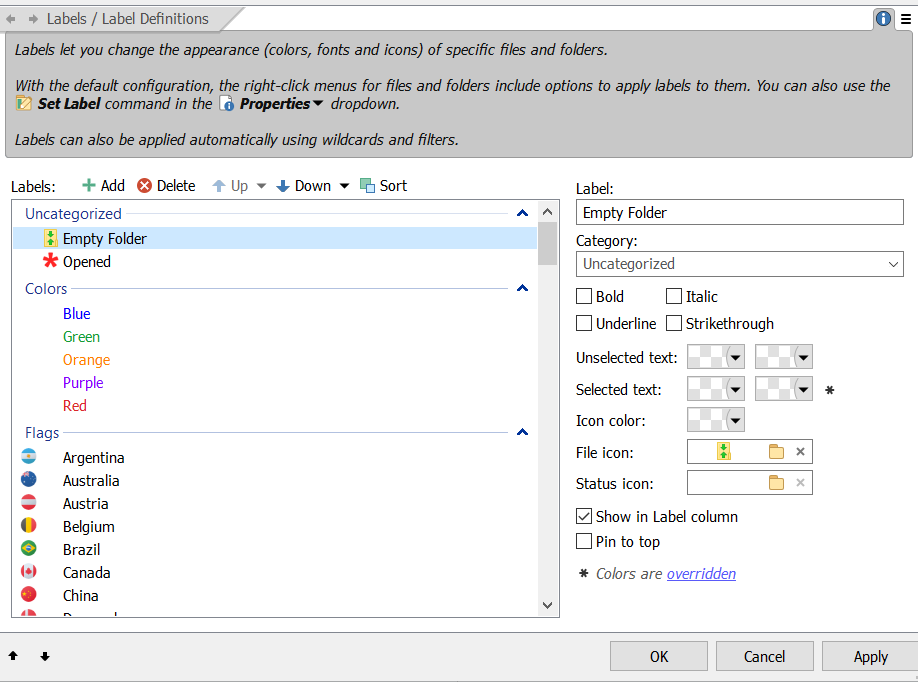
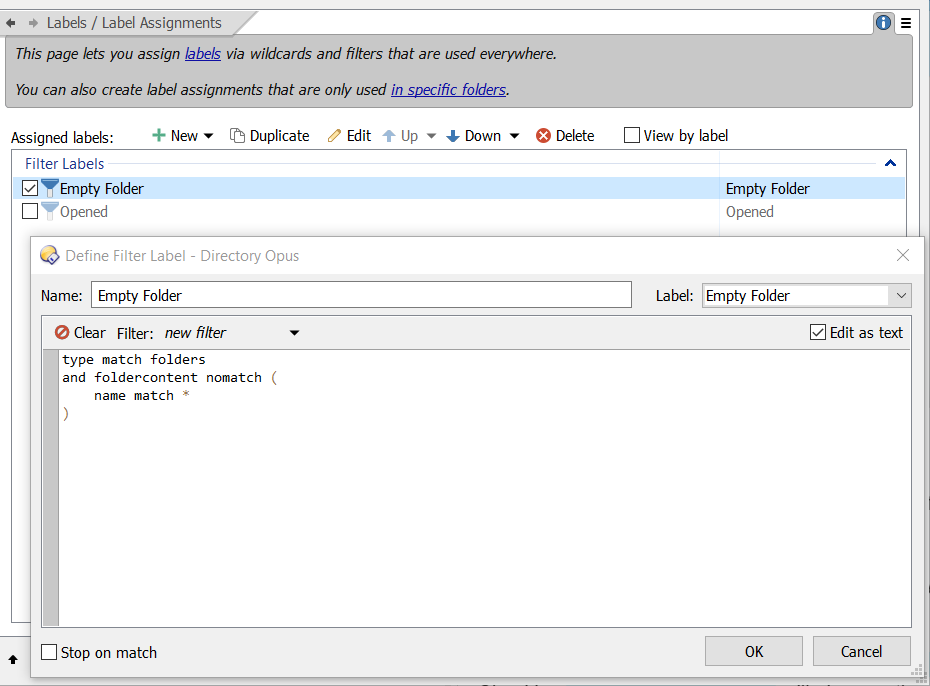
This is probably more easily done with filter labels in Preferences.
Here is an easy example.
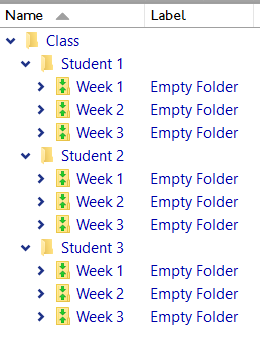
This will give Empty Folders a different icon globally, but it is easily extended to specific folders or drives.
The icon chosen is `166` from `/system/imageres.dll` .
Checking `Show in Label column` will give you the label name in that column.
---
### Author:  [@xoxo](https://resource.dopus.com/u/xoxo)
#### Post date: [September 8, 2026, 3:11am UTC](https://resource.dopus.com/t/homework-submission-tracker-for-teachers/60483/3 "2026-09-08T03:11:46Z")
That's cool. let me try it..thanks