# How to Add "Extract Here" to the Archive Context Menu using Bandizip
**URL:** https://resource.dopus.com/t/how-to-add-extract-here-to-the-archive-context-menu-using-bandizip/36727
**Category:** Help & Support
**Created:** [September 19, 2020, 8:20pm UTC](https://resource.dopus.com/t/how-to-add-extract-here-to-the-archive-context-menu-using-bandizip/36727 "2020-09-19T20:20:24Z")
**Posts on this page:** 6
**Page:** 1
### Author:  [@SoBreezyInChile](https://resource.dopus.com/u/SoBreezyInChile)
#### Post date: [September 19, 2020, 8:20pm UTC](https://resource.dopus.com/t/how-to-add-extract-here-to-the-archive-context-menu-using-bandizip/36727/1 "2020-09-19T20:20:24Z")
When I install Bandizip to Windows 10, the Windows context menu adds a function labeled "Extract Here". This function unzips archives using Bandizip within the folder the archive is located in.
How do I add this function to Directory Opus's context menu for archives?
Thank you for any help that anyone can provide.
---
### Author:  [@Leo](https://resource.dopus.com/u/Leo)
#### Post date: [September 19, 2020, 10:19pm UTC](https://resource.dopus.com/t/how-to-add-extract-here-to-the-archive-context-menu-using-bandizip/36727/2 "2020-09-19T22:19:46Z")
Does it appear if you hold shift when opening the menu?
(Does Bandizip do something Opus's built-in extraction can't?)
---
### Author:  [@SoBreezyInChile](https://resource.dopus.com/u/SoBreezyInChile)
#### Post date: [September 21, 2020, 5:13pm UTC](https://resource.dopus.com/t/how-to-add-extract-here-to-the-archive-context-menu-using-bandizip/36727/3 "2020-09-21T17:13:31Z")
Yep. It does as well as a host of other things that aren't in the Directory Opus context menu. How do I transfer them? Thanks.
Bandizip doesn't do anything that Opus doesn't but I've used Bandizip for years. I guess I feel safer when I use it. And, it looks pretty.
---
### Author:  [@Leo](https://resource.dopus.com/u/Leo)
#### Post date: [September 21, 2020, 5:51pm UTC](https://resource.dopus.com/t/how-to-add-extract-here-to-the-archive-context-menu-using-bandizip/36727/4 "2020-09-21T17:51:23Z")
It looks like it works in Opus by default:
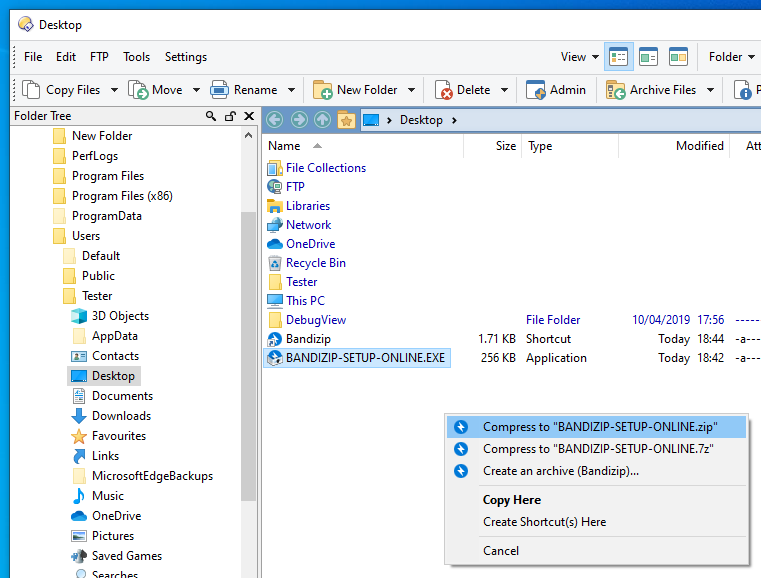
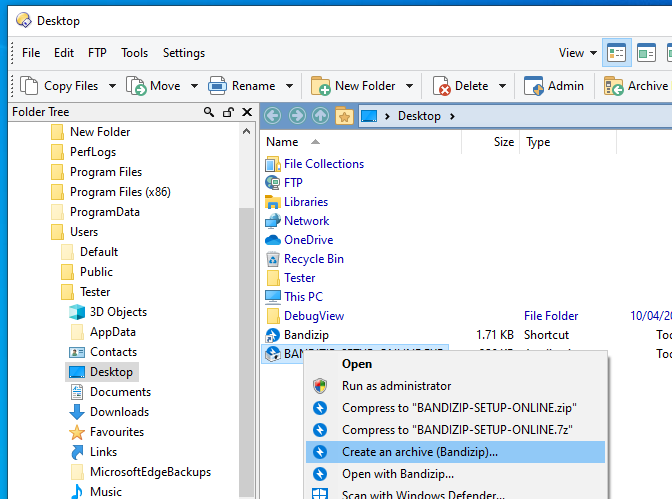
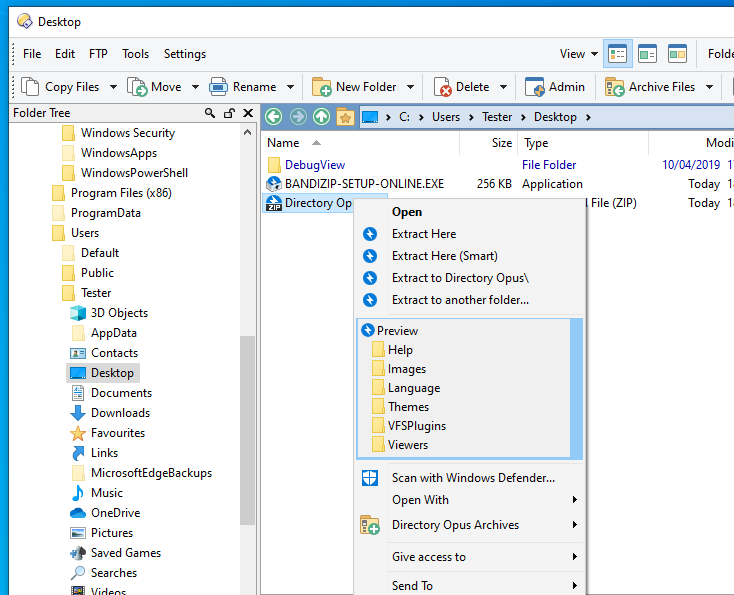
Since it only appears for you when you hold down Shift, you're probably turned on **Preferences / Miscellaneous / Windows Integration / Hide Windows items on file context menus (shift overrides)**.
Turning that off is the quickest way to get its menus back.
You can usually also find the commands or context menu handler CLSID that it uses and explicitly add them to your Opus menus, if you want to hide some Windows/3rd party menu items but not others. This old guide is still relevant, if you want to do that: [Tip: Organise and Speed-Up Context Menus](https://resource.dopus.com/t/tip-organise-and-speed-up-context-menus/1204/1)
But if you just want to extract archives via the right-click menu, Opus can do that itself for you for most common archive formats.
---
### Author:  [@SoBreezyInChile](https://resource.dopus.com/u/SoBreezyInChile)
#### Post date: [September 26, 2020, 5:43am UTC](https://resource.dopus.com/t/how-to-add-extract-here-to-the-archive-context-menu-using-bandizip/36727/5 "2020-09-26T05:43:48Z")
Just getting to these questions on a Friday.
Thanks. That's exactly what I did. I fixed it and it's ok now.
By the way, there is an inordinate amount of settings. Are you guys thinking of any ways to make it easier to utilize settings? Apple takes the stance of taking away options from users and picking it for them. You are the total opposite. You allow settings for everything which I love. But, have you guys thought of a way to make it easier to manage? I frequently know there is a settings somewhere for something but I can't remember. The search functions help sometimes but sometimes they don't.
I'm just curious.
---
### Author:  [@Leo](https://resource.dopus.com/u/Leo)
#### Post date: [September 26, 2020, 6:18am UTC](https://resource.dopus.com/t/how-to-add-extract-here-to-the-archive-context-menu-using-bandizip/36727/6 "2020-09-26T06:18:50Z")
Our attitude is basically the opposite of Apple's. We give you lots of options, even if it means some people are going to be confused by them.
If you find it confusing, and that changing things you don't fully understand creates problems down the road, my advice is to try not to mess with things you don't _really_ need to change. (e.g. Copy buffer sizes and ram disks.) Of course, the temptation is sometimes hard to resist. 🙂