Thank you Jon, that which you present is an obvious alternate method, perhaps preferable, to the area which i went as by the directions to reset toolbars individually as opposed to modifying them when one did not simply choose to reset all toolbars initially. As taken directly from "Directory Opus 13 - Tips for Upgrading from Opus 12" (and found immediately prior to the example you depicted from under the heading "Default Toolbars"):
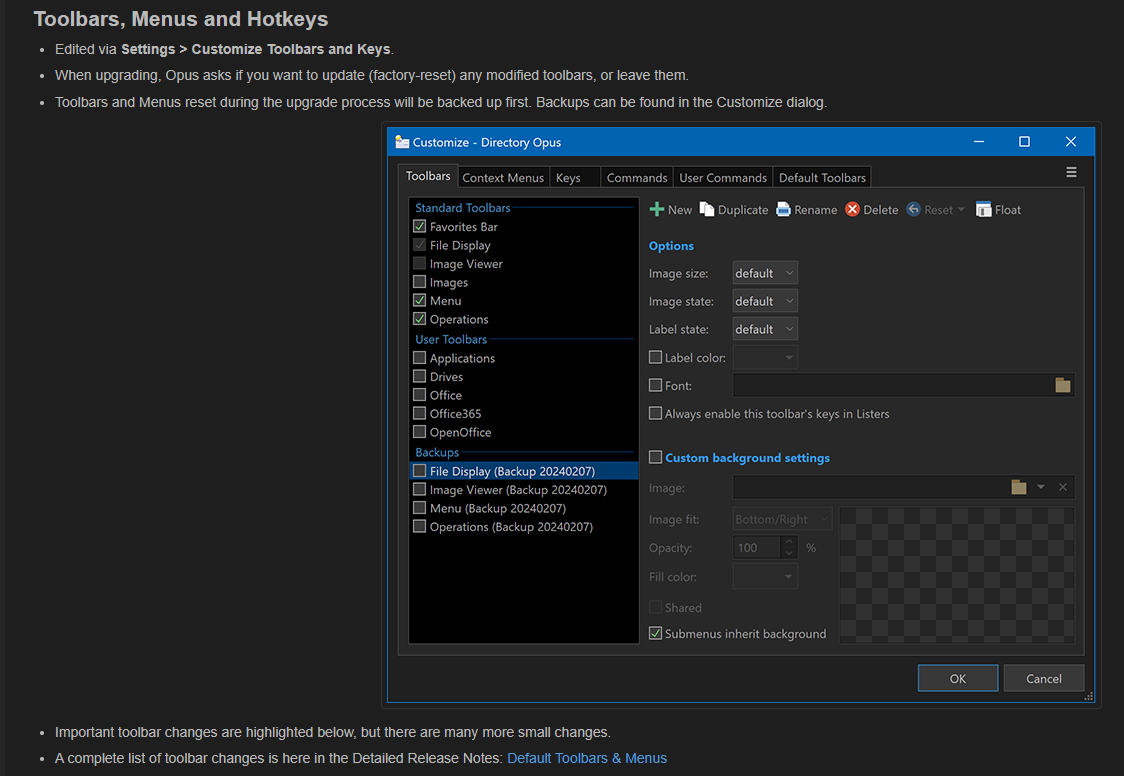
As to what gives the impression that the Image Viewer is a component of the Favorites Bar, please refer to the partial screenshot provided above. In a normal hierarchal diagram or listing, the main container/subject/topic is presented with then components of said main container listed, underneath which and indented are sub-items that belong subordinate to the outdented container. Only when one sees a container listed at the same indentation level as the primary does one typically know one has a new "container". This presentation method is commonly called an "outline method" in nature.
If one goes to "Customize Toolbars" | "Toolbars" in DO "Dark Mode" (especially in bright conditions) the selection boxes that are obvious adjacent to "Favorites Bar", "Images", "Menu" and Operations" are all prominent, but those next to "File Menu" and "Image Viewer" are very dim - nearly impossible to see (perhaps my old eyes don't help either), even in lower lighting they appear grayed out and are not selectable. This lends to giving both of those the appearance that they are in outline view and subcategories of "Favorites Bar".
I hope this explanation helps!