# How to Navigate from a sub folder to Next or Previous sub folder?
**URL:** https://resource.dopus.com/t/how-to-navigate-from-a-sub-folder-to-next-or-previous-sub-folder/33930
**Category:** Help & Support
**Created:** [November 12, 2019, 1:42pm UTC](https://resource.dopus.com/t/how-to-navigate-from-a-sub-folder-to-next-or-previous-sub-folder/33930 "2019-11-12T13:42:21Z")
**Posts on this page:** 20
**Page:** 1
### Author:  [@khalidhosain](https://resource.dopus.com/u/khalidhosain)
#### Post date: [November 12, 2019, 1:42pm UTC](https://resource.dopus.com/t/how-to-navigate-from-a-sub-folder-to-next-or-previous-sub-folder/33930/1 "2019-11-12T13:42:21Z")
My folder structure is:
Album\_A\sub\_folder\_1
Sub\_folder\_2
Sub\_folder\_3
Album\_B\sub\_folder\_1
sub\_folder\_2
Album\_C\sub\_folder\_1
Album\_D\sub\_folder\_1
In my file Display, I open "Album\_A\sub\_folder\_1" Now I want to go directly into "Album\_B\sub\_folder\_1" then from here to Album\_C\sub\_folder\_1
Note: in real senary, every album name in a deferent name in Unicode (Bangla) and every sub\_folder name is also in a deferent name in Unicode (Bangla). Every Album folder contains minimum one subfolder or one more subfolder. I want to Navigate the first subfolder to next first subfolder
---
### Author:  [@Leo](https://resource.dopus.com/u/Leo)
#### Post date: [November 12, 2019, 5:24pm UTC](https://resource.dopus.com/t/how-to-navigate-from-a-sub-folder-to-next-or-previous-sub-folder/33930/2 "2019-11-12T17:24:21Z")
Julianon's script here does something similar with its depth argument:
> [@Command: Go-Relative (go to next/prev sibling folder)](https://resource.dopus.com/t/command-go-relative-go-to-next-prev-sibling-folder/20597/15):
>
> I've taken the dangerous liberty of adding some bells and whistles to leo's script. Apologies, leo, in advance for my inevitable mistakes and misunderstandings. In particular, I'm not confident that I've understood the significance of all the check…
---
### Author:  [@khalidhosain](https://resource.dopus.com/u/khalidhosain)
#### Post date: [November 13, 2019, 4:46am UTC](https://resource.dopus.com/t/how-to-navigate-from-a-sub-folder-to-next-or-previous-sub-folder/33930/3 "2019-11-13T04:46:16Z")
[Leo](https://resource.dopus.com/u/Leo) I have already tried that button
```nohighlight
@Set TheDirectory={SourcePath|NoPath}
Go Up
GoRelative Sibling=Next Wrap SkipHidden
Go {$TheDirectory}
```
but It's not worked for me. It's only work in the folder structure as [Julianon](https://resource.dopus.com/u/Julianon) said
2014\Tax
2015\Tax
2016\Tax
2017\Tax
I have also tested the button, with changing the subfolder name "Tax" to "Token"
2014\Token
2015\Token
2016\Token
2017\Token
The button also worked in that structure. But when I had tried the button in that structure
2014\Token
2015\tax
2016\taxxx
2017\Tokennn
then it's not worked. That means This button maybe works only when the subfolder name is the same. But in my case each of the subfolder names is different. so in my folder structure, That button behavior goes to just crazy.
I give here my original folder structure. Now you can create that situation and test that button your self and I hope you will find some solution. my original folder structure is:
```auto
অপরাধী হইলেও আমি তোর. শিল্পী. বারী সিদ্দিকী\অপরাধী হইলেও আমি তোর Covers
অপরাধী. শিল্পী. আসিফ, অভিজিৎ\অপরাধী Covers
অবশেষে. শিল্পী. হাবিব, ফেরদৌস ওয়াহিদ\অবশেষে Covers
অভিসার. শিল্পী. শাহীন সামাদ\অভিসার Covers
```
Note: don't be confused about my structure. Here is actually album name before the `\` and after the `\` is the folder contain album scanned covers photo. I want to navigate covers to next/previous covers folder
---
### Author:  [@Leo](https://resource.dopus.com/u/Leo)
#### Post date: [November 13, 2019, 8:53am UTC](https://resource.dopus.com/t/how-to-navigate-from-a-sub-folder-to-next-or-previous-sub-folder/33930/4 "2019-11-13T08:53:13Z")
You aren't using the depth argument. I don't think you would need to go up a level first, either.
---
### Author:  [@khalidhosain](https://resource.dopus.com/u/khalidhosain)
#### Post date: [November 13, 2019, 2:56pm UTC](https://resource.dopus.com/t/how-to-navigate-from-a-sub-folder-to-next-or-previous-sub-folder/33930/5 "2019-11-13T14:56:45Z")
Ok, As you said I just remove go up a level part from my button code. and now the button code is
```nohighlight
@Set TheDirectory={SourcePath|NoPath}
GoRelative Sibling=Next Wrap SkipHidden
Go {$TheDirectory}
```
But When I click this button This button show an error massage like the screenshot
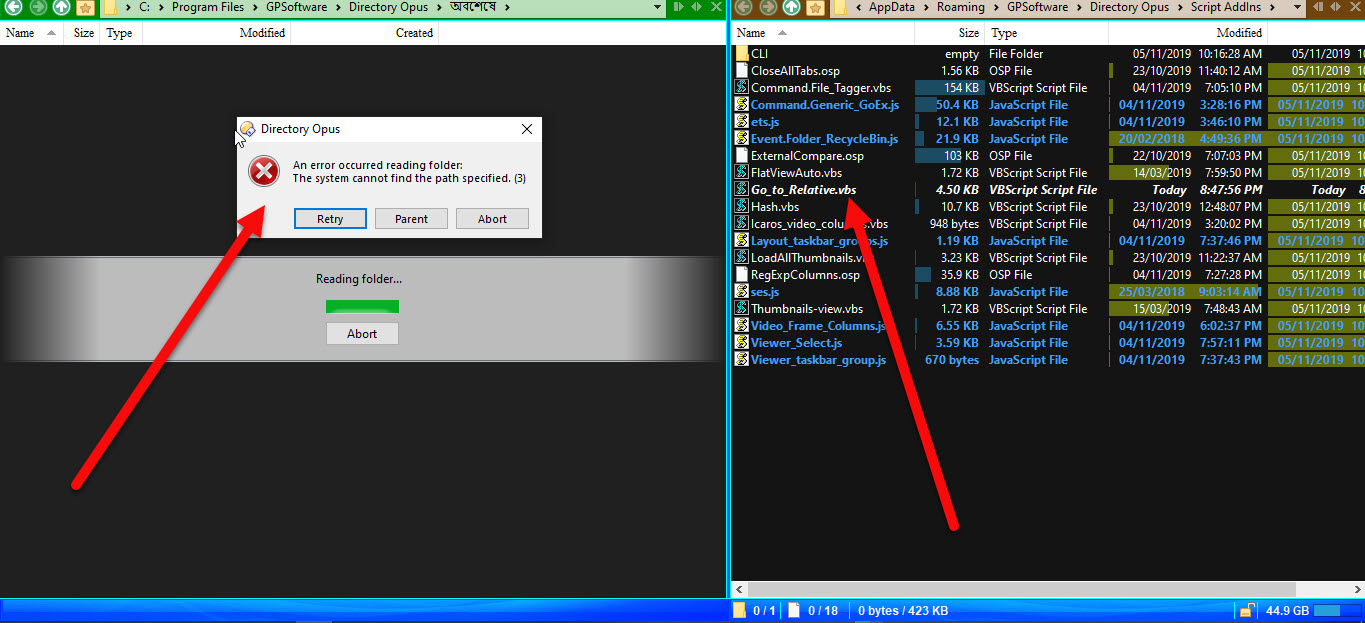
plz Leo Do something.
---
### Author:  [@Leo](https://resource.dopus.com/u/Leo)
#### Post date: [November 13, 2019, 3:06pm UTC](https://resource.dopus.com/t/how-to-navigate-from-a-sub-folder-to-next-or-previous-sub-folder/33930/6 "2019-11-13T15:06:03Z")
Depth argument.
---
### Author:  [@khalidhosain](https://resource.dopus.com/u/khalidhosain)
#### Post date: [November 14, 2019, 4:05am UTC](https://resource.dopus.com/t/how-to-navigate-from-a-sub-folder-to-next-or-previous-sub-folder/33930/7 "2019-11-14T04:05:54Z")
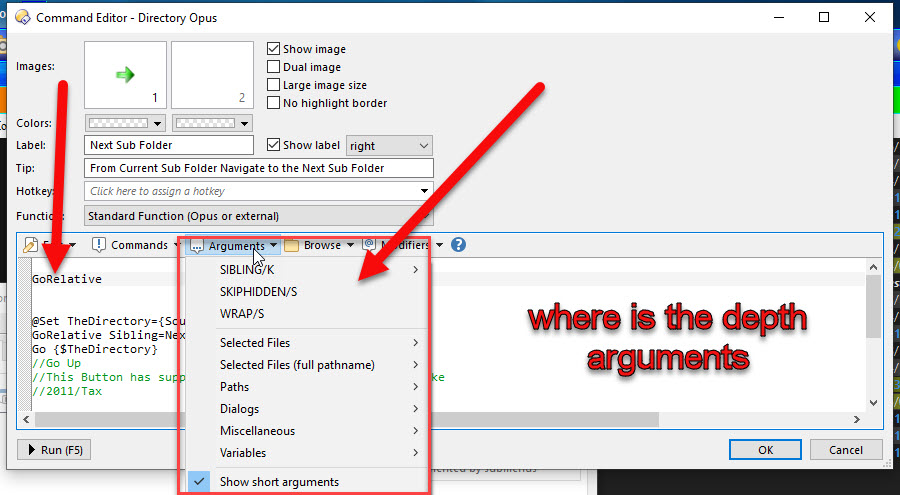
[Leo](https://resource.dopus.com/u/Leo) are we talking about the same script? I use the script provided by you is _ **Go\_to\_Relative.vbs** _ and I don't find any option in argument section Named _ **Depth argument** _ . Can you tell me something details.
---
### Author:  [@Jon](https://resource.dopus.com/u/Jon)
#### Post date: [November 14, 2019, 4:17am UTC](https://resource.dopus.com/t/how-to-navigate-from-a-sub-folder-to-next-or-previous-sub-folder/33930/8 "2019-11-14T04:17:43Z")
Leo was talking about Julianon's version of the script. He gave you a link to it in his original response.
---
### Author:  [@khalidhosain](https://resource.dopus.com/u/khalidhosain)
#### Post date: [November 20, 2019, 4:51pm UTC](https://resource.dopus.com/t/how-to-navigate-from-a-sub-folder-to-next-or-previous-sub-folder/33930/9 "2019-11-20T16:51:43Z")
Ok Here I am again. Now I Use The [GoRelative.js.txt](https://resource.dopus.com/uploads/default/original/3X/f/e/fe3eeb94a6ca32d2cb6a27082b562899dccb18b6.txt) (14.8 KB) script. I flow the Instruction: I Delete the Go\_to\_Relative.vbs Before I Install GoRelative.js.txt. Now I Create the Demo Folder structure As [Julianon](https://resource.dopus.com/u/Julianon) Said Like That:
`...\Lessons\2016\Class09` and
`...\Lessons\2017\Class09`
And Create Two Button with This Code:
`GoRelative Depth=2 Sibling=Previous` (or `Sibling=-1` )
`GoRelative Depth=2 Sibling=Next` (or `Sibling=1` )
**And The Button Works Fine, No Error**
Now I had Tried the button In my Wanted Folder structure Which is:
`D:\Project Secure\অবশেষে. শিল্পী. হাবিব, ফেরদৌস ওয়াহিদ\অবশেষে Covers`
`D:\Project Secure\অপরাধী. শিল্পী. আসিফ, অভিজিৎ\অপরাধী Covers`
`D:\Project Secure\অপরাধী হইলেও আমি তোর. শিল্পী. বারী সিদ্দিকী\অপরাধী হইলেও আমি তোর Covers`
Suppose I am in `D:\Project Secure\অপরাধী. শিল্পী. আসিফ, অভিজিৎ\অপরাধী Covers` Now I Press The **Next** Button which had This code: `GoRelative Depth=2 Sibling=Next`
This Button open `D:\Project Secure\অপরাধী হইলেও আমি তোর. শিল্পী. বারী সিদ্দিকী`
But It should Open `D:\Project Secure\অপরাধী হইলেও আমি তোর. শিল্পী. বারী সিদ্দিকী\অপরাধী হইলেও আমি তোর Covers`
And Show an _ **Error Massage** _: `Opening an ancestor of the target`
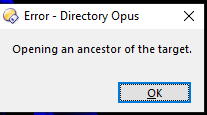
And The Previous Button Do The Same Things also
How to Solve It? Dear [Jon](https://resource.dopus.com/u/Jon), [Leo](https://resource.dopus.com/u/Leo), [Julianon](https://resource.dopus.com/u/Julianon)
---
### Author:  [@khalidhosain](https://resource.dopus.com/u/khalidhosain)
#### Post date: [November 23, 2019, 6:14am UTC](https://resource.dopus.com/t/how-to-navigate-from-a-sub-folder-to-next-or-previous-sub-folder/33930/10 "2019-11-23T06:14:25Z")
Is There Any One please give a reply!!
---
### Author:  [@Jon](https://resource.dopus.com/u/Jon)
#### Post date: [November 23, 2019, 6:37am UTC](https://resource.dopus.com/t/how-to-navigate-from-a-sub-folder-to-next-or-previous-sub-folder/33930/11 "2019-11-23T06:37:29Z")
Maybe if you give some examples using English folder names people might find it easier to understand what you're asking.
---
### Author:  [@khalidhosain](https://resource.dopus.com/u/khalidhosain)
#### Post date: [November 23, 2019, 9:24am UTC](https://resource.dopus.com/t/how-to-navigate-from-a-sub-folder-to-next-or-previous-sub-folder/33930/12 "2019-11-23T09:24:28Z")
Thanks [Jon](https://resource.dopus.com/u/Jon) for reply.
I asking a very simple Things Here Is Simple English Folder List
`\Lessons\Abcd Xyz\Any Name Folder`
`\Lessons\Efgh Ijkl\My Folder`
Now I Want to go from `Any Name Folder` to `My Folder` with a Next button and as well as Want to go Back from `My Folder` to `Any Name Folder` with a Previous button
am I make me clear? There is nothing common in the folder Name? Every Folder Name is Different But The Main Parent Folder Name `Lessons`
---
### Author:  [@pctechtv](https://resource.dopus.com/u/pctechtv)
#### Post date: [November 23, 2019, 6:41pm UTC](https://resource.dopus.com/t/how-to-navigate-from-a-sub-folder-to-next-or-previous-sub-folder/33930/13 "2019-11-23T18:41:26Z")
Is this what you want to do?
[https://resource.dopus.com/uploads/default/original/3X/7/8/783be27d651a1c5cef196102ae007af7b7b876f6.mp4](https://resource.dopus.com/uploads/default/original/3X/7/8/783be27d651a1c5cef196102ae007af7b7b876f6.mp4)
[Siblings.zip](https://resource.dopus.com/uploads/short-url/kz3RMwzD8cqHlB7jYRb97LnApqp.zip) (719 Bytes)
---
### Author:  [@khalidhosain](https://resource.dopus.com/u/khalidhosain)
#### Post date: [November 24, 2019, 7:08am UTC](https://resource.dopus.com/t/how-to-navigate-from-a-sub-folder-to-next-or-previous-sub-folder/33930/14 "2019-11-24T07:08:58Z")
Thank you so much [pctechtv](https://resource.dopus.com/u/pctechtv) for your video clip. But I don't want What you shown in your video. In your video you Navigate the folder in same level. But I want to navigate depth in one level. for example you are in `D:\Backup\Important Photo` and you want to go in `D:\CD Images\Titanic` That's what I mean One level depth. Am I Clear?
---
### Author:  [@aussieboykie](https://resource.dopus.com/u/aussieboykie)
#### Post date: [November 25, 2019, 5:45am UTC](https://resource.dopus.com/t/how-to-navigate-from-a-sub-folder-to-next-or-previous-sub-folder/33930/15 "2019-11-25T05:45:51Z")
> [@khalidhosain](#):
>
> I asking a very simple Things Here Is Simple English Folder List
>
> `\Lessons\Abcd Xyz\Any Name Folder`
> `\Lessons\Efgh Ijkl\My Folder`
> Now I Want to go from `Any Name Folder` to `My Folder` with a Next button and as well as Want to go Back from `My Folder` to `Any Name Folder` with a Previous button
> am I make me clear? There is nothing common in the folder Name? Every Folder Name is Different But The Main Parent Folder Name `Lessons`
Your top level folder Lessons could have any number of subfolders and each subfolder could have any number of 2nd level subfolders, e.g:
\lessons\one\chapter1
\lessons\one\chapter2
\lessons\one\chapter3
etc
\lessons\two\episode1
\lessons\two\episode2
\lessons\two\episode3
etc
\lessons\three\part1
\lessons\three\part2
\lessons\three\part3
etc
If you were currently positioned in \lessons\one\chapter1 what folder would you expect "next" to go to and what logic would you use to make that decision given that there are many possible target folders at the same depth?
---
### Author:  [@khalidhosain](https://resource.dopus.com/u/khalidhosain)
#### Post date: [November 25, 2019, 6:42am UTC](https://resource.dopus.com/t/how-to-navigate-from-a-sub-folder-to-next-or-previous-sub-folder/33930/16 "2019-11-25T06:42:54Z")
**The Logic is folder position number after sort by folder name.**
Let me explain,
\lessons\one\chapter1
\lessons\one\chapter2
\lessons\one\chapter3
etc
In This case I sort all last Child folder by Folder name. Then
`chapter1` Folders position number will be `1`
`chapter2` Folders position number will be `2`
`chapter3` Folders position number will be `3`
\lessons\two\episode1
\lessons\two\episode2
\lessons\two\episode3
etc
`episode1` Folders position number will be `1`
`episode2` Folders position number will be `2`
`episode3` Folders position number will be `3`
We can create some `argument` called `PositionNumber` or something like that. If we use `PositionNumber=1` Then the **Next** Button will Navigate me from
\lessons\one\chapter1
\lessons\one\chapter2
\lessons\one\chapter3 (or any other child folder like... chapter 22 or......chapter29)
to `\lessons\two\episode1`
Because there is other folder in the same depth but their position number is different.
In the same depth
`episode2` Folders position number is `2`
`episode3` Folders position number is `3`
If we use `PositionNumber=2` Then the **Next** Button will Navigate me
\lessons\one\chapter1
\lessons\one\chapter2
\lessons\one\chapter3 (or any other child folder like... chapter 22 or......chapter29)
to `\lessons\two\episode2`
---
### Author:  [@aussieboykie](https://resource.dopus.com/u/aussieboykie)
#### Post date: [November 25, 2019, 11:11pm UTC](https://resource.dopus.com/t/how-to-navigate-from-a-sub-folder-to-next-or-previous-sub-folder/33930/17 "2019-11-25T23:11:57Z")
If I now understand you correctly you always want to jump to the Nth folder in the next subfolder at depth 2? For example, let's assume a folder structure as follows, sorted by name, and a command called MyGoNext that does what you want:
c:\animals\cats\burmese
c:\animals\cats\siamese
c:\animals\cats\tabby
c:\animals\dogs\beagle
c:\animals\dogs\collie
c:\animals\dogs\labrador
c:\animals\horses\arabian
c:\animals\horses\belgian
c:\animals\horses\shetland
If your starting point is any one of:
c:\animals\cats
c:\animals\cats\burmese
c:\animals\cats\siamese
c:\animals\cats\tabby
MyGoNext 1 will take you to c:\animals\dogs\beagle
MyGoNext 2 will take you to c:\animals\dogs\collie
MyGoNext 3 will take you to c:\animals\dogs\labrador
If your starting point is any one of:
c:\animals\dogs
c:\animals\dogs\beagle
c:\animals\dogs\collie
c:\animals\dogs\labrador
MyGoNext 1 will take you to c:\animals\horses\arabian
MyGoNext 2 will take you to c:\animals\horses\belgian
MyGoNext 3 will take you to c:\animals\horses\shetland
If this is correct then you need to decide how you want to handle special situations. For example, what would you expect MyGoNext 4 to do? Nothing? Likewise, if your starting point is somewhere in the c:\animals\horses structure would you want MyGoNext to loop back to c:\animals\cats or do nothing? What about a situation where your starting position is c:\animals (i.e. depth 1) - just go to c:\animals\cats or do nothing?
---
### Author:  [@khalidhosain](https://resource.dopus.com/u/khalidhosain)
#### Post date: [November 26, 2019, 5:41am UTC](https://resource.dopus.com/t/how-to-navigate-from-a-sub-folder-to-next-or-previous-sub-folder/33930/18 "2019-11-26T05:41:59Z")
> [@aussieboykie](#):
>
> If this is correct
**YES This is correct** But Not Fully Correct.
This is correct when my Starting point is:
c:\animals\cats\burmese
c:\animals\cats\siamese
c:\animals\cats\tabby
But when my starting point is: c:\animals\cats Then
MyGoNext1 will go in c:\animals\dogs
MyGoNext2 will go in c:\animals\horses\
Ok let's talk about Special Situations.
Special Situations - 1:
> [@aussieboykie](#):
>
> what would you expect MyGoNext 4 to do?
If My Starting point is: c:\animals\horses\shetland
**I want MyGoNext4 to loop back to c:\animals\cats\burmese**
Special Situations - 2:
> [@aussieboykie](#):
>
> What about a situation where your starting position is c:\animals (i.e. depth 1)
If my starting position is c:\animals (i.e. depth 1) Then MyGoNext will Open c:\Birds
---
### Author:  [@aussieboykie](https://resource.dopus.com/u/aussieboykie)
#### Post date: [November 30, 2019, 9:18pm UTC](https://resource.dopus.com/t/how-to-navigate-from-a-sub-folder-to-next-or-previous-sub-folder/33930/19 "2019-11-30T21:18:54Z")
The attached script will do what you want. It expects a positive or negative integer argument, e.g. KHGo 1, KHGo 2, KHGo -1, KHGo -2, etc.. If you don't supply an argument it defaults to 1. Positive arguments take you FORWARD through a structure, negative arguments take you BACKWARD. I will also attach a zip file of the "animals" structure I used during testing.
[KHGo.js.txt](https://resource.dopus.com/uploads/short-url/lVO1mdblcs82hOC5aiE3gqBNsyD.txt) (6.0 KB)
[animals.zip](https://resource.dopus.com/uploads/short-url/Aes5hkR9PDU1zjdLvxmiM5NHe5o.zip) (2.1 KB)
**Edit: 2019-12-02** Updated to v1.1. Fix to handle single folder in structure depth \> 3.
---
### Author:  [@pctechtv](https://resource.dopus.com/u/pctechtv)
#### Post date: [December 2, 2019, 12:36am UTC](https://resource.dopus.com/t/how-to-navigate-from-a-sub-folder-to-next-or-previous-sub-folder/33930/20 "2019-12-02T00:36:48Z")
Should this be put in a button? Thanks
[Next page](https://resource.dopus.com/t/how-to-navigate-from-a-sub-folder-to-next-or-previous-sub-folder/33930.md?page=2)