# How to set .rar icon to look like a zip folder?
**URL:** https://resource.dopus.com/t/how-to-set-rar-icon-to-look-like-a-zip-folder/11762
**Category:** Help & Support
**Created:** [September 9, 2011, 11:56pm UTC](https://resource.dopus.com/t/how-to-set-rar-icon-to-look-like-a-zip-folder/11762 "2011-09-09T23:56:41Z")
**Posts on this page:** 7
**Page:** 1
### Author:  [@Gino](https://resource.dopus.com/u/Gino)
#### Post date: [September 9, 2011, 11:56pm UTC](https://resource.dopus.com/t/how-to-set-rar-icon-to-look-like-a-zip-folder/11762/1 "2011-09-09T23:56:41Z")
Hi,
Sorry to HJ into this thread but how do I get the .rar icon in DOpus looking like a zip folder
Cheers,
---
### Author:  [@Leo](https://resource.dopus.com/u/Leo)
#### Post date: [September 10, 2011, 6:04am UTC](https://resource.dopus.com/t/how-to-set-rar-icon-to-look-like-a-zip-folder/11762/2 "2011-09-10T06:04:09Z")
I've split this into a separate topic. (Please start new threads if you have a question that isn't directly related to another thread.)
You can set the icons used for file types via Settings -\> File Types.
If you don't already have a RAR file type you can create a new one there as well.
---
### Author:  [@Gino](https://resource.dopus.com/u/Gino)
#### Post date: [September 10, 2011, 7:25am UTC](https://resource.dopus.com/t/how-to-set-rar-icon-to-look-like-a-zip-folder/11762/3 "2011-09-10T07:25:28Z")
Hey Leo,
Sorry about jumping into the other thread.
Here is a screen shot I would like the zip icon when I see it in Dopus.
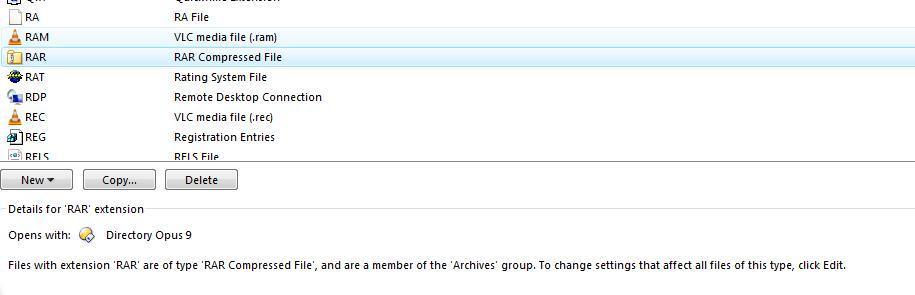
This is what I get

Have I not setup something right
Cheers,
Gino
---
### Author:  [@Leo](https://resource.dopus.com/u/Leo)
#### Post date: [September 10, 2011, 8:42am UTC](https://resource.dopus.com/t/how-to-set-rar-icon-to-look-like-a-zip-folder/11762/4 "2011-09-10T08:42:26Z")
To the right of where it says Opens with: (icon) Directory Opus 9, click Change..., then select the bold "Directory Opus 9" item in the left-hand list and click Clear Default, then click OK.
If you now refresh your file display, you'll have the icon you want.
After doing this, double-clicking RAR files outside of Opus may no longer open an Opus window for them. (Inside of Opus should still be fine.) To correct that, in a way which won't affect the icon, follow this guide: [HOW TO: Make RAR files open in Opus on double-click](https://resource.dopus.com/t/make-rar-7z-iso-etc-files-open-in-opus-on-double-click/1310/1).
---
### Author:  [@Gino](https://resource.dopus.com/u/Gino)
#### Post date: [September 10, 2011, 9:58am UTC](https://resource.dopus.com/t/how-to-set-rar-icon-to-look-like-a-zip-folder/11762/5 "2011-09-10T09:58:57Z")
[quote="leo"]To the right of where it says Opens with: (icon) Directory Opus 9, click Change..., then select the bold "Directory Opus 9" item in the left-hand list and click Clear Default, then click OK.
If you now refresh your file display, you'll have the icon you want.
After doing this, double-clicking RAR files outside of Opus may no longer open an Opus window for them. (Inside of Opus should still be fine.) To correct that, in a way which won't affect the icon, follow this guide: [HOW TO: Make RAR files open in Opus on double-click](https://resource.dopus.com/t/make-rar-7z-iso-etc-files-open-in-opus-on-double-click/1310/1).[/quote]
Hey Leo,
I did all of what you suggested and its fixed 👍 zip icon shows is the way I want thank you 😃
In windows explorer the zip icon now shows it as the DOpus icon like my screen shot is that the it should be?
I know not to ask more than one question per thread but am using the old icon set from a previous install.
Cheers,
Gino 🙂
---
### Author:  [@Leo](https://resource.dopus.com/u/Leo)
#### Post date: [September 10, 2011, 10:26am UTC](https://resource.dopus.com/t/how-to-set-rar-icon-to-look-like-a-zip-folder/11762/6 "2011-09-10T10:26:36Z")
Explorer might continue using the previous icon until you reboot, though I'm not 100% sure.
---
### Author:  [@Noam](https://resource.dopus.com/u/Noam)
#### Post date: [February 7, 2024, 7:45am UTC](https://resource.dopus.com/t/how-to-set-rar-icon-to-look-like-a-zip-folder/11762/7 "2024-02-07T07:45:29Z")
Hey there I'm having the same problem on Dopus 12. I have followed instructions and tried clearing the default but it just reverts to the default being "Directory Opus Helper Application" and it doesn't show the selected icon