# Icons too small - do not look as assigned
**URL:** https://resource.dopus.com/t/icons-too-small-do-not-look-as-assigned/21073
**Category:** Help & Support
**Created:** [August 21, 2015, 1:37pm UTC](https://resource.dopus.com/t/icons-too-small-do-not-look-as-assigned/21073 "2015-08-21T13:37:41Z")
**Posts on this page:** 2
**Page:** 1
### Author:  [@sadicus](https://resource.dopus.com/u/sadicus)
#### Post date: [August 21, 2015, 1:37pm UTC](https://resource.dopus.com/t/icons-too-small-do-not-look-as-assigned/21073/1 "2015-08-21T13:37:41Z")
I think I posted this problem before but could not find how to search by user.
Win7 x64sp1
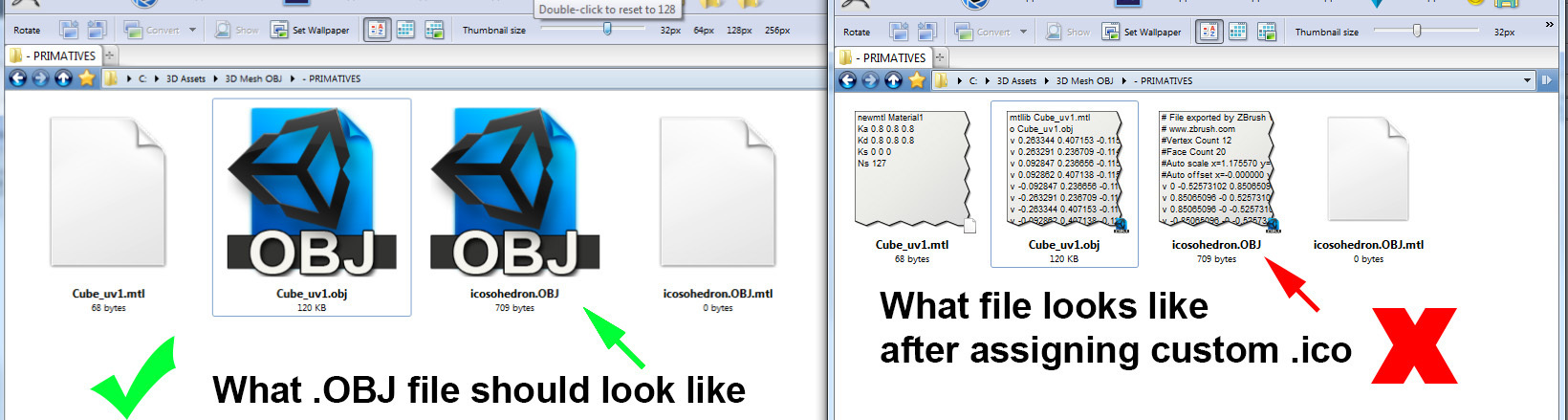
1. Used Types (icon manager) to assign Silo.exe to open .OBJ files.
2. change icon to a custom .ico file.
see image for the problem.
---
### Author:  [@Leo](https://resource.dopus.com/u/Leo)
#### Post date: [August 21, 2015, 2:09pm UTC](https://resource.dopus.com/t/icons-too-small-do-not-look-as-assigned/21073/2 "2015-08-21T14:09:15Z")
[Re: HDR Image Display](https://resource.dopus.com/t/hdr-image-display/20022/5) is what you were looking for.
You can search by user by clicking the Advanced Search icon/cog that is part of the search field, top-right. (Or, on small screen devices, there won't be a search field and clicking the Search link will take you directly to Advanced Search.)