# Image formats & metadata
**URL:** https://resource.dopus.com/t/image-formats-metadata/38238
**Category:** Off-Topic
**Created:** [April 2, 2021, 4:19am UTC](https://resource.dopus.com/t/image-formats-metadata/38238 "2021-04-02T04:19:08Z")
**Posts on this page:** 5
**Page:** 1
### Author:  [@mazeckenrode](https://resource.dopus.com/u/mazeckenrode)
#### Post date: [April 2, 2021, 4:19am UTC](https://resource.dopus.com/t/image-formats-metadata/38238/1 "2021-04-02T04:19:08Z")
> [@The case of the missing COMMENT (DOpus vs. ExifTool, round 10?)](https://resource.dopus.com/t/the-case-of-the-missing-comment-dopus-vs-exiftool-round-10/38208/7):
>
> Have you tried experimenting with different image formats?
@auden
Hope you don’t mind, but I’m responding to [your post in “The case of the missing COMMENT”](https://resource.dopus.com/t/the-case-of-the-missing-comment-dopus-vs-exiftool-round-10/38208/7) here, lest we incur the wrath of the admins for straying too far from the original topic.
I use PNG because it’s compressed but lossless, and I can (currently) upload 32-bit PNGs to my Google Photos account without having them count against my combined Google account free storage limit of 15 GB (reportedly, _ALL_ image uploads to Google Photos after some date in June of this year will count against the free storage limit). I experimented with TIFF a bit some years ago, but didn’t see any way to save them with LZW or other compression from any of the tools I commonly use (mostly Corel PaintShop Pro and GIMP), and am not in a position to shell out for Photoshop or other “professional-level” applications. Also, as great as DOpus is, I can’t use it natively to convert to TIFF.
If you have any other suggestions, I’m open.
---
### Author:  [@DesertDwarf](https://resource.dopus.com/u/DesertDwarf)
#### Post date: [April 2, 2021, 9:36pm UTC](https://resource.dopus.com/t/image-formats-metadata/38238/2 "2021-04-02T21:36:18Z")
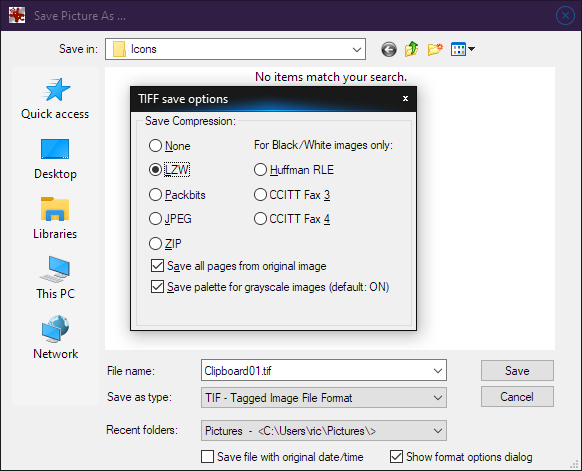
Here I am pretending I'm going to save a TIFF from within Irfanview.
---
### Author:  [@mazeckenrode](https://resource.dopus.com/u/mazeckenrode)
#### Post date: [April 2, 2021, 10:57pm UTC](https://resource.dopus.com/t/image-formats-metadata/38238/3 "2021-04-02T22:57:31Z")
@DesertDwarf
Cool, thanks. I just recently started using IrfanView as a viewer.
---
### Author:  [@auden](https://resource.dopus.com/u/auden)
#### Post date: [April 3, 2021, 8:31am UTC](https://resource.dopus.com/t/image-formats-metadata/38238/4 "2021-04-03T08:31:16Z")
@mazeckenrode
I see someone has pointed you to a program that can make LZW Tiffs and does not cost a fortune like Photoshop.
My understanding of LZW compression is that it was written in the mid 1970s and is owned by Unisys from whom software companies wanting to use it have to buy a licence.
It is apparently widely used processing PDFs and text based files, which apparently compress well with its algorithms. It is also lossless and supports transparency.
---
### Author:  [@DesertDwarf](https://resource.dopus.com/u/DesertDwarf)
#### Post date: [April 3, 2021, 6:07pm UTC](https://resource.dopus.com/t/image-formats-metadata/38238/5 "2021-04-03T18:07:41Z")
Reading this may update you on the current state of things regarding licensing. (Also, it was released in the 80s, not 70s.)
> **[Lempel–Ziv–Welch | Wikiwand](https://www.wikiwand.com/en/Lempel%E2%80%93Ziv%E2%80%93Welch)**
>
> Lempel–Ziv–Welch is a universal lossless data compression algorithm created by Abraham Lempel, Jacob Ziv, and Terry Welch. It was published by Welch in 1984 as an improved implementation of the LZ78 algorithm published by Lempel and Ziv in 1978. The...
Wikiwand is a nicer-looking (in my opinion) mirror of Wikipedia. Here's the article on Wikipedia:
> **[Lempel–Ziv–Welch](https://en.wikipedia.org/wiki/Lempel%E2%80%93Ziv%E2%80%93Welch)**
>
> Lempel–Ziv–Welch (LZW) is a universal lossless data compression algorithm created by Abraham Lempel, Jacob Ziv, and Terry Welch. It was published by Welch in 1984 as an improved implementation of the LZ78 algorithm published by Lempel and Ziv in 1978. The algorithm is simple to implement and has the potential for very high throughput in hardware implementations. It is the algorithm of the widely used Unix file compression utility compress and is used in the GIF image format.
> The scenario descri...