# Is it possible to import or use shapes or icons from Microsoft Office 365 to be used as icons in DO
**URL:** https://resource.dopus.com/t/is-it-possible-to-import-or-use-shapes-or-icons-from-microsoft-office-365-to-be-used-as-icons-in-do/51342
**Category:** Help & Support
**Created:** [June 18, 2024, 6:04am UTC](https://resource.dopus.com/t/is-it-possible-to-import-or-use-shapes-or-icons-from-microsoft-office-365-to-be-used-as-icons-in-do/51342 "2024-06-18T06:04:56Z")
**Posts on this page:** 2
**Page:** 1
### Author:  [@KebordKauboi](https://resource.dopus.com/u/KebordKauboi)
#### Post date: [June 18, 2024, 6:04am UTC](https://resource.dopus.com/t/is-it-possible-to-import-or-use-shapes-or-icons-from-microsoft-office-365-to-be-used-as-icons-in-do/51342/1 "2024-06-18T06:04:57Z")
Hi,
I've posted this earlier:
> [@New folder with items ... I want to be able to give it a name](https://resource.dopus.com/t/new-folder-with-items-i-want-to-be-able-to-give-it-a-name/37413):
>
> Hi, I like the feature of selecting some files and folders and place them all in one folder. But it happens a lot that I want to do this with several groups of files and folder that happened that they all exists on the same folder. So if I selecte…
I would to use a suitable icon for this button, but can not find a suitable one in the listed icons, so is it possible to use icons from Office?
Or create a suitable one.
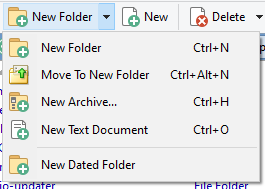
I want the icon to be a default folder, and instead of the + to be an arrow to the right of the icon, like this one:

How to do so?
Thanks
---
### Author:  [@galaxyhub](https://resource.dopus.com/u/galaxyhub)
#### Post date: [June 18, 2024, 11:14am UTC](https://resource.dopus.com/t/is-it-possible-to-import-or-use-shapes-or-icons-from-microsoft-office-365-to-be-used-as-icons-in-do/51342/2 "2024-06-18T11:14:22Z")
Using [Iconset Maker (Updated) - Icons - Directory Opus Resource Centre (dopus.com)](https://resource.dopus.com/t/iconset-maker-updated/42158)
and the decompiled default iconset I quickly put this one together

in this iconset
[Default Folder (32px & 24px).dis](https://resource.dopus.com/uploads/short-url/9hE9XYAj0mjpAEoCrTwKaw2PPSD.dis) (2.6 KB)
Put the iconset (drag & drop) in

and Move it up to the top of the list and click apply