# Is there a command to toggle checked/unchecked in checkbox mode as {SPACE}?
**URL:** https://resource.dopus.com/t/is-there-a-command-to-toggle-checked-unchecked-in-checkbox-mode-as-space/53435
**Category:** Help & Support
**Created:** [November 12, 2024, 1:20pm UTC](https://resource.dopus.com/t/is-there-a-command-to-toggle-checked-unchecked-in-checkbox-mode-as-space/53435 "2024-11-12T13:20:16Z")
**Posts on this page:** 20
**Page:** 1
### Author:  [@bytim](https://resource.dopus.com/u/bytim)
#### Post date: [November 12, 2024, 1:20pm UTC](https://resource.dopus.com/t/is-there-a-command-to-toggle-checked-unchecked-in-checkbox-mode-as-space/53435/1 "2024-11-12T13:20:16Z")
In checkbox mode, we click a file, then we can press SPACE key to toggle checked/unchecked status of that file, and this operation will not affect the checked status of other files.
Now I want to use AHK script to do it, some code like:
`space & c::dopusrt.exe /cmd select checked=toggle`
but I cannot find a command like this.
" **Select TOCHECKS**" will cause other unselected files to be unchecked.
I need help, please...
---
### Author:  [@Leo](https://resource.dopus.com/u/Leo)
#### Post date: [November 12, 2024, 1:25pm UTC](https://resource.dopus.com/t/is-there-a-command-to-toggle-checked-unchecked-in-checkbox-mode-as-space/53435/2 "2024-11-12T13:25:33Z")
Probably easier to make AHK send a keypress of the space key if that's what you want to trigger.
---
### Author:  [@bytim](https://resource.dopus.com/u/bytim)
#### Post date: [November 12, 2024, 2:04pm UTC](https://resource.dopus.com/t/is-there-a-command-to-toggle-checked-unchecked-in-checkbox-mode-as-space/53435/3 "2024-11-12T14:04:26Z")
But I have use SPACE as sequence key, such as:
SPACE,SPACE =========== Select FIRST EXACT MAKEVISIBLE=immediate
SPACE,1 =========== Set SORTBY=name
SPACE,2 =========== Set SORTBY=modified
...
So using AHK to sendinput {space} will trigger these sequence key leading with SPACE.
I hope there is such a command in DO for calling from outside.
Or, is there some message number in DOpus to do the toggle ? So that we can use AHK's "SendMessage" like this:
`SendMessage 0x0114, 1, 0, ControlGetFocus("A")`
---
### Author:  [@dpuser441](https://resource.dopus.com/u/dpuser441)
#### Post date: [June 28, 2025, 11:49am UTC](https://resource.dopus.com/t/is-there-a-command-to-toggle-checked-unchecked-in-checkbox-mode-as-space/53435/4 "2025-06-28T11:49:58Z")
I ran into this because I use `SPACE` for another command so it doesn't work for (un-)checking files in checkbox mode, so I want to use another key to check/uncheck/toggle. Is there really no command to just check/uncheck/toggle the checkbox (in cb-mode) of the currently selected file? If so, would be great if one can be added. Thanks.
---
### Author:  [@bytim](https://resource.dopus.com/u/bytim)
#### Post date: [June 28, 2025, 12:42pm UTC](https://resource.dopus.com/t/is-there-a-command-to-toggle-checked-unchecked-in-checkbox-mode-as-space/53435/5 "2025-06-28T12:42:41Z")
You cam press:
Ctrl+Space
Ctrl+alt+Space
---
### Author:  [@dpuser441](https://resource.dopus.com/u/dpuser441)
#### Post date: [June 28, 2025, 12:46pm UTC](https://resource.dopus.com/t/is-there-a-command-to-toggle-checked-unchecked-in-checkbox-mode-as-space/53435/6 "2025-06-28T12:46:48Z")
Thanks. That's good to know. Ideally, I'd like to use a custom key, e.g. `SHIFT-S`, which I think requires DOpus to offer a command for that and I'm surprised it does not seem to exist. 🙂
---
### Author:  [@galaxyhub](https://resource.dopus.com/u/galaxyhub)
#### Post date: [June 28, 2025, 1:54pm UTC](https://resource.dopus.com/t/is-there-a-command-to-toggle-checked-unchecked-in-checkbox-mode-as-space/53435/7 "2025-06-28T13:54:28Z")
SHIFTs is used for capital **s** , assigning to something else not a good idea.
---
### Author:  [@dpuser441](https://resource.dopus.com/u/dpuser441)
#### Post date: [June 28, 2025, 1:57pm UTC](https://resource.dopus.com/t/is-there-a-command-to-toggle-checked-unchecked-in-checkbox-mode-as-space/53435/8 "2025-06-28T13:57:15Z")
I do use `SHIFT + letter` without problems (e.g. `SHIFT-C` to copy). When focus is in an input field (e.g, when renaming a file), DOpus does not trigger the shortcut, but the capital letter is typed as expected.
> **Caveat**
>
> This can be a downside as well: I use `SHIFT-R` to do inline-rename, but when activated, I can't just hit `SHIFT-R` again to cycle the inline-rename selections (stem, ext, full etc.), as it'll type captial `R` instead, but that's fine of course.
---
### Author:  [@galaxyhub](https://resource.dopus.com/u/galaxyhub)
#### Post date: [June 28, 2025, 4:07pm UTC](https://resource.dopus.com/t/is-there-a-command-to-toggle-checked-unchecked-in-checkbox-mode-as-space/53435/9 "2025-06-28T16:07:16Z")
to answer your original question
> [@dpuser441](#):
>
> I ran into this because I use `SPACE` for another command so it doesn't work for (un-)checking files in checkbox mode, so I want to use another key to check/uncheck/toggle. Is there really no command to just check/uncheck/toggle the checkbox (in cb-mode) of the currently selected file? If so, would be great if one can be added. Thanks.
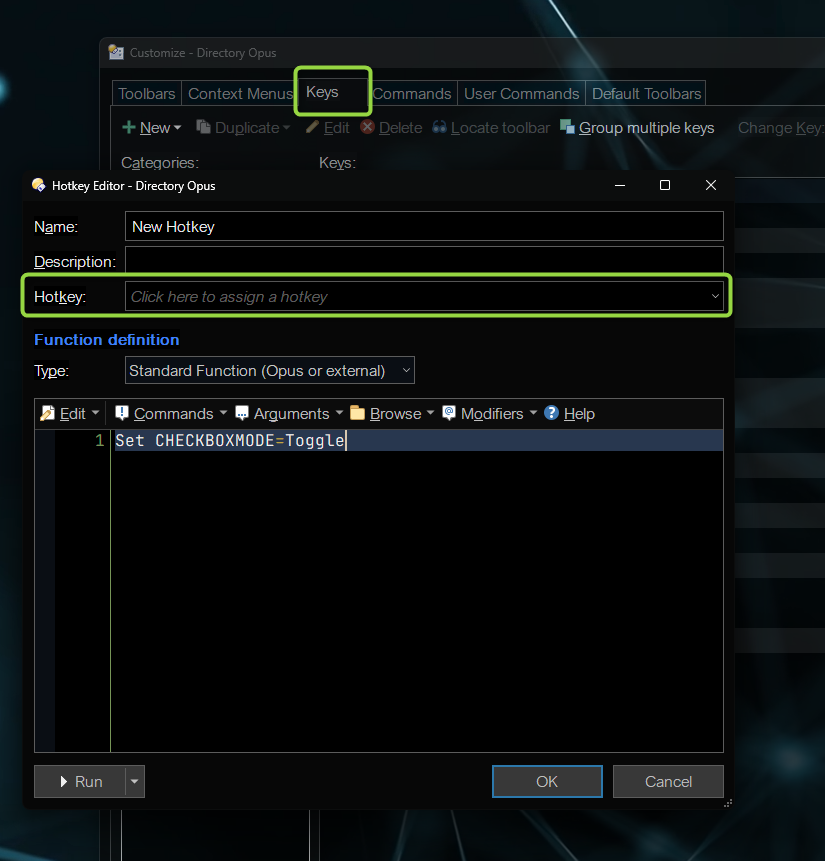
go into customize mode, select the keys tab and create a new hotkey like so (assigning whatever key you like)
---
### Author:  [@dpuser441](https://resource.dopus.com/u/dpuser441)
#### Post date: [June 28, 2025, 6:34pm UTC](https://resource.dopus.com/t/is-there-a-command-to-toggle-checked-unchecked-in-checkbox-mode-as-space/53435/10 "2025-06-28T18:34:59Z")
I don't want to toggle Checkbox mode, I want to toggle the checked state of the currently selected file.
---
### Author:  [@galaxyhub](https://resource.dopus.com/u/galaxyhub)
#### Post date: [June 28, 2025, 9:15pm UTC](https://resource.dopus.com/t/is-there-a-command-to-toggle-checked-unchecked-in-checkbox-mode-as-space/53435/11 "2025-06-28T21:15:40Z")
Apologies,
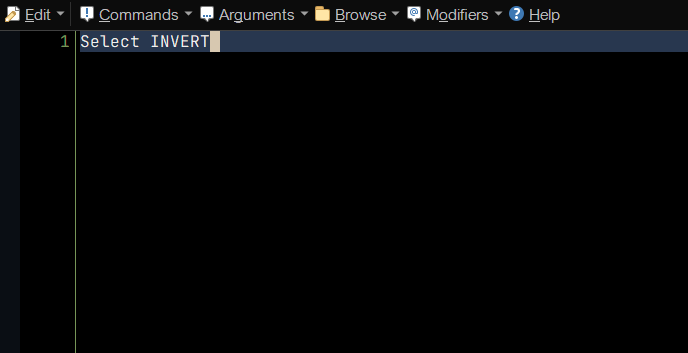
from the [documentation](https://docs.dopus.com/doku.php?id=basic_concepts:selecting_files:selecting_with_the_mouse_and_keyboard:checkbox_mode)
> use the **Edit / Invert Selection** command to invert the check states,
so try
---
### Author:  [@dpuser441](https://resource.dopus.com/u/dpuser441)
#### Post date: [June 28, 2025, 9:47pm UTC](https://resource.dopus.com/t/is-there-a-command-to-toggle-checked-unchecked-in-checkbox-mode-as-space/53435/12 "2025-06-28T21:47:42Z")
This does invert _all_ checkboxes, i.e., check previously unchecked boxes and vice versa - not what I'm looking for. Instead, I want to toggle _the currently selected file(s)_ only.
---
### Author:  [@galaxyhub](https://resource.dopus.com/u/galaxyhub)
#### Post date: [June 29, 2025, 1:24am UTC](https://resource.dopus.com/t/is-there-a-command-to-toggle-checked-unchecked-in-checkbox-mode-as-space/53435/13 "2025-06-29T01:24:13Z")
Ahhh. In that case Feature request please @Leo
- `Select INVERT {file$)` to invert selection/check of currently selected item. (when alternative to SPACE is required)
---
### Author:  [@errante](https://resource.dopus.com/u/errante)
#### Post date: [June 29, 2025, 2:31am UTC](https://resource.dopus.com/t/is-there-a-command-to-toggle-checked-unchecked-in-checkbox-mode-as-space/53435/14 "2025-06-29T02:31:00Z")
> [@dpuser441](#):
>
> I want to toggle _the currently selected file(s)_ only.
You can do it via scripting 😀
Try using this User Command: `ToggleSelection` (you need to import it via the Customize dialog...).
[ToggleSelection.ouc](https://resource.dopus.com/uploads/short-url/2MTMj3BpCIvUHrW5PQ0PAM5XbJD.ouc) (3.7 KB)
```javascript
function OnClick(clickData) {
// --------------------------------------------------------
var cmd = clickData.func.command;
cmd.deselect = false; // Prevent automatic deselection
// --------------------------------------------------------
var tab = clickData.func.sourcetab;
var checkbox_mode = tab.stats.checkbox_mode;
//DOpus.Output('checkbox_mode=' + checkbox_mode);
var ch_selcount = tab.selstats.selitems; //items checked
var selcount = tab.stats.selitems; //items selected
//DOpus.Output('ch_selcount=' + ch_selcount + '; selcount=' + selcount);
//No checkbox mode, just normal selection
//or no items selected, we deal with checked items only
if (!checkbox_mode || !selcount ) {
cmd.RunCommand('Select ALL');
cmd.RunCommand('Select DESELECT FROMSCRIPT')
}
//items selected, check one by one 'cause we can't easily tell
//which is selected but not checked
else {
var items = tab.all;
var check_items = DOpus.NewVector();
var uncheck_items = DOpus.NewVector();
//DOpus.Output('items=' + items.count);
var counter = 0; //counter for selected
for (var i = items.count - 1; i >= 0; i--, counter++) {
//item is not selected, omitted
if (!items(i).selected) continue;
//so we don't iterate the whole batch
if (counter === selcount) break;
//DOpus.Output('item=' + items(i));
if (items(i).checked) uncheck_items.push_back(items(i));
else check_items.push_back(items(i));
}
if (!uncheck_items.empty) {
cmd.SetFiles(uncheck_items);
DOpus.Output('Deselecting ' + uncheck_items.count + ' items...');
cmd.RunCommand('Select FROMSCRIPT DESELECT');
}
if (!check_items.empty) {
cmd.SetFiles(check_items);
DOpus.Output('Selecting ' + check_items.count + ' items...');
cmd.RunCommand('Select FROMSCRIPT');
}
}
}
```
Note : It does not work on shell path types.
Note 2: I've corrected the case for non-checkbox mode. So if you already downloaded it, please do it again (sorry about that).
---
### Author:  [@bytim](https://resource.dopus.com/u/bytim)
#### Post date: [June 29, 2025, 9:10am UTC](https://resource.dopus.com/t/is-there-a-command-to-toggle-checked-unchecked-in-checkbox-mode-as-space/53435/15 "2025-06-29T09:10:15Z")
> [@dpuser441](#):
>
> This does invert _all_ checkboxes, i.e., check previously unchecked boxes and vice versa - not what I'm looking for. Instead, I want to toggle _t_
I set hotkey "Insert" to send \ like this:
```auto
@if:Set CHECKBOXMODE=on
//SendKeys "^% "
//SendKey KEYS=ctrl+alt+space
@sendkey:ctrl+alt+space
@if:else
Select NEXT=row,nodeselect
```
It works on all path types.
---
### Author:  [@errante](https://resource.dopus.com/u/errante)
#### Post date: [June 29, 2025, 3:44pm UTC](https://resource.dopus.com/t/is-there-a-command-to-toggle-checked-unchecked-in-checkbox-mode-as-space/53435/16 "2025-06-29T15:44:32Z")
Oh, I did not know about that internal hotkey.
But I'm not sure what that `Select` command is actually trying to do—the result is pretty far from what I expected.
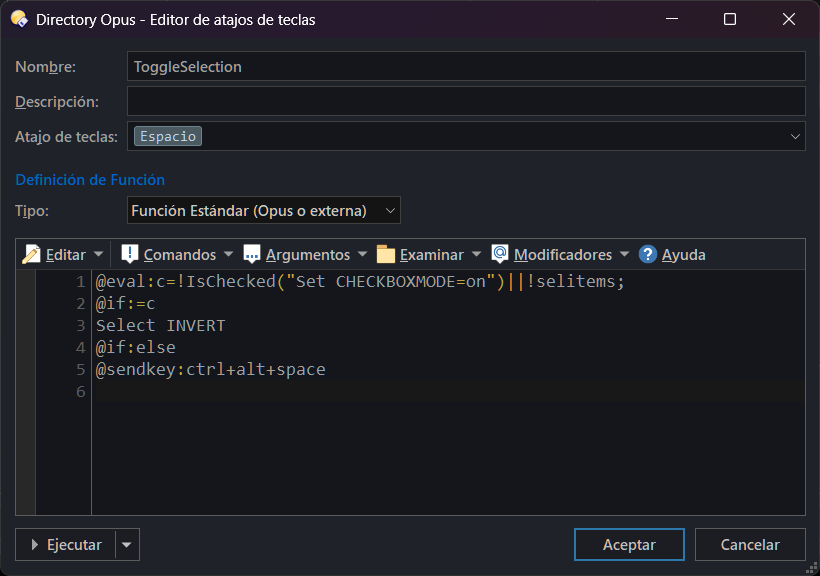
Anyway, you can get full support everywhere just by using Evaluator and a regular function type:
```auto
@eval:c=!IsChecked("Set CHECKBOXMODE=on")||!selitems;
@if:=c
Select INVERT
@if:else
@sendkey:ctrl+alt+space
```
It works in all contexts, for both checkbox mode and normal selection.
On the other hand, the simplified script version looks better to me—maybe because it can differentiate between regular selections and checkbox selections.
```javascript
function OnClick(clickData) {
// --------------------------------------------------------
var cmd = clickData.func.command;
cmd.deselect = false; // Prevent automatic deselection
// --------------------------------------------------------
var tab = clickData.func.sourcetab;
var checkbox_mode = tab.stats.checkbox_mode;
//DOpus.Output('checkbox_mode=' + checkbox_mode);
var selcount = tab.stats.selitems; //items selected
//DOpus.Output('selcount=' + selcount);
//No checkbox mode, just normal selection
//or no items selected, we deal with checked items only
cmd.ClearFiles();
if (!checkbox_mode || !selcount ) {
cmd.RunCommand('Select INVERT');
}
else {
DOpus.SendKey('ctrl+alt+space');
}
}
```
---
### Author:  [@dpuser441](https://resource.dopus.com/u/dpuser441)
#### Post date: [June 30, 2025, 2:47pm UTC](https://resource.dopus.com/t/is-there-a-command-to-toggle-checked-unchecked-in-checkbox-mode-as-space/53435/17 "2025-06-30T14:47:48Z")
Thanks for your suggestions.
The `sendkey` solution is interesting and should work, but it is and feels like a workaround.
Generally, as a user I'd expect that _all_ shortkeys are listed under `Settings / Customize Toolbars and Keys... / Keys` and thus, have a command that can be used with any key. However, `SPACE` to check/uncheck files in checkbox mode is not listed there (as no command exists).
Maybe this can be fixed in a future version. Thanks.
---
### Author:  [@Leo](https://resource.dopus.com/u/Leo)
#### Post date: [June 30, 2025, 3:06pm UTC](https://resource.dopus.com/t/is-there-a-command-to-toggle-checked-unchecked-in-checkbox-mode-as-space/53435/18 "2025-06-30T15:06:49Z")
Space to select things in a list is a standard part of Windows, and it'd be like including explicit hotkeys to move the cursor around, or for each letter you can type on the keyboard. 🙂
It also does totally different things depending on which type of control has focus, unlike most hotkeys where it only matters which window has focus.
---
### Author:  [@dpuser441](https://resource.dopus.com/u/dpuser441)
#### Post date: [June 30, 2025, 5:16pm UTC](https://resource.dopus.com/t/is-there-a-command-to-toggle-checked-unchecked-in-checkbox-mode-as-space/53435/19 "2025-06-30T17:16:50Z")
Thanks @Leo. I agree on standard hotkeys like arrow keys etc.
I'd still like to see a command to check/uncheck the currently selected file - to allow customizing shortkeys for this function. 🙂
---
### Author:  [@errante](https://resource.dopus.com/u/errante)
#### Post date: [June 30, 2025, 5:28pm UTC](https://resource.dopus.com/t/is-there-a-command-to-toggle-checked-unchecked-in-checkbox-mode-as-space/53435/20 "2025-06-30T17:28:15Z")
> [@dpuser441](#):
>
> I'd still like to see a command to check/uncheck the currently selected file - to allow customizing shortkeys for this function
Workaround or not, you can create a User Command (or something similar) using the script above and assign whatever hotkey you want—spacebar, etc.
Isn’t that what really matters in the end? I don’t really see the difference between having a built-in option and setting one up yourself (with your specific needs) if you still get the result you’re after.
[Next page](https://resource.dopus.com/t/is-there-a-command-to-toggle-checked-unchecked-in-checkbox-mode-as-space/53435.md?page=2)