All I'll say is that I would not hold my breath.
The next beta (Opus 13.20.1 and later) will also support JXL images via the WIC plugin, provided JPEG XL Image Extension - Free download and install on Windows | Microsoft Store is installed.
2 Likes
The WIC plugin has the advantage of using Windows colour handling for converting HDR to SDR for DOpus as well. It's never going to look great, but it should be better than with my plugin, which uses a fixed conversion from libjxl.
I've been using the WIC plugin for viewing HDR JXL images and it's pretty good on an HDR OLED monitor. Colour actually matches photo editing software like ART.
It looks like Chrome is reintroducing JXL support as well, probably due to JXL being added to the PDF spec and so being necessary to display them. Unfortunately Firefox on Windows still doesn't have full HDR support, but JXL works.
"JPEG 2000" has also been added to the PDF spec (version 1.5), so that means nothing.
Let me know when it enters the usage diagram:
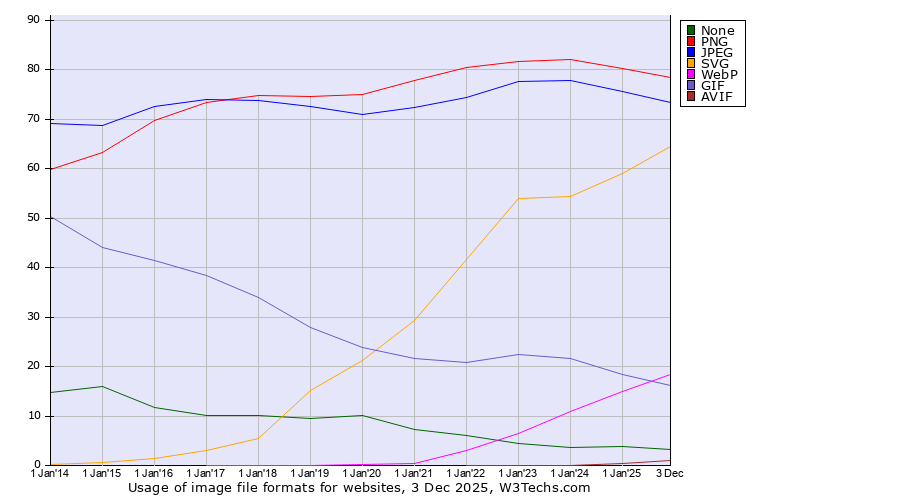
(Historical yearly trends in the usage statistics of image file formats for websites)
AVIF just made it, and my alternative SeaMonkey web browser still doesn't support it...
At least it doesn't pretend to be JPEG, so that's OK with me.
"JPEG XL" is the same kind of fake as everything else that came from that side.
Regards
Guido
JPEG developer
"JPEG XL" is the same kind of fake as everything else that came from that side.
But you say that you are a "JPEG developer" 
JPEG 2000 failed because it didn't offer enough over JPEG, but JPEG XL does have many new and useful features.
- Proper HDR support.
- Lossless transcoding of JPEG for smaller file sizes.
- Lossless encoding with decent compression.
- Better decoding performance on modern CPUs.
It is also already adopted by some major players, including Apple who let you save photos from your iPhone in it directly. Once Chrome supports it, it should quickly gain some traction. Any JPEG can be losslessly transcoded for an average 20% space/bandwidth saving, and it outperforms WebP for similar file sizes. It also outperforms PNG for lossless.
Yes, but I am not part of the fake factory, also called ISO WG1 (Working Group 1). 
I am Independent JPEG Group (IJG).
Regards
Guido
JPEG developer
1 Like
There is a very simple fact which is overlooked:
- JPEG: has substance
- "JPEG 2000", "JPEG XL", etc. (everything coming from ISO WG1): have no substance
The substance of JPEG is in four fundamental properties for image representation.
Upcoming JPEG 10 will enable backward compatible HDR support, as announced in the infancy article.
Lossless transcoding of JPEG for smaller file sizes can already be done with jpegtran or Jpegcrop.
It is called arithmetic coding.
See also my recent post here.
You could add any other entropy coding method with lossless transcoding to JPEG if you are really interested in the feature.
The fact that they do not add it to JPEG but to an otherwise unusable format shows that they are not really interested in making such feature usable.
Arithmetic encoded or transcoded JPEG is at least usable.
I use it since many years for almost all my local JPEG images.
That's why it is the default setting in Jpegcrop.
Regards
Guido
JPEG developer
1 Like
I won't pretend to know the full history of it, but my understanding was that JPEG wasn't moving fast enough and even JPEG 10 lacks some stuff that people wanted, so JPEG XL was born.
The lossless transcoding of JPEG to JXL takes advantage of better compression (JPEG is RLE if I recall), similar to what some file compression apps have been doing for decades now. I think Stuffit Expander on the Mac was the first to do it, in the early 2000s.
Lossless image coding also means that JXL can become the one format for everything, rather than the split between JPEG and PNG we have now. That has its pros and cons though - at least with PNG you knew it was always lossless, bit depth aside.
I don't know, and to be honest I don't really care. JXL is here, adoption is moving along, and it solves the problems I need solving.
Now we just need DOpus to support HDR as well 
The details of JPEG 10 are totally unknown to date, aside from the abstract given in the article, especially for the folks in ISO WG1, who have not the slightest clue about the substance of JPEG.
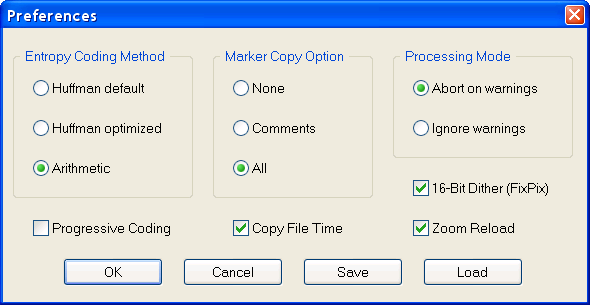
The common entropy coding method of JPEG was Huffman, as shown in the Preferences dialog of Jpegcrop (running on Windows XP SP3) above.
This is considerably more advanced than RLE.
My opinion is that any universal image format should provide a lossless coding option.
JPEG has it integrated since JPEG 8 in the SmartScale framework.
JPEG 9 added about 3 lines of source code to make it better than PNG, but only for photographic images (see JPEG 9 Lossless Coding).
The goal was not to compete with PNG, but to provide the basic function and framework for further development if necessary.
(The ISO WG1 stole that idea of lossless integration for "JPEG XL", but still lacking the JPEG substance. So one could say that this theft is the origin of "JPEG XL".)
My opinion is that any attempt to replace the ubiquitous JPEG and PNG duo with a unified alternative will ultimately fail, and will only increase the format mess, contrary to the (illusionary) intention.
My suggestion is:
Consider the JPEG and PNG duo as the actual universal solution, and further develop both together!
That is my vision, and I do the JPEG part of it.
Everything else will not be beneficial and only increase confusion.
Regards
Guido
JPEG developer
It's all very interesting and I'm sure there are good ideological reasons for preferring JPEG 10 when it arrives, but you see the problem - there were a bunch of half arsed solutions like Google's JPEG extension for HDR, and JPEG XL addresses them. It's here now with a reference library and support on hundreds of millions of devices already.
2 Likes
My opinion is that any universal image format should provide a lossless coding option.
JPEG has it integrated since JPEG 8 in the SmartScale framework.
My understanding is that JPEG had lossless compression since the very beginning (SOF 3), which nobody ever used, to the point that many viewers don't even support it.
My opinion is that any attempt to replace the ubiquitous JPEG and PNG duo with a unified alternative will ultimately fail, and will only increase the format mess, contrary to the (illusionary) intention.
I'm not a fan of the idea of adding HDR to the original JPEG compression, given it takes down 4:4:4 to 4:2:0. It just seems you're adding a wide gamut to then throw most of it away, correct me if I'm wrong?
And PNG might seem the best, but it still has issues. It doesn't really support HDR or deeper bit depths, except by hacking them into colour profiles, which again most viewers will still ignore.
We NEED a new format, in my opinion.
Now we just need DOpus to support HDR as well
I totally agree. But before DOpus can support it, more of Windows OS and ecosystem needs to. Support is horrible  And the world needs more time to learn that HDR and wide colour profiles aren't just a gimmick.
For example if DOpus went HDR, what image format would they use to convert images internally instead of PNG/JPEG/BMP? Not many image formats support HDR, and they all have their problems. HEIC/HEVC is a licensed encoder. AVIF doesn't have true mathematically lossless compression (or at least I've never been able to find it...). OpenEXR? Possible, but I can't imagine users being happy with the memory and diskspace requirements...
JPEG-XL is the only file format that currently fits that bill. Lossless compression, licensing free, HDR-capable yet also not so huge and heavy as to make it impossible as a drop-in replacement for JPEG.
I can't see it being added in this way even after the WIC plugin, but it is currently the only real choice, and might well be for many years to come.
You seem to have that postmodern way of thinking, while I take the modern approach, so we cannot agree.
See explanation here.
It has nothing to do with subsampling or wide gamut.
JPEG (9) already has that.
The point is to allow larger than 8 bits per sample in a backward compatible way.
You can see soon in JPEG 10 how it works:
CHANGE LOG for Independent JPEG Group's JPEG software


Version 10  25-Jan-2026
-----------------------

jmorecfg.h: add JPEG_DATA_PRECISION parameter alongside and independent
of BITS_IN_JSAMPLE, enabling higher bit depth support with backward
compatibility and preparing the next standard for file interchange.

...
/*
 * jmorecfg.h
 *
 * ...
 *
 * This file contains additional configuration options that customize the
 * JPEG software for special applications or support machine-dependent
 * optimizations.  Most users will not need to touch this file.
 */


#define JPEG_DATA_PRECISION  8						/* see table below */
#define BITS_IN_JSAMPLE      JPEG_DATA_PRECISION	/* see table below */
/*
 * Most useful alternative for "HDR" (High Dynamic Range) application
 * with backward compatibility for file interchange (see table below;
 * move comment marks for selection):
#define BITS_IN_JSAMPLE      10
 */
/* For still higher demands (see table below):
#define BITS_IN_JSAMPLE      11
 */
/* or
#define BITS_IN_JSAMPLE      12
 */

/*                      |                     BITS_IN_JSAMPLE
 *  JPEG_DATA_PRECISION |   read / write with full DCT up to lossless operation
 *                      |                  exceptions see below
 * -------------------------------------------------------------------------------
 *     {[_8_]}    |    _8_   <9>   <10>   <11>*  <12>~
 *      [_9_]     |    <8>   _9_   <10>   <11>   <12>*
 *     [_10_]     |    <8>   <9>   _10_   <11>   <12>    13 *
 *      _11_      |    <8>   <9>   <10>   _11_   <12>    13     14 *
 *      _12_      |    <8>   <9>   <10>   <11>   _12_    13     14     15 *
 *       13       |     8     9     10     11     12     13     14     15     16 *
 *
 * _x_ currently and previously implemented - default configuration
 * <x> newly implemented
 * {x} current standard for file interchange - backward compatible
 * [x] next standard for file interchange - common DCT implementation category
 *  *  does not support GCC lossless (GCbCr lossless - requires 1 extra bit)
 *  ~  1 bit precision loss - effective 11 bits precision (lossy)
 *
 * Since the DCT coefficients are 3 bits larger than sample values with normal DCT
 * processing, it is possible to support sample values with up to 3 more bits than
 * the nominal JPEG data precision parameter by adapted DCT processing with up to
 * lossless operation.  The generated JPEG files are fully interchangeable for the
 * same JPEG data precision parameter.  Another BITS_IN_JSAMPLE setting will just
 * reconstruct an image with corresponding precision.
 *
 * A special case for JPEG data precision 8 with 12-bit sample size (4 more bits)
 * is provided so that all previously available sample formats are now supported
 * for file interchange with backward compatibility.
 * If full-feature DCT up to lossless operation with up to 12-bit sample size is
 * required, it is recommended to select JPEG data precision 10, because it falls
 * in the same DCT implementation category with 8 and 9 which may be commonly
 * supported at run-time as the next standard for file interchange.
 *
 * Remaining bit depths and variability at run-time may be added later and
 * are currently not supported, sorry.
 * Exception:  The transcoding part (jpegtran) supports all settings in a
 * single instance, since it operates on the level of DCT coefficients and
 * not sample values.  The DCT coefficients are of the same type (16 bits)
 * in all cases (see below).
 */
You can still use the default setting and the code works as before, which I assume and recommend for Opus initially.
It is important to have the additional capabilities, but there is no reason for haste.
HDR is only useful in a modern form.
In a postmodern form it is useless.
Because it was one of the junk parts of the spec, and that's why Independent JPEG Group never implemented it.
As mentioned, JPEG 8 integrates the feature in the SmartScale framework, and ISO WG1 "adapted" that idea for "JPEG XL" without SmartScale, because they want to protect their "JPEG 2000" business in Digital Cinema application.
That's why you always get junk from that side.
The point of the JPEG 8 lossless integration is that there is nothing added to the JPEG compression, contrary to the junk mode in the spec!
Similarly, nothing is added to the JPEG compression in the modern form of HDR as described!
All these features were already hidden in the JPEG substance, they are just unable to see it.
Regards
Guido
JPEG developer
Will you PLEASE take you bickering to the off-topic section.
1 Like
That "bickering" is important and on-topic.
The Directory Opus developers made the right decision to satisfy their "postmodern" customers with the WIC plugin, thus with the minimum possible effort, as I have suggested.
So everyone is satisfied.
The initial decision of the Directory Opus developers to have native support for JPEG and PNG in their application was also a very good one in my opinion.
So they have done everything right.
Regards
Guido
No it is not. It's annoying, is what is it.
2 Likes
There is the problem that the Windows JPEG-XL WIC on Windows 10/11 is not that great - none of the Windows WICs are. The WIC system isn't very elegant in the first place, but WIC "drivers" (and they are implemented as drivers, unfortunately) tend not to be very good. The native HEIC WIC doesn't support lossless HEIC, the native AVIF one doesn't support transparency.
As for JPEG-XL, mojo-chan's plugin worked fine for me. The WIC plugin images are all too bright in DOpus (they're fine in Windows Photo). Is anyone else seeing that, before I report it as a bug?
1 Like
You seem to have that postmodern way of thinking, while I take the modern approach, so we cannot agree.
I've been around long enough to have experienced why there are so many image formats. No matter the implementation, people will always want features that aren't in and can't be shoehorned into older formats without loss of compatibility or adding too much complexity. This will always be the case as needs evolve over time. You have a lot of faith in JPEG 10 I simply don't; it looks to me as if it might go down the over-complicated route TIFF did.
I also tend to be ahead of the curve when it comes to images themselves, as microscopy is part of my job, and every image format I've ever used for it has been lacking in some way. It either didn't support large bits for colour, lossless compression, layers, or some other. I imagine it's even worse for professional photographers, which is why the high end stuff tend to output in raw sensor formats. Which Directory Opus supports, by the way 
I don't tend to be a format fanboy, but JPEG-XL is just such an ideal fit for my needs that I'm very grateful to both mojo-chan and the DOpus developers to allow me to use it in the best file manager in existence.
1 Like
The lack of quality of the WIC system matches the lack of substance of the corresponding postmodern image formats.
That's why I appreciate the progress of natively supported image formats in systems and applications.
Regards
Guido